1
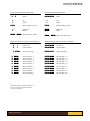
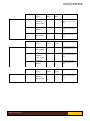
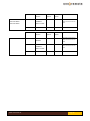
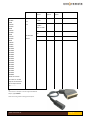
Everyday Control with Beo4, Beo5, Beo6
Everyday Control with Beolink 1000
OO
Select
Pp
Select
D
F
Up
Down
D
F
Up
Down
q
Manual power on/ off
q
Manual power on/ off
A
S
DAB / FM
Menu
Z
X
DAB / FM
Menu
0 – 9 Select a pre-set station
0 – 9 Select a pre-set station
Special Commands, used only by initial installation
Special Commands, used only by initial installation
oD
oF
Volume up
Volume down
pC
pV
Volume up Volume up
Volume down
oe
Station scanning
px
Station scanning
O1
O2
O3
O4
O5
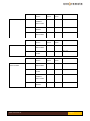
Set as preset 1
Set as preset 2
Set as preset 3
Set as preset 4
Set as preset 5
*1
p1
p2
p3
p4
p5
Set as preset 1
Set as preset 2
Set as preset 3
Set as preset 4
Set as preset 5
O6
O7
O8
O9
O0
Set as preset 6 *1
Set as preset 7 *1
Set as preset 8 *1
Set as preset 9 *1
Set as preset 10*1
p6
p7
p8
p9
p0
Set as preset 6 *1
Set as preset 7 *1
Set as preset 8 *1
Set as preset 9 *1
Set as preset 10*1
*1
*1
*1
*1
*1
*1
*1
*1
*1
*1
Not all Bang & Olufsen equipment responds to
numeric commands. Using the Direct Mode
option is recommended.
www.oneremote.dk
Page 1