1
3
1
2
3
ENGLISH
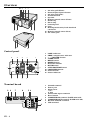
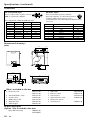
Bottom side
Adjustment foot (right and left)
Lamp cover
Adjustment foot (up and down)
Caution:
Do not replace the lamp right after using the projector. The
lamp is very hot.
2
1
11
1
2
3
4
5
6
7
8
9
10
11
12
13
14
15
16
17
18
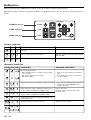
Transmitter indicator
Power button
SOURCE button
Mouse button
Right click button (For mouse)
MENU button
AUTO POSITION button
PinP button
+ , – (VOLUME) buttons
EXPAND button
STILL button
ENTER button
Mouse pointer / Direction buttons
LASER button
KEYSTONE button
MUTE button
Laser aperture
Left click button (For mouse)
10
•
When pressing Mouse button, it illuminates and
Direction buttons work as the mouse pointer. Press
the Mouse button or MENU button to set off. (Direction buttons work as Direction buttons.)
Pressing LASER button emits the laser beam about
1 minute. Release LASER button and press it again
if you wish to emits the laser beam.
Remote control
1
2
POWER
MUTE
16
SOURCE KEYSTONE
3
MOUSE
LASER
15
14
4
13
5
R-CLICK
6
7
8
9
17
MENU
ENTER
AUTO POSITION
STILL
P in P
EXPAND
– VOLUME +
12
AVOID EXPOSURE -LASER
RADIATION IS EMITTED
FROM THIS APERTURE.
•
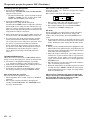
About laser beam
18
This remote control is class 2 (max. output 1 mW laser diode
640 - 660 nm) laser equipment.
Beam Divergence : 3m distance about 5.0mm x 3.0mm (±1.5mm)
CAUTION
LASER RADIATION
DO NOT STARE INTO BEAM
WAVE LENGTH : 640 - 660 nm
MAX OUTPUT : 1 mW
CLASS 2 LASER PRODUCT
IEC 60825-1:1993+A1:1997
CAUTION :
• Pressing the LASER button provided remote control emits
laser beam. Do not look into the beam light directly. Do not
point the laser beam at people. Looking the laser beam directly
may damage eyesight.
• Use of controls or adjustments or procedures other than those
specified herein may result in hazardous radiation exposure.
EN – 7