1
PROCEDURES FOR USING THE FEATURES
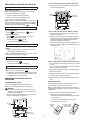
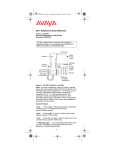
Figure 2. The Bottom of the 6200 Series Telephones
2 Remove the desk stand by sliding it to the left until it is
free of the telephone base.
ANSWERING AND PLACING A CALL
To answer or place a call
Note: The Message light flashes when a call is coming in
(that is, when the telephone is ringing).
Desktop
stand
1 To place or answer a call, lift the handset.
Slide stand
to left and lift
2 To place a call, next, dial the desired number.
3 To end the call, hang up the handset.
Note: To raise the volume of the handset, press the upper
; to
half of the Handset volume control button labeled
lower the volume of the handset, press the lower half of the
.
Handset volume control button labeled
HOLD
To put a call on hold
1 Press
. (The red light next to
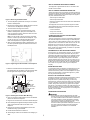
Figure 3. Sliding the Base from the Bottom of the Set
goes on.)
3 Plug one end of the line cord into the line jack on the
To return to the held call
bottom of the telephone.
1 Press
, or, if you have hung up the handset,
lift the handset again from the cradle.
(The red light next to
goes off.)
•
4 Align the other end of the line cord so that it appears
through the slot at the top of the stand and reattach the
stand to the telephone by sliding the stand into the
appropriate tabs and then to the right.
You are reconnected to the other party.
5 After you have attached the stand to the telephone, use
the screw provided to tighten the stand onto the back of
the telephone set.
MESSAGE
To retrieve a message when your Message light is
blinking
1 See your system manager for instructions about your
local message retrieval procedures.
Note: The Message light also flashes when a call is coming
in (that is, when the telephone is ringing).
REDIAL
To redial the last number that you dialed
Figure 4. Tightening the Stand to Back of the Telephone
1 While off-hook, press
.
(The telephone will redial up to 32 digits.)
6 Turn the telephone right-side up and place it on your desk
or table.
RINGER VOLUME
7 Plug one end of the coiled handset cord into the handset
jack on the side of the telephone.
To control the volume of the tone ringer
Note: The volume control is labeled
.
8 Plug the other end of the handset cord into the handset.
9 Hang up the handset.
1 To raise the volume of the ringer, slide the Ringer volume
control upwards; to lower the volume of the ringer, slide
the Ringer volume control downwards.
10 Plug the free end of the line cord into a modular wall jack.
11 Lift the handset and listen for dial tone.
12 Set the Ringer Volume Control switch to the setting you
PROCEDURES FOR INSTALLING THE
TELEPHONE
want.
WALL INSTALLATION
TABLE/DESK INSTALLATION
Use the following directions to mount the telephone on a
standard wallphone jack with mounting studs.
Use the 7-foot straight line cord that came with your
telephone to connect the telephone to a modular jack.
!
Note: For wall installation, do NOT unbundle the line cord
packaged with the telephone; that is, leave the line cord in its
coiled position.
WARNING:
Do not plug the handset cord into the line jack or the
data jack on your telephone since it could damage your
handset and the telephone.
1 You must reverse the handset tab (which holds the
handset when you hang up). See Figure 4.
1 Turn the telephone upside down so that you can see the
bottom of the telephone. See Figure 2.
•
Desktop
stand
•
Turn the tab so that the curved end is facing up.
•
Insert the tab back into its slot.
a. Handset
retainer
in place
Line jack
4 holes for
wall mounting
Hold down the switchhook and slide the handset tab up
and out of its slot.
2
b. Press to release
and then remove
handset retainer