1
Table of content
Before you
begin
.......................................................................................................................................................6
Software
...........................................................................................................................................................................................................6
updates
Warnings
...........................................................................................................................................................................................................6
Steering
...........................................................................................................................................................................................................7
wheel control interface
Installation
.......................................................................................................................................................8
Safety
...........................................................................................................................................................................................................8
instructions
Before
...........................................................................................................................................................................................................8
you begin
Installation
...........................................................................................................................................................................................................9
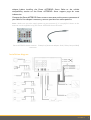
diagram
Installation
...........................................................................................................................................................................................................10
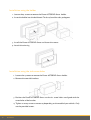
using the holder
Installation
...........................................................................................................................................................................................................10
using the side screw holes
Installing
...........................................................................................................................................................................................................11
the GPS receiver
Connecting
...........................................................................................................................................................................................................12
the parking brake lead
Installing
...........................................................................................................................................................................................................12
a rear view camera
Installing
...........................................................................................................................................................................................................12
the microphone
Installing
...........................................................................................................................................................................................................13
the ISO cable
Installing
...........................................................................................................................................................................................................13
the USB cables
Basic
...........................................................................................................................................................................................................14
operations
Getting started
.......................................................................................................................................................15
Turning
...........................................................................................................................................................................................................15
the Parrot ASTEROID Smart on / off
Home
...........................................................................................................................................................................................................15
screen
Personalizing
...........................................................................................................................................................................................................15
the home screen
Changing
...........................................................................................................................................................................................................16
settings
Connecting
...........................................................................................................................................................................................................16
a phone via Bluetooth
Connecting
...........................................................................................................................................................................................................16
two phones
Using
...........................................................................................................................................................................................................17
the Application safety control option
Synchronising
...........................................................................................................................................................................................................17
the phonebook
Phone .......................................................................................................................................................18
Receiving
...........................................................................................................................................................................................................18
a call
Making
...........................................................................................................................................................................................................18
a call
Consulting
...........................................................................................................................................................................................................19
the call history
Manage
...........................................................................................................................................................................................................20
favourite contacts