1
DVD Menu Operation
DVD SETUP
(Applies to models with built in DVD player)
Tip: This TV/DVD player is pre-set to play
Region 2 DVDs. In the event you wish
to use the TV/DVD in another country
that uses different region discs, please
visit www.umc-uk.co.uk. Select ‘Product
Support’, ‘Changing Region’.
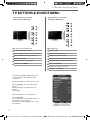
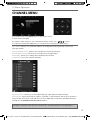
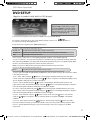
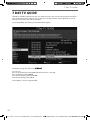
To enter this menu please ensure the TV is in DVD source & press [DVD SETUP]
If you wish to make changes to any of the default settings, use the scroll
To confirm any settings press [OK] button.
buttons.
To exit this menu at anytime, press [DVD SETUP] button.
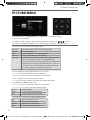
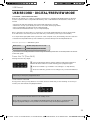
TV Display - Choose from the following options
Normal / PS
(Pan&Scan) Black edges left and right will be seen
Normal / LB
(Letter Box) Traditional picture which has been adapted for widescreen
Wide
16:9 Widescreen picture format
OSD Language - Select the on screen display language, “English” is the default language
Last Memory ON/OFF - You may want the player to remember where you finished watching a DVD and
then removed the DVD disc, the player will automatically remember the point it stopped playing. When
the disc is re-inserted the player will continue from the same point.
Note: if you put in a different disc the memory will be cleared for the previous disc.
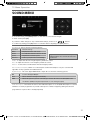
Downmix - Choose from the following options
Stereo
Converts from multi-channel sound to stereo
TV Type - Select from PAL TV (UK Default). AUTO detects the TV system from the disc information. NTSC
is the USA picture mode.
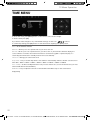
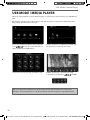
Audio - Select audio using the
/
buttons. The languages available will be shown in the right
column. Select the required language using the
/
buttons. “English” is the default language. If the
disc has English it will play the soundtrack in English.
Subtitles - Select Subtitle using the
/
buttons. The languages available will be shown in the
right column. Select the required language using the
/
buttons. The default language is “English”.
If the disc has English available it will display the subtitles in English.
Disc Menu - Select Disc Menu using the
/
buttons. The languages available will be shown in the
right column. Select the required language using the
/
buttons. The default language is “English”.
If the disc has English available it will display the menu in English.
Parental - Select Parental using the
using the
/
/
buttons. Enter the list using the
button. Set the level
buttons and press “OK”. You will be asked for the password (0000). “the default
is ADULT”.
Password - Select password using the
/
buttons. Select Change using the
button and “OK”.
Put in the old password then you will be prompted to put in the new password twice and press “OK”.
Default - Selecting Default will reset your personal settings to the factory settings for the DVD
setup menu.
27
User Guide - e-motion -32-147I-WB-5B-HKUP, 32-147I-WB-5B-HCUP, 32-147I-WB-5B-HKDUP, 32-147I-WB-5B-HCDUP - EMO-MAN-0026.indd
2/12/2014 3:37:07
Sec1:27
PM