1
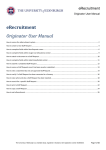
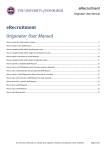
ITI Telephone Services - Philips DECT User Guide
8
9
1
2
10
3
4
5
11
12
13
6
7
Main Menu Items:
Messaging
1
2
3
4
5
6
7
8
9
10
11
12
13
Volume up key
Volume down key
SOS key
OK key
Off hook/enquiry (green phone key)
Headset jack connector
Microphone
Earpiece
Colour display
Soft keys
On hook/clear/power (red phone key)
Navigational keys (up/right/down/left)
Key pad (0-9, *, #)
Keys 1-9: long press for speed
dialling (if programmed)
0: used in text editor to enter space
and special characters
*: used in text editor to enter a star
symbol and special characters, or
to insert pause in dial mode
#: used in text editor to capitalise
letters and type numbers, long
press activates silent mode
Top row icons:
Calls
Signal strength
Message Waiting
Contacts
Calendar
Settings
Accessories
Voice mail waiting
Call filter active
Bluetooth active
Keys locked
Please note – not all menu features
are available within the University
Telephone System, please call 50
3300 or e-mail [email protected] if
the information you require is not
contained within this user guide.
UoE Telephone Services – May 2010
Missed calls
Silent mode
Battery indication
How do I turn the phone on and off?
• Press and hold the red phone key (11)
for a few seconds.
How do I lock / unlock the phone?
• In Idle mode, press the OK key (4), and
then press the Lock soft key (10).
• To unlock, press the OK key (4), and
then press the Unlock soft key (10).
How do I make a call?
• In Idle mode, type the number you want
to dial and then press the green phone
key (5)
How do I answer a call?
• Press the green phone key (5)
How do I end a call?
• Press the red phone key (11)
How do I reject a call?
• Press the reject soft key (10)
How do I make a consultation call?
• While engaged in a call, press the green
phone key (5)
• Dial the number of the party you wish to
consult and talk to this party
• You can then toggle between the two
parties by pressing the green phone key
(5)
How do I transfer a call?
• Ask the connected party to hold
• Press the green phone key (5)
• Dial the number you wish to transfer the
call to and wait for them to answer
• Press the red phone key (11) to transfer
the call
How do I change the volume?
• During a call, press the volume up (1) or
volume down (2) buttons on the side of
the phone
How do I use the speakerphone?
• During a call, press the Spk on soft key
• To deactivate, press the Spk off soft key
How do I mute a call?
• During a call, press the Mute soft key
• To turn the microphone on again, press
the Unmute soft key
UoE Telephone Services – May 2010
How do I divert my calls?
• Press the green phone key (5)
• Dial *21 followed by either the 6 digit
university extension (517000 for
voicemail) or 9 followed by the external
number
• Press the red phone key (11)
How do I listen to voicemail messages?
• In Idle mode, press the Menu soft key
• Select Messaging, Inbox and then Listen
to voicemail
• This will allow you to access the
University voicemail service
NB – If the number displayed under the
Listen to voicemail option is not 517000
then you will need to change it to this
first
How do I create a shortcut?
• In Idle mode, press the Menu soft key
• Select Settings, General and then
Shortcuts
• This will allow you to assign a function to
one of the navigational keys (12)
How do I create a contact?
• In Idle mode, press the Menu soft key
• Select Settings and then New Contact
• Press the Add soft key and you will then
be prompted to enter the number
• Press the save soft key and you will then
be promoted to enter the name
• Press the save soft key again and you
will then be promoted to confirm the
details
How do I create a speed dial?
• In Idle mode, press the Menu soft key
• Select Contacts
• Select the contact that you want to
assign and press the More soft key
• Choose Speed dial and press OK
• Scroll to the speed dialling key number
that you want and press the Add or
Replace soft key
How do I dial a speed dial?
• To use the speed dial(s) you have
programmed, press and hold the
relevant number on the key pad (13)