1
RECORDING FUNCTION
The recording function can record the songs played and playback. It have two track. to record and play.
1. Record.
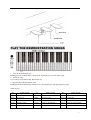
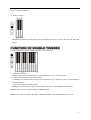
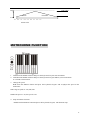
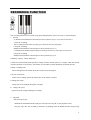
A. Hold down the EFFECT button and press the keyboard’s key (A-1),to start record. track 1
a. Start the recording
The recording will start when you play (press the keyboard, step the pedal).
b. Stop the recording
Hold down the EFFECT button and press the keyboard’s key (A-1)
c. Hold down the EFFECT button and press the keyboard’s key (C0),to start record. track 2
d. Stop the recording
Hold down the EFFECT button and press the keyboard’s key (C0)
● Memory capacity --about 5000 tones.
Content of record includes pedal operation, change of timbre and the pause etc. example: when the amount
of pedal operation record increase, the amount of record that is played through the keyboard decrease.
● Little recording room
The record light start to twinkle when the record room is running low.
● Use the metronome
Before the recording, operate the metronome, and it will be recorded.
● Change the tempo
Tempo can not be changed during the recording.
●
Change the speed
Speed can not be changed during the recording.
2. Playback
Start and stop to play
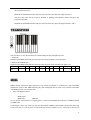
●Hold down the EFFECT button and press the keyboard’s key (B-1),start playback track 1.
The play stops after the recording is finished or by holding down the EFFECT button and pressing
13