1
Racelogic Upgrader
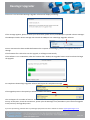
If the unit is not found the Racelogic Upgrader software will display a warning…
If this message appears, please re-check your connections, power source, and COM port reported in device manager.
The COM port listed in device manager must match the COM port set in Racelogic Upgrader software.
Once a connection has been established between the computer and Racelogic product, the upgrade should run
through.
If the firmware file is clicked to start the upgrade, it will begin automatically.
If the software is run via Windows, after the firmware file is loaded, the ‘upgrade’ button must be selected to begin
the upgrade.
On completion the Racelogic upgrader software will report this completion message.
If the upgrade process is disrupted you will be notified of the failure.
This can happen for a number of reasons. The main cause is that the upgrade process was interrupted by other PC
activity. At this point, check the connections, power cycle the Racelogic unit (remember to put it back into upgrade
mode) and retry the upgrade process.
August 2011
Oct 2011
If you are experiencing problems with any Racelogic equipment then don’t hesitate to contact [email protected].
01/11/2011