1
IP Video 9100A
User Guide
IP VIDEO 9100A PLUS USER MANUAL
User Guide
IP Video 9100A
Manual version: 2.32
Date: SEP. 20 , 2004
-1-
VER. 2.32,
Caution: Any changes or modifications not approved by the party
responsible for compliance could void the user’s authority to operate the
equipment.
Note: This equipment has been tested and found to comply with the limits
for FCC and CE. These limits are designed to provide reasonable
protection against harmful interference when the equipment is operated in
commercial environment.
Important Notice
1. IP Video 9100A is for indoor use only.
2. IP Video 9100A is not waterproof. Therefore we will not hold any
damage responsibility if IP Video is used under raining condition.
3. Be sure to use the DC adapter that is provided by your dealer. We will
not hold any responsibly if wrong DC adapter is in use.
4. Be caution in handling IP Video 9100A for physical shocks may
occur serious damage.
5.
If IP Video 9100A does not operate properly, please contact your
local dealer for after sale service. In all cases, you are prohibited to
disassemble the product. If so, we do not hold any responsibility for
mal-function nor service warranty.
-2-
IP VIDEO 9100A PLUS USER MANUAL
Table of Contents
1. PRODUCT OVERVIEW............................................................................................... 4
FEATURES
......................................................................................................
2. PHYSICAL DESCRIPTION ......................................................................................... 5
SPECIFICATION ..................................................................................................................
SYSTEM MINIMUM REQUIRNMENT .......................................................................................
3. PANEL DESCRIPTION…………………………………………………………………6
FRONT PANEL………………………………………………………………………………
BACK PANEL………………………………………………………………………………..
4. INSTALLATION………………………………………………………………………..7
PREPERATION ....................................................................................................................
HARDWARE INSTALLATION .................................................................................................
SOFTWARE INSTALLATION ...............................................................................................
5. INTERNET SET UP ................................................................................................... 14
LAN SET UP ........................................................................................................................
INTERNET SET UP...............................................................................................................
6. FUNCTION…………………………………………………………………………….16
SIMPLE FUNCTION .............................................................................................................
VIDEO ADJUSTMENT………………………………………………………………………..
SECURITY SETTING ............................................................................................................
MOTION DETECTION FUNCTION ...........................................................................................
7. OTHER FUNCTIONS………………………………………………………………….27
8. AOUTHORITY………………………………………………………………………….27
ADMINISTRATOR ................................................................................................................
NORMAL USER ...................................................................................................................
9. CAUTION.................................................................................................................... 30
ADDITIONAL INFORMATION
: FAQ......................................................................................
-3-
VER. 2.32,
1. Product Overview
IP video 9100A has an IP digital web server inside. With this great gadget you can
put up 4 different sources with only one set of IP, for example (live security
observing, online education, TV shows, video games and etc) make remote
locations immediately accessible through standard web browsers. IP video 9100
A is equipped with cutting edge technology, includes 4 video in, 1 video out, a web
server, and physical Ethernet connection. Therefore it does not need to plug in
front of computer, you can simply just plug into an internet line and start observing
or broadcasting from any where in the world.
FEATURES
IP Video 9100A features:
1. Embedded Web Server
2. Pass image to Displays - TV, PDP, HDTV. LCD TV
3. Support MSN & YAHOO Messenger
4. Can input 4 different sources.
5. Multi – video or video source from different area.
6. Layout 1x1, 2x2, 3x3, 4x4
7. Resolution - True 640x480, 352x288, 320x240, 176x144,
& 704 * 576, 160 *120
8. Video Quality - Low, High
9. Color adjustment: Brightness, Contrast, Hue, and Saturation
10. Motion Detection - Three-Sensitivity Level.
11.E-mail the Detected Images to preset e-Mail address.
12. FTP the Detected Images to preset FTP server.
13. Support Network - Fixed IP, DHCP or PPPoE , and DDNS
13. Default HTTP Port supported14. Changed to fit different network.
15. Browser by Internet - IE (internet Explore) , NETSCAPE,
Mozilla Firefox ( LINUX ).
16. Support Java Applet support and Active X control.
17. A Linux based server
•10/100BT LAN supported
•Built in JPEG Decoder
•Motion detection
•User may setup his email address in the system, let the system
notice the user when an event occur
•Provide some GPIOs for different application
19. Support GlobalSign – no need to lower security level.
20. Work with MSN& Yahoo Messenger, AMCAP, and WMCAP &
VIDCAP program
-4-
IP VIDEO 9100A PLUS USER MANUAL
2. Physical Description
BOX CONTENT
IP Video 9100 package content:
!
1 x IP Video 9100A
!
1 x RJ 45 internet line
!
1 x DC Power adopter (110~240V)
!
2 x Composite Cable (RCA jacks)
!
1 x CD (a. IP Editor program b. User Manual book)
!
1 x Quick Installation Guide
Minimum Requirement
≥300MHz Intel Pentium II and above
Windows 98 / SE / 2000 / ME / XP, or LINUX, MAC system
≥64MB memory
VGA Card:support Hi - Colors and above and direct draw
Internet card - RJ 45 (CAT 5)
Internet Hub / Router
Internet : one set of IP provided by your ISP
EX: xxx.xxx.xxx.xxx
-5-
VER. 2.32,
3. Panel Description
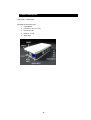
Side Panel: 4 Video Input
Back Panel: from left to right:
1. Reset Button
2. DC Power - 5V, 110 ~ 240.
3. Power On / Off
4. Network - RJ 45
5. Audio input
-6-
IP VIDEO 9100A PLUS USER MANUAL
4. Installation
Before using IP Video 9100, follow bellow:
Before installation:
Reconfirm your package content
Prepare a Hub for Internet monitor
Electricity 110 ~ 240 V
Hardware installation
1. Plug in IP Video 9100A Power
2. Plug in RJ 45 line to a HUB
3. Connect the HUB to Internet modem (ADSL/XDSL modem)
4. Connect Video source for IP Video box.
5. Turn you computer on
-7-
VER. 2.32,
SOFTWARE INSTALLER
1. IP_ KAM VID_ 1070
After connecting the power and RJ 45 line, following the steps below to install the
software.
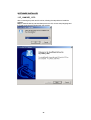
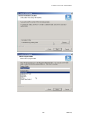
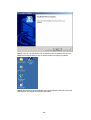
Step 1: Install IP KAM by executes Setup.exe in the CD; choose setup language and
the install shield Wizard will help finish the program.
-8-
IP VIDEO 9100A PLUS USER MANUAL
-9-
VER. 2.32,
Step 2: Then you can see shortcut icon “IP KamVid 1070 “on desktop, click this icon.
Note: Be sure that the power is turn on and the RJ45 line is properly connected.
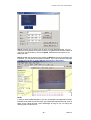
Step 3: The KIPEDIT program will detect all the active IP9000s or IP9100s in the same
local Ethernet, and display the findings in the window.
- 10 -
IP VIDEO 9100A PLUS USER MANUAL
Step 4: Click the one you want to set, its name, IP will be displayed below. You can
change its name (please use numbers or letter) or IP (please set in the same subnet as
your PC) in the text windows. Then click Update. After about 20 seconds, the new
setting will work.
Step 5: Double click the picture in the window of KIPEdit or type the IP address in the
IE browser, you can open the web page of IP9000A. If you can not open the web page
of IP9000, be sure that you have installed IE 6.0 with SP1 or later version.
NOTE:
1. After you have installed IP9000A on your PC, the IP9000A was registered in DirectX.
IP9000A can be used as local camera by any software that supported DirectX, such as
MSN, Amcap, Media encoder, Yahoo Messenger as long as you not change the
directory path of ipcam’s driver.
- 11 -
VER. 2.32,
2. For those software that only supported old VFM driver, such as Vidcap and
netmeeting, please click install VFM device, then you can get the captured images
from IP9000A (you should be the administrator at the first install process)
3. For those not totally compatible with VFM, such as QQ and POPO, you should click
remove device button first, then click install VFM device, then you can get the
captured images from IP9000.
Work with Yahoo /MSN Messenger
1. Work with Yahoo /MSN Messenger: We use Yahoo for instance. Select the friend
you would like to send your video. For instance, we pick up YahooHelper.
2. Choose Webcam then system will ask your Internet connecting speed.
- 12 -
IP VIDEO 9100A PLUS USER MANUAL
3. Then My WEBCAM will jump up. Please go to “file “
Setting” to select your prefer video to transfer.
“Preference”
“Camera
4. You can type in appointed IP address (No matter Real IP or Dynamic IP) and confirm
by click “Add” and choose if reverse the out streaming video.
We support
A. Normal B. Flip Vertical C. Flip Horizontal D. Rotate 180
If the video is upside down, you can choose D to get rotate video.
And also adjust the video color ; Brightness, contrast, Hue, Saturation, Sharpness
Note
1 : for safety issue , as transfer video by Yahoo /MSN, only Administrator can do the
video streaming. You have to type the username and password.
2 : Work with Yahoo/ MSN , the streaming speed is depend on Yahoo .MSN server.
2. INFINITELY CAM : Please refer in readme file.
- 13 -
VER. 2.32,
5. Network Set up
From our Network set up, users can view live video from any where in the world, with
just a computer.
Click on Network set up: this area is authorized by administrator only.
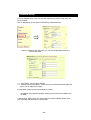
1. Still IP: Provided by ISP, with this IP you can connect this address from any
where in the world.
1-1 : Using Still IP: list your still IP address
1-2 : Choose “Reboot immediately”. Please close your browser and reboot again and
type in your IP address once again.
If using DHCP, please choose‘ Automatically by DHCP”
*And please use IP EDITOR program (Find users exact IP) that’s included in the
CD ROM
2. DHCP setup- ADSL / xDSL: ISP will provide your exact IP address, please enter
your Username and password for your provider.
- 14 -
IP VIDEO 9100A PLUS USER MANUAL
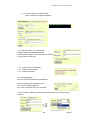
2-1 Enter your user name, password, mail server, mail name (pass word), sender
e-mail, and receiver e-mail.
2-2 Choose Save & Dial Now, by using PPPoE it can automatically dial to your ISP,
and ISP will provide exact IP address in your mail.
2-3 Turn off your browser of IP Video 9100A and restart
- 15 -
VER. 2.32,
6. Functions
Please refer to all the function on the left side of IP Video 9100A AP; most of its
configuration can only be use by Administrator.
Functions:
1. IP address
2. Change Password
3. Camera Control:
Picture Quality - Low, High, Medium, Clarity& Motion
(Resolution)
- 640*480,352*288,320*240,176*144
Frequency – Indoor 50, Indoor 60 & Outdoor
7. Configuration: System, User, Motion detection, Network, Channel, and DDNS
8. Right click function: Record, Snap,
3-3: Color Adjust
: Brightness Contrast, Saturation, Hue, Sharpness
STD is Default color
4. Image (Split)
- 1x1, 2x2, 3x3, and 4x4
In 9100 A Plus - Support Round Robin – Display multi - channel in one IP
address . The select channel will display by turns.
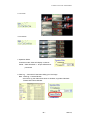
4. Splits – 4 / 9/ 16 screen
4-1: 4 screen –
- 16 -
IP VIDEO 9100A PLUS USER MANUAL
4-2: 9 screen
4-3:16 screen
5. Operation Mode:
Continues mode: Video will display continues
Period – Video will refresh 1 - 60 per millisecond or
per second
6. View Log – view which IP has been visiting your Live image
Note: View/Log / Camera Window
As in View Log, the video will not show on windows, to get the video back
Please click Camera Window.
- 17 -
VER. 2.32,
7. There are Video setting in Configuration:
* System
* User
* Motion Detection
* Network
* Audio
* DDNS
Video Window: Click to go back to Application main
page.
7-1 System Setting: Setup Name , Time , show on Windows,
- 18 -
IP VIDEO 9100A PLUS USER MANUAL
7-1-1 : Camera name, time and date setup
Note: maximum 18 English characyters
7-1-2 : Http Port setup : For customer with
IP Sharer device can setup the share port
Please check the setup in the IP Share device and type
the port number in this area.
7-1-3 : Reset to factory configuration
7-1-4 : Restart IP Video 9100A
7-1-5 : Renew its firmware
7-2. User Management:
Can choose user authorization require optional
Choose if viewers need a password or not.
Yes - Viewers needs a password
No - Open to all viewer who logs in to users IP
7-2-2: Add user by adding a username and a password and you can add a current
users list.
- 19 -
VER. 2.32,
7-2-3: You can also delete a user by selecting its name and press delete.
7-3: Motion detection: when motion detection is triggered, it will automatically send
video or image to user E-mail or FTP site.
7-3-1: Choose motion detection:
Disable Enable: choose – Low / Mid / High
7-3-1-1: Motion Detection Setup:
Fill sender mail and receiver mail.
- 20 -
IP VIDEO 9100A PLUS USER MANUAL
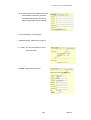
7-3-1-2: When send to FTP, please fill in its FTP
server address, user name, password,
account and upload path, and click on
Upload images when motion detected.
7-3-1-3 :Note setting : Future support.
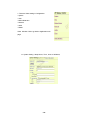
7-4 Network setting : Please refer in page 14.
7-5 . Audio : You can control audio on /off at
Server or Client .
7-6 DDNS : Please refer in Page 25.
- 21 -
VER. 2.32,
7-7 Click Video Window - Go back to the Camera
Window, User can try to choose the Splits and the
Operation Mood. If you feel the screen throb too
fast, You can change the Periodic more than 60,
such as 500 or 600 or…
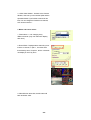
8. Mode and source select :
1. Fixed: select 1~ 4 for changing every
different channel. (Only one channel for display
each time.)
2. Round Robin: Displays select channel by turns.
If select 4 channel , in split 1 , the video show
three video by turns. If in split 4, all the 4 channels
can display in one IP by turns.
9. Video Window: after click, the left screen will
back to Monitor video.
- 22 -
IP VIDEO 9100A PLUS USER MANUAL
10. When right click mouse, it can also use:
-
View
Splits
Rotate
Resolution
Image Recording
Save picture
10-1 View
- Resizable: adjust screen size.
- Actual size: default to original size.
- Status Bar: show ip address, and
screen size.
10-2 Split
- 1x1, 2x2, 3x3, 4x4
- Split to 1,4,9,16 continuous screen
10-3 Rotate
- Rotate 0
- Rotate 180
- Flip Horizontal
- Flip Vertical
- 23 -
VER. 2.32,
Rotate 0
Rotate 180
10-4 Quality:
Low
High
Medium
Clarity
Motion
10-5 Resolution
- 704*576, 640*480, 352*288
- 320*240, 176*144, 160*120
- 24 -
IP VIDEO 9100A PLUS USER MANUAL
10-6 Image Recording
- Record image to JPEG
and AVI file. Both format
can be recorded in the
same time.
JPEG: can select how many
pictures taken in each file. And
time frame.
10-6-1 Recording AVI
- Select save as AVI, and then
select the maximum number of
frame in each file.
Note: If select No limit, it will
continue recording until it used up all
memory space.
10-7 Save current picture as
- Take a snap shot on current
images showed on IP Video 9100
AP.
11. Dynamic DNS (DDNS)
When the IP9100A dial up to the internet network, your IP provided by your ISP is
random. So the user may difficult to find your IP9000 because the ip is changing at
every time it dial up.
The Dynamic DNS service is provided by www.DynDNS.org for free.
First, user can logon the www.DynDNS.org to apply a domain name for each IP9100A,
then fill in the follow textbox with proper user name, password, domain name, proxy
server (because some where can not logon the www.DynDNS.org directly, user may
find a proxy server first, such as 210.0.212.98). Click Submit to confirm the settings.
- 25 -
VER. 2.32,
Then, every time the IP9000 dial up to the internet network, it will send a data package
including its IP to the www.DynDNS.org, so www.DynDNS.org will set the domain
name your have applied before for this IP9000 pointing to this IP.
So, user can type the domain name in the IE browser to find the IP9100 without
knowing its exact IP.
12. Firmware update
User can update the firmware.
First, click Firmware update and it will pop up Firmware Update window.
Then, click Browser to select the new firmware.
At last, click Upload to update the firmware.
- 26 -
IP VIDEO 9100A PLUS USER MANUAL
7. Other Functions
1. IP Video 9100 can view 9 different IP at the same time.
8. Authorization
In IP Video 9100A factory set up: factory setting
Username: administrator
Password: 1234
*Is recommended to change its factory setting password and user name
1. Administrator:
Change Password:
Camera Control:
(Quality) - Low, High, Advance
(Resolution) - 640*480, 352*288, 320*240, 176*144
-
& 704 * 576, 160 *120
(Split) - 1x1, 2x2, 4x4, and 8x8
(Operation Mode):
Continues
Period: 1-60 sec
View Log: view visitor IP
Configuration: System, User, Motion detection, Network, Channel & DDNS
- 27 -
VER. 2.32,
.基1-1 Adding IP Address
A. Add in another IP address
Please add in a different IP in
“ Watching and press enter”
Note1: please type in http://
before your IP.
Note2: when selecting different
views, it will show
different IP addresses in
Watching.
B. Press AD”
C. Another view open up
1-2 When cancel IP address ,
please select the camera you want
to delete and select
“Delete a Video”
2. Visitor Authorization:
Change its own password
View log: check other visitors IP address
Add / delete camera
2-1 USER:
- When non-administrator entered ip
addresses to view its AP, it will ask
for a user ID and PASSWORD.
- 28 -
IP VIDEO 9100A PLUS USER MANUAL
2-2
-
Users entered IP Video
9100A ’s AP, it will
automatically request for
Administrator’s Password. If
user or other visitors don’t have
the rights to use Administrator
authorization password, press,
“CANCEL” to ignore the inquiry.
# Note: IP Video’s AP confirming
Administrator
2-3
- Non-administrator enter “system,
user, motion detect, and net work”
which are under configuration mode,
are require to enter administrator
name and password to adjust these
functions.
- 29 -
VER. 2.32,
9. Caution
FAQ
Q 1: I forgot the ID and password for the administrator account, so
I cannot log into the Administration Page.
A: Make sure IP Video 9100A is powered on and press the “reset” button
behind IP video 9100A for at least 10 seconds, to help default
camera setting to factory setting.
*Note: Factory Administrator ID and Password
ID:
administrator
Password: 1234
Q 2 : The Web Camera does not launch?
A: Upgrade Internet Explorer or Netscape to 5.0 or higher version.
Sometimes the web camera base cannot bring 'index.html' from the
web Camera when the Internet Explorer version is at 4.0. And
remember to adjust Internet default level to low when launching IP
Video’s AP for the first time.
Q 3: The Image recording cannot stop immediately?
A: If your IP is virtual IP, than it will not be happened. If your IP is true IP
(EX: PPPoE or FIX IP….), than it might be happened. You need to
wait for a second and it will be return to normal.
- 30 -