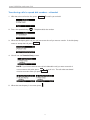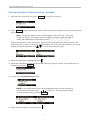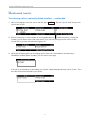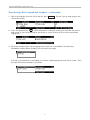
1
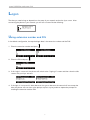
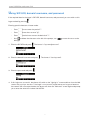
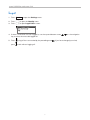
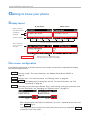
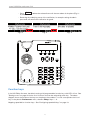
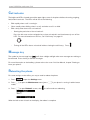
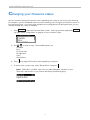
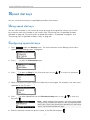
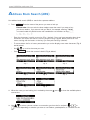
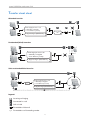
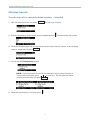
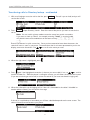
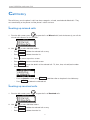
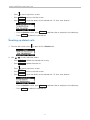
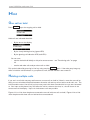
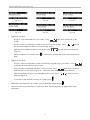
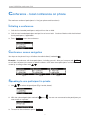
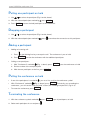
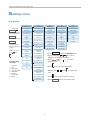
and the User Guide Using the with Table of Contents Copyright, Trademarks, GPL, Legal Disclaimers .......................................................4 Using the phone with snom UC Edition ....................................................................5 Brief introduction to input modes and navigation ...............................................................5 Entering numerals, letters, special characters, and symbols ............................................5 Logon .....................................................................................................................................6 Using extension number and PIN ..........................................................................................6 Using SIP-URI, domain\username, and password ............................................................7 Logoff .............................................................................................................................................8 Getting to know your phone ...........................................................................................9 Display layout ...............................................................................................................................9 Idle screen configuration ...........................................................................................................9 Function keys .............................................................................................................................10 Call indicator ............................................................................................................................. 11 Message key .............................................................................................................................. 11 Rebooting the phone ............................................................................................................... 11 Changing your Presence status ...................................................................................12 Speed dial keys .................................................................................................................13 Using speed dial keys ............................................................................................................. 13 Configuring speed dial keys .................................................................................................. 13 Address Book Search (ABS)...........................................................................................14 Transferring calls ..............................................................................................................15 What are the different transfer procedures? ..................................................................... 15 Attended transfer ................................................................................................................ 15 Unattended (blind) transfer ............................................................................................ 15 Safe unattended/blind transfer ........................................................................................ 15 Transfer cheat sheet ................................................................................................................ 16 Attended transfer ...................................................................................................................... 17 Transferring calls to manually dialed numbers - attended ......................................... 17 Transferring calls to speed dial numbers - attended .................................................. 18 Transferring calls to Directory lookup - attended ........................................................ 19 Unattended transfer ................................................................................................................. 20 Transferring calls to manually dialed numbers - unattended .................................... 20 Transferring calls to speed dial numbers - unattended ............................................. 21 Transferring calls to Directory lookup - unattended .................................................... 22 2 Safe transfer .............................................................................................................................. 23 Transferring calls to manually dialed numbers safely ................................................. 23 Transferring calls to speed dial numbers safely ........................................................... 24 Transferring calls to Directory lookups safely ............................................................. 25 Transferring calls directly to Voicemail ................................................................................ 26 Call history .........................................................................................................................27 Looking up missed calls............................................................................................................ 27 Looking up received calls......................................................................................................... 27 Looking up dialed calls ........................................................................................................... 28 Hold ..................................................................................................................................29 One call on hold ..................................................................................................................... 29 Holding multiple calls ........................................................................................................... 29 Conference - local conference on phone ..................................................................31 Initiating a conference ........................................................................................................... 31 Conference screen navigation ........................................................................................... 31 Speaking to one participant in private Putting one participant on hold Dropping a participant Adding a participant ......................................................................................... 32 ..................................................................................................... 32 .......................................................................................................... 32 Putting the conference on hold Terminating the conference Call forwarding ............................................................................. 31 ......................................................................................... 32 ............................................................................................... 32 ...............................................................................................................33 Turning call forwarding on ...................................................................................................... 33 Turning call forwarding off ...................................................................................................... 33 Settings menu ...................................................................................................................34 3 snom UC Edition and snom 710 Copyright, Trademarks, GPL, Legal Disclaimers © 2013 snom technology AG. All Rights Reserved. snom, the names of snom products, and snom logos are trademarks owned by snom technology AG. Microsoft® and LyncTM are the property of Microsoft Corporation. All other product names and names of enterprises are the property of their respective owners. Product specifications are subject to change without notice. snom technology AG reserves the right to revise and change this document at any time, without being obliged to announce such revisions or changes beforehand or after the fact. Texts, images, and illustrations and their arrangement in this document are subject to the protection of copyrights and other legal rights worldwide. Their use, reproduction, and transmittal to third parties without express written permission may result in legal proceedings in the criminal courts as well as civil courts. When this document is made available on snom’s web page, snom technology AG gives its permission to download and print copies of its content for the intended purpose of using it as a manual. No parts of this document may be altered, modified or used for commercial purposes without the express written consent of snom technology AG. Although due care has been taken in the compilation and presentation of the information in this document, the data upon which it is based may have changed in the meantime. snom therefore disclaims all warranties and liability for the accurateness, completeness, and currentness of the information published, except in the case of intention or gross negligence on the part of snom or where liability arises due to binding legal provisions. Our firmware includes some source code that may be used and modified by anyone and everyone under the GNU Public License (GPL), provided they, in turn, make it available to everyone else with the same licensing agreement. Please go to http://www.snom.com/en/support/download/gpl-quellcode/ for the original GPL license and the source code of components licensed under GPL and used in snom products. 4 snom UC Edition and snom 710 Using the phone with snom UC Edition This guide describes the use of phones running snom UC Edition firmware version 8.8.2.10 with Microsoft LyncTM. As long as the phone is connected to your network and the Lync server, it will use the data in your Lync account, even when your computer is turned off or when you are not signed in to Lync on your PC. For more information on setting up and connecting the hardware and for any other information not covered in this User Guide for UC Edition, please refer to the snom 710 User Manual which you can download from snom's web page at www.snom.com. Brief introduction to input modes and navigation Input modes: 123: Numerals abc: Small letters ABC: Capital letters Current input mode: Next input mode: Changing input mode: : Moving cursor to the left : Move cursor to the right Redialing Deleting character to the left of the cursor Directories, call lists, contact list, favorites The current input mode is indicated in the information line. Press the left function key underneath the display to switch to the input mode indicated by the symbol directly above it in the function key line. Text in Information Line = current input mode Press function key to switch to input mode indicated by symbol in Function Key Line 123 abc ABC Entering numerals, letters, special characters, and symbols When entering letters and special characters, pause briefly after each character until the cursor has moved forward so that you won't write over the last character you entered. Pausing is not necessary when entering numerals. For more information, please refer to the snom 710 User Manual. 5 snom UC Edition and snom 710 Logon The data you need to log on depends on the setup of your network and on the Lync server. After connecting the phone to your network, you will see a screen like the following: Using extension number and PIN In the default configuration, the required login data is the extension number and the PIN. 1. Enter the extension number and press 2. Enter the PIN and press . . 3. If this login is successful, the phone will switch to the "signing in" screen and then show the idle screen with your Lync account. 4. If the login is unsuccessful, either because of a typo or because the network will not accept the data, the phone will start over at the prompt to press any key and then repeat the prompts for entering the extension and the PIN. 6 snom UC Edition and snom 710 Using SIP-URI, domain\username, and password If the required data for the logon is SIP URI, domain\username, and password, you can switch to this logon method by pressing . Entering special characters in letter mode: ◦◦ Press once to enter the period ".". ◦◦ Press three times to enter "@". ◦◦ Press twelve times to enter the backslash "\". ◦◦ Use to delete the character to the left of the prompt; use left/right. 1. Enter the SIP URI and press to move the cursor to the . The format is "[email protected]". 2. Enter the domain\username and press 3. Enter the password and press / . The format is "test\my.name". . 4. If this login was successful, the phone will switch to the "signing in" screen and then show the idle screen with your Lync account. If the login is unsuccessful, either because of a typo or because the network will not accept the data, the phone will show the "Welcome" screen again and prompt you to enter the extension number and the PIN. 7 snom UC Edition and snom 710 Logoff 1. Press Settin to open the Settings menu. 2. Press 3. Press to open the Identity menu. to open Logoff User screen. 4. If there is more than one user logged in, use the top and bottom arrows key to select the one to be logged off. 5. Press press to log off the user marked by the preceding arrow to exit without logging off. 8 / on the navigation . If you have changed your mind, snom UC Edition and snom 710 Getting to know your phone Display layout In idle mode When active Info & status bar with date and time Configured identities Function key line Context-sensitive function key symbols Date is replaced by current status message Context area Right function key is replaced by "Info" key when status messages are available Idle screen configuration In the default configuration of the idle screen the four context-sensitive keys underneath the display have the following functions: ABS Directory search. For more information, see "Address Book Search (ABS)" on page 14. Settin Settings menu. For more information, see "Settings menu" on page 34. CFwd noFwd F orwarding of all incoming calls (on/off). For more information, see "Call forwarding" on page 33. Presen Overriding system presence indication (Fig. 1) and manually setting your presence state. For more information, see "Changing your Presence status" on page 12. Fig. 1 Fig. 2 ◦◦ W hen the phone has received new notifications, the icon is replaced by the status info icon Info (Fig. 2). ◦◦ T o bring the presence icon back onscreen, press the function key underneath to open the status info screen. 9 Info snom UC Edition and snom 710 ◦◦ Press Del 5, below). to delete the selected item until the next reboot of the phone (Fig. 3 - ◦◦ R emoving the underlying cause of the notification, for example setting the admin password, will remove the notification for good. Fig. 3 Fig. 5 Fig. 4 F1 F2 F3 F4 F5 Function keys In the UC Edition firmware, the default setting of all programmable function keys with LEDs is line. See "Settings menu" on page 34 for the list of functions that can be selected for each key. The above diagram shows the location of the keys on the phone; the numbers F1 to F5 correspond to the list of keys in the phone's Preferences menu, submenu Fkeys, fkeys 1 - 5. Mapping speed dial on function keys: See "Configuring speed dial keys" on page 13. 10 snom UC Edition and snom 710 Call indicator The bright-red LEDs situated around the upper right corner of the phone indicate incoming, ongoing, held, and missed calls. The LEDs will do one of the following: • Blink rapidly when a call is coming in. • Glow steadily when dialling, when in a call, and when a call is on hold. • Blink slowly when there was a missed call. ◦◦ Viewing the particulars of the missed call: ress the left arrow on the navigation key to view missed calls and simultaneously turn off the P LED. For more information on call lists, see "Call history" on page 27. ◦◦ Turning off the LEDs after a missed call without viewing the call history: Press . Message key The symbol on the message key will show a bright red light when new messages are waiting to be retrieved. Press the key to retrieve messages. For more information on the hardkeys, please refer to the snom 710 User Manual, chapter "Getting to know your phone". Rebooting the phone For some settings to take effect, you may to need to reboot the phone. 1. Press Settin to open the Settings menu. 2. Press mode). to open the Maintenance menu (press 3. Press to open Reboot? screen, then if your phone is running in administrator to confirm and start rebooting. When the idle screen is back on the display, the reboot is complete. 11 snom UC Edition and snom 710 Changing your Presence status You can manually change the Presence status signaled by the system to one of your own choosing. For example, if you are scheduled to be in an online meeting, Lync will signal your Presence status as busy during that time. If you want to be available for incoming phone calls during that time, you can manually change your status to available. 1. Press Presen to open the Presence State screen. If the key has been replaced by see "Idle screen configuration" on page 9 on how to make it visible. 2. Use / to select a state. The available options are: Available Busy Do not disturb Be right back Away Reset Status 3. Press to change the Presence state signaled by your phone. 4. To revert to the system state, select "Reset Status" and press . Note: DND does not affect calls from your admin/delegate, members of your Team Call, and contacts in your Friends and Family relationship group. 12 Info , snom UC Edition and snom 710 Speed dial keys You can use the function keys for speed dialing numbers and contacts. Using speed dial keys You can call the number or your contact by simply pressing the assigned key, and you can use the key to transfer calls to the number or your contact (see "Transferring calls to speed dial numbers attended" on page 18, "Transferring calls to speed dial numbers - unattended" on page 21, and "Transferring calls to speed dial numbers safely" on page 24). Configuring speed dial keys 1. Press Settin to open the Settings menu. For more information on the Settings menu and its submenus, see "Settings menu" on page 34. 2. Press to open the Preferences menu. 3. Press to open the Fkey list (list of function keys) (or use / to scroll to it, then press ). 4. S elect a key by pressing the respective number key on the keypad. For example, if you want to put speed dial on key F1, press . 5. Press then press to select Speed Dial from the Function for key menu (or use / to scroll to it, ). Note: When entering phone numbers, type each phone number exactly the way it needs to be dialed, i.e., with any required prefixes (area code, country code, operator/auto attendant, etc.) and without spaces or punctuation between the digits. 6. Enter the extension number, the phone number, or the SIP URI and press 13 . snom UC Edition and snom 710 Address Book Search (ABS) Use address book search (ABS) to search the corporate address. ABS . Enter the name of the person you want to look up. 1. Press Please note: You can switch to letter mode to enter the name if you want to, but you do not need to. If you want to look up "Steve", for example, entering "78383" in numeral mode will yield all names with combinations of the letters on keys . ◦◦ nter the characters in quick succession (Fig. 1, below). Once you have entered at least three E characters, the search will start as soon as you pause (Fig. 2 and 3, below) and result in all names starting with the letters on the keys you have pressed (Fig. 4, below). ◦◦ o narrow down the list of names presented to you on the display, enter more characters (Fig. 5 T and 6, below). ◦◦ Use ◦◦ Press Detail to show the contact's details (Fig. 8, below). / to scroll to the name you want. Fig. 1 Fig. 2 Fig. 3 Fig. 4 Fig. 5 Fig. 6 Fig. 7 Fig. 8 2. W hen the name you are looking for is marked by the arrow connections. 3. Use call. / , press to show the available phone to select a phone number or connection type from the list and press or or to call, depending on whether you want to use handset, speakerphone, or a headset for the 14 snom UC Edition and snom 710 Transferring calls Active calls as well as ringing calls can be transferred to a third party. With the snom UC Edition you have several options for transferring active calls and incoming ringing calls: ◦◦ Active calls: -- Attended transfer -- Unattended (blind) transfer ◦◦ Incoming ringing calls: -- Unattended (blind) transfer -- Safe unattended (blind) transfer -- Direct transfer to your VoiceMail Transfers can be made to: ◦◦ ◦◦ ◦◦ ◦◦ Numbers (extensions or external phone numbers) dialed manually on the keypad Speed dial keys Directory lookups Your Voicemail What are the different transfer procedures? Attended transfer With attended transfer, the call is on hold while you first speak to the party you intend to transfer the call to. This way you can be sure that the third party is available and that the call is welcome before you initiate the call transfer. Unattended (blind) transfer With unattended or blind transfer, active and ringing calls are transferred to a third party without prior announcement of the call to the third party. They can be picked up by the third party or forwarded to the third party's voicemail or the active forwarding number, and you will not be able to tell whether the call was picked up or sent to voicemail or forwarded. Safe unattended/blind transfer With safe transfer, active calls are also transferred to a third party without prior announcement of the call to the third party. The calls can only be picked up by the third party; they will not be forwarded to the third party's voicemail or forwarding number. If the call was not picked up or sent to voicemail or forwarded, it will be reconnected to your phone. Note: You need to decide whether you want to make an attended or unattended transfer before beginning the transfer procedure. 15 snom UC Edition and snom 710 Transfer cheat sheet Attended transfer Enter target phone for call • Manually on keypad • From Directory lookup Announce call • By pressing a speed dial key Unattended (blind) transfers / Enter target phone for call • Manually on keypad • From Directory lookup • By pressing a speed dial key Safe unattended/blind transfer / OK Enter target phone for call • Manually on keypad • From Directory lookup • By pressing a speed dial key Legend: Incoming call ringing Connected in a call Call on hold Forwarded to Voicemail Forwarded to call forwarding number 16 NO snom UC Edition and snom 710 Attended transfer Transferring calls to manually dialed numbers - attended 1. With the active call on the line, press Hold . The call is put on hold. 2. Enter the extension or other number on the keypad and press . The phone dials the number. 3. W hen the third party picks up your call, announce the call you want to transfer. If the third party wants to accept the call, press Xfer . 4. You will see the Transfer Party screen. NOTE: If you have more than one call on hold and the call you want to transfer is not onscreen at this point, press to scroll to it. The call to be transferred must be onscreen when you press Xfer . 5. When the transfer party is onscreen, press . 17 snom UC Edition and snom 710 Transferring calls to speed dial numbers - attended 1. With the active call on the line, press Hold . The call is put on hold. 2. Press the speed dial key . The phone dials the number. 3. W hen the third party picks up your call, announce the call you want to transfer. If the third party wants to accept the call, press Xfer . 4. You will see the Transfer Party screen. NOTE: If you have more than one call on hold and the call you want to transfer is not onscreen at this point, press to scroll to it. The call to be transferred must be onscreen when you press Xfer . 5. When the transfer party is onscreen, press . 18 snom UC Edition and snom 710 Transferring calls to Directory lookup - attended 1. With the active call on the line, press Hold . The call is put on hold. 2. Press Pool call to. to open the Directory search. Enter the name of the person you want to transfer the Note: You do not need to switch to letter mode to enter the name. If you want to look up "Steve", for example, entering "78383" in numeral mode will yield all names with combinations of the letters on keys . Enter the characters in quick succession. Once you have entered at least three characters, the search will start as soon as you pause. To narrow down the list of names presented to you on the display, enter more characters. Use / to scroll to the name you want. 3. When the right name is highlighted, press . 4. W hen the callee picks up your call, announce the call you want to transfer. If the callee wants to accept the call, press Xfer . 5. You will see the Transfer Party screen. NOTE: If you have more than one call on hold and the call you want to transfer is not onscreen at this point, press to scroll to it. The call to be transferred Xfer . must be onscreen when you press 6. When the transfer party is onscreen, press . 19 snom UC Edition and snom 710 Unattended transfer Transferring calls to manually dialed numbers - unattended 1. W ith a call ringing or an active call on the line, press see the dial screen. Xfer . The call is put on hold, and you will 2. E nter the extension or other number on the keypad and press . While the phone is calling the number, you will either see the the hold screen (if you are transferring an active call) or a new missed call (if you have transferred a ringing call). 3. W hen the third party picks up the ringing call (or if the call is forwarded to the third party's VoiceMail or another phone number), you will see this message: If the call is not picked up or forwarded, you will hear a double beep and see the error screen. Then the caller will be reconnected to your phone. 20 snom UC Edition and snom 710 Transferring calls to speed dial numbers - unattended 1. W ith a call ringing or an active call on the line, press see the dial screen. Xfer . The call is put on hold, and you will 2. P ress the speed dial key . While the phone is calling the number, you will either see the the hold screen (if you are transferring an active call) or a new missed call (if you have transferred a ringing call). 3. W hen the third party picks up the ringing call (or if the call is forwarded to the third party's VoiceMail or another phone number), you will see this message: If the call is not picked up or forwarded, you will hear a double beep and see the error screen. Then the caller will be reconnected to your phone. 21 snom UC Edition and snom 710 Transferring calls to Directory lookup - unattended 1. W ith a call ringing or an active call on the line, press see the dial screen. 2. Press Pool call to. Xfer . The call is put on hold, and you will to open Directory search. Enter the name of the person you want to transfer the Note: You can switch to letter mode to enter the name, but you do not need to. If you want to look up "Steve", for example, entering "78383" in numeral mode will yield all names with combinations of the letters on keys . Enter the characters in quick succession. Once you have entered at least three characters, the search will start as soon as you pause. To narrow down the list of names presented to you on the display, enter more characters. Use / to scroll to the name you want. 3. When the right name is highlighted, press . 4. Press again if the highlighted connection is the one you want to dial; if not, use / to scroll to another number first. While the phone is calling the contact, you will either see the the hold screen (if you are transferring an active call) or a new missed call (if you have transferred a ringing call). 5. W hen the callee picks up the ringing call (or if the call is forwarded to the callee's VoiceMail or another phone number), you will see this message: If the call is not picked up or forwarded, you will hear a double beep and see the error screen. The caller will then be reconnected to your phone. 22 snom UC Edition and snom 710 Safe transfer Transferring calls to manually dialed numbers safely 1. W ith an active call on the line, press screen. Xfer . The call is put on hold, and you will see the dial 2. Press Safe T . 3. E nter the extension or other number on the keypad and press number, you will see the hold screen. . While the phone is calling the 4. When the callee picks up the ringing call, you will see this message: If the call is not picked up, you will hear a double beep and see the error screen. Then the caller will be reconnected to your phone. 23 snom UC Edition and snom 710 Transferring calls to speed dial numbers safely 1. W ith an active call on the line, press screen. Xfer . The call is put on hold, and you will see the dial 2. Press Safe T and then the speed dial key see the Holding screen. . While the phone is dialing the number, you will 3. When the speed-dialed party picks up the ringing call, you will see this message. If the call is not picked up, you will hear a double beep and see the error screen (Fig. 1). The caller will then be reconnected to your phone (Fig. 2). 24 snom UC Edition and snom 710 Transferring calls to Directory lookups safely 1. W ith an active call on the line, press screen. Xfer . The call is put on hold, and you will see the dial 2. Press Safe T . 3. Press Pool call to. to open the Directory search. Enter the name of the person you want to transfer the Note: You can switch to letter mode to enter the name, but you do not need to. If you want to look up "Steve", for example, entering "78383" in numeral mode will yield all names with combinations of the letters on keys . Enter the characters in quick succession. Once you have entered at least three characters, the search will start as soon as you pause. To narrow down the list of names presented to you on the display, enter more characters. Use / to scroll to the name you want. 4. When the right name is highlighted, press 5. Press . . While your phone is calling the selected number, you will see the Holding screen. 6. When the callee picks up the ringing call, you will see this message: If the call is not picked up, you will hear a double beep and see the error screen. Then the caller will be reconnected to your phone. 25 snom UC Edition and snom 710 Transferring calls directly to Voicemail When an incoming call is ringing, press to transfer it directly to your VoiceMail. 26 snom UC Edition and snom 710 Call history The call history sorts the phone's calls into three categories, missed, received and dialed calls. They are stored locally on the phone until the phone's values are reset. Looking up missed calls 1. F rom the idle screen, press to open the list of Missed calls (and simultaneously turn off the missed call indication of the call LED). 2. Use / to select individual callers. Del ◦◦ Press ◦◦ Press Clear to delete the entire list. ◦◦ Press to return to previous screen. ◦◦ Press ESC ◦◦ Press Detail to show the details of the selected call: To, from, time, missed (total number from the same caller) to delete the selected call or entry. to return to the idle screen. -- From the Details screen, press Save to add the caller to the phone's local directory. -- Press Del to delete the selected call. Looking up received calls 1. From the idle screen, press 2. Use / to open the list of Received calls. to select individual callers. Del ◦◦ Press ◦◦ Press Clear to delete the entire list. to delete the selected call or entry. 27 snom UC Edition and snom 710 ◦◦ Press to return to previous screen. ◦◦ Press ESC ◦◦ Press Detail to show the details of the selected call: To, from, time, duration. to return to the idle screen. -- From the Details screen, press Save to add the caller to the phone's local directory. -- Press Del to delete the selected call. Looking up dialed calls 1. From the idle screen, press 2. Use / to open the list of Dialed calls. to select individual callers. Del ◦◦ Press ◦◦ Press Clear to delete the entire list. ◦◦ Press to return to previous screen. ◦◦ Press ESC ◦◦ Press Detail to show the details of the selected call: To, from, time, duration. to delete the selected call or entry. to return to the idle screen. -- From the Details screen, press Save to add the caller to the phone's local directory. -- Press Del to delete the selected call. 28 snom UC Edition and snom 710 Hold One call on hold Press Hold to put the ongoing call on hold. Held calls are indicated threefold: ◦◦ By the text on the display. ◦◦ By the slowly blinking line key (green LED). ◦◦ By the glowing call indication LED (red LEDs). You can now: ◦◦ transfer the held call blindly or with prior announcement - see "Transferring calls" on page 15. ◦◦ receive and make calls and put other calls on hold. ick up the held call by pressing its line key or by pressing Hold again. If the other party hangs up P while on hold the call terminates on your phone as well, and the indicators are turned off. Holding multiple calls If you are in a call with one party and have one or more calls on hold or if there is more than one call on hold, you can switch back and forth between the active call and any call on hold, transfer calls, etc. The info bar and the status line will tell you how many total calls there are and which one you are connected to. Your input on the phone's keys will affect the call on-screen at the time, i.e., the call shown in the contact area of the display. Up to 12 simultaneous calls are possible. Figures H-1 to H-3 show the phone connected to one call with two calls on hold; Figures H-4 to H-6 show the phone with three calls on hold and no connected call. 29 snom UC Edition and snom 710 • • Fig. H-1 Fig. H-2 Fig. H-3 Fig. H-4 Fig. H-5 Fig. H-6 Figures H-1 to H-3: ◦◦ In Fig. H-1 the connected call is on-screen. Press screen. ◦◦ In Fig. H-2 the first held call of a total of two (1/2) is on the screen. Press put the second held call (2/2) on the screen (Fig. H-3). ◦◦ ith the second held call (2/2) on the screen, press W (Fig. H-1). ◦◦ When a held call is on-screen, press hold. to put the first held call on the again to to scroll to the connected call to connect to it and put the current connected call on Figures H-4 to H-6: ◦◦ In Fig. H-4 the first held call of a total of three Calls on Hold (1/3) is on-screen. Press to put the second held call on the screen. ◦◦ In Fig. H-5 the second held call (2/3) is on the screen. Press again to put the third held call (3/3) on the screen (Fig. H-6). If there are more held calls, continue likewise. ◦◦ ith the last held call (3/3, in our example) on the screen, press W held call (Fig. H-4). ◦◦ To connect tothe held call currently on-screen, press to scroll to the first . • When the connected call is on-screen, you can terminate it by pressing • ou can transfer the connected on-screen call. See "Transferring calls" on page 15 for more Y information. 30 . snom UC Edition and snom 710 Conference - local conference on phone The maximum number of participants is five (your phone and four others). Initiating a conference 1. Call the first intended participants and put him or her on hold. 2. C all the next intended participant and put him or her on hold. Continue likewise with the third and fourth participants, if applicable. 3. Press Cnf.On to start the conference. Conference screen navigation Your input on the phone's keys will affect the caller/callee(s) marked by . Example: A conference with three participants, including yourself. After you have pressed Cnf.On to start the conference, the names or phone numbers of the other three participants can be shown onscreen by scrolling to them with / . Fig. 1 Fig. 2 Fig. 3 Speaking to one participant in private 1. Use / to select the participant (Fig. 2 and 3, above). 2. W ith the selected participant marked by want to talk to in private. , press 3. To return to the conference, press Cnf.On . 31 . You are now connected to the participant you snom UC Edition and snom 710 Putting one participant on hold 1. Use / to select the participant (Fig. 2 and 3, above). , press Hold . 2. With the selected participant marked by 3. Press Cnf.On to return the held participant to the conference. Dropping a participant 1. Use / to select the participant (Fig. 2 and 3, above). 2. With the selected participant marked by , press to terminate the connection to this participant. Adding a participant • Adding an incoming call: 1. Press or the blinking line key to accept the call. The conference is put on hold. 2. Press Cnf.On to restart the conference with the additional participant. • Calling a new participant: 1. With "Conference" marked by (Fig. 1, above), press Hold to put the conference on hold. 2. Dial the number of the new participant. 3. With the new participant on the line, press Cnf.On . Putting the conference on hold • If one of the participants is marked by , you must first scroll to the conference symbol. • ith "Conference" marked by (Fig. 1, above), press Hold . Technically, you are ending the W conference; you will see the "Calls on Hold" screen (see "Holding multiple calls", Fig. H-4). • To restart the conference, press Cnf.On . Terminating the conference 1. With the conference symbol marked by 2. Select each participant in turn and press , press Hold to put all participants on hold. . 32 snom UC Edition and snom 710 Call forwarding Standard call forwarding means that incoming calls to your phone will not ring on your phone, but, instead, are forwarded automatically to another extension, external phone number, or your Voicemail. Turning call forwarding on 1. Press CFwd to open the Call Forwarding menu. Note: If the CFwd key is not available, press Settin 2. Use / . to select one of the options. ◦◦ Press ◦◦ If you have selected New Number, a new text window will open. to turn on call forwarding for all options except New Number. 1. Enter the number on the phone's keypad. 2. Press to confirm the number and turn on call forwarding. Turning call forwarding off Press noFwd . If the noFwd key is not available, press Settin 33 . snom UC Edition and snom 710 Settings menu At a glance 1 Preferences 2 Call Features 3 Network 4 Maintenance 5 Information 1 Time Zone 1 Call Forwarding 1 Outgoing Identity 1 System Info 1 Status Info 2 Tone Scheme 1 Forward all 2 2 Administrator Reregister User Mode 2 System Info 3 Ringer 2 Forward when busy 3 Edit User 3 Reboot 3 Help 4 Language 3 Fwd after timeout 4 Logoff User 4 Change PIN 4 Location 5 Display 2 Outgoing Calls 5 Logoff All 5 Check SW Update 1 Contrast 1 Auto Dial 6 Call Voicemail 7 Check Call Quality 2 Backlight 2 Number Guessing 6 Fkeys 3 Call Completion 1 line 4 Hide own outgoing ID Available Fkey functions: 2 line 3 Incoming Calls 1 2 3 4 5 6 7 8 5 line 1 Reject anonymous Time zone: Jump Move to beginning of next time zone More Show all time zones Reduc Show only countries where phone language is spoken Select time zone and with . Presence Line Speed Dial Voice Recorder Push2Talk Intercom Action URL Button • Press Settin to open the Settings menu • Press number key 1 , 2 , etc. to open submenus and individual settings ABC • Press / , / , or (settings, etc.) • Press 2 Call Waiting 4 Auto Answer Type • Press 3 Always • Press Delegate Forward 34 to select to save the selected setting • Settings with save 3 Auto Answer Indication / / : Press to change and to return to the previous screen ESC to return to the idle screen snom technology AG Wittestr. 30 G 13509 Berlin, Deutschland Tel. +49 30 39 83 3-0 Fax +49 30 39 83 31 11 [email protected], [email protected] snom France SARL snom technology, Inc. 18 Commerce Way, Suite 6000 Woburn, MA 01801, USA Tel. 781-569-2044 Fax 978-998-7883 [email protected] snom technology SRL Via A. Lusardi 10 20122 Milano, Italia Tel +39 02 00611212 Fax +39 02 93661864 [email protected] snom UK Ltd Amethyst House, Meadowcroft Way Leigh Business Park, Leigh Manchester WN7 3XZ, UK Tel. +44 169 348 7500 Fax +44 169 348 7509 [email protected] snom technology Ltd. Rm. A2, 3F, No. 37, Ln. 258 Ruiguang Rd., Neihu Dist. Taipei City 114, Taiwan Tel +886-2-8751-1120 Fax +886-2-8751-1130 [email protected] 6 Parc des fontenelles 78870 Bailly, France Tel. +33 1 80 87 62 87 Fax +33 1 80 87 62 88 [email protected] Your specialist retailer - Ihr Fachhändler Votre distributeur - Su distribuidor - Il tuo rivenditore: © 2013 snom technology AG V1.00