1
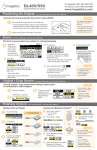
CONTROL PANEL
RESET
PROGRAM
STOP
CHECK STATUS
Clears all settings (Defaults).
Store frequently used copy settings in
the machine memory and recall them
for future use.
Not in use.
Turn the machine ON/OFF (from
standby)
Logout hard key.
Access System menus. Take counter
readings.
Delete quantity.
Stop copying/scanning/faxing when
on that function.
Toggles between normal and
simplified screen mode.
Use this key instead of the green
button to produce a sample set.
* Can only be used when [Sort] is
selected.
Begin copying/scanning/faxing when
on that function.
Cancel/stop Copier job.
Overview of function status.
F1
F2
F3
F4
F5
Access the Copier function.
Access the Printer function.
Not in use.
Not in use.
Not in use.
HOME
Returns to ‘HOME’ screen.
INTERRUPT
ENERGY SAVER
LOGOUT
USER TOOLS/COUNTER
C/CLEAR
STOP
SIMPLIFIED DISPLAY
SAMPLE COPY
START
3