1
Safety and Legal
1
MFC-J220/J265W/J415W/J615W/J630W
Using the
documentation
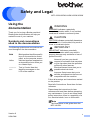
WARNING
1
WARNING indicates a potentially
hazardous situation which, if not avoided,
could result in death or serious injuries.
Thank you for buying a Brother machine!
Reading the documentation will help you
make the most of your machine.
Symbols and conventions
used in the documentation
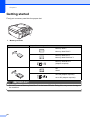
The following symbols and conventions are
used throughout the documentation.
CAUTION
1
CAUTION indicates a potentially hazardous
situation which, if not avoided, may result in
minor or moderate injuries.
IMPORTANT
IMPORTANT indicates a potentially
hazardous situation which may result in
property-damage-only accidents or loss of
product function.
Bold
Bold typeface identifies specific
keys on the machine’s control
panel, on the computer screen.
Italics
Italicized typeface emphasizes
an important point or refers you
to a related topic.
Notes tell you how you should
respond to a situation that may arise
or give tips about how the operation
works with other features.
Courier
New
Text in Courier New font
identifies messages on the
LCD of the machine.
Electrical Hazard icons alert you to
possible electrical shock.
Improper Setup icons alert you to
devices and operations that are not
compatible with the machine.
Follow all warnings and instructions marked
on the product.
Read all of instructions. Save them for later
reference.
Please keep the instructions for later
reference and read them before attempting
any maintenance. If you do not follow these
safety instructions, there is a possibility of a
fire, electrical shock, burn or suffocation.
Note
The illustrations in this guide show the
MFC-J615W.
Version 0
USA/CAN
1