1
Premier Series User Guide
Operating the Alarm System
To DISPLAY the cause(s) of System Alerts (Alarms)
When silencing an alarm or unsetting the system after an alarm, the number of the
zone(s) will be displayed on the keypad. If several zones were triggered, the display will
scroll through each in turn.
After noting the cause of the alarm, the system can be reset as described in ‘RESET After
an Alarm’ below.
System Alerts
When the system has faults to display, or has not been reset after an alarm condition, the
display may show ‘SYSTEM ALERTS’.
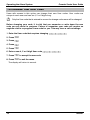
Enter a valid User code ,,,,2
Any alarms or faults will be displayed. If several fault or alarm conditions have been
triggered, the display will scroll through each in turn.
After noting the cause of the alarm or fault, the system can be reset as described in
‘RESET After an Alarm’ below.
!
Some action may be required to clear the cause of the alarm or fault in order to
successfully reset the panel.
INS221
7