1
USB-TC User's Guide
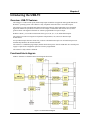
Functional Details
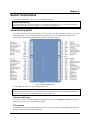
USB connector
The USB connector provides +5V power and communication. No external power supply is required.
LED
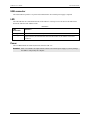
The LED indicates the communication status of the USB-TC. It uses up to 5 mA of current. The table below
defines the function of the USB-TC LED.
Illumination
LED
Illumination
Indication
Steady green
Blinking green
The USB-TC is connected to a computer or external USB hub.
Data is being transferred.
Upon connection, the LED blinks three times and then remains on; this indicates a successful
installation.
Power
The two +5V terminals are isolated (500 VDC) from the USB +5V.
Caution! Each +5V terminal is an output. Do not connect to an external power supply or you may damage
the USB-TC and possibly the computer.
14