1
_______________________________________________________________Use of the Optoscan
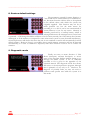
To assist setting up the wavelength positions there is a real time adjustment option. If this is set
to ON, the grating and slits are set to the positions
shown on the display and the selected wavelength
will be output from the monochromator. This setting
also generates the timing signals required for our
photometry modules, allowing the effect of changing
the individual parameters on system output signals to
be monitored. If this setting is OFF, the slits are fully
closed to prevent any unnecessary illumination of the
sample, and timing signals are not generated.
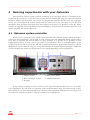
Each wavelength position to be utilised during
a particular experiment needs to be set for inclusion in the wavelength program. This is done via
option 7, and allows easy inclusion or exclusion of individual positions depending on the nature of the
experiment being carried out. To review the current program settings and see which positions are
included in the program use option 9, which will give you a display similar to that shown above.
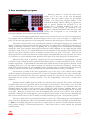
2. Show wavelengths and times
Function 2 on the main menu leads to this
sub-menu, where more detailed information about
the program position settings can be obtained. The
facility for the display of the actual slit widths used
for a given position (Option 3) allows users with
manual slit adjustment to set the most appropriate
setting for a given experiment. The same mechanical
slit width will not apply for all positions, as the
relationship between mechanical slit width and
optical bandwidth is somewhat wavelength
dependent. The information here will allow the micrometer to be set to the best compromise.
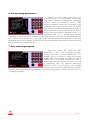
A facility that is potentially very useful under ALL circumstances is option 4, "Show optical
bandpass profiles", as it allows the actual bandpass characteristics for each position to be displayed.
This is particularly valuable when experimenting with different input and exit slit widths. A very
important guide is that the optical throughput at each position is proportional to the area enclosed by
the bandpass characteristic. In general, for maximum throughput the input and exit slit widths
(defined optically, as we do, rather than mechanically) should be the same. The bandpass characteristic
is then triangular, with the bandwidth, as defined between the 50% points (full width half maximum,
FWHM), being half the total width of the spectrum along its baseline. This topic is well described in
the theoretical part of the technical manual, so for more information, please read that section.
_________________________________________________________________________Page 13