1
JTL USER GUIDE
COMPRESSOR PACK SUCTION CONTROLLER TYPE:
When a change in compressor capacity is required the controller
decides which step of capacity is to be changed. The decision is based
on the following:
•
•
•
•
•
The maximum number of starts per hour on an individual
compressor.
The compressor running hours are balanced.
All machines are run periodically.
Unnecessary starts and stops of the compressors are
avoided.
Capacity of compressors when unequal.
The suction pressure is maintained within the deadband if sufficient
capacity is available. The deadband is positioned symmetrically about
the suction pressure setpoint so that for example, if the setpoint is set
to 8 psi and the deadband is set to 4 psi, then the bottom of the
deadband is 6 psi and the top 10 psi.
Under normal conditions when the suction pressure is within the
deadband no increase or decrease in staged capacity will occur.
Suction Pressure Optimisation
When used in conjunction with a JTL suction pressure optimiser (SPO)
and appropriate JTL evaporator controllers/monitors, the
suction pressure can be optimised to save energy.
The optimiser monitors the evaporator conditions and sets the suction
pressure to the appropriate level to maintain the evaporator at the
optimiser level to achieve the desired temperatures at the lowest
energy.
The allowed range of pressure is set on items 40 (minimum) and 152
(maximum) optimisation is enabled on item 150.
CAPACITY CHANGES (STAGE CONTROL)
The stage control is implemented using additional digital interface (IF)
modules. One or two IF31 modules are used depending on the number
of compressors and stages on the compressors. Up to 8 stages can be
controlled using one IF31 module and up to 14 stages can be
controlled using IF31 modules.
Note when using two IF31 modules stages 1 -7 are on IF1 & 8-14 on IF2.
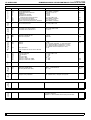
The output arrangement for multistage compressors is controlled
using item 167.
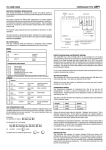
Compressor output
configuration
(Note: When compressor 1 is
set for 50% unloader then the
inverter is disabled)
0
1
2
3
When compressor 1 is not set
for inverter control all
compressors can be used for
stage control.
4
All compressors 1 stage
Compressor 2 50% unload
Compressors 2 & 3 50%
unload
Compressor 1 50% unload
Compressors 1 & 2 50%
unload
Compressors 1 to 3 50%
unload
5
LP210/220
longer the time before a capacity increase occurs.
Capacity Decrease
When the suction pressure goes below the control deadband the
controller program will decide when and how a decrease in capacity will
occur. If the pressure does not return within the deadband a change
in capacity will eventually occur.
As for the increase in capacity there is a minimum delay between each
decrease in capacity and the pressure error is integrated with respect
to time. When the integrated error is large enough a capacity decrease
will occur.
Capacity Decrease Response Time
The speed of response of the system can be adjusted using the
decrease time constant (item 45). The larger the time constant, the
longer the time before a capacity decrease occurs.
The use of separate increase and decrease time constants allows the
compressors to unload faster than loading if desired. This feature is of
particular benefit on low temperature stages to prevent the suction
pressure going too low.
Change Of Pressure
The change of pressure is also considered. If the pressure is going
towards the setpoint fast enough for the suction pressure to reach the
deadband in an acceptable time then, no capacity change is made.
Starts Per hour
Each compressor can be programmed to have a maximum number of
starts per hour. The item numbers for this selection are 219 for
compressor 1, 229 for compressor 2 up to 309 for compressor 10.
Once a compressor has started it is not allowed to restart again until the
restart timer, which ensures the starts per hour are observed, has
timed out.
Compressor Capacity
Each compressor can be programmed to have a capacity. The items for
this data are 216 for compressor 1, 226 for compressor 2 up to 306 for
compressor 10.
The capacity control takes account of the capacity that can be
started and stopped to ensure optimum control. Where a small
capacity change can be made by starting and stopping two machines
to give a net change in capacity this is done. In this condition the
machine to be started always starts before the machine to be stopped
regardless of whether capacity is to be increased or decreased.
High Discharge Pressure
If the discharge pressure exceeds the pressure safety level (on input 2)
then, the compressor capacity is reduced. There is a choice of two
actions in this condition on item 197 either the reduction in capacity is
controlled by the normal sequence of unloading or all conpressors are
stopped immediately.
When the pressure falls below the safety level the capacity is allowed to
increase again according to the normal requirements of the suction
pressure.
Capacity Increase
When the suction pressure goes above the control deadband the
controller will decide when and how an increase in capacity will occur.
If capacity is available and the pressure does not return within the
deadband a change in capacity will eventually occur.
Low load Condition
When the refrigeration load is low enough for the compressors to run
on 1 step only (including the trim compressor) then, to prevent the last
compressor stopping unnecessarily, the deadband lower limit is
automatically lowered, reducing the pressure at which the last
compressor would be stopped.
However, the capacity change does not occur immediately the pressure
goes outside the deadband. There is a minimum delay between each
increase in capacity regardless of demand.
In this condition the deadband lower limit is set to the 1st stage hold on
pressure setpoint (item 48).
The size and duration of the difference (or error) between the desired
pressure and the actual pressure is taken into account. This error is
integrated with respect to time. When the integrated error is large
enough a capacity increase will occur.
There is a very low suction pressure setting (item 196) below which, if
enabled by item 195, will stop all compressors instantly.
INVERTER CONTROL
To put this more simply, if the pressure error is large a capacity change
will occur more quickly than if the error is small.
Capacity Increase Response Time
The speed of response of the system can be adjusted using the
increase time constant (item 44). The larger the time constant, the
Inverter Speed Control
The inverter requires the use of an analogue interface module (IF35)
which can vary the frequency of the inverter drive is varied using a 0 10 signal. The inverter should be set up so that 0 V is for minimum
speed and 10 V is maximum speed.