1
Contents
Safety and operational information..................................................................7
Important............................................................................................................................................................................8
Safety Information.........................................................................................................................................................8
Section 1 - General information.........................................................................9
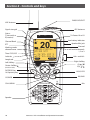
Section 2 - Controls and keys............................................................................10
2-1 Keys/Controls and functions........................................................................................................ 11
2-1-1 Use of Softkeys in this radio....................................................................................................................13
2-1-2 DSC Softkeys.....................................................................................................................................................14
Section 3 - Operating the radio........................................................................15
3-1
3-2
3-3
3-4
3-5
3-6
3-7
Power On/Off.................................................................................................................................... 15
Adjusting the Squelch level........................................................................................................ 15
Volume control................................................................................................................................. 15
Channel selection........................................................................................................................... 16
Receiving and transmitting......................................................................................................... 16
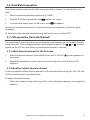
Dual Watch operation.................................................................................................................... 17
3CH operation (Favorite Channel)............................................................................................ 17
3-7-1 Add a favorite channel for the first time..........................................................................................17
3-7-2 Modify or delete favorite channel.......................................................................................................17
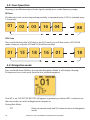
3-8 Scan Operation................................................................................................................................ 18
3-9 Navigation mode............................................................................................................................ 18
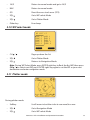
3-10 WP select mode............................................................................................................................. 19
3-11 Plotter mode ................................................................................................................................. 19
3-12 GPS satellite mode....................................................................................................................... 20
Section 4 - Advanced setup...............................................................................21
4-1 Waypoint............................................................................................................................................. 22
4-1-1 Add a new waypoint....................................................................................................................................22
4-1-2 Edit a waypoint................................................................................................................................................23
4-1-3 Delete a waypoint.........................................................................................................................................24
4-1-4 Set a route to a stored waypoint.........................................................................................................24
4-2 Backlight adjustment.................................................................................................................... 25
4-3 Lamp timer........................................................................................................................................ 25
4-4 Buddy list (Manage your buddy list)......................................................................................... 26
4-4-1 Add a new buddy name............................................................................................................................26
4-4-2 Edit a buddy name........................................................................................................................................27
Lowrance - Link-2 Installation and Operation Instructions
3