1
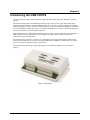
USB-1616FS User's Guide Introducing the USB-1616FS Connecting a USB-1616FS to your computer is easy Installing a data acquisition device has never been easier. The USB-1616FS relies upon the Microsoft Human Interface Device (HID) class drivers. The HID class drivers ship with every copy of Windows that is designed to work with USB ports. We use the Microsoft HID because it is a standard, and its performance delivers full control and maximizes data transfer rates for your USB-1616FS. No third-party device driver is required. The USB-1616FS is plug-and-play. There are no jumpers to position, DIP switches to set, or interrupts to configure. You can connect the USB-1616FS before or after you install the software, and without powering down your computer first. When you connect an HID to your system, your computer automatically detects it and configures the necessary software. You can connect and power multiple HID peripherals to your system using a USB hub. You can connect up to four USB-1616FS devices to one USB 2.0 port. You can connect up to two devices to a USB 1.1 port. You can connect your system to various devices using a standard four-wire cable. The USB connector improves upon serial and parallel port connectors with one standardized plug and port combination. Data can flow two ways between a computer and peripheral over USB connections. 8