1
User Guide
Time-Lapse DVD Recorder
1 Introduction
MultiBurner has been specifically designed for use with Ovation Systems’ AfterBurner
time-lapse DVD video recorder and is capable of burning up to 7 AfterBurner disks
without user intervention. MultiBurner is easy to connect to AfterBurner via a ribbon
cable which is supplied with the unit.
MultiBurner can be used back at base to speed up the download of evidence gathered
from a number of AfterBurners returned from the field or, alternatively, MultiBurner can
be deployed with an AfterBurner where up to 8 DVDs can be automatically burnt without
the need for the user to be present.
Another timesaving feature is the ability to burn multiple DVD copies. This is particularly
useful for producing a master and working copy when preparing evidence for court.
2 Hardware Installation
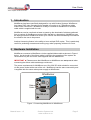
MultiBurner connects to AfterBurner via the supplied ribbon cable as shown in Figure 1
below. As the length of the ribbon cable is critical to the operation of the system we
recommend only the use of the cable supplied with the MultiBurner.
IMPORTANT 2 Please ensure that AfterBurner or MultiBurner are not powered when
connecting the ribbon cable as damage could occur.
The power requirements for MultiBurner are 10 to 20V DC which should be connected
via the power socket at the rear of the unit. MultiBurner has the same connectivity and
is supplied with the same mains power supply as AfterBurner.
AfterBurner
OUT
IN
VIDEO
Ribbon
Cable
LEFT
OUT
LEFT
IN
RIGHT
OUT
AUDIO
MultiBurner
Figure 1: Connecting MultiBurner to AfterBurner
Manual Issue: 1-2
Ovation Systems Ltd.
www.ovation.co.uk
Page 3