1
Code: 383332 W
USER GUIDE
Edited/Published/Produced by:
Olivetti S.p.A.
Gruppo Telecom Italia
Via Jervis, 77
Ivrea (TO)
Italy
www.olivetti.com
Copyright © Olivetti, 2010
All rights reserved
The mark affixed to the product certifies that
the product satisfies the basic quality
Requirements.
Code: 383332 W
Date of publication: January 2010
Trademarks: Microsoft and Windows are registered
trademarks of Microsoft Corporation.
Other trademarks and trade names
may be used in this document to refer to either the entities
claiming the marks and names or their products.
Olivetti disclaims any proprietary interest in trademarks and
trade names other than its own.
Directive 2002/96/CE
DIRECTIVE 2002/96/CE ON THE TREATMENT, COLLECTION,
RECYCLING AND DISPOSAL OF ELECTRIC AND ELECTRONIC
DEVICES AND THEIR COMPONENTS
1. FOR COUNTRIES IN THE EUROPEAN UNION (EU)
The disposal of electric and electronic devices as solid urban waste is
strictly prohibited: it must be collected separately. The dumping of these
devices at unequipped and unauthorized places may have hazardous
effects on health and the environment.
Offenders will be subjected to the penalties and measures laid down by
the law.
To dispose of our devices correctly:
a) Contact the Local Authorities, who will give you the practical
information you need and the instructions for handling the waste
correctly, for example: location and times of the waste collection
centres, etc.
b) When you purchase a new device of ours, give a used device similar
to the one purchased to our dealer for disposal.
The crossed dustbin symbol on the device means that:
- When it to be disposed of, the device is to be taken to
the equipped waste collection centres and is to be
handled separately from urban waste;
- Olivetti guarantees the activation of the treatment,
collection, recycling and disposal procedures in
accordance with Directive 2002/96/CE (and subsequent
amendments).
2. FOR OTHER COUNTRIES (NOT IN THE EU)
The treatment, collection, recycling and disposal of electric and electronic
devices will be carried out in accordance with the laws in force in the
country in question.
Table of Contents
Contents
Notice ........................................................................ I
Instructions for Care and Operation ......................III
Power Safety ........................................................V
Battery Precautions .............................................. VI
Cleaning ............................................................. VII
Servicing ............................................................. VII
Travel Considerations ......................................... VIII
Quick Start Guide
About this Quick Guide ..........................................1-1
Regulatory and Safety Information .......................1-1
Trademarks ..........................................................1-1
System Startup .......................................................1-1
System Software ..................................................1-1
System Map: Front & Rear Views ............................1-2
System Map: Side & Bottom Views .........................1-3
LED Indicators ........................................................1-4
Keyboard & Function Keys ......................................1-5
Driver Installation ...................................................1-6
Features & Components
Overview ................................................................2-1
Hard Disk Drive ......................................................2-2
7-in-1 Card Reader .................................................2-3
TouchPad and Buttons/Mouse ................................2-4
Audio Features .......................................................2-5
Power Management
Overview ................................................................3-1
Advanced Configuration and Power Interface .......3-1
The Power Sources .................................................3-2
AC/DC Adapter ....................................................3-2
Battery .................................................................3-2
Turning on the Computer .......................................3-3
Power Schemes ......................................................3-4
Battery Information ................................................3-6
Recharging the Battery with the
AC/DC Adapter ....................................................3-7
Battery FAQ ..........................................................3-9
Drivers
What to Install ........................................................4-1
Module Driver Installation .....................................4-1
Driver Installation ....................................................4-2
Authorized Driver Message ...................................4-4
New Hardware Found ...........................................4-4
Version Conflict Message .....................................4-4
XI
Table of Contents
BIOS Utilities
Troubleshooting
Overview ................................................................5-1
The Power-On Self Test (POST) ...............................5-2
Failing the POST ...................................................5-2
The Setup Utility .....................................................5-3
Entering Setup .....................................................5-3
Setup Screens .......................................................5-4
Main Menu ............................................................5-5
Advanced Menu .....................................................5-7
Security Menu ......................................................5-10
Boot Menu ...........................................................5-12
Exit Menu .............................................................5-13
Overview ................................................................8-1
Basic Hints and Tips ................................................8-2
Backup and General Maintenance ..........................8-3
Viruses ...................................................................8-4
Upgrading and Adding New Hardware/Software ....8-5
Problems and Possible Solutions .............................8-6
Upgrading The Computer
Intel Video Driver Installation ..................................B-1
Dynamic Video Memory Technology .......................B-1
Intel Graphics Properties .........................................B-2
Scheme Options .....................................................B-4
Display Devices & Options .......................................B-5
Attaching Other Displays ........................................B-6
Overview ................................................................6-1
When Not to Upgrade ..........................................6-2
Removing the Battery .............................................6-3
Upgrading the HDD ................................................6-4
Upgrading the System Memory (RAM) ....................6-7
Upgrading the Processor ......................................6-10
Additional Modules
Overview ................................................................7-1
PC Camera Module ................................................7-2
Wireless LAN Module .............................................7-4
XII
Interface (Ports & Jacks)
Notebook Ports and Jacks ...................................... A-2
Intel Video Driver Controls
Table of Contents
Specifications
Processor ............................................................... C-2
Core Logic ............................................................. C-2
Display .................................................................. C-2
Memory ................................................................ C-2
Video Adapter ....................................................... C-2
BIOS ...................................................................... C-2
Storage ................................................................. C-2
Security ................................................................. C-2
Audio .................................................................... C-2
Pointing Device ..................................................... C-2
Keyboard .............................................................. C-2
Operating System .................................................. C-3
Card Reader .......................................................... C-3
Slot ....................................................................... C-3
Dimensions & Weight ............................................ C-3
XIII
Table of Contents
XIV
Table of Contents
XV
Table of Contents
XVI
Preface
Notice
The company reserves the right to revise this publication or to change its contents without notice. Information contained herein is for reference only and does not constitute a commitment on the part of the
manufacturer or any subsequent vendor. They assume no responsibility or liability for any errors or inaccuracies that may appear in this publication nor are they in anyway responsible for any loss or damage
resulting from the use (or misuse) of this publication.
This publication and any accompanying software may not, in whole or in part, be reproduced, translated,
transmitted or reduced to any machine readable form without prior consent from the vendor, manufacturer or creators of this publication, except for copies kept by the user for backup purposes.
Brand and product names mentioned in this publication may or may not be copyrights and/or registered
trademarks of their respective companies. They are mentioned for identification purposes only and are
not intended as an endorsement of that product or its manufacturer.
©January 2010
Trademarks
Intel and Atom are trademarks/registered trademarks of Intel Corporation.
Olivetti and Alice are trademarks/registered trademarks of Telecom Italia S.p.A.
I
Preface
IMPORTANT SAFETY INSTRUCTIONS
Follow basic safety precautions, including those listed below, to reduce the risk of fire, electric shock, and
injury to persons when using any electrical equipment:
1.
2.
3.
4.
Do not use this product near water, for example near a bath tub, wash bowl, kitchen sink or laundry tub, in a wet
basement or near a swimming pool.
Avoid using this equipment with a telephone line (other than a cordless type) during an electrical storm. There may
be a remote risk of electrical shock from lightning.
Use only the power cord and batteries indicated in this manual. Do not dispose of batteries in a fire. They may
explode. Check with local codes for possible special disposal instructions.
This product is intended to be supplied by a Listed Power Unit (Full Range AC/DC Adapter – AC Input 100 - 240 V,
50 - 60 Hz, DC Output 19 V, 1.57A / 1.58 A).
This Computer’s Optical Device is a Laser Class 1 Product
II
Preface
Instructions for Care and Operation
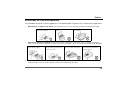
The notebook computer is quite rugged, but it can be damaged. To prevent this, follow these suggestions:
1.
Don’t drop it, or expose it to shock. If the computer falls, the case and the components could be damaged.
Do not expose the computer to
any shock or vibration.
2.
Do not place anything heavy on
the computer.
Keep it dry, and don’t overheat it. Keep the computer and power supply away from any kind of heating element. This is an electrical appliance. If water or any other liquid gets into it, the computer could be badly damaged.
Do not expose it to excessive
heat or direct sunlight.
3.
Do not place it on an unstable
surface.
Do not leave it in a place where
foreign matter or moisture may
affect the system.
Don’t use or store the computer in a humid environment.
Do not place the computer on
any surface that will block the
Vents/Fan Intakes.
Avoid interference. Keep the computer away from high capacity transformers, electric motors, and other strong
magnetic fields. These can hinder proper performance and damage your data.
III
Preface
4.
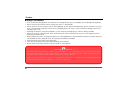
Follow the proper working procedures for the computer. Shut the computer down properly and don’t forget
to save your work. Remember to periodically save your data as data may be lost if the battery is depleted.
Do not turn off the power until
you properly shut down all programs.
5.
Do not turn off any peripheral
devices when the computer is
on.
Take care when using peripheral devices.
Use only approved brands of
peripherals.
IV
Do not disassemble the computer by yourself.
Unplug the power cord before
attaching peripheral devices.
Perform routine maintenance
on your computer.
Preface
Power Safety
The computer has specific power requirements:
• Only use a power adapter approved for use with this computer.
• Your AC/DC adapter may be designed for international travel but it still requires a
steady, uninterrupted power supply. If you are unsure of your local power specifications, consult your service representative or local power company.
• The power adapter may have either a 2-prong or a 3-prong grounded plug. The
third prong is an important safety feature; do not defeat its purpose. If you do not
have access to a compatible outlet, have a qualified electrician install one.
• When you want to unplug the power cord, be sure to disconnect it by the plug
head, not by its wire.
• Make sure the socket and any extension cord(s) you use can support the total current load of all the connected devices.
• Before cleaning the computer, make sure it is disconnected from any external
power supplies (i.e. AC/DC adapter or car adapter).
Do not plug in the power cord
if you are wet.
Do not use the power cord if it
is broken.
Do not place heavy objects on
the power cord.
Power Safety
Warning
Before you undertake
any upgrade procedures, make sure that
you have turned off the
power, and disconnected all peripherals and
cables (including telephone lines). It is advisable to also remove
your battery in order to
prevent
accidentally
turning the machine
on.
V
Preface
Battery Precautions
• Only use batteries designed for this computer. The wrong battery type may explode, leak or damage the computer.
• Do not remove any batteries from the computer while it is powered on.
• Do not continue to use a battery that has been dropped, or that appears damaged (e.g. bent or twisted) in any way.
Even if the computer continues to work with a damaged battery in place, it may cause circuit damage, which may
possibly result in fire.
• Recharge the batteries using the notebook’s system. Incorrect recharging may make the battery explode.
• Do not try to repair a battery pack. Refer any battery pack repair or replacement to your service representative or
qualified service personnel.
• Keep children away from, and promptly dispose of a damaged battery. Always dispose of batteries carefully. Batteries
may explode or leak if exposed to fire, or improperly handled or discarded.
• Keep the battery away from metal appliances.
• Affix tape to the battery contacts before disposing of the battery.
• Do not touch the battery contacts with your hands or metal objects.
Battery Disposal & Caution
The product that you have purchased contains a rechargeable battery. The battery is recyclable. At the end of its useful life, under
various state and local laws, it may be illegal to dispose of this battery into the municipal waste stream. Check with your local
solid waste officials for details in your area for recycling options or proper disposal.
Danger of explosion if battery is incorrectly replaced. Replace only with the same or equivalent type recommended by the manufacturer. Discard used battery according to the manufacturer’s instructions.
VI
Preface
Cleaning
Do not apply cleaner directly to the computer; use a soft clean cloth.
Do not use volatile (petroleum distillates) or abrasive cleaners on any part of the computer.
Servicing
Do not attempt to service the computer yourself. Doing so may violate your warranty and expose you and
the computer to electric shock. Refer all servicing to authorized service personnel. Unplug the computer
from the power supply. Then refer servicing to qualified service personnel under any of the following conditions:
•
•
•
•
•
When the power cord or AC/DC adapter is damaged or frayed.
If the computer has been exposed to rain or other liquids.
If the computer does not work normally when you follow the operating instructions.
If the computer has been dropped or damaged (do not touch the poisonous liquid if the LCD panel breaks).
If there is an unusual odor, heat or smoke coming from your computer.
Removal Warning
When removing any cover(s) and screw(s) for the purposes of device upgrade, remember to replace the cover(s) and screw(s)
before turning the computer on.
VII
Preface
Travel Considerations
Packing
As you get ready for your trip, run through this list to make sure the system is ready to go:
1.
2.
3.
4.
5.
Check that the battery pack and any spares are fully charged.
Power off the computer and peripherals.
Close the display panel and make sure it’s latched.
Disconnect the AC/DC adapter and cables. Stow them in the carrying bag.
The AC/DC adapter uses voltages from 100 to 240 volts so you won’t need a second voltage adapter. However,
check with your travel agent to see if you need any socket adapters.
Put the notebook in its carrying bag and secure it with the bag’s straps.
If you’re taking any peripherals (e.g. a printer, mouse or digital camera), pack them and those devices’ adapters and/
or cables.
Anticipate customs - Some jurisdictions may have import restrictions or require proof of ownership for both hardware and software. Make sure your documents are prepared.
6.
7.
8.
Power Off Before Traveling
Make sure that your notebook is completely powered off before putting it into a travel bag (or any such container). Putting a
notebook which is powered on in a travel bag may cause the vent(s)/fan intake(s)/outlet(s) to be blocked. To prevent your computer from overheating make sure nothing blocks the vent(s)/fan intake(s)/outlet(s) while the computer is in use.
VIII
Preface
On the Road
In addition to the general safety and maintenance suggestions in this preface, and Chapter 8: Troubleshooting, keep these points in mind:
Hand-carry the notebook - For security, don’t let it out of your sight. In some areas, computer theft is
very common. Don’t check it with normal luggage. Baggage handlers may not be sufficiently careful.
Avoid knocking the computer against hard objects.
Beware of Electromagnetic fields - Devices such as metal detectors & X-ray machines can damage the
computer, hard disk, floppy disks, and other media. They may also destroy any stored data - Pass your
computer and disks around the devices. Ask security officials to hand-inspect them (you may be asked to
turn it on). Note: Some airports also scan luggage with these devices.
Fly safely - Most airlines have regulations about the use of computers and other electronic devices in
flight. These restrictions are for your safety, follow them. If you stow the notebook in an overhead compartment, make sure it’s secure. Contents may shift and/or fall out when the compartment is opened.
Get power where you can - If an electrical outlet is available, use the AC/DC adapter and keep your
battery(ies) charged.
Keep it dry - If you move quickly from a cold to a warm location, water vapor can condense inside the
computer. Wait a few minutes before turning it on so that any moisture can evaporate.
IX
Preface
Developing Good Work Habits
Developing good work habits is important if you need to work in front of the computer for long periods
of time. Improper work habits can result in discomfort or serious injury from repetitive strain to your
hands, wrists or other joints. The following are some tips to reduce the strain:
•Adjust the height of the chair and/or desk so that the keyboard is at or slightly below
the level of your elbow. Keep your forearms, wrists, and hands in a relaxed position.
•Your knees should be slightly higher than your hips. Place your feet flat on the floor or
on a footrest if necessary.
•Use a chair with a back and adjust it to support your lower back comfortably.
•Sit straight so that your knees, hips and elbows form approximately 90-degree angles
when you are working.
• Take periodic breaks if you are using the computer for long periods of time.
X
Quick Start Guide
Chapter I: Quick Start Guide
About this Quick Guide
System Startup
This quick guide is a brief introduction to getting your system
1. Remove all packing materials.
2. Place the computer on a stable surface.
3. Securely attach any peripherals you want to use with the
notebook (e.g. keyboard and mouse) to their ports.
4. Attach the AC/DC adapter to the DC-In jack on the left of the
computer, then plug the AC power cord into an outlet, and
connect the AC power cord to the AC/DC adapter.
5. Use one hand to carefully raise the lid/LCD to a comfortable
viewing angle, while using the other hand o support the base of
the computer (Note: Never lift the computer by the lid/LCD).
6. Press the power button to turn the computer “on”.
started. The remainder of the present manual covers the more
advanced features and options, including troubleshooting, upgrade
and driver installation. The drivers necessary for the proper
operation of the computer are contained in the same Device Drivers
& User’s Manual disc supplied with your computer
(Note: The
company reserves the right to revise this publication or to change its
contents without notice). The computer’s features may already have
been setup . If you are planning to re-configure (or re-install) portions
of the system, refer to the present User’s Manual. The Device Drivers
& User’s Manual disc does not contain an operating system.
Regulatory and Safety Information
Please pay careful attention to the safety information contained in
the present User’s Manual .
© January 2010
Trademarks
Intel and Atom are trademarks/registered trademarks of Intel
Corporation.
Olivetti and Alice are trademarks/registered trademarks of Telecom
Italia S.p.A.
Figure 1
Computer with AC/DC
Adapter Plugged-In
System Software
Your computer come with system software pre-installed. You will
find this manual refers to the Microsoft Win 7 Starter Edition
operating system.
About this Quick Guide 1 - 1
I
I
Quick Start Guide
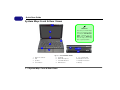
System Map: Front & Rear Views
1 Front Open
Shutdown
2
Note that you should always
shut your computer down by
choosing the Turn Off Computer command from the
Start menu in Windows.
This will help prevent hard
disk or system problems.
3
4
5
6
8
7
9 10 11
12
Front
Rear
Figure 2 - Front & Rear Views
1.
2.
3.
4.
Built-In PC Camera
LCD
Speakers
Power Button
5.
6.
7.
8.
1 - 2 System Map: Front & Rear Views
Keyboard
Built-In Microphone
TouchPad & Buttons
LED Indicators
9.
10.
11.
12.
7-in-1 Card Reader
Microphone-In Jack
Headphone-Out Jack
Battery
I
Quick Start Guide
System Map: Side & Bottom Views
Figure 3 - Side & Bottom
Views
External Optical Device
Drives
To install applications and drivers etc. you will need to attach
an external optical device ( CD
or DVD ROM ) to the USB ports.
If you are having problems detecting external ODDs, enable
the enhanced detection of
these devices as follows:
2
Left
Right
1. Press F2 at startup to enter
the Setup Utility and use
the arrow keys to navigate
to the Advanced menu.
2. Use the arrow keys to select
“Enhance USB ODD
detection” and set the item
to “Enabled” using the
spacebar.
3. Press F10 to save and exit (if
you want to start from the
external ODD you will need
to set it as first priority in the
Boot menu after it has been
detected).
5
4
4
3
Overheating
7
7
1 - 3 System Map: Side & Bottom Views
Bottom
Security Lock Slot
DC-In Jack
RJ-45 LAN Jack
2 * USB 2.0 Ports
External Monitor Port
Hard Disk Bay
Vent
Power Button
Battery
1
7
9
6
1.
2.
3.
4.
5.
6.
7.
8.
9.
To prevent your computer
from overheating make
sure nothing blocks any
vent while the computer is
in use.
I
Quick Start Guide
LED Indicators
The LED indicators on the computer display helpful information about the current status of the computer.
Icon
Color
Orange
Green
Blinking Green
Orange
Green
Blinking
Orange
Description
DC Power is Plugged In
The Computer is On
The Computer is in Sleep Mode
The Battery is Charging
The Battery is Fully Charged
The Battery Has Reached Critically
Low Power Status
Green
Hard Disk Activity
Green
The Wireless LAN Module is Powered On
Table 1 - - LED Indicators
1 - 4 LED Indicators
Quick Start Guide
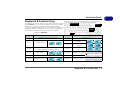
Keyboard & Function Keys
Keypad
The keyboard has a numeric keypad for easy numeric data input. Pressing
the Fn +NumLk keys turns on/off the numeric keypad. It also features
function keys to allow you to change operational features instantly.
The function keys (F1 - F12 etc.) will act as hot keys when pressed while
the Fn key is held down. In addition to the basic function key combinations,
visual indicators are available when the hot key driver is installed.
Function Keys
NumLk &
ScrLk
Numeric
Keypad
Figure 4 - Keyboard
Fn Key
Keys
Function/Visual Indicators
Keys
Function/Visual Indicators
Fn + ~
Play/Pause (in Audio/Video Programs)
Fn + F7
Display Toggle
Fn + F1
Turn LCD Backlight Off
(Press a key to or use TouchPad to turn on)
Fn + F3
Mute Toggle
Fn +F5/F6
Brightness Decrease/
Increase
Fn + F10
PC Camera Power
Toggle
Fn + F11
WLAN Module Power Toggle
Fn + NumLk
Number Lock Toggle
Fn + ScrLk
Scroll Lock Toggle
Caps Lock
Caps Lock Toggle
TouchPad Toggle
Fn + F2
Fn + F4
Fn + F8/F9
Sleep Toggle
Volume Decrease/Increase
Table 2 - Function Keys & Visual Indicators
Keyboard & Function Keys 1 - 5
I
I
Quick Start Guide
Driver Installation
The Device Drivers & User’s Manual disc contains the drivers necessary for the proper operation
of the computer. This setup has already been done for you. If for any reason you need to
reinstall the drivers , insert the disc and browse the Driver Folder to locate the driver you need.
Install it by starting the executable file ( “Setup.exe” ) present in each of the folders and follow
the guided procedure.If you need to intall more than one driver , take care to install them in
the order indicated in Figure 5.
If the Found New Hardware wizard appears during the installation procedure, click
Cancel to close the window, and follow the installation procedure as directed.
Driver - Win 7 Starter Edition
Chipset
General guidelines for
installation of drivers in
Win 7 Starter Edition
As a general guide follow the default on-screen instructions for
each driver (e.g. Next > Next >
Finish) unless you are an advanced user. In many cases a restart is required to install the
driver.
Make sure any modules (e.g. PC
Camera, WLAN ) are ON before
installing the appropriate driver.
Video
Audio
LAN
TouchPad
Card Reader
Hot Key
PC Camera Module
Wireless LAN Module
Table 3- Driver Installation
1 - 6 Driver Installation
Features & Components
Chapter 2: Features & Components
2
Overview
Read this chapter to learn more about the following main features and components of the computer:
•
•
•
•
•
Hard Disk Drive
7-in-1 Card Reader
TouchPad and Buttons/Mouse
Audio Features
Overview 2 - 1
Features & Components
2
Power Safety
Before attempting to access any of the internal
components of your
computer please ensure
that the machine is not
connected to the AC
power, and that the machine is turned off. Also
ensure that all peripheral
cables, including phone
lines, are disconnected
from the computer.
Figure 2 - 1
HDD Bay
2 - 2 Hard Disk Drive
Hard Disk Drive
The hard disk drive is used to store your data in the computer. The hard disk can be taken
out to accommodate other 2.5" serial (SATA) HDDs with a height of 9.5 mm.
The HDD is located in the bay on the right of your computer, and this can be opened after
elevating the keyboard and accessing the screw securing the hard disk assembly. For further
details see “Upgrading the HDD” on page 6 - 4.
Hard Disk Drive Bay
Hard Disk Drive Speeds
HDD Bay
If you are going to upgrade/replace the hard disk
drive, note that It is recommended that HDDs of a
maximum speed of 5400 RPM are used. DO NOT
use 7200rpm or higher HDDs.
Note that the HDD bay can be
accessed by elevating the keyboard (see “Upgrading the
HDD” on page 6 - 4).
Features & Components
7-in-1 Card Reader
The card reader allows you to use some of the latest digital storage cards. Push
the card into the slot and it will appear as a removable device, and can be accessed in the same way as your hard disk (s). Make sure you install the Card
Reader driver).
•
•
•
•
MMC (MultiMedia Card)
SD (Secure Digital)
MS (Memory Stick)
MS Pro (Memory Stick Pro)
• MS Duo (requires PC adapter*)
• Mini SD (requires PC adapter*)
• RS MMC (requires PC
adapter*)
Card Reader Cover
Make sure you keep the
rubber cover provided in
the card reader when not
in use. This will help prevent foreign objects and/
or dust getting in to the
card reader.
*Note: The PC adapters are usually supplied with these cards.
Figure 2 - 2
Right View
1.
Card Reader
1
7-in-1 Card Reader 2 - 3
2
Features & Components
2
Mouse Driver
If you are using an external mouse your operating system may be able
to auto-configure your
mouse during its installation or only enable its basic functions. Be sure to
check the device’s user
documentation for details.
TouchPad and Buttons/Mouse
The TouchPad is an alternative to the mouse; however, you can also add a
mouse to your computer through one of the USB ports. The TouchPad buttons
function in much the same way as a two-button mouse. Make sure you have
installed the TouchPad driver.
You can configure the mouse functions from the Mouse Properties control
panel. Click Start, point to Settings and click Control Panel (or just click Control Panel), and then double-click Mouse.
Click Hardware and double-click Proprieties to access Advanced settings.
Figure 2 - 3
Mouse Properties
2 - 4 TouchPad and Buttons/Mouse
Features & Components
Audio Features
The audio options of the computer can be configured from the control panel
of Windows Sounds and Audio Peripherals or using the icon of the Realtek
HD Audio Manager in the task bar/ control panel (this causes display of the
Audio Realtek Configuration menus). Volume can also be adjusted using the
key combination Fn + F5/F6.
Sound Volume
Adjustment
How high the sound
volume can be set depends on the setting of
the volume control
within Windows (and
the volume control
function keys on the
computer). Click the
Volume icon on the
taskbar to check the
setting.
Figure 2 - 4
Realtek HD Audio
Manager
Audio Features 2 - 5
2
Features & Components
Audio Recording from Microphone
2
To record using the built-in or external microphone, configure the audio options as follows:
1.
2.
3.
4.
Figure 2 - 5
Mixer - Mic Volume
2 - 6 Audio Features
Double-click the Realtek HD Audio Manager icon in the task bar/control panel.
Click Mixer (folder).
Click the button under Mic Volume to select this (the volume can be increased as
required).
Click OK to close the control panel.
Power Management
Chapter 3: Power Management
Overview
To conserve power, especially when using the battery, your computer power
management conserves power by controlling individual components of the
computer (the monitor and hard disk drive) or the whole system. This chapter
covers:
• The Power Sources
• Turning on the Computer
• Power Schemes
• Battery Information
• Configuring the Power Button
• Battery Information
OS Note
Power
management
functions will vary slightly
depending on your operating system. For more
information it is best to
refer to the user’s manual
of your operating system.
Advanced Configuration and Power Interface
The ACPI interface provides the computer with enhanced power saving techniques and gives the operating system (OS) direct control over the power and
thermal states of devices and processors. For example, it enables the OS to set
devices into low-power states based on user settings and information from applications. ACPI is fully supported in Win 7.
Overview 3 - 1
3
Power Management
The Power Sources
The computer can be powered by either an AC/DC adapter or a battery pack.
3
AC/DC Adapter
Use only the AC/DC adapter that comes with your computer. The wrong type
of AC/DC adapter will damage the computer and its components.
1.
2.
3.
4.
Attach the AC/DC adapter to the DC-in jack on the left of the computer.
Plug the AC power cord into an outlet, and then connect the AC power cord to the
AC/DC adapter.
Raise the lid/LCD to a comfortable viewing angle.
Press the power button to turn “On”.
Battery
The battery allows you to use your computer while you are on the road or when
an electrical outlet is unavailable. Battery life varies depending on the applications and the configuration you're using. To increase battery life, let the
battery discharge completely before recharging (see “How do I completely discharge the battery?” on page 3 - 9).
We recommend that you do not remove the battery. For more information on
the battery, please refer to “Battery Information” on page 3 - 6.
3 - 2 The Power Sources
Power Management
Turning on the Computer
Now you are ready to begin using your computer. To turn it on simply press the
power button on the front panel.
When the computer is on, you can use the power button as a Stand by/Hibernate/Shutdown hot-key button when it is pressed for less than 4 seconds
(pressing and holding the power button for longer than this will shut the computer down). Use Power Options in the Windows control panel to configure
this feature.
Shutdown
Note that you should always shut your computer
down by choosing the
Turn Off Computer
command from the Start
menu in Windows. This
will help prevent hard
disk or system problems.
Forced Off
If the system “hangs”, and the Ctrl + Alt + Del key combination doesn’t work, press the power button for 4 seconds, or longer, to force the system to turn itself off.
Power Button as Stand by or Hibernate Button
If you are using a fully ACPI-compliant OS, (such as Windows XP) you can use the OS’s “Power
Options” control panel to set the power button to send the system into Stand by or Hibernate
mode (see your OS’s documentation, or “Configuring the Power Button” on page 3 - 8 for
details).
Turning on the Computer 3 - 3
3
Power Management
3
Resuming Operation
Press a key on the keyboard, or move the
mouse/TouchPad to resume from Monitor or
Hard Disk Stand by.
Figure 3 - 1
Power Schemes
3 - 4 Power Schemes
Power Schemes
The computer can be set to power save mode using single components by means
of the Power Save combinations. Each combination can also be set so that the
monitor switches off after a preset period and the hard disk switches to sleep mode
if not accessed for a specific period of time (as soon as the system performs a read
or write access, the motor of the disk is restarted).
Power Management
Each Windows Power Save combination will also regulate the performance
level of the system processor in order to save energy. Remember this if you a
drop in performance (especially when the computer is powered by the battery).
Select the balanced setting for most uses of the portable.
3
Power Schemes 3 - 5
Power Management
3
Low Battery
Warning
When the battery is critically low, immediately
connect the AC/DC
adapter to the computer
or save your work, otherwise, the unsaved data
will be lost when the
power is depleted.
Battery Information
Please follow these simple guidelines to get the best use out of your battery.
New Battery
Always completely discharge, then fully charge, a new battery (see “Battery
FAQ” on page 3 - 9 for instructions on how to do this).
Battery Life
Battery life depends on many factors including the programs that are running
and peripherals connected. The Power save options (you can set Alarms and
actions to be activated when the batteries are running down, and check the
Battery meter from the control panel of the Power save options) or directly
from the task bar, clicking the power save/mains icon.
Figure 3 - 2
Power Options
(Alarm & Power
Meter)
3 - 6 Battery Information
Power Management
Battery life may be shortened through improper maintenance. To optimize
the life and improve its performance, fully discharge and recharge the
battery at least once every 30 days.
We recommend that you do not remove the battery yourself. If you need to remove the battery for any reason, see “Removing the Battery” on page 6 - 3.
Recharging the Battery with the AC/DC Adapter
The battery pack automatically recharges when the AC/DC adapter is attached
and plugged into an electrical outlet. If the computer is powered on, and in use,
it will take several hours to fully recharge the battery. When the computer is
turned off but plugged into an electrical outlet, battery charge time is less. (Refer to “Battery Information” on page 3 - 6 for more information on how to
maintain and properly recharge the battery pack.)
Conserving Battery
Power
To conserve battery power:
Lower the brightness level of
the LCD display. The system
will decrease LCD brightness
slightly to save power when
it is not powered by the AC/
DC adapter.
Close modem or communication applications when
they are not being used.
Remove any unused PC
Cards from the computer
(PC Cards quickly use up
battery power even if the
system enters sleep mode).
Disconnect any unnecessary
external devices.
Battery Information 3 - 7
3
Power Management
Proper handling of the Battery Pack
3
• DO NOT disassemble the battery pack under any circumstances
• DO NOT expose the battery to fire or high temperatures, it may explode
• DO NOT connect the metal terminals (+, -) to each other
Damaged Battery Warning
Should you notice any physical defects (e.g. the battery is bent out of shape after being
dropped), or any unusual smells emanating from the notebook battery, shut your computer
down immediately and contact your service center. If the battery has been dropped we do not
recommend using it any further, as even if the computer continues to work with a damaged
battery in place, it may cause circuit damage, which may possibly result in fire. It is recommended that you replace your computer battery every two years.
3 - 8 Battery Information
Power Management
Battery FAQ
How do I completely discharge the battery?
Use the computer with battery power until it shuts down due to a low battery.
Don’t turn off the computer by yourself even when you see a message that indicates the battery is critically low, just let the computer use up all of the battery
power and shut down on its own. Disable the Power Options functions in the
Control Panel, especially any Alarms (unclick the tickboxes - see page 3 - 6)
and Schemes (change all the settings to Never - see page 3 - 4). As the battery
nears the end of its life save and close any critical files.
How do I fully charge the battery?
When charging the battery, don’t stop until the LED charging indicator light
changes from orange to green.
Caution
Danger of explosion if
battery is incorrectly replaced.
Replace only with the
same or equivalent type
recommended by the
manufacturer.
Discard
used battery according to
the manufacturer’s instructions.
How do I maintain the battery?
Completely discharge and charge the battery at least once every 30 days or after about 20 partial discharges.
Battery Information 3 - 9
3
Power Management
3
3 - 10 Battery Information
Drivers
Chapter 4: Drivers
This chapter deals with installing the drivers a essential to the operation or improvement of some of the
computer’s subsystems. The system takes advantage
of some newer hardware components for which the
latest versions of most available operating systems haven’t built in drivers . Thus, some of the system components won’t be auto-configured with an
appropriate driver or utility during operating system
installation. Instead, you need to manually install
some system-required drivers .
What to Install
The Device Drivers & User’s Manual disc contains
the drivers necessary for the proper operation of the
computer.
Table 4 - 1, on page 4 - 2 lists what you need to install and it is very important that the drivers are
installed in the order indicated.
Module Driver Installation
The procedures for installing drivers for the Wireless
LAN,and PC Camera modules are provided in “Additional Modules” on page 7 - 1.
Make sure any modules (e.g. PC Camera or WLAN)
are ON before installing the appropriate driver.
What to Install 4 - 1
4
Drivers
Driver Installation
I
Driver - Win 7
4
Chipset
Video
Audio
LAN
TouchPad
Card Reader
Hot Key
PC Camera Module
Wireless LAN Module
Table 4 - 1 - Driver Installation
4 - 2 Driver Installation
From “my Computer” select the CD/DVD unit containning the Device Drivers & User’s Manual disc.
RightClick and select Browse .
Open the Drivers folder and and browse to the executable file ( “Setup.exe” ) in the appropriate driver
folder.
If you are installing more than a single driver , make
sure to install them in the order indicated in the Table
4-1.
Drivers
Windows Update
After installing all the drivers make sure you enable
Windows Update in order to get all the latest security updates etc. (all updates will include the latest hotfixes from Microsoft).
External optical drives (CD/DVD)
To install applications, drivers and similar components,
an external optical drive must be connected to the USB
ports.
Driver Installation General Guidelines
As a general guide follow the default on screen instructions for each driver (e.g. Next > Next > Finish) unless
you are an advanced user. In many cases a restart is required to install the driver.
Driver Installation 4 - 3
4
Drivers
Authorized Driver Message
4
If you receive a message telling you that the driver you
are installing is not authorized (Digital Signature
Not Found), just click Yes or Continue Anyway to
ignore the message and continue the installation procedure.
You will receive this message in cases where the driver has been released after the version of Windows
you are currently using. All the drivers provided will
have already received certification for Windows.
New Hardware Found
If you see the message “New Hardware Found”
(Found New Hardware Wizard) during the installation procedure (other than when outlined in the driver install procedure), click Cancel to close the
window, and follow the installation procedure as directed.
Version Conflict Message
During driver installation if you encounter any “file
version conflict” message, please click Yes to choose
to keep the existing (newer) version.
4 - 4 Driver Installation
Updating/Reinstalling Individual Drivers
If you wish to update/reinstall individual drivers it may
be necessary to uninstall the original driver.To do this
go to the Control Panel in the Windows OS and
double-click the Add/Remove Programs item. If
you see the individual driver listed (if not see below), uninstall it, following the on screen prompts (it
may be necessary to restart the computer). Go to the
appropriate section of the manual to complete the
update/reinstall procedure for the driver in question.
If the driver is not listed in the Add/Remove Programs item:
1.
2.
3.
4.
5.
Click Start (menu), point to Settings and click Control Panel (or click Start > Control Panel).
Double-click System (icon); System (icon) is in
Performance and Maintenance (category).
Click Hardware (tab) > Device Manager (button).
Double-click the device you wish to update/reinstall
the driver for (you may need to click “+”).
Look for the Update Driver button (check the
Driver tab) and follow the on screen prompts.
BIOS Utilities
Chapter 5: BIOS Utilities
Overview
This chapter gives a brief introduction to the computer’s built-in software:
Diagnostics: The POST (Power-On Self Test)
Configuration: The Phoenix TrustedCore Setup Utility
If your computer has never been set up, or you are making important changes
to the system (e.g. hard disk setup), then you should review this chapter first
and note the original settings found in Setup. Even if you are a beginner, keep
a record of the settings you find and any changes you make. This information
could be useful if your system ever needs servicing.
BIOS Settings
Warning
Incorrect settings can
cause your system to
malfunction. To correct
mistakes, return to Setup
and restore the Setup
Defaults with <F9>.
There is one general rule: Don’t make any changes unless you are sure of what
you are doing. Many of the settings are required by the system, and changing
them could cause it to become unstable or worse. If you have any doubts, consult your service representative.
Overview 5 - 1
5
BIOS Utilities
POST Screen
5
1.BIOS information
2.CPU type
3.Memory status
4.Enter Setup prompt
appears only during
POST
If you disable the Boottime Diagnostic Screen,
the POST screen will not
appear.
The Power-On Self Test (POST)
Each time you turn on the computer, the system takes a few seconds to conduct a POST, including a quick test of the on-board RAM (memory).
As the POST proceeds, the computer will tell you if there is anything wrong. If
there is a problem that prevents the system from booting, it will display a system summary and prompt you to run Setup.
If there are no problems, the Setup prompt will disappear and the system will
load the operating system. Once that starts, you can’t get into Setup without
rebooting.
Failing the POST
Errors can be detected during the POST. There are two categories, “fatal” and
“non-fatal”.
Fatal Errors
These stop the boot process and usually indicate there is something seriously
wrong with your system. Take the computer to your service representative or authorized service center as soon as possible.
5 - 2 The Power-On Self Test (POST)
BIOS Utilities
Non-Fatal Errors
This kind of error still allows you to boot. You will get a message identifying the
problem (make a note of this message!) followed by the prompt:
• Press <F1> to resume
• <F2> to enter Setup
Press F1 to see if the boot process can continue. It may work, without the correct
configuration.
Press F2 to run the Setup program and try to correct the problem. If you still get
an error message after you change the setting, or if the “cure” seems even worse,
call for help.
The Setup Utility
The Phoenix TrustedCore Setup Utility tells the system how to configure itself
and manage basic features and subsystems (e.g. port configuration).
Setup Menus
The Setup menus shown
in this section are for reference only. Your computer’s
menus
will
indicate the configuration appropriate for your
model and options.
Entering Setup
To enter Setup, turn on the computer and press F2 during the POST. The prompt
(Press F2 to Enter Setup) seen on page 5 - 2 is usually present for a few seconds
after you turn on the system. If you get a “Keyboard Error”, (usually because you
pressed F2 too quickly) just press F2 again.
If the computer is already on, reboot using the Ctrl + Alt + Delete combination
and then hold down F2 when prompted. The Setup main menu will appear.
The Setup Utility 5 - 3
5
BIOS Utilities
Setup Screens
The following pages contain additional advice on portions of the Phoenix
TrustedCore Setup Utility.
5
Along the top of the screen is a menu bar with menu headings. When you select a heading, a new screen appears. Scroll through the features listed on each
screen to make changes to Phoenix TrustedCore Setup Utility.
Instructions on how to navigate each screen are in the box along the bottom
of the screen. If these tools are confusing, press F1 to call up a General Help
screen, and then use the arrow keys to scroll up or down the page.
The Item Specific Help on the right side of each screen explains the highlighted item and has useful messages about its options.
If you see an arrow next to an item, press Enter to go to a sub-menu on that
subject. The sub-menu screen that appears has a similar layout, but the Enter
key may execute a command.
5 - 4 The Setup Utility
BIOS Utilities
Main Menu
Phoenix TrustedCore(tm) Setup Utility
Main
Main
Advanced
Security
Boot
Exit
Item Specific Help
System Time:
[22:12:05]
[12/12/2009]
System Date:
SATA Port 1
[SAMSUNG HM160HI-(S1)]
System Memory
Extended Memory
640 KB
1014 MB
BIOS Revision
KBC/EC Firmware Revision
********
********
F1
Esc
Help
Exit
Figure 5 - 1
Main Menu
Select Item
Select Menu
-/+
Enter
<Tab>, <Shift Tab>, or
<Enter> selects field.
Change Values
Select Sub-Menu
5
F9 Setup Defaults
F10 Save and Exit
System Time & Date (Main Menu)
The hour setting uses the 24-hour system (i.e., ØØ = midnight; 13 = 1 pm). If
you can change the date and time settings in your operating system, you will
also change these settings. Some applications may also alter data files to reflect
these changes.
Main Menu 5 - 5
BIOS Utilities
SATA Port 1 (Main Menu)
Pressing Enter opens the sub-menu to show the configuration of a HDD on the
computer’s Serial ATA Port 1. Use the Auto (Type:) setting to have the items
configured automatically for you.
System/Extended Memory (Main Menu)
This item contains information on the system memory, and is not user configurable. The system will auto detect the amount of memory installed.
5
5 - 6 Main Menu
BIOS Utilities
Advanced Menu
Phoenix TrustedCore(tm) Setup Utility
Main
A
dvanced
Advanced
Security
Boot
Exit
Item Specific Help
SATA mode selection
Legacy USB Support:
Boot-time Diagnostic Screen:
Reset Configuration Data:
Power On Boot Beep
Battery Low Alarm Beep
[AHCI]
[Enabled]
[Disabled]
[No]
[Disabled]
[Enabled]
Detect External CRT
[Enabled]
F1
Esc
Help
Exit
Select Item
Select Menu
-/+
Enter
Enable support for
Legacy Universal Serial
Bus.
Change Values
Select Sub-Menu
Figure 5 - 2
Advanced Menu
F9 Setup Defaults
F10 Save and Exit
SATA Mode Selection
Choose the data transfer mode for the SATA controller (the default setting is
AHCI).
Advanced Menu 5 - 7
5
BIOS Utilities
Legacy USB Support (Advanced Menu)
Use this menu item to enable/disable the support for Legacy Universal Serial Bus
in non-USB aware operating systems.
Boot-time Diagnostic Screen (Advanced Menu)
Use this menu item to enable/disable the Boot-time Diagnostic Screen or POST
screen (see “The Power-On Self Test (POST)” on page 5 - 2).
Reset Configuration Data (Advanced Menu)
This item is set to No as default. You can change the setting to Yes if you have
installed a new add-on which has reconfigured the system, resulting in such a
serious system conflict that the operating system is unable to boot.
5
Power On Boot Beep (Advanced Menu)
Use this menu item to enable/disable the beep as the computer starts up.
Battery Low Alarm Beep (Advanced Menu)
Use this menu item to enable/disable the audible warning when the battery has
reached low power status.
5 - 8 Advanced Menu
BIOS Utilities
Detect External CRT (Advanced Menu)
This menu allows you to Enable/Disable detection for External CRT’s (external
displays). You can disable detection to save system power.
Enhance USB ODD detection (Advanced Menu)
This menu allows you to Enable/Disable enhanced detection for External USB
ODD (optical device drives e.g. DVD drives). You can disable detection to speed
up boot time, or enable it if you are having problems with detecting any attached USB ODDs.
5
Advanced Menu 5 - 9
BIOS Utilities
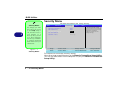
Security Menu
Security Menu
Phoenix TrustedCore(tm) Setup Utility
Main
Advanced
Security
Security
Boot
Exit
=
5
Item Specific Help
The changes you make
here affect the access
to the Setup utility itself, and also access to
your machine as it
boots up after you turn
it on. These settings do
not affect your machine
or network passwords
which will be set in your
software OS.
Figure 5 - 3
Security Menu
5 - 10 Security Menu
F1
Esc
Supervisor Password Is:
User Password Is:
Clear
Clear
Set Supervisor Password
Set User Password
[Enter]
[Enter]
Password on boot:
[Disabled]
Help
Exit
Select Item
Select Menu
-/+
Enter
Supervisor Password
controls access to the
setup utility.
Change Values
Select Sub-Menu
F9 Setup Defaults
F10 Save and Exit
Set Supervisor Password (Security Menu)
You can set a password for access to the Phoenix TrustedCore Setup Utility.
This will not affect access to the computer OS (only the Phoenix TrustedCore
Setup Utility).
BIOS Utilities
Set User Password (Security Menu)
You can set a password for user mode access to the Phoenix SecureCore Setup Utility. This will not affect access to the computer OS, (only the Setup utility) unless you choose to set a Password on Boot (see below). Many menu
items in the Phoenix SecureCore Setup Utility cannot be modified in user
mode. You can only set the user password after you have set the supervisor
password.
If you set a boot password (Password on boot
is “Enabled“), NEVER
forget your password.
Password on boot (Security Menu)
Specify whether or not a password should be entered to boot the computer
(you may only set a password on boot if a supervisor password is enabled). If “Enabled” is selected, only users who enter a correct password can
boot the system (see the warning in the sidebar). The default setting is “Disabled”.
The consequences of this
could be serious. If you
cannot remember your
boot password you must
contact your vendor and
you may lose all of the information on your hard
disk.
Password Warning
Fixed disk boot sector (Security Menu)
If you choose “Write-Protect” this will protect against viruses being written to
the hard disk boot sector (this is not a substitute for installing an anti-virus program - see “Viruses” on page 8 - 4).
Note: To clear existing passwords press Enter and type the existing password,
then press Enter for the new password (without typing any password entry)
and Enter again to confirm the password clearance.
Security Menu 5 - 11
5
BIOS Utilities
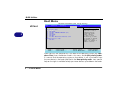
Boot Menu
Phoenix TrustedCore(tm) Setup Utility
Figure 5 - 4
Boot Menu
Main
Advanced
Security
Boot
Item Specific Help
Boot priority order:
1: USB KEY:
2: USB CDROM:
3: IDE HDD: SAMSUNG HM160HI-(S1)
4: IDE FDC:
5: USB CDROM:
6: USB HDD:
7: PCI BEV: KMC26X Fast Ethernet Contr
8:
Excluded from boot order:
: USB ZIP:
5
Exit
F1
Esc
Help
Exit
Select Item
Select Menu
-/+
Enter
Keys used to view or
configure devices:
Up and Down arrows
select a device.
<+> and <-> moves
the device up or down.
<x> exclude or include
the device to boot.
<Shift + 1> enables or
disables a device.
Change Values
Select Sub-Menu
F9 Setup Defaults
F10 Save and Exit
When you turn the computer on it will look for an operating system (e.g. Windows Vista) from the devices listed in this menu, and in this priority order.
If it cannot find the operating system on that device, it will try to load it from
the next device in the order specified in the Boot priority order. Item specific
help on the right is available to help you move devices up and down the order.
5 - 12 Boot Menu
BIOS Utilities
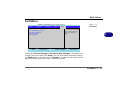
Exit Menu
Figure 5 - 5
Exit Menu
Phoenix TrustedCore(tm) Setup Utility
Main
Advanced
Security
Boot
Exit
Item Specific Help
Exit Saving Changes
Exit Discarding Changes
Load Setup Defaults
Discard Changes
Save Changes
F1
Esc
Help
Exit
Select Item
Select Menu
Exit System Setup and
save your changes to
CMOS.
-/+
Enter
Change Values
Select Sub-Menu
5
F9 Setup Defaults
F10 Save and Exit
Choosing to Discard Changes, or Exit Discarding Changes, will wipe out any
changes you have made to the Setup. You can also choose to restore the original Setup defaults that will return the Setup to its original state, and erase any
previous changes you have made in a previous session.
Exit Menu 5 - 13
BIOS Utilities
5
5 - 14
Upgrading The Computer
Chapter 6: Upgrading The Computer
Overview
This chapter contains information on upgrading the computer. Follow the steps
outlined to make the desired upgrades. If you have any trouble or problems you
can contact your service representative for further help. Before you begin you
will need:
• A small crosshead or Phillips screwdriver
• A small regular slotted (flathead) screwdriver
• An antistatic wrist strap
Warranty Warning
Please check with your
service representative before undertaking any upgrade procedures to find
out if this will VOID your
warranty.
Before working with the internal components you will need to wear an antistatic wrist strap to ground yourself because static electricity may damage the components.
The chapter includes:
• Removing the Battery
• Upgrading the HDD
• Upgrading the System Memory (RAM)
Please make sure that you review each procedure before you perform
it.
Overview 6 - 1
6
Upgrading The Computer
When Not to Upgrade
Power Safety
Warning
6
Before you undertake
any upgrade procedures,
make sure that you have
turned off the power,
and disconnected all peripherals and cables (including telephone lines).
It is advisable to also remove your battery in order
to
prevent
accidentally turning the
machine on.
These procedures involve opening the system’s case, adding and sometimes replacing parts.
You should not perform any of these upgrades if:
•
•
•
•
Your system is still under warranty or a service contract
You don’t have all the necessary equipment
You’re not in the correct environment
You doubt your abilities
Under any of these conditions, contact your service representative to purchase
or replace the component(s).
Removal Warning
When removing any cover(s) and screw(s) for the purposes of device upgrade, remember to
replace the cover(s) and screw(s) before turning the computer on.
6 - 2 Overview
Upgrading The Computer
Removing the Battery
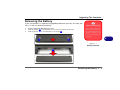
If you are confident in undertaking upgrade procedures yourself, for safety reasons it is best to remove the battery.
1.
2.
3.
Turn the computer off, and turn it over.
Slide the latches 1 in the direction of the arrows to unlock the battery.
Slide the battery out in the direction of the arrow 2 .
1
Warranty Warning
Please check with your
service representative before undertaking any upgrade procedures to find
out if this will VOID your
warranty.
6
1
Figure 6 - 1
Battery Removal
2
Removing the Battery 6 - 3
Upgrading The Computer
HDD System
Warning
6
New HDDs are blank. Before you begin make sure:
You have backed up any
data you want to keep from
your old drive.
You have all the CDs/DVDs
required to install your operating system and programs.
If you have access to the internet, download the latest
application and hardware
driver updates for the operating system you plan to install. Copy these to a
removable medium.
Upgrading the HDD
The hard disk drive can be taken out to accommodate other 2.5" serial (SATA)
HDDs with a height of 9.5mm (h) and a speed of 5400 RPM or lower. Follow
your operating system’s installation instructions, and install all necessary drivers
and utilities (see “Driver Installation” on page 4 - 2), when setting up a new
hard disk.
6 - 4 Upgrading the HDD
Upgrading The Computer
Hard Disk Removals
1.
2.
3.
4.
Turn off the computer, and remove the battery.
Locate the hard disk bay cover and remove screw 1 .
Slide the hard disk assembly in the direction of the arrow 2 .
5 up out of the bay.
Carefully lift the hard disk assembly 3
Hard Disk Drive
Speeds
2
1
If you are going to upgrade/replace the hard
disk drive, note that It is
recommended
that
HDDs of a maximum
speed of 5400 RPM are
used. DO NOT use
7200rpm or higher
HDDs.
Figure 6 - 2
Keyboard Release
3
Upgrading the HDD 6 - 5
6
Upgrading The Computer
5.
6.
7.
8.
9.
5 - 7
5 from the hard disk assembly.
Remove screws 4
Separate the hard disk from the case.
Insert the new hard disk into the case and pay careful attention to the disk’s
orientation in the case.
Secure the disk with the four screws and then reinsert the hard disk assembly into the
computer’s hard disk bay.
Replace the hard disk bay screw (see Figure on page 6 - 5).
4
6
5
Figure 6 - 3
HDD Removal
7
6
6 - 6 Upgrading the HDD
Upgrading The Computer
Upgrading the System Memory (RAM)
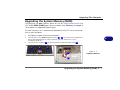
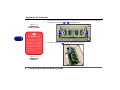
The computer has one memory socket for 200 pin Small Outline Dual In-line
(SO-DIMM) DDRII (DDR2) type memory modules (see “Memory” on page C
- 2 for details of supported module types).
The total memory size is automatically detected by the POST routine once you
turn on your computer.
1.
2.
3.
Turn off the computer, and remove the battery.
Carefully press in the three keyboard latches ( 1 - 3 ) at the top of the keyboard to
elevate the keyboard from its normal position (you will need to use a small
screwdriver to do this).
5 up (do not bend the keyboard ribbon cable 5 ).
Carefully lift the keyboard 4
1
2
6
3
5
Figure 6 - 4
Keyboard Release
4
Upgrading the System Memory (RAM) 6 - 7
Upgrading The Computer
4.
Gently pull the two release latches on the sides of the memory socket in the direction
indicated by the arrows ( 6 & 7 ) in Figure 6 - 5.
Figure 6 - 5
RAM Module
Release Latches
6
6
7
Contact Warning
Be careful not to touch
the metal pins on the
module’s
connecting
edge. Even the cleanest
hands have oils which
can attract particles, and
degrade the module’s
performance.
5.
The RAM module will 8 pop-up, and you can remove it.
8
Figure 6 - 6
RAM Module
Removal
6 - 8 Upgrading the System Memory (RAM)
Upgrading The Computer
6.
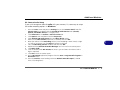
Insert a new module holding it at about a 30° angle and fit the connectors firmly into
the memory slot.
7. The module’s pin alignment will allow it to only fit one way. Make sure the module is
seated as far into the slot as it will go. DO NOT FORCE the module; it should fit
without much pressure.
8. Press the module in and down towards the mainboard until the slot levers click into
place to secure the module.
9. Secure the keyboard, replace the battery and restart the computer to allow the
system to detect the hard disk drive.
10. Restart the computer to allow the BIOS to register the new memory configuration as
it starts up.
Re-Inserting the
Keyboard
When re-inserting the
keyboard firstly align the
three keyboard tabs at
the bottom of the keyboard with the slots in
the case.
Upgrading the System Memory (RAM) 6 - 9
6
Upgrading The Computer
A
Warranty
The CPU is not a user serviceable part. Accessing
the CPU in any way, may
violate your warranty.
6
Upgrading the Processor
If you want to upgrade your computer by replacing the existing processor with
a faster/new one you will need to contact your customer service representative.
We recommend that you do not do this yourself, since if it is done incorrectly
you may damage the processor or mainboard.
Unauthorized tampering
with the HDD may also
violate your warranty.
6 - 10 Upgrading the Processor
Additional Modules
Chapter 7: Additional Modules
Overview
This chapter contains information on the following modules, which come with
your computer.
• PC Camera Module
• Wireless LAN Module
Driver Installation & Module Power
A
Wireless Device
Operation Aboard
Aircraft
The use of any portable
electronic transmission
devices aboard aircraft is
usually prohibited. Make
sure the module(s) are
OFF if you are using the
computer aboard aircraft.
Make sure any modules (e.g. PC Camera or WLAN are ON before installing the appropriate
driver).
Overview 7 - 1
7
Additional Modules
PC Camera Module
Taking Still Pictures
Double-click the
computer icon of
desktop or, from
Start menu, point to
computer and click.
Double-click the camera
icon. Click Take new
photo in the Camera
Tasks folder.
.
7
My
the
the
My
Use the Fn + F10 key combination (see “Function/Hot Key Indicators” on
Chapter 1) to toggle power to the PC Camera module.
The PC camera is supported by the embedded Windows drivers .
The Device Drivers & User’s Manual CD also includes the BisonCam application , you may want to install to capture video files and to take pictures.
Before installing the driver, make surh that the optional PC Camera is on (the
PC Camera’s default power state is off)
PC Camera Driver & Bison Cam application Installation
1. Make sure the module is powered on, and then insert the Device
Drivers & User’s Manual disc into the CD/DVD drive.
2. Browse the CD and go to the Drivers / Camera folder .
3. Start the executable file ( “Setup.exe” ) .
4. Choose the language you prefer and click Next.
5. Click Next > Finish to restart the computer.
6. Run the BisonCap application program from the BisonCam shortcut
on the desktop, or from the BisonCam item in the Start > Programs/
All Programs menu (if the hardware is turned off use the Fn + F10 key
combination to turn it on again).
7 - 2 PC Camera Module
Additional Modules
PC Camera Audio Setup
If you wish to capture video & audio with your camera, it is necessary to setup
the audio recording options in Windows.
1.
2.
3.
4.
5.
6.
7.
8.
9.
10.
11.
12.
13.
Go to the Start menu and point to Settings (or just click Control Panel) and click
Control Panel, then double-click the Sounds & Audio Devices icon (Sounds,
Speech, and Audio Devices in Category View).
Click Advanced in the Volume > Device volume tab.
Click Options and scroll down and click Properties.
Select Realtek HD Audio Input from the Mixer device menu.
Make sure the Mic Volume (check box) is checked, then click OK.
Boost the volume in the Recording section (in the Recording Control menu) as high
as it will go, and make sure the Select check box is checked.
Close the Recording Control window, and then click OK.
Double-click the Realtek HD Audio Manager icon in the task bar /control panel.
Click Mixer (tab).
Click the button under Mic Volume to select it (you can boost the volume level as
high as required).
Click OK to close the control panel.
Run the BisonCap application program from the Start > Programs/All Programs >
BisonCam menu.
Go to the Devices menu heading and select Realtek HD Audio Input (it should
have a tick alongside it).
PC Camera Module 7 - 3
7
Additional Modules
A
Wireless Device
Operation Aboard
Aircraft
7
The use of any portable
electronic transmission
devices aboard aircraft is
usually prohibited. Make
sure the module(s) are
OFF if you are using the
computer aboard aircraft.
Wireless LAN Module
Make sure that the Wireless LAN module is on before installing the driver (the
WLAN module’s default power state is off).
Use the Fn + F11 key combination (see “Function/Hot Key Indicators” on
Chapter 1) to toggle power to the Wireless LAN module. Make sure you
install the drivers in the order indicated in Table 4 - 1, on page 4 - 2.
Use the Fn + F11 key
combination to toggle
power to the WLAN
module, and check the
indicator to see if the
module is powered on or
not (see Table 1 - 2, on
page 1 - 9/ Table 1 - 3,
on page 1 - 11).
7 - 4 Wireless LAN Module
Additional Modules
802.11b/g or 802.11n WLAN Driver Installation
1. Make sure the module is powered on, and then insert the Device
Drivers & User’s Manual disc into the CD/DVD drive.
2. Browse the CD and go to the Drivers / WLAN folder .
3. Start the executable file ( “Setup.exe” ) .
4. Choose the language you prefer and click Next.
5. Click Next > Install.
6. Click Finish.
7. In Win 7, the default setting for control of the Wireless LAN is the
operating system.
Network
Connection
Use the Windows Network Connections control panel to access
available wireless networks (Start > Settings >
Network Connections or
Start > Connect To >
Show all Connections).
Figure 7 - 1
Wireless Network
Control Panels
Wireless LAN Module 7 - 5
7
Additional Modules
8. Access any available wireless network from Windows Network connections > Wireless network connection in Windows (or click the
wireless network icon in the task bar), then click Display wireless network.
7
7 - 6 Wireless LAN Module
Troubleshooting
Chapter 8: Troubleshooting
Overview
Should you have any problems with your computer, before consulting your service representative, you
may want to try to solve the problem yourself. This chapter lists some common problems and their possible solutions. This can’t anticipate every problem, but you should check here before you panic. If you don’t
find the answer in these pages, make sure you have followed the instructions carefully and observed the
safety precautions in the preface. If all else fails, talk to your service representative. You should also make
a record of what happened and what remedies you tried.
Of course, if something goes wrong, it will happen at the most inconvenient time possible, so you should
preview this section just in case. If, after you’ve tried everything, and the system still won’t cooperate, try
turning it off for a few minutes and then rebooting. You will lose any unsaved data, but it may start working again. Then call your service representative.
Overview 8 - 1
8
Troubleshooting
Basic Hints and Tips
Many of the following may seem obvious but they are often the solution to a problem when your computer appears not to be working.
• Power - Is the computer actually plugged into a working electrical outlet? If plugged into a power
strip, make sure it is actually working. Check the LED Power & Communication Indicators to see
the computer’s power status.
• Connections - Check all the cables to make sure that there are no loose connections anywhere.
• Power save options - Check that in Power Management/Power Options (see “Configuring the
Power Button” on page 3 - 8), the key combination Fn + F4 or the power button are set to wake
up the system.
8
• Brightness - Check the brightness of the screen by pressing the Fn + F8 and F9 keys to adjust the
brightness.
• Display Choice - Press Fn + F7 to make sure the system is not set to “external only” display.
• Boot Drive - Make sure there are no optical media and/or USB storage devices in any connected
drive when you start up your machine (this is a common cause of the message “Invalid system disk
- Replace the disk, and then press any key” / “Remove disks or other media. Press any key to
restart”).
8 - 2 Basic Hints and Tips
Troubleshooting
Backup and General Maintenance
• Always backup your important data, and keep copies of your OS and programs safe, but close to
hand. Don’t forget to note the serial numbers if you are storing them out of their original cases, e.g.
in a CD wallet.
• Run maintenance programs on your hard disk and OS as often as you can. You may schedule these
programs to run at times when you are not using your computer. You can use those that are provided
free with your OS, or buy the more powerful dedicated programs to do so.
• Write down your passwords and keep them safe (away from your computer). This is especially important if you choose to use a Supervisor password for the BIOS (see “The Power-On Self Test
(POST)” on page 5 - 2).
• Keep copies of vital settings files such as network, dialup settings, mail settings etc.(even if just brief
notes).
Warranty
The CPU is not a user serviceable part. Opening this compartment, or accessing the CPU in any way, may violate your warranty.
Backup and General Maintenance 8 - 3
8
Troubleshooting
Viruses
• Install an Anti-Virus program and keep the definitions file (the file which tells your program which
viruses to look for) up to date. New computer viruses are discovered daily, and some of them may seriously harm your computer and cause you to lose data. Anti-Virus programs are commercially available and the definitions file updates are usually downloadable directly from the internet.
• Be careful when opening e-mail from sources you don’t know. Viruses are often triggered from
within e-mail attachments so take care when opening any attached file. You can configure most
Anti-Virus programs to check all e-mail attachments. Note: You should also beware of files from
people you know as the virus may have infected an address book and been automatically forwarded
without the person’s knowledge.
8
• Keep a “Bootable CD-ROM/DVD-ROM/USB storage device” (this CD/DVD/USB device provides
basic information which allows you to startup your computer) handy. You may refer to your OS’s documentation for instructions on how to make one, and many Anti-Virus programs will also provide
such a disk (or at least instructions on how to make one).
8 - 4 Viruses
Troubleshooting
Upgrading and Adding New Hardware/Software
• Do not be tempted to make changes to your Windows Registry unless you are very sure of what you are
doing, otherwise you will risk severely damaging your system.
• Don’t open your computer or undertake any repair or upgrade work if you are not comfortable with what
you are doing.
• Read the documentation. We can assume, since you are reading this that you are looking at the computer’s manual, but what about any new peripheral devices you have just purchased? Many problems are
caused by the installation of new hardware and/or software. Always refer to the documentation of any
new hardware and/or software, and pay particular attention to files entitled “READ ME” or “READ ME
FIRST”.
• When installing a new device always make sure the device is powered on, and in many cases you will need
to restart the computer. Always check that all the cables are correctly connected.
• Make sure you have installed the drivers for any new hardware you have installed (latest driver files are
usually available to download from vendor’s websites).
• Thoroughly check any recent changes you made to your system as these changes may affect one or more
system components, or software programs. If possible, go back and undo the change you just made and
see if the problem still occurs.
• Don’t over complicate things. The less you have to deal with then the easier the source of the problem may
be found; Example - if your computer has many devices plugged into its ports, and a number of programs
running, then it will be difficult to determine the cause of a problem. Try disconnecting all of the devices
and restarting the computer with all the peripheral devices unplugged. A process of elimination (adding
and removing devices and restarting where necessary) will often find the source of a problem, although
this may be time consuming.
Upgrading and Adding New Hardware/Software 8 - 5
8
Troubleshooting
Problems and Possible Solutions
8
Problem
Possible Cause - Solution
You turned on the power but it doesn’t
work.
Battery missing / incorrectly installed. Check the battery bay, make sure the battery
is present and seated properly (the design of the battery only allows it to go in one
way). Make sure there’s nothing interfering with the battery contacts.
The battery LED power indicator
blinking orange.
, is
Low Battery. Plug in the DC power source. If the computer doesn’t start up
immediately, turn it off then on again.
You are losing battery power too quickly.
The system is using too much power. If your OS has a Power Options Scheme (see
“Power Schemes” on page 3 - 4) check its settings. You may also be using a USB
device/external device that is drawing a lot of power.
Actual battery operating time is shorter
than expected.
The battery has not been fully discharged before being recharged. Make sure the
battery is fully discharged and recharge it completely before reusing (see “Battery
Information” on page 3 - 6).
Power Options have been disabled. Go to the Control Panel in Windows and reenable the options.
A peripheral device is consuming a lot of power. Turn off the unused device to save
power.
8 - 6 Problems and Possible Solutions
Troubleshooting
Problem
The computer feels too hot.
Possible Cause - Solution
Make sure the computer is properly ventilated and the Vent/Fan intakes are not
blocked. If this doesn’t cool it down, put the system into Hibernate mode or turn
it off for an hour. Make sure the computer isn’t sitting on a thermal surface.
Make sure you’re using the correct adapter.
Make sure that your notebook is completely powered off before putting it into a
travel bag (or any such container). Putting a notebook which is powered on in a
travel bag may cause the Vent/Fan intakes to be blocked.
Nothing appears on screen.
The system is in a power saving mode. Toggle the sleep/resume key combination,
Fn + F4 (see “Hibernate” on page 3 - 7/“Configuring the Power Button” on
page 3 - 8).
The screen controls need to be adjusted. Toggle the screen control key
combinations Fn + F8/F9. If you’re connected to an external monitor, make sure it’s
plugged in and turned on. You should also check the monitor’s own brightness and
contrast controls.
The computer is set for a different display. Toggle the screen display key
combination, Fn + F7. If an external monitor is connected, turn it on.
The screen saver is activated. Press any key or touch the TouchPad.
Problems and Possible Solutions 8 - 7
8
Troubleshooting
Problem
Possible Cause - Solution
No image appears on the external
monitor I have plugged in and powered on.
You haven’t installed the video driver and configured it appropriately from the
Control Panel. See “Display Devices & Options” on page B - 5 for instructions
on installing and configuring the video driver.
You forget the boot password.
If you forget the password, you may have to discharge the battery of the CMOS.
Contact your service representative for help.
Password Warning
If you choose to set a boot password, NEVER forget your password. The consequences of this could be serious. If you cannot
remember your boot password you must contact your vendor and you may lose all of the information on your hard disk.
8
The sound cannot be heard or the volume
is very low.
The volume might be set too low. Check the volume control in the Volume
Control Panel in the Windows taskbar, or use the key combination Fn + F5 and F6
(see “Function/Hot Key Indicators” on Chapter 1) to adjust.
Audio cannot be recorded from the builtin or external microphone.
The audio recording options need to be configured from the Realtek HD Audio
Manager. See “Audio Recording from Microphone” on page 2 - 6 for
configuration information.
Unwelcome
typing.
Check that Num Lock is not turned ON.
numbers
appear
when
8 - 8 Problems and Possible Solutions
Troubleshooting
Problem
Possible Cause - Solution
Other Keyboards
If your keyboard is damaged or you just want to make a change, you can use any standard USB keyboard. The system will detect
and enable it automatically. However special functions/hot keys unique to the system’s regular keyboard may not work.
The system freezes or the screen goes
dark.
The system’s power saving features have timed-out. Use the AC/DC adapter, press
the sleep (Fn + F4) key combination, or press the power button if no LEDs are lit.
The system never goes into a power
saving mode.
Power Options features are not enabled. Go to the Windows Power Options
menu and enable the features you prefer (see “Battery Information” on page 3
- 6). Make sure you have enabled Hibernate mode from the control panel.
The Wireless LAN
detected.
The module is off. Check the LED indicator
and/or function key indicator to see
if the WLAN module is on or off (see “Function/Hot Key Indicators” on
Chapter 1). If the LED indicator is off, then press the Fn + F11 (WLAN) key
combination in order to enable the modules (see “Function/Hot Key Indicators”
on Chapter 1).
The PC Camera
detected.
module cannot be
module
cannot
be
The module is off. Press the Fn + F10 key combination in order to enable the
module (see “Function/Hot Key Indicators” on Chapter 1).
Problems and Possible Solutions 8 - 9
8
Troubleshooting
Problem
Possible Cause - Solution
The Wireless LANor PC Camera modules
cannot be configured.
The driver(s) for the module(s) have not been installed. Make sure you have
installed the driver for the appropriate module (see the instructions for the
appropriate module in “Additional modules” on page 7-1 ).
The Card Reader/Network (LAN) Device
does not appear in the Device Manager in
Windows.
This is a power saving feature. When not in use the Card Reader/Network (LAN)
Device will not appear in the Windows Device Manager as they are not
consuming any power. However as soon as the Card Reader is reading from/
writing to an inserted card, or the LAN card is experiencing network activity, the
device will reappear in the Windows Device Manager.
8
8 - 10 Problems and Possible Solutions
Interface (Ports & Jacks)
Appendix A: Interface (Ports & Jacks)
Overview
The following chapter will give a quick description of the interface (ports & jacks) which allow your computer to communicate with external devices, connect to the internet etc.
A
Interface (Ports & Jacks) A - 1
Interface (Ports & Jacks)
Notebook Ports and Jacks
Item
Description
Card Reader Port
The card reader allows you to use some of the latest digital storage cards. Push the card into the slot
and it will appear as a removable device.
DC-In Jack
Plug the supplied AC/DC adapter into this jack to power your computer.
External Monitor Port
This port allows you to connect an external monitor, or Flat Panel Display, to get dual video or
simultaneous display on the LCD and external monitor/FPD.
Headphone-Out Jack
Headphones or speakers may be connected through this jack. Note: Set your system’s volume to a
reduced level before connecting to this jack.
Microphone-In Jack
Plug an external microphone in to this jack to record on your computer (see “Audio Recording
from Microphone” on page 2 - 6 for configuration information).
A
RJ-45 LAN Jack
This port supports LAN (Network) functions.
Note: Broadband (e.g. ADSL) modems usually connect to the LAN port.
A - 2 Interface (Ports & Jacks)
Interface (Ports & Jacks)
Item
Description
Security Lock Slot
To prevent possible theft, a Kensington-type lock can be attached to this slot. Locks can be purchased
at any computer store.
USB 2.0/1.1 Ports
These USB 2.0 compatible ports (USB 2.0 is fully USB 1.1 compliant) are for low-speed peripherals
such as keyboards, mice or scanners, and for high-speed peripherals such as external HDDs, digital
video cameras or high-speed scanners etc. Devices can be plugged into the computer, and
unplugged from the computer, without the need to turn the system off (if the power rating of your
USB device is 500mA or above, make sure you use the power supply which comes with the device).
A
Interface (Ports & Jacks) A - 3
Interface (Ports & Jacks)
A
A - 4 Interface (Ports & Jacks)
Appendix B: Intel Video Driver Controls
The basic settings for configuring the LCD are outlined in “Video Features” section.
Intel Video Driver Installation
Make sure you install all the drivers in the order indicated in Table 4 - 1, on
page 4 - 2.
Video
1. insert the Device Drivers & User’s Manual disc into the CD/DVD
drive.
2. Browse the CD and go to the Drivers / Video folder .
3. Start the executable file ( “Setup.exe” )
4. Follow the installation procedure.
5. Click Finish to restart the computer.
DVMT Notes
DVMT is not local video
memory.
DVMT is not user-configurable.
DVMT will not function
in MS-DOS. DOS uses the
legacy memory indicated.
B
Dynamic Video Memory Technology
Intel® DVMT automatically and dynamically allocates as much (up to 256MB)
system memory (RAM) as needed to the video system (the video driver must
be installed). DVMT returns whatever memory is no longer needed to the operating system.
Intel Video Driver Installation B - 1
Taskbar Icon
You can also access the
controller
properties
from the taskbar. Click
on the icon to bring up
the menu and scroll to
Graphics Properties.
Intel Graphics Properties
More advanced video configuration options are provided by the Intel(R)
Graphics Media Accelerator Driver for Mobile.
1.
2.
3.
Open Display Propertiesand click Advanced.
Click the Intel(R)... tab and click Graphics Properties (button).
You can also access Graphics Properties from the Windows Intel(R) GMA Driver
for Mobile control panel, or from the taskbar icon .
If you cannot see the tray
icon go to the Intel(R)
Graphics Media Accelerator Driver tab (in the
Display Properties >
Advanced options) and
click the “Show Tray
Icon” tickbox.
B
Figure B - 1
Intel Graphics
Properties
B - 2 Intel Graphics Properties
You may make changes to the devices, color, schemes, Hot Keys etc. by clicking the appropriate menu item or button.
Help Menus
Right-click on many of
the items in the tabs to
bring up the “What’s
This?” button.
Click
the
“What’s
This?” button to bring
up the help menu.
Multiple Display
At least one other display
must be attached in order to view Multiple
Display selection options.
Figure B - 2
Intel Graphics Media
Accelerator Driver
for mobile
(Control Panel Tabs)
Intel Graphics Properties B - 3
B
Application.exe
You will need to locate
the actual application
executable (.exe) file,
not just the shortcut. To
find the application rightclick its shortcut on the
desktop click Properties.
Click the Shortcut (tab)
and see where the executable file is located by
clicking the Find Target
(button). Note the location and you will then be
able to browse to this
file.
Scheme Options
Use Scheme Options to configure quick settings for applications which require specific resolution and color settings in order to run properly e.g. games,
multimedia programs. To set the scheme options:
1.
2.
3.
4.
5.
6.
7.
8.
9.
B
Figure B - 3
Select Scheme
Go to the Graphics Properties control panel (see “Intel Graphics Properties” on
page B - 2).
Configure your display configuration, resolution etc. as per your requirements, from
Display Devices (tab).
Click on Scheme Options (button).
Type a name for the scheme then click Save.
If you want to automatically launch an application when running the scheme click on
Browse (button).
Browse to the executable file for the application you want to set the scheme for (see
sidebar), and click Open to select it.
Click Save to save the settings (you can click in the “Restore the display settings
after exiting this application” box to return to your original settings when you exit
the program).
Click OK to exit the program.
You can run the scheme by clicking the taskbar icon
and selecting the scheme
from Select Scheme.
B - 4 Intel Graphics Properties
Display Devices & Options
Besides the built-in LCD, you can also use an external VGA monitor (CRT) or
external Flat Panel Display as your display device. A VGA monitor/Flat Panel
Display connects to the external monitor port. The following display modes are
available.
Intel Display Mode
Description
Single Display
One of the connected displays is used as the display device
Multiple Display - Intel(R) Dual
Display Clone
Both connected displays output the same view and may be
configured independently
Multiple Display - Extended
Desktop
Both connected displays are treated as separate devices, and
act as a virtual desktop
Attaching Displays
Function Key
Combination
You can use the Fn + F7
key combination to toggle through the display
options:
• Notebook Only
• External Display Only
• Notebook + External
Display
Make sure you give the
displays enough time to
refresh.
Table B - 1
Display Modes
When you first attach an external display you may find that the desktop does not occupy the
full screen area. Use either the display’s auto adjust/configure controls, or the Intel(R) GMA
Driver for Mobile control panel to configure the full screen display.
B - 5
B
Multiple Display
At least one other display
must be attached in order to view Multiple
Display selection options.
BIOS Setting
Attaching Other Displays
If you prefer to use a monitor or flat panel display, connect it to the external
monitor port on the left of the computer.
To Enable Intel(R) Dual Display Clone Mode
1.
2.
3.
4.
5.
Attach your external display to the external monitor port, and turn it on.
Go to the Intel(R) GMA Driver for mobile control panel and click Display Devices.
Click to choose Intel(R) Dual Display Clone (Multiple Display).
Click Apply, and OK to confirm the settings change.
Click Display Settings to adjust the settings for the attached devices.
Make sure that you have
not disabled external display detection in the BIOS
if attempting to connect
external displays (see
“Detect External CRT
(Advanced Menu)” on
page 5 - 9).
B
Figure B - 4
Display Devices
B - 6 Attaching Other Displays
Video Settings
Click Video Settings (button) in the Intel(R) GMA
Driver for mobile control
panel to access settings for
Video Quality, Color
Control and Video Scaling.
To Enable Extended Desktop Mode:
1.
2.
3.
4.
5.
Attach your external display to the external monitor port, and turn it on.
Go to the Intel(R) GMA Driver for mobile control panel and click Display Devices.
Click to choose Extended Desktop (Multiple Display).
Click Apply, and OK to confirm the settings change.
Click Display Settings to adjust the settings for the attached devices.
Click the appropriate monitor icon and drag it to
match the physical arrangement you wish to use (e.g.
the secondary display may
be extended left/right/
above/below the primary
display).
Click Display Settings to
make any adjustments required.
Display Settings
Extended Desktop
You can have different
Colors, Screen Area and
Monitor Refresh Rates
for each display device
provided your monitor
can support them.
You can drag the monitor icons to match the
physical layout of your
displays. Icons and programs may also be
dragged between the
displays.
B
You can also enable the Extended Desktop mode from the Display Properties
control panel (see page B - 8).
Figure B - 5
Extended Desktop
Mode
Attaching Other Displays B - 7
To Enable Extended Desktop (Windows Display Properties)
Display Settings
Extended Desktop
Use the control panel to
drag the monitors to
match the physical arrangement you wish to
use.
1.
2.
3.
4.
5.
Attach your external monitor to the external monitor port, and turn it on.
Click Start, point to Settings (or click Control Panel) and click Control Panel (if you
are in Category View choose Appearance and Themes).
Double-click Display (icon).
In the Display Properties dialog box, click Settings (tab).
Click the monitor icon (e.g. 2 ), and make sure you have checked “Extend my
Windows desktop onto this monitor.” and click Apply.
You can drag any icons
or windows across to either display desktop,
which makes it possible
to have one program visible in one of the displays, and a different
program visible in the
other display.
B
Figure B - 6
Display Properties
(Extended Desktop)
B - 8 Attaching Other Displays
Click the appropriate monitor
icon (e.g. 2 ) to be able to select the option to extend the
desktop on to it.
In this example the Primary
monitor 1 is on the left, the
secondary display 2 is on the
B
Attaching Other Displays B - 9
B
B - 10 Attaching Other Displays
Specifications
Appendix C: Specifications
Latest Specification Information
The specifications listed in this Appendix are correct at the time of going to press. Certain items (particularly processor types/
speeds) may be changed, delayed or updated due to the manufacturer's release schedule. Check with your service center for
details.
C
Specifications C - 1
Specifications
Processor
Video Adapter
Audio
Intel® Atom® N450 processor
(1.6 GHz 512KB On-die L2 Cache &
533MHz FSB - BGA Package)
Intel® NM10 Integrated Video Card
High Definition Audio Compliant Interface
Compliant with Microsoft UAA (Universal
Audio Architecture)
Direct Sound 3D™ Compatible
2 * Built-In Speakers
Built-In Microphone
Supports DirectX 9.0
Core Logic
Shared Memory Architecture
(up to 256MB shared video memory
dynamically allocated from system memory
where needed)
Intel® 82945GSE +82801GBM
BIOS
Display
One 8Mb SPI Flash ROM
Phoenix™ BIOS
10.1” WSVGA (1024 * 576) TFT LCD
Memory
One 200 Pin SO-DIMM Socket Supporting
DDRII (DDR2) 533 MHz Memory
Memory Expandable up to 2GB
Storage
One Changeable 2.5" 9.5 mm (h) SATA
(Serial) Hard Disk Drive
Note: It is recommended that HDDs of a
speed of 5400 RPM are used. DO NOT use
7200rpm HDDs.
Security
Kensington Lock
C
C - 2 Specifications
Pointing Device
Built-in TouchPad (scrolling key
functionality integrated)
Keyboard
“WinKey” keyboard (with embedded
numeric keypad)
Interface
Two USB 2.0 ports
Headset output jack
Microphone input jack
A RJ-45 jack for LAN
A DC input jack
A port for external monitor
Specifications
Communication
Half Mini-card Wireless LAN 802.11b/g/n
module
Two Mini-card type slots (one for the Wireless
LAN module, PCIe type, and an USB for
Minicard type)
10Mb/100Mb Ethernet LAN
Power Management
USB 1.3M pixel PC camera
Wake On LAN
Wake On USB
Operating System
Power
Windows 7 Starter Edition
Full Range AC/DC Adapter
AC Input: 100 - 240V, 50 - 60Hz
DC Output: 19V, 1.57A/1.58A (30 Watts)
Card Reader
Embedded 7-in-1 Card Reader (MS/ MS
Pro/ SD/ Mini SD/ MMC/ RS MMC/ MS
Duo)
Note: MS Duo/ Mini SD/ RS MMC Cards
require a PC adapter
271mm (w) * 188.6mm (d) * 19.5 - 28mm (h)
Around 1.2 kg With Battery
Battery
Polymer Battery Pack, 3550mAh
Environmental Spec
Temperature
Operating:
5°C - 35°C
Non-Operating: -20°C - 60°C
Relative Humidity
Operating:
20% - 80%
Non-Operating: 10% - 90%
C
Dimensions & Weight
Slot
Specifications C - 3
Specifications
C
C - 4
Edited/Published/Produced by:
Olivetti S.p.A.
Gruppo Telecom Italia
Via Jervis, 77
Ivrea (TO)
Italy
www.olivetti.com
Copyright © Olivetti, 2010
All rights reserved
The mark affixed to the product certifies that
the product satisfies the basic quality
Requirements.
Code: 383332 W
Date of publication: January 2010
Trademarks: Microsoft and Windows are registered
trademarks of Microsoft Corporation.
Other trademarks and trade names
may be used in this document to refer to either the entities
claiming the marks and names or their products.
Olivetti disclaims any proprietary interest in trademarks and
trade names other than its own.
Directive 2002/96/CE
DIRECTIVE 2002/96/CE ON THE TREATMENT, COLLECTION,
RECYCLING AND DISPOSAL OF ELECTRIC AND ELECTRONIC
DEVICES AND THEIR COMPONENTS
1. FOR COUNTRIES IN THE EUROPEAN UNION (EU)
The disposal of electric and electronic devices as solid urban waste is
strictly prohibited: it must be collected separately. The dumping of these
devices at unequipped and unauthorized places may have hazardous
effects on health and the environment.
Offenders will be subjected to the penalties and measures laid down by
the law.
To dispose of our devices correctly:
a) Contact the Local Authorities, who will give you the practical
information you need and the instructions for handling the waste
correctly, for example: location and times of the waste collection
centres, etc.
b) When you purchase a new device of ours, give a used device similar
to the one purchased to our dealer for disposal.
The crossed dustbin symbol on the device means that:
- When it to be disposed of, the device is to be taken to
the equipped waste collection centres and is to be
handled separately from urban waste;
- Olivetti guarantees the activation of the treatment,
collection, recycling and disposal procedures in
accordance with Directive 2002/96/CE (and subsequent
amendments).
2. FOR OTHER COUNTRIES (NOT IN THE EU)
The treatment, collection, recycling and disposal of electric and electronic
devices will be carried out in accordance with the laws in force in the
country in question.
Code: 383332 W
USER GUIDE