1
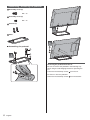
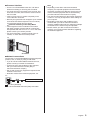
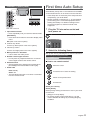
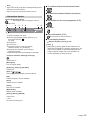
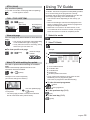
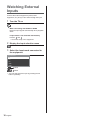
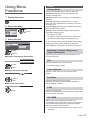
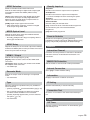
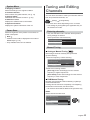
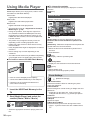
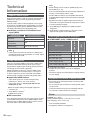
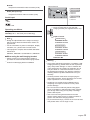
English Model No. TX-39A400B TX-42A400B TX-50A400B Operating Instructions LCD Television Thank you for purchasing this Panasonic product. Please read these instructions carefully before operating this product and retain them for future reference. The images shown in this manual are for illustrative purposes only. M0314-0 TQB0E2453U-1 English Even if no special notation has been made of company or product trademarks, these trademarks have been fully respected. DVB and the DVB logos are trademarks of the DVB Project. HDMI, the HDMI Logo, and High-Definition Multimedia Interface are trademarks or registered trademarks of HDMI Licensing LLC in the United States and other countries. Manufactured under license from Dolby Laboratories. Dolby and the double-D symbol are trademarks of Dolby Laboratories. For DTS patents, see http://patents.dts.com. Manufactured under license from DTS Licensing Limited. DTS, the Symbol, & DTS and the Symbol together are registered trademarks and DTS 2.0+Digital Out is a trademark of DTS, Inc. © DTS, Inc. All Rights Reserved. Windows is a registered trademark of Microsoft Corporation in the United States and other countries. This product incorporates the following software: (1) the software licensed under the GNU General Public License, Version 2.0 (GPL V2.0) and/or, (2) open sourced software other than the software licensed under the GPL. Contents Be Sure to Read Important Notice··················································· 3 Safety Precautions ··············································· 3 Quick Start Guide Accessories ························································ 5 Connections ························································ 7 Identifying Controls ··············································10 First time Auto Setup ············································11 At least three (3) years from delivery of this product, Panasonic Corporation will give to any third party who contacts us at the contact information provided below, for a charge no more than our cost of physically performing source code distribution, a complete machine-readable copy of the corresponding source code covered under GPL V2.0 or the other licenses with the obligation to do so, as well as the respective copyright notice thereof. Contact Information:[email protected] Using your VIERA The source code and the copyright notice are also available for free in our website below. Watching TV·······················································12 http://www.unipf.jp/dl/DTV13ET/ Viewing Text Service ············································14 Using TV Guide ··················································15 Watching External Inputs ······································16 Using Menu Functions ··········································17 Tuning and Editing Channels ·································21 Child Lock··························································23 Updating the TV Software ·····································23 Using Media Player··············································24 Technical Information ···········································26 Others FAQs ································································28 Maintenance ······················································29 Specifications ·····················································30 2 The software categorized as (1) - (2) are distributed in the hope that it will be useful, but WITHOUT ANY WARRANTY, without even the implied warranty of MERCHANTABILITY or FITNESS FOR A PARTICULAR PURPOSE. Please refer to the detailed terms and conditions thereof shown in the “Software License” menu on this product. English Important Notice Notice for DVB / Data broadcasting / IPTV functions This TV is designed to meet the standards (as of August, 2013) of digital services. Not all the features are available depending on the country, area, broadcaster, service provider and network environment. The compatibility with future services is not guaranteed. Check the latest information on the available services at the following website. http://panasonic.net/viera/support This product is licensed under the AVC patent portfolio license for the personal and non-commercial use of a consumer to (i) encode video in compliance with the AVC Standard (“AVC Video”) and/or (ii) decode AVC Video that was encoded by a consumer engaged in a personal and non-commercial activity and/or was obtained from a video provider licensed to provide AVC Video. No license is granted or shall be implied for any other use. Additional information may be obtained from MPEG LA, LLC. See http://www.mpegla.com. Panasonic does not guarantee operation and performance of peripheral devices made by other manufacturers; and we disclaim any liability or damage arising from operation and/or performance from usage of such other maker’s peripheral devices. Transport only in upright position Safety Precautions To help avoid risk of electrical shock, fire, damage or injury, please follow the warnings and cautions below: Mains plug and lead Warning If you detect anything unusual, immediately switch off the mains supply switch and remove the mains plug. IMPORTANT: THE MOULDED MAINS PLUG FOR YOUR SAFETY, PLEASE READ THE FOLLOWING TEXT CAREFULLY. This TV is supplied with a moulded 3-pin mains plug for your safety and convenience. A 5 amp fuse is fitted in this mains plug. Shall the fuse need to be replaced, please ensure that the replacement fuse has a 5 amp rating and that it is approved by ASTA or BSI to BS1362. Check for the ASTA mark the fuse body. or the BSI mark on If the mains plug contains a removable fuse cover, you must ensure that it is refitted when the fuse is replaced. If you lose the fuse cover, the mains plug must not be used until a replacement cover is obtained. A replacement fuse cover may be purchased from your local dealer. Do not cut off the mains plug. Do not use any other type of mains lead except the one supplied with this TV. The supplied mains lead and moulded plug are designed to be used with this TV to avoid interference and for your safety. If the socket outlet in your home is not suitable, get it changed by a qualified electrician. If the plug or mains lead becomes damaged, purchase a replacement from an authorised dealer. How to replace the fuse: For plug type shown in example 1 Example 1 Lift out the removable fuse cover with a screwdriver and replace the fuse, then refit it securely into the mains plug. For plug type shown in example 2 Lift open the fuse cover in the mains plug with a screwdriver and replace the fuse, then press the fuse cover down securely. Example 2 This TV is designed to operate on AC 220-240 V, 50 / 60 Hz. English 3 Insert the mains plug fully into the socket outlet. Ensure that the mains plug is easily accessible. Disconnect the mains plug when cleaning the TV. Do not touch the mains plug with wet hands. Do not damage the mains lead. • Do not place a heavy object on the lead. • Do not place the lead near a high temperature object. • Do not pull on the lead. Hold onto the mains plug body when disconnecting the plug. • Do not move the TV with the lead plugged into a socket outlet. • Do not twist the lead, bend it excessively or stretch it. • Do not use a damaged mains plug or socket outlet. • Ensure the TV does not crush the mains lead. Do not use any mains lead other than that provided with this TV. Take care Warning Do not remove covers and never modify the TV yourself as live parts are accessible when they are removed. There are no user serviceable parts inside. Do not expose the TV to rain or excessive moisture. This TV must not be exposed to dripping or splashing water and objects filled with liquid, such as vases, must not be placed on top of or above the TV. Do not insert foreign objects into the TV through the air vents. Do not use an unapproved pedestal / mounting equipment. Be sure to ask your local Panasonic dealer to perform the setup or installation of approved wall-hanging brackets. Do not apply strong force or impact to the display panel. Do not place the TV on sloped or unstable surfaces, and ensure that the TV does not hang over the edge of the base. This TV is designed for table-top use. Do not expose the TV to direct sunlight and other sources of heat. 4 English To prevent the spread of fire, keep candles or other open flames away from this product at all times Dangerous part / Small object Warning This product contains possibly dangerous parts such as plastic bags, that can be breathed in or swallowed by young children accidentally. Keep these parts out of reach of young children. Pedestal Warning Do not disassemble or modify the pedestal. Caution Do not use any pedestal other than the one provided with this TV. Do not use the pedestal if it becomes warped or physically damaged. If this occurs, contact your nearest Panasonic dealer immediately. During setup, make sure that all screws are securely tightened. Ensure that the TV does not suffer any impact during installation of the pedestal. Ensure that children do not climb onto the pedestal. Install or remove the TV from the pedestal with at least two people. Install or remove the TV by the specified procedure. Ventilation Caution Allow sufficient space around the TV in order to help prevent excessive heat, which could lead to early failure of some electronic components. Minimum distance: 10 10 10 10 (cm) Ventilation should not be impeded by covering the ventilation openings with items such as newspapers, tablecloths and curtains. Whether you are using a pedestal or not, always ensure the vents at the bottom of the TV are not blocked and there is sufficient space to enable adequate ventilation. Moving the TV Caution Accessories Before moving the TV, disconnect all cables. Move the TV with at least two people. Support as shown to avoid injury by the TV tipping or falling. When not in use for a long time Remote Control (p. 10) N2QAYB000816 or N2QAYB000975 Pedestal (p. 6) Caution This TV will still consume some power even in the Off mode, as long as the mains plug is still connected to a live socket outlet. Remove the mains plug from the wall socket when the TV is not in use for a prolonged period of time. Excessive volume Mains lead (p. 7) Caution Do not expose your ears to excessive volume from the headphones. Irreversible damage can be caused. If you hear a drumming noise in your ears, turn down the volume or temporarily stop using the headphones. Battery for the Remote Control Caution Incorrect installation may cause battery leakage, corrosion and explosion. Replace only with the same or equivalent type. Do not mix old and new batteries. Do not mix different battery types (such as alkaline and manganese batteries). Do not use rechargeable batteries (Ni-Cd, etc.). Batteries (2) R6 (p. 10) Operating Instructions Production Registration Leaflet Accessories may not be placed all together. Take care not to throw them away unintentionally. Do not burn or break up batteries. Do not expose batteries to excessive heat such as sunshine, fire or the like. Make sure you dispose of batteries correctly. Remove the battery from the unit when not using for a prolonged period of time to prevent battery leakage, corrosion and explosion. English 5 Assembling / Removing the pedestal Assembly screw (4) M5 × 15 Assembly screw (4) M4 × 12 Bracket (2) 2 Base 3 Assembling the pedestal B A 1 C D Removing the pedestal from the TV Be sure to remove the pedestal in the following way when using the wall-hanging bracket or repacking the TV. 1 Remove the assembly screws from the TV. 2 Lift the TV from the pedestal. 3 Remove the assembly screws 6 English from the bracket. Connections Basic connections Mains lead External equipment and cables shown are not supplied with this TV. Please ensure that the unit is disconnected from the mains socket before attaching or disconnecting any cables. Check the terminal type and cable plugs are correct when connecting. Use a fully wired HDMI compliant cable. AC 220-240 V 50 / 60 Hz Use a fully wired SCART cable. Keep the TV away from electronic equipment (video equipment, etc.) or equipment with an infrared sensor, otherwise distortion of image / sound may occur or operation of other equipment may be affected. Please also read the manual of the equipment being connected. Mains lead (supplied) Insert the mains plug firmly into place. When disconnecting the mains lead, be absolutely sure to disconnect the mains plug at the socket outlet first. Terminals Rear of the TV Aerial TV 1 9 RF cable Terrestrial aerial For DVB-T, Analogue 2 8 AV devices DVD Recorder / VCR 3 6 4 5 7 TV 1 DIGITAL AUDIO 2 HDMI1 - 2 (p. 8) (p. 7, 8) 3 AV1 (SCART) 4 ETHERNET (p. 9) 5 AV2 (COMPONENT / VIDEO) 6 Terrestrial / cable terminal 7 Headphone jack (p. 8) (p. 7, 8) (p. 8) 8 USB port 9 CI slot (p. 9) SCART cable RF cable English 7 DVD Recorder / VCR Terrestrial aerial Camcorder / Game equipment (VIDEO equipment) DVD Recorder (VCR) / Set top box TV TV (Viewing) (Listening) Game equipment Camcorder Amplifier (to listen with speakers) Use HDMI2 for connecting an amplifier. This connection is applicable when using an amplifier that has ARC (Audio Return Channel) function. SCART cable As for an amplifier without ARC function, use DIGITAL AUDIO. RF cable HDMI cable DVD Recorder / VCR To enjoy multi-channel sound from external equipment (e.g. Dolby Digital 5.1ch), connect the equipment to the amplifier. For the connections, read the manuals of the equipment and amplifier. Set top box TV Satellite dish Terrestrial aerial Other connections DVD Player (COMPONENT equipment) TV HDMI cable Amplifier with speaker system External equipment (DVD Player, etc.) Headphones (Viewing) To adjust volume [Headphone Volume] in the Sound Menu TV (Listening) DVD Player 8 English (M3 stereo mini plug) Common Interface Turn the TV off with Mains Power On / Off switch whenever inserting or removing the CI module. If a smart card and a CI module come as a set, first insert the CI module, then insert the smart card into the CI module. Insert or remove the CI module completely in the correct direction as shown. Normally encrypted channels will appear. (The viewable channels and its features depend on the CI module.) If encrypted channels does not appear [Common Interface] in the Setup Menu There might be some CI modules in the market with older firmware versions that do not work fully interoperable with this new CI+ v1.3 TV. In this case, please contact your content provider. For more information, read the manual of the CI module, or check with the content provider. Note Depending on the ISP or telecommunications company, the required equipment and the internet connection procedure are different. Ensure that you use the network equipment that are authorized by your ISP and telecommunications company. You cannot make settings for the network equipment on this TV. You may be required to make settings on your computer. Depending on the terms and conditions of the contracts with your ISP or telecommunications company, additional fees may be charged or multiple connections to the internet may be impossible. Please contact your ISP or telecommunications company if you require further assistance regarding the network equipment. TV CI module Network connections Connect the TV and the Broadband network equipment (modem, hub, or router) by using a LAN cable. If you do not have a Broadband network services, please consult your retailer for assistance. Confirm the term and conditions of the contracts with your Intenet Service Provider (ISP) or telecommunications company. Set up and connect any equipment required for the network environment. Read the manual of the network equipment, too. TV Internet environment LAN cable (Shielded) Use the Shielded Twist Pair (STP) LAN cable. English 9 Identifying Controls Remote Control 8 Coloured buttons (red-green-yellow-blue) Used for the selection, navigation and operation of various functions. 9 Volume Up / Down 10 Numeric buttons Changes channel and teletext pages. Sets characters. When in Standby mode, switches TV on. 11 Still Freezes / unfreezes the picture. 12 Input mode selection TV - switches to DVB / Analogue. AV - switches to AV input mode from Input Selection list. 13 TV Guide Displays Electronic Programme Guide. 14 Subtitles Displays / hides subtitles. (if available) 15 Exit Returns to the normal viewing screen. 16 Cursor buttons Makes selections and adjustments. 17 Return Returns to the previous menu / page. 18 Aspect Changes aspect ratio. 19 Channel Up / Down 20 Sound Mute On / Off 21 Last view Switches to previously viewed channel or input mode. Installing / Removing batteries Pull open 1 Standby On / Off switch 2 MEDIA PLAYER 3 [Main Menu] Press to access Picture, Sound, Timer and Setup. Hook 4 Text service button 5 Information Displays channel and programme information. Close 6 OK Confirms selections and choices. Press after selecting channel positions to quickly change channel. Displays channel list. 7 [Option Menu] Easy optional setting for viewing, sound, etc. 10 English Note the correct polarity (+ or -) First time Auto Setup Indicator / Control panel 1 2 3 4 5 6 7 Rear side of the TV Automatically sets up the TV and searches for available TV channels when the TV is turned on for the first time. These steps are not necessary if the setup has been completed by your local dealer. Please complete connections (p. 7 - 9) and settings (if necessary) of the connected equipment before starting Auto Setup. For details of settings for the connected equipment, read the manual of the equipment. 1 1 Input mode selection Press repeatedly until you reach the desired mode. Plug the TV into mains socket and turn power on Takes a few seconds to be displayed. [Main Menu] Press and hold for about 3 seconds to display main menu. OK (when in the menu system) 2 Channel Up / Down Cursor Up / Down (when in the menu system) 3 Volume Up / Down Cursor Left / Right (when in the menu system) 4 Mains power On / Off switch Use to switch the mains power. 5 Remote control signal receiver Do not place any objects between the TV remote control signal receiver and remote control. 6 Ambient sensor Senses brightness to adjust picture quality when [Eco Mode] in the Picture Menu is set to [On]. 2 Select the following items Set up each item by following the on-screen instructions. Please select your viewing environment. Home Shop How to use remote control Move the cursor 7 Power LED Red: Standby Green: On The LED blinks when the TV receives a command from the remote control. Access the item / store the setting Return to the previous item Exit the item Select your country Select [Home] Select [Home] viewing environment to use in your home environment. [Shop] is for shop display. To change viewing environment later on, you will need to initialise all settings by accessing Shipping Condition. English 11 Auto Setup is now complete and your TV is ready for viewing. If tuning has failed, check the connection of the RF cable, and then follow the on-screen instructions. To retune all channels [Automatic Channel Search] (p. 21) To initialise all settings [Shipping Condition] (p. 21) Watching TV 1 Turn power on (TV) or (Remote Control) Mains power On / Off switch should be on. (p. 10) 2 Select the mode 3 Select a channel up down or To select 2 or more-digit channel position number, e.g. 399 Note The TV will automatically go into Standby mode when no operation is performed for the period selected in [Auto Standby] (Timer Menu). Aspect Change the aspect ratio (image size) [Auto]: The best ratio is selected automatically according to the “Aspect Control Signal” (p. 26). [16:9]: Directly displays the image at 16:9 without distortion (anamorphic). [14:9]: Displays the image at the standard 14:9 without distortion. [Just]: Displays a 4:3 image full-screen. Stretching is only noticeable at the left and right edges. [4:3]: Displays the image at the standard 4:3 without distortion. [4:3 Full]: Displays a 4:3 image enlarged horizontally to fit the screen. For HD (High definition) signals [Zoom 1]: Displays a 16:9 letterbox or 4:3 image without distortion. [Zoom 2]: Displays a 16:9 letterbox (anamorphic) image full-screen without distortion. [Zoom 3]: Displays a 2.35:1 letterbox (anamorphic) image full-screen without distortion. At 16:9, displays the image at its maximum (with slight enlargement). 12 English To confirm another tuned channel name Note Aspect is fixed to [16:9] when [Viewing Mode] is set to [Game] in the Picture Menu. Aspect cannot be changed in teletext service. To watch the channel listed in the banner Information banner Display Information banner Also appears when changing a channel. Information on the next programme (DVB) Example: DVB 1 2 HDTV 1 ZDF 3 5 Coronation Street 20:00 - 20:55 Now Bad signal Dolby D+ 6 7 Info AD Extra information (DVB) 1 Channel position and name 2 Channel type ([Radio], [Data], [HDTV], etc.) / 6 7 To hide Select favourites STTL TEXT Multi Audio 45 * 3 4 5 4 20:35 All DVB Channels Encrypted channel ( ) / TV mode Programme Current time Programme Start / Finish time (DVB) Channel number, etc. (Analogue) Progress time indicator of the selected programme (DVB) [All DVB Channels] or [All Analogue Channels] (Press again to hide the banner) To set display timeout [Banner Display Timeout] (p. 20) Note [AD], [STTL], [TEXT], [Multi Audio] indications are displayed as available on particular programmes, but may not be available for all individual programmes being broadcast. Display the extra information to confirm availability of these functions. *Features available / Message meanings Sound mute on [Bad signal] Poor TV signal quality [Dolby D+], [Dolby D], [HE-AAC] Audio track [Also in ] Same programme available as HD broadcast [AD] Audio Description service available [STTL] Subtitle service available [TEXT] Text service available [Multi Audio] Multiple audio available [Stereo], [Mono], [NICAM] Audio mode 1 - 90 Off Timer remaining time English 13 Viewing Text Service will have to press the TEXT button again when the download is complete. Teletext services are the text information provided by the broadcasters. While navigating text services, you will find there is a short delay when moving between pages while the page downloads. There is often a prompt shown on the page (for example “Loading”) to let you know that this is happening. The features may vary depending on the broadcasters. The availability of text services for a programme is indicated by [TEXT] in the information banner. Analogue teletext Depending on the broadcaster, the digital text (MHEG) services may not be available. In this case, the operation of the text services may be the same as the analogue teletext services. Digital text (MHEG) When you switch to a digital text service, the images you see can contain graphics and text, laid out and controlled in a manner decided by the broadcaster. What is FLOF (FASTEXT) mode? In FLOF mode, four differently coloured subjects are situated at the bottom of the screen. To access more information about one of these subjects, press the appropriate coloured button. This facility enables fast access to information on the subjects shown. What is TOP mode? (in case of TOP text broadcasting) 1 Select DVB TOP is a particular improvement of the standard teletext service that enables easier search and effective guide. Fast overview of the teletext information available 1 Switch to Text service Easy to use step-by-step selection of the topical subject Page status information at the bottom of the screen Available page up / down How to operate services In all cases, it is possible to navigate the pages using buttons on the remote control, but because the commands available must apply to all manufacturers of digital equipment, some on-screen commands may not correspond exactly to the remote control buttons. Select, go (red) (green) To select among subject blocks (blue) To select next subject within the subject block (After the last subject, it moves to the next subject block.) (yellow) Symbol: 1 Back key Switch to Teletext Coloured characters Coloured button When options with numbers are displayed Displays the index page (content varies depending on the broadcasters). 2 Select the page up down To exit from Text service Coloured buttons (Corresponds to the colour bar) To return to TV Note As soon as you switch to a digital channel with links to a text service, software is downloaded in the background to enable the text function. This means that when switching to a digital channel, you should wait for approximately 5 seconds before pressing the TEXT button - this will allow the software to download. If you press the TEXT button before download is complete, it will be ignored and you 14 English Reveal hidden data Reveal hidden words e.g. quiz page answers Press again to rehide. (red) STILL (Hold) Stop automatic updating (If you wish to hold the current page without updating) Press again to resume. FULL / TOP / BOTTOM (green) (TOP) (BOTTOM) Normal (FULL) View sub page View sub page (Only when Teletext is more than one page) The number of sub pages varies depending on the broadcasters (up to 79 pages). It may take some time for searching, during which time you can watch TV. Using TV Guide TV Guide - Electronic Programme Guide (EPG) provides an on-screen listing of the programmes currently broadcast and the forthcoming broadcasts over the next seven days (depending on the broadcasters). This function varies depending on the country you select. DVB-T and Analogue channels are displayed on the same TV Guide screen. There will be no programme listings for Analogue channels. When this TV is turned on for the first time, or the TV is switched off for more than a week, it may take some time before TV Guide is completely shown. 1 Select the mode 2 View TV Guide To view specific sub page Example: Enter the 4-digit number (blue) Example: P6 Watch TV while waiting for update View the TV picture while searching for a teletext page Teletext automatically updates itself when new information becomes available. (yellow) TV Guide 2 3 Tuesday, 6-December-2011 13:10:28 1 NEWS 06/12/2011 NDR FS NDS 8:00 - 8:30 Schleswig-Holstein Magazin Time: 117 NDR FS NDS 118 NDR FS HH 119 NDR FS SH 120 NDR FS MV 122 MDR Sachsen 123 MDR S-Anhalt 124 MDR Thüringen 8:00 Schleswig-Holst... buten un binnen... 9:00 Hallo Niedersac... Das Beste aus E... Schleswig-Holst... buten un binnen... Hallo Niedersac... Das Beste aus E... Schleswig-Holst... buten un binnen... Hallo Niedersac... Das Beste aus E... Schleswig-Holst... buten un binnen... Hallo Niedersac... Das Beste aus E... Haral... Rucksack artour Leben für 4... MDR... Haral... Rucksack artour Leben für 4... MDR... Haral... Rucksack artour Leben für 4... MDR... 4 5 1 2 3 4 5 Current date and time TV Guide date TV Guide time Programme Channel position and name It may cause slow response, when press the UP/ DOWN keys for TV programme guide. This is due to programme data downloading. Changes to TV screen temporarily (You cannot change the channel.) To view the next programme P108 select next programme Appears when updating is completed View the updated page (yellow) The news page provides a function that indicates arrival of the latest news (“News Flash”). To the previous day (DVB) (red) To the next day (DVB) (green) English 15 Watching External Inputs Connect the external equipment (VCRs, DVD equipment, etc.) and you can watch through the input. 1 Turn the TV on When connecting with SCART or HDMI Receives input signals automatically when playback starts. If input mode is not switched automatically and Perform Check the setup of the equipment. 2 Display the input selection menu 3 Select the input mode connected to the equipment Input Selection TV AV1 AV2 HDMI 1 HDMI 2 select watch You can also select the input by pressing the AV button repeatedly. 16 English Using Menu Functions Picture Viewing Mode Selects your favourite picture mode for each input. [Dynamic]: Improves contrast and sharpness for viewing in a bright room. 1 2 Display the menu [Normal]: Normal use for viewing in a normal lighting condition. [Cinema]: Improves the performance of contrast, black and colour reproduction for watching movies in a darkened room. Select the menu [True Cinema]: Reproduces the original image quality precisely without any revision. select Main Menu [Game]: Provides suitable images for fast response signal when playing games. Not valid on TV mode access Picture 3 To display a continuous record of time spent using [Game] mode [Playing Time Display] (p. 20) Select the item In each viewing mode, [Contrast], [Brightness], [Colour], [Sharpness], [Tint], [Colour Balance], [P-NR], and [3D-COMB] can be adjusted and stored for each input. 1/2 Viewing Mode Backlight Contrast Dynamic 70 60 Backlight / Contrast / Brightness / Colour / Sharpness select access Choose from among alternatives Colour Balance Cool Normal Warm Adjusts the levels of these options according to your personal preference. Tint Adjusts the picture hue to suit your taste. For NTSC signal reception select store Colour Balance Adjust using the slide bar 50 Sharpness Sets the overall colour tone of the picture (bluer redder). Moved Eco Mode change store Go to the next screen Child Lock Automatic Brightness Control function Adjusts picture settings automatically depending on ambient lighting conditions. Access P-NR access Picture Noise Reduction Reduces unwanted picture noise and flicker noise in the contoured parts of a picture. 3D-COMB Makes still or slow moving pictures more vivid. Occasionally, while viewing still or slow moving pictures, colour patterning may be seen. Set to [On] to display sharper and more accurate colours. For PAL / NTSC signal reception in TV mode or from composite English 17 Colour Matrix Selects the suitable colour parameter for SD (Standard definition) or HD (High definition) signal. This function is available with 480p or 576p input signal from COMPONENT or HDMI terminal. AV Colour System Selects optional colour system based on video signals. For AV input 16:9 Overscan Selects the screen area displaying the image for 16:9 aspect. [On]: Enlarges the image to hide the edge of the image. [Off]: Displays the image in the original size. Set to [On] if noise occurs on the edge of the screen. This function can be memorised for SD (Standard definition) and HD (High definition) signals respectively. Equaliser Adjusts the frequency level to suit your favourite sound quality. This function is available when [Mode] is set to [User]. Select the frequency and change the frequency level by using the cursor button. To enhance the bass sound, raise the level of the lower frequency. To enhance the treble sound, raise the level of the higher frequency. To reset the levels of each frequency to the default settings, select [Reset to Defaults] by using the cursor button. Balance Adjusts volume level of right and left speakers. Headphone Volume Adjusts the volume of headphones. Surround Reset to Defaults Resets the current Picture Viewing Mode of the selected input to the default settings. Provides a dynamic enhancer of width to simulate improved spatial effects. Auto Gain Control Sound Automatically regulates large sound level differences between channels and inputs. Mode Selects your favourite sound mode. The selected mode affects all input signals. [Music]: Improves sound quality for watching music videos, etc. [Speech]: Improves sound quality for watching news, drama, etc. [User]: Adjusts the sounds manually by using the equaliser to suit your favourite sound quality. For the User mode, [Equaliser] will be available in the Sound Menu instead of [Bass] and [Treble]. Select [Equaliser] and adjust the frequency. This function is not effective for the sound from headphones. Volume Correction Adjusts the volume of each individual channel or input mode. Speaker Distance to Wall Compensates for the low frequency sound due to the distance between the speakers and the wall. If the back space between the TV and wall is within 30 cm, [Up to 30cm] is recommended. If the back space between the TV and wall is over 30 cm, [Over 30cm] is recommended. Preferred Audio 1 / 2 Bass Adjusts level to enhance or minimise lower, deeper sound output. Selects the first and second preferred language for DVB multi audio (depending on the broadcaster). MPX Treble Adjusts level to enhance or minimise sharper, higher sound output. Selects multiplex sound mode. (if available) [Stereo]: Use this normally. [Mono]: When stereo signal cannot be received. [M1] / [M2]: Available while mono signal is transmitted. For Analogue mode 18 English SPDIF Selection SPDIF: A standard audio transfer file format Selects the initial setting for digital audio output signal from DIGITAL AUDIO and HDMI2 (ARC function) terminals. [Auto]: Dolby Digital Plus, Dolby Digital and HE-AAC multi-channel are output as Dolby Digital Bitstream. MPEG is output as PCM. DTS is output as DTS for video contents of Media Player. [PCM]: Digital output signal is fixed to PCM. ARC (Audio Return Channel): A function of digital audio output using HDMI cable MPEG Optical Level Adjusts the audio level output from DIGITAL AUDIO terminal as the initial setting. Normally, [PCM] sound is larger comparing with the other types of audio track. Visually Impaired Speaker Narration sound track is output to the TV speakers. Headphone Narration sound track is output to the headphone. Connect a headphone before selecting this option. Volume Adjusts the volume of the narration sound track. Pan and Fade Sets the audio pan and fade effect. [On]: Controls the level of the Main Audio Programme and controls the pan of the Associated Audio Programme [Off]: Main Audio programme Reset to Defaults Resets the current [Bass], [Treble], [Balance], [Headphone Volume], [Surround], [MPEG Optical Level], [Type], and [Visually Impaired] to the default settings. SPDIF Delay Adjusts the delay time of the sound output from DIGITAL AUDIO and HDMI2 (ARC function) terminals if the sound does not synchronise the image. HDMI 1 / 2 Input Network Interaction Channel Interaction channel provides an extension of broadcast interactive services via broadcast transmission or IP connection. Selects to fit the input signal. (p. 26) [Digital]: When sound is carried via the HDMI cable connection [Analogue]: When sound is not carried via the HDMIDVI adaptor cable connection For HDMI input Downmix Mode Selects the output mode for listening to compressed music. For DVB mode Type Narration settings for impaired users (only available in some countries). [Hearing Impaired] [Preferred Subtitle Type] (p. 20) Set to [Visually Impaired] to activate the narration sound track when available on the broadcast. [Visually Impaired] appears after you have selected this option. (p. 19) For DVB mode MHEG PIN Protection Ask the viewer to enter the PIN to allow presentation. Internet Connection Set to [On] to enable network setting. Information Displays information of network connection. IP Setting Detect IP automatically or sets IP manually. Connection Test Check the TV connects to the network successfully or not. Timer Off Timer Sets the duration of time until the TV automatically goes into Standby mode. English 19 Time Zone Adjusts the time data. The time data will be corrected based on GMT. Sorts channels. (p. 22) Channel List Edit Edits channels. (p. 22) Clear block Clears the channel lists. (p. 22) Auto Standby Automatically turns the TV to Standby mode for energy saving when no operation is performed for 4 hours. [Off] / [2 hours] / [4 hours] Automatic input switching with the connected equipment affects this function and time-count will be reset. The notification message will appear 3 minutes before going into Standby mode. Display Settings Preferred Teletext Selects the preferred language for DVB teletext service. (depending on the broadcaster) Teletext Character Set Selects teletext language font. [West]: English, French, German, Greek, Italian, Spanish, Swedish, Turkish, etc. Setup [East1]: Czech, English, Estonian, Lettish, Rumanian, Russian, Ukrainian, etc. Link Settings [East2]: Czech, Hungarian, Lettish, Polish, Rumanian, etc. CEC When set to [On], the TV will automatically switch to the appropriate HDMI input whenever an HDMI connected equipment is initially turned on and the Play mode is selected. The HDMI CEC feature of connected HDMI CECcompatible device must be turned on. Power off Link When set to [On], all HDMI connected equipment will be turned off automatically by turning off the TV. A Panasonic DVD Recorder will not turn off if it is still in the Rec mode. The TV remains on even if all the HDMI connected equipment are turned off. Child Lock Applies access control for channels or inputs to prevent unwanted access. (p. 23) Preferred Subtitles 1 / 2 Selects the first and second preferred language for DVB subtitles. (depending on the broadcaster) Preferred Subtitle Type Selects the preferred subtitle type [Hearing Impaired] / [Normal]. [Hearing Impaired] provides aids in understanding and enjoyment with DVB subtitles (depending on the broadcaster). [Preferred Subtitles 1] / [Preferred Subtitles 2] are given priority. Input Labels Accesses the input labels list to select the label of each input mode or set to skip unconnected one for easier identification and selection in [TV Selection] (p. 12), [Input Selection] (p. 16) or banner. To skip the input mode, select [Skip]. Banner Display Timeout Sets how long the Information banner stays on screen. Playing Time Display Tuning Menu Automatic Channel Search Automatically searches for the receivable channels. (p. 21) Scan Adds newly found channels while keeping existing channels. (p. 21) Radio Mode Analogue Manual Tuning Searches for the analogue channels manually. (p. 21) The sound is active even if the screen turns off. This function is effective in reducing power consumption when listening to a radio channel. Press any buttons except Standby, Volume Up / Down and MUTE buttons to turn the screen on. Not valid on Analogue mode DVB-T Signal Condition Checks the DVB-T signal condition. (p. 21) DVB-T Manual Tuning Searches for the DVB-T channels manually. (p. 21) Favourites Edit Creates a list of favourite channels. (p. 22) Skip Skips unwanted channels. (p. 22) Sort 20 Sets to [On] to display a continuous record of time spent using [Game] mode in the top right of the screen every 30 minutes. This function is available when [Viewing Mode] is set to [Game]. (p. 17) English Sets the timer for turning off the screen automatically when a radio channel is selected. System Menu Shipping Condition Resets all settings to the original condition. Common Interface Sets to watch encrypted channels, etc. (p. 12) System Update Downloads new software to this TV. (p. 23) Tuning and Editing Channels You can retune channels or make your favourite channel lists, skip unwanted channels, etc. Software License Displays the software licence information. System Information Displays the system information of this TV. Power Save Reduces brightness of the picture to economise on power consumption. Note A different menu will be displayed in the mode of Media Player. (p. 24) Only available items can be selected. [Setup] [Tuning Menu]* *The menu name varies depending on the TV mode. The settings in [Tuning Menu] are applicable only for the selected TV mode. Retuning channels Only the selected mode is retuned. All the previous tuning settings are erased. Select [Automatic Channel Search] Automatic Channel Search Access Manual Tuning Analogue Manual Tuning Set Analogue channel manually after [Automatic Channel Search]. 1 Enter the frequency to start scanning Analogue Manual Tuning Searching channels Start Frequency (MHz) Scan up 48.00 Scan down 2 Select the scanning method [Scan up]: Scans ascendingly from the entered frequency to higher frequencies. [Scan down]: Scans descendingly from the entered frequency to lower frequencies. DVB Manual Tuning Normally use [Automatic Channel Search] or [Scan] to retune DVB channels. If tuning has not been done completely or for adjusting the direction of the aerial, use this function. All channels found will be added to the [Channel List]. DVB-T Select channel and start scan DVB-T Manual Tuning Antenna Scan Channel Signal Level Signal Condition 0% 2 0 0 English 21 2 Swap Check DVB signal condition DVB-T Signal Condition Channel Signal Level Signal Condition Bit Error Rate 22 0 0 0.00E-06 These bars show the maximum signal value of the selected channel. Ɣ To change page (page up) (red) Ɣ To change page (page down) Editing channels (green) Favourites Edit Ɣ To select Create your favourite channel lists from various broadcasters. (yellow) Ɣ To exit Select a channel to list Favourites Edit Analogue Analogue Digital Digital 1 2 3 4 (blue) BBC ONE Wales BBC THREE BBCi CBBC Channel : [Add] Editing channel settings Channel List Edit : [Remove] You can edit channel settings. 1 Select a channel to edit Skip Channel List Edit You can hide (skip) unwanted channels. The hidden channels cannot be displayed except in this function. 1 2 3 4 Analogue Analogue Digital Digital BBC ONE Wales BBC THREE BBCi CBBC Channel Select a channel and reveal / hide 2 Edit the channel settings Skip Analogue Analogue Digital Digital 1 2 3 4 BBC ONE Wales BBC THREE BBCi CBBC Channel : Hide (skip) You cannot change [Network Name]. [Frequency (MHz)], [Colour System] and [Sound System] edit is valid for analogue channels only. You can set characters by using numeric buttons. (When you select [Channel Name]). : Reveal Sort backspace You can sort channels. 1 To swap the channel position (if available) Sort 1 2 3 4 Analogue Analogue Digital Digital BBC ONE Wales BBC THREE BBCi CBBC Channel : selected : unselected 22 English Child Lock You can lock specific channels / AV input terminals and control who watches them. When the locked channel / input is selected, a message appears. Enter the PIN number to watch. [Setup] [Child Lock] A new version of software may be released for download to enhance the performance or operations of the TV. Download may take a few hours. During software download and update, DO NOT switch off the TV. 1 Enter the PIN number (4 digits) Enter the PIN number twice at first setting. Make a note of the PIN number in case you forget it. “0000” may be stored as the default PIN number which depends on the country you select. 2 Select [Child Lock List] and set the channel / input to be locked Update from Broadcasting If there is an update available, a notification message is displayed when the channel has the update information. To update in next Standby mode, select [Standby]. To update immediately, select [Now]. (Select [Ignore] not to update.) You can search new software automatically or update manually. Child Lock List - TV and AV Name 101 BBC 1 Wales 7 BBC THREE 14 E4C VCR 1 BBC1 2 ***** AV1 AV2 Updating the TV Software Input DVB DVB DVB Analogue Analogue Analogue External External Type Free TV Free TV Free TV Analogue Analogue Analogue AV AV Lock : Appears when the channel / input is locked [Setup] [System Menu] To update automatically Set [Auto Download] and [Auto Install] to [Yes] Manual OAD Download Access To edit the list by using the coloured buttons Auto Download Yes Lock all: Locks all channels and input. Unlock all: Cancels all locks. Auto Install No To change the PIN number Select [Change PIN] and enter a new PIN number twice To set Parental Rating To watch the DVB programme that has the rating information over the selected age, enter the PIN number to watch (depending on the broadcaster). Select [Parental Rating] and set an age for the restriction of programmes. [System Update] If System Update is performed, the software will be updated (it may change TV functions). If you do not want to do so, set [Auto Install] to [No]. Every time you set, the TV automatically performs a search in Standby and downloads an update, if any software updates are available. The automatic updating is performed in Standby mode (TV turned off with the remote control). To update immediately Note Setting [Shipping Condition] (p. 21) erases the PIN number and all settings. 1 Select [Manual OAD Download] 2 Searches for an update (for several minutes) and displays a corresponding message if any 3 Download Note Download may take a few hours. During software download and update, DO NOT switch off the TV. The notification message might be a reminder. In this case, the schedule information (the date that the new version can be used) will appear. You can set the reservation for update. The update will not start when the TV is off. English 23 Using Media Player Media Player allows you to enjoy photo, video or music recorded on a USB Flash Memory. Photo mode: To change the contents While the thumbnail is displayed, display the contents selection (blue) Photo mode Digital photo data will be displayed. Example: Thumbnail - [All photos] Music mode: Media Player Digital music data will be played back. Photo All photos Movie mode: Digital video data will be played back. Supported file format “Supported file format in Media Player” (p. 26) During the operation, audio signal is output from AV1, DIGITAL AUDIO and HDMI2 (ARC function) terminals. But no video signals are output. To use HDMI2 with ARC function, connect an amplifier that has ARC function. The picture may not appear correctly on this TV depending on the recording equipment used. Display may take some time when there are many files and folders. Partly degraded files might be displayed at a reduced resolution. Picture setting may not work depending on the conditions. The folder and file names may be different depending on the digital camera or digital video camera used. View Select Slideshow EXIT Info Option Menu RETURN View Select Drive Select USB 2.0 Contents Select : Error display [Single view] - Photos are displayed one at a time. Select the file from the thumbnail of photos to be viewed [Slideshow] - Slideshow completes when all photos are viewed within the current thumbnail. 1 Select the file from the thumbnail of photos for the first view 2 Start Slideshow (red) To display / hide the operation guide To insert or remove the USB Flash Memory To sort by folder 1 Display the view selection in the thumbnail view (green) 2 Select [Folder view] Displays the thumbnail grouped by folder. Photo Settings Insert or remove straightly and completely. Connect the USB Flash Memory to the USB port. Check the type of terminals and devices are correct when connecting. 1 Insert the USB Flash Memory to the TV 2 Start [Media Player] and select the content (Photo / Music / Movie) Contents Select MEDIA PLAYER EXIT Select RETURN Access USB 2.0 Photo Music Movie Select the appropriate content for playing back each file. 24 English [Slideshow Settings] Transition Effect Selects the transition effect for switching the photo during the slideshow. Screen Mode Selects enlarged or normal viewing on Single view and Slideshow. Depending on the photo size, it may not be fully enlarged to fill the screen, e.g. portrait style picture. Interval Selects slideshow interval. Repeat Slideshow repeat Back Ground Music Selects the back ground music during Photo mode. [Type1 - 3] are the fixed music each installed in this TV. Note To change aspect Picture quality may become lower depending on the slideshow settings. Picture setting may not work depending on the slideshow settings. Video Setup Video Setup Menu Music mode Repeat Example: Thumbnail - [Folder view] Media Player Music Folder view Playback repeat within the selected file (depending on the content). My Music_1 My Music_2 My Music_3 Play Select Play Folder EXIT RETURN USB 2.0 Info Option Menu Drive Select Contents Select 1 Select the folder / file 2 Start playback (red) To display / hide the operation guide Music Setup [Music Setup] Repeat [Folder]: Playback repeat within the selected folder [One]: Playback repeat of the selected one file Movie mode Example: Thumbnail - [Title view] Media Player Movie Title view Trip1 Trip2 Trip3 Trip4 Trip5 Room Nature1 Nature2 Nature3 Nature4 Nature5 Nature6 2011_4 2011_7 2011_9 Play Select Play Folder EXIT RETURN Info Option Menu Drive Select USB 2.0 Contents Select : Error display : The file does not support thumbnail view. 1 Select the title / scene 2 Start playback (red) To display / hide the operation guide and information banner English 25 Technical Information Note Aspect Control Signal Programmes usually contain an “Aspect Control Signal” (Widescreen signal, Control signal through SCART / HDMI terminal). In [Auto] mode, aspect mode will appear in the top left of the screen if a Widescreen signal (WSS) or a Control signal through SCART (pin8) / HDMI terminal is found. The aspect will switch to the appropriate ratio. Available conditions for the Widescreen signal (WSS) Input terminal Terrestrial Input signal format DVB PAL I 625 (576) / 50i, 50p Input signal that can be displayed COMPONENT (AV2) / HDMI terminal Signal name Note If the screen size looks unusual when a widescreenrecorded programme is played back on a VCR, adjust the tracking of the VCR. HDMI PAL AV2 (Component) *1: The HDMI logo is displayed on HDMI-compliant equipment. *2: Audio Return Channel (ARC) is a function to send digital sound signals via an HDMI cable. COMPONENT AV1 / AV2 (Composite) Audio settings can be made on [HDMI Input] in the Sound Menu. (p. 18) If the connected equipment has an aspect adjustment function, set the aspect ratio to “16:9”. These HDMI connectors are compatible with HDCP (High-Bandwidth Digital Content Protection) copyright protection. Equipment having no digital output terminal may be connected to the input terminal of component or video to receive analogue signals. 525 (480) / 60i, 60p 625 (576) / 50i, 50p 750 (720) / 60p, 50p HDMI connection This TV incorporates HDMI™ technology. HDMI (highdefinition multimedia interface) allows you to enjoy high-definition digital images and high-quality sound by connecting the TV and the equipment. HDMI-compatible equipment*1 with an HDMI or DVI output terminal, such as a DVD player, a set top box or game equipment, can be connected to the HDMI terminal using an HDMI compliant (fully wired) cable. Applicable HDMI features Input audio signal: 2ch Linear PCM (sampling frequencies - 48 kHz, 44.1 kHz, 32 kHz) Input video signal “Input signal that can be displayed” (p. 26) Match the output setting of the digital equipment. Content Type Audio Return Channel*2 (HDMI2 terminal only) DVI connection If the external equipment has only a DVI output, connect to the HDMI terminal via a DVI to HDMI adaptor cable. When the DVI to HDMI adaptor cable is used, connect the audio cable to AV2 audio terminals. 1,125 (1,080) / 60i, 50i 1,125 (1,080) / 60p, 50p, 24p : Applicable input signal Signals other than above may not be displayed properly. The above signals are reformatted for optimal viewing on your display. Supported file format in Media Player Some files may not be played back even if they fulfil these conditions. Do not use two-byte characters or other special codes for file names. Connected devices may become unusable with this TV if the file or folder names are changed. Photo JPEG (.jpg / .jpeg) Image resolution (pixel): 8 × 8 to 30,719 × 17,279 Sub-sampling: 4:4:4, 4:2:2, 4:2:0 DCF and EXIF standards Progressive JPEG is not supported. 26 English Video AVI (.avi) Music MP3 (.mp3) Video codec: H.264 BP/MP/HP, MPEG1, MPEG2, MPEG4 SP/ASP, VC-1, Windows Media Video Ver. 9 AAC (.m4a) Audio codec: AAC, Dolby Digital, Dolby Digital Plus, DTS core, HE-AAC, LPCM, MPEG Audio, MP3, WMA Some subtitles or chapter functions may not be available. WMA Pro and WMA Lossless are not supported. MKV (.mkv) Video codec: H.264 BP/MP/HP, MPEG1, MPEG2, MPEG4 SP/ASP Audio codec: AAC, Dolby Digital, Dolby Digital Plus, DTS core, HE-AAC, MPEG Audio, MP3 Some subtitles or chapter functions may not be available. ASF (.asf / .wmv) Video codec: MPEG4 SP/ASP, VC-1, Windows Media Video Ver. 9 Audio codec: AAC, Dolby Digital, Dolby Digital Plus, HE-AAC, LPCM, MP3, WMA Copy-protected files cannot be played back. WMA Pro and WMA Lossless are not supported. MP4 (.f4v / .m4v / .mp4) Video codec: H.264 BP/MP/HP, MPEG1, MPEG2, MPEG4 SP/ASP Audio codec: AAC, Dolby Digital, Dolby Digital Plus, HE-AAC, MPEG Audio, MP3 This TV supports this container recorded with Panasonic products. For details, read the manual of the products. FLV (.flv) Video codec: H.264 BP/MP/HP Audio codec: AAC, MP3 3GPP (.3gp / .3g2) Video codec: H.264 BP/MP/HP, MPEG4 SP/ASP Audio codec: AAC, HE-AAC PS (.mod / .mpg / .mpeg / .vob / .vro) Video codec: H.264 BP/MP/HP, MPEG1, MPEG2, VC-1 Audio codec: AAC, Dolby Digital, Dolby Digital Plus, HE-AAC, LPCM, MPEG Audio, MP3 TS (.mts / .m2ts / .tp / .trp / .ts / .tts) Video codec: H.264 BP/MP/HP, MPEG1, MPEG2, VC-1 Audio codec: AAC, Dolby Digital, Dolby Digital Plus, DTS core, HE-AAC, MPEG Audio, MP3 Copy-protected files cannot be played back. WMA (.wma) Copy-protected files cannot be played back. WMA Pro and WMA Lossless are not supported. LPCM (.wav) FLAC (.flac) Devices for playing back USB Flash Memory (for playing back in [Media Player]) USB Flash Memory format: FAT16, FAT32, NTFS USB Flash Memory compliance: Supports only USB1.1 or USB2.0 standard Maximum USB capacity supported is 32GB USB Hub or card adapter is not supported Note Data modified with a PC may not be displayed Do not remove the device while the TV is accessing data. Otherwise this can damage device or TV. Do not touch the pins on the device. Do not subject the device to a high pressure or impact. Insert the device in the correct direction. Otherwise this can damage device or TV. Electrical interference, static electricity, or erroneous operation may damage the data or device. Back up the recorded data at regular intervals in case of deteriorated or damaged data or erratic operation of the TV. Panasonic is not liable for any deterioration or damage of recorded data. USB connection It is recommended to connect the USB Flash Memory directly to the TV’s USB port. Some USB devices or USB HUB may not be used with this TV. You cannot connect any devices by using USB card reader. Additional information for USB devices may be on the following website. http://panasonic.net/viera/support Subtitles MicroDVD, SubRip, TMPlayer (.srt / .sub / .txt) The video file and subtitles text file are inside the same folder, and the file names are the same except for the file extensions. If there are more than one subtitles text files inside the same folder, they are displayed in the following order of priority: “.srt”, “.sub”, “.txt”. English 27 FAQs Before requesting service or assistance, please follow these simple guides to solve the problem. When an error message appears, follow the message’s instructions. If the problem still persists, contact your local Panasonic dealer or the authorised service centre. Block noise, frozen or disappearing image occurs in DVB mode / White spots or shadow image (ghosting) occurs in Analogue mode / Some channels cannot be tuned Check the position, direction and connection of the aerial. Check [DVB-T Signal Condition] (p. 20). If [Signal Condition] is poor, check aerial. Weather conditions will affect signal reception (heavy rain, snow, etc.), in particular in poor reception areas. Even during good weather, the high pressure can cause poor reception of some channels. Due to the digital reception technologies involved, quality of the digital signals may be relatively low in some cases, despite good reception of analogue channels. Consult your local dealer or service provider for the availability of services. Picture quality problem Check the settings of the Picture Menu. Set [P-NR] to remove noise (p. 17). Check nearby electrical products (car, motorcycle, fluorescent lamp). Reset channels. Check that the output of the external equipment matches the input of the TV. When connecting with SCART, ensure the output setting of the external equipment is not S-Video. Sound quality problem Check the volume level or sound mute. Check connections and setting of external equipment. Sound signal reception may be deteriorated. Set [MPX] to [Mono] (p. 18). Picture or sound problems with HDMI connection Check the HDMI cable is connected properly. Turn the TV and equipment off, then turn them on again. Check an input signal from the equipment. Use equipment compliant with EIA/CEA-861/861D. Set the sound setting of the connected equipment to “2ch L.PCM”. Check the [HDMI 1 / HDMI 2] setting (p. 19). If digital sound connection has a problem, select analogue sound connection. 28 English The TV does not switch on Check the mains lead is plugged into the TV and the socket outlet. The fuse in the mains plug may have blown. Replace it with one of an identical rating. (p. 3) The TV goes into Standby mode Auto power standby function is activated. The remote control does not work or is intermittent Are the batteries installed correctly? (p. 10) Has the TV been switched on? The batteries may be running low. Replace them with new ones. Point the remote control directly at the TV’s remote control signal receiver (within about 7 m and a 30 degree angle of the signal receiver). Situate the TV away from sunshine or other sources of bright light not to shine on the TV’s remote control signal receiver. No image can be displayed Check the TV is turned on. Check the mains lead is plugged into the TV and the socket outlet. Check the correct input mode is selected. Check the settings of the Picture Menu. Check all required cables and connections are firmly in place. Unusual image is displayed Turn the TV off with Mains power On / Off switch, then turn it on again. If the problem persists, initialise all settings. [Shipping Condition] (p. 21) There may be red, blue, green and black spots on the screen This is a characteristic of liquid crystal panels and is not a problem. The liquid crystal panel is built with very high precision technology giving you fine picture details. Occasionally, a few non-active pixels may appear on the screen as a fixed point of red, green, blue or black. Please note this does not affect the performance of your LCD. Parts of the TV become hot Even if the temperature of parts of the front, top and rear panels has risen, these temperature rises do not cause any problems in terms of performance or quality. The LCD panel moves slightly and clattered sound is heard when it is pushed with a finger There is a little gap around the panel to prevent damage to the panel. This is not a malfunction. Overcurrent error message appears The connected USB device might cause this error. Remove the device and turn the TV to standby mode with Standby On / Off switch, then turn it on again. Check foreign objects are not inside the USB port. Check you can get Freeview HD in your area. Text your postcode, followed by your house number or name to 80560*. Or visit freeview. co.uk *e.g. NW96NY1 (Costs no more than a normal text.) To get the most up to date service from Freeview it is important for Freeview customers to retune from time to time. How do I re-tune my Freeview TV ? This is a quick reference. If you have any problems, check the Operating Instructions or ask a friend or family member to show you how. Alternatively, go to your local electrical retailer, contact your local Panasonic dealer or visit freeview.co.uk/retune Re-tuning only takes a few minutes, just follow the steps below: 1. Press the TV button to select DVB mode. 2. Press the MENU button to open the main menu. 3. [Setup] [DVB-T Tuning Menu] [Auto Setup] Please note: most digital TV recorders will keep your original recordings after running a re-tune but you will need to reset any future recordings. Maintenance First, remove the mains plug from the socket outlet. Display panel, Cabinet, Pedestal Regular care: Gently wipe the surface of the display panel, cabinet, or pedestal by using a soft cloth to clean the dirt or fingerprints. For stubborn dirt: (1) First clean the dust on the surface. (2) Dampen a soft cloth with clean water or diluted neutral detergent (1 part detergent to 100 parts water). (3) Wring the cloth firmly. (Please note liquids do not enter the TV inside. May lead to product failure.) (4) Finally, wipe away all the moisture. Caution Do not use a hard cloth or rub the surface too hard, otherwise this may cause scratches on the surface. Take care not to subject the surfaces to insect repellent, solvent, thinner or other volatile substances. This may degrade surface quality or cause peeling of the paint. The surface of the display panel is specially treated and may be easily damaged. Take care not to tap or scratch the surface with your fingernail or other hard objects. Do not allow the cabinet and pedestal to make contact with a rubber or PVC substance for a long time. This may degrade surface quality. Mains plug Wipe the mains plug with a dry cloth at regular intervals. Moisture and dust may cause fire or electrical shock. English 29 Specifications AV2 input (COMPONENT / VIDEO) VIDEO RCA PIN Type × 1 TV 1.0 V[p-p] (75 :) Model Name AUDIO L - R RCA PIN Type × 2 39-inch model : TX-39A400B 0.5 V[rms] 42-inch model : TX-42A400B 50-inch model : TX-50A400B Dimensions (W × H × D) Y 1.0 V[p-p] (including synchronisation) PB, PR 39-inch model ±0.35 V[p-p] 886 mm × 560 mm × 247 mm (With Pedestal) 886 mm × 516 mm × 53 mm (TV only) 42-inch model HDMI 1 / 2 input TYPE A Connectors 963 mm × 610 mm × 247 mm (With Pedestal) HDMI1: Content Type 963 mm × 566 mm × 69 mm (TV only) HDMI2: Content Type, Audio Return Channel 50-inch model 1 126 mm × 697 mm × 260 mm (With Pedestal) 1 126 mm × 652 mm × 53 mm (TV only) Card slot Common Interface slot (complies with CI Plus) × 1 Mass 39-inch model 11.0 Net (With Pedestal) 10.0 Net (TV only) 42-inch model 10.5 9.0 Net (With Pedestal) ETHERNET RJ45, IEEE802.3 10BASE-T / 100BASE-TX USB USB2.0 DC 5 V, Max. 500 mA Net (TV only) 50-inch model 16.0 Net (With Pedestal) 15.0 Net (TV only) Power source AC 220-240 V, 50 / 60 Hz DIGITAL AUDIO output PCM / Dolby Digital / DTS, Fibre optic Receiving systems / Band name Check the latest information on the available services at the following website. http://panasonic.net/viera/support Panel LED LCD panel DVB-T / T2 Digital terrestrial services Sound Speaker output 20 W (10 W + 10 W) Headphones PAL I UHF E21 -68 M3 (3.5 mm) stereo mini Jack × 1 Connection terminals AV1 input / output SCART (Audio/Video in, Audio/Video out, RGB in) PAL I VHF A -J CATV S1 -S20 UHF E21 -E69 CATV S21 -S41 (Hyperband) PAL 525/60 Playback of NTSC tape from some PAL Video recorders (VCR) or NTSC disc playback from DVD player and recorder 30 English M.NTSC Rear of the TV Playback from M.NTSC Video recorders (VCR) 39-inch model a NTSC (AV input only) 42-inch model b Playback from NTSC Video recorders (VCR) a: 200 mm b: 200 mm 50-inch model Aerial input a: 400 mm b: 200 mm UHF VHF / UHF Operating conditions (View from the side) Screw for fixing the TV onto the wallhanging bracket (not supplied with the TV) Temperature: 0 °C - 35 °C Humidity: 20 % - 80 % RH (non-condensing) Depth of screw Note 39-inch model Design and Specifications are subject to change without notice. Mass and Dimensions shown are approximate. For the information of power consumption, display resolution, etc., please refer to Product fiche. This equipment complies with the EMC standards listed below. minimum: 11 mm EN55013, EN61000-3-2, EN61000-3-3, EN55020 minimum: 10 mm maximum: 27 mm 42-inch model minimum: 10 mm maximum: 19 mm 50-inch model maximum: 28 mm When using the wall-hanging bracket Please contact your local Panasonic dealer to purchase the recommended wall-hanging bracket. Holes for wall-hanging bracket installation Diameter: M6 Warning Using other wall-hanging brackets, or installing a wallhanging bracket by yourself have the risk of personal injury and product damage. In order to maintain the unit’s performance and safety, be absolutely sure to ask your dealer or a licensed contractor to secure the wall-hanging brackets. Any damage caused by installing without a qualified installer will void your warranty. Carefully read the instructions accompanying the wall-hanging bracket, and be absolutely sure to take steps to prevent the TV from falling off. Handle the TV carefully during installation since subjecting it to impact or other forces may cause product damage. Do not mount the unit directly below ceiling lights (such as spotlights or halogen lights) which typically give off high heat. Doing so may warp or damage plastic cabinet parts. Take care when fixing wall brackets to the wall. Always ensure that there are no electrical cables or pipes in the wall before hanging bracket. To prevent fall and injury, remove the TV from its fixed wall position when it is no longer in use. English 31 Information for Users on Collection and Disposal of Old Equipment and used Batteries These symbols on the products, packaging, and/or accompanying documents mean that used electrical and electronic products and batteries should not be mixed with general household waste. For proper treatment, recovery and recycling of old products and used batteries, please take them to applicable collection points, in accordance with your national legislation and the Directives 2002/96/EC and 2006/66/EC. By disposing of these products and batteries correctly, you will help to save valuable resources and prevent any potential negative effects on human health and the environment which could otherwise arise from inappropriate waste handling. For more information about collection and recycling of old products and batteries, please contact your local municipality, your waste disposal service or the point of sale where you purchased the items. Penalties may be applicable for incorrect disposal of this waste, in accordance with national legislation. For business users in the European Union If you wish to discard electrical and electronic equipment, please contact your dealer or supplier for further information. [Information on Disposal in other Countries outside the European Union] These symbols are only valid in the European Union. If you wish to discard these items, please contact your local authorities or dealer and ask for the correct method of disposal. Note for the battery symbol (bottom two symbol examples): This symbol might be used in combination with a chemical symbol. In this case it complies with the requirement set by the Directive for the chemical involved. Sales and Support Information Customer Communications Centre )RUFXVWRPHUVZLWKLQWKH8.0844 844 3899 )RUFXVWRPHUVZLWKLQ,UHODQG01289 8333 0RQGD\í)ULGD\DPíSP([FOXGLQJSXEOLFKROLGD\V )RUIXUWKHUVXSSRUWRQ\RXUSURGXFWSOHDVHYLVLWRXUZHEVLWHwww.panasonic.co.uk Direct Sales at Panasonic UK 2UGHUDFFHVVRU\DQGFRQVXPDEOHLWHPVIRU\RXUSURGXFWZLWKHDVHDQGFRQILGHQFHE\SKRQLQJRXU&XVWRPHU &RPPXQLFDWLRQV&HQWUH0RQGD\í)ULGD\DPíSP([FOXGLQJSXEOLFKROLGD\V 2UJRRQOLQHWKURXJKRXU,QWHUQHW $FFHVVRU\RUGHULQJDSSOLFDWLRQDWwww.pas-europe.com 0RVWPDMRUFUHGLWDQGGHELWFDUGVDFFHSWHG $OOHQTXLULHVWUDQVDFWLRQVDQGGLVWULEXWLRQIDFLOLWLHVDUHSURYLGHGGLUHFWO\E\3DQDVRQLF8. ,WFRXOGQ¶WEHVLPSOHU $OVRDYDLODEOHWKURXJKRXU,QWHUQHWLVGLUHFWVKRSSLQJIRUDZLGHUDQJHRIILQLVKHGSURGXFWV TDNHDEURZVHRQ RXUZHEVLWHIRUIXUWKHUGHWDLOV Authorized Representative: Panasonic Testing Centre Panasonic Marketing Europe GmbH Winsbergring 15, 22525 Hamburg, Germany Customer’s Record The model number and serial number of this product may be found on its rear panel. You should note this serial number in the space provided below and retain this book, plus your purchase receipt, as a permanent record of your purchase to aid in identification in the event of theft or loss, and for Warranty Service purposes. Model Number Serial Number English Willoughby Road, Bracknell, Berkshire, RG12 8FP Web Site: http://panasonic.net © Panasonic Corporation 2014 Printed in the Czech Republic