1
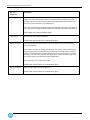
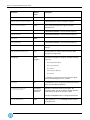
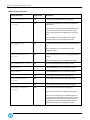
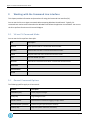
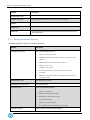
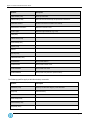
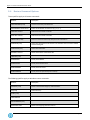
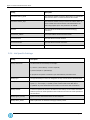
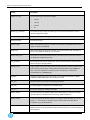
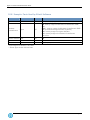
Agent 7.3 for Microsoft Windows User Guide Setting Description Backup.enc_type The encryption type. These are the options: NONEDES TRIPLEDES BLOWFISH AES Backup.log_maxcopies The number of logs to keep. The oldest logs are removed automatically in order to allow new logs to be created. Backup.local_catalog When set to YES, a local catalog file is created in the job subdirectory. Backup.retention The retention name. Backup.registry Backs up the Windows registry. The values are YES or NO. The default is NO. This only applies to Windows 2003/2008. Backup.nds Backs up the Novell Directory Service (NDS). The values are YES or NO. The default is NO. This only applies to NetWare 4.2x. or greater Backup.defer_after The number of minutes the backup skips any new files or parts of new files that were not backed up completely previously. enc_password The encryption password for the file data. This is the password (case sensitive) that is used to encrypt or decrypt safesets. log.log_to_file Logs, messages to a file. The file is written to the job directory and has the same name as the current command (e.g. "%data_directory%\myJob\Restore.log"). NOTE that upon successful completion of a backup, the file "Backup.log" is renamed to a numbered file (e.g. "00000099.log"). log.detail The level of detail in the log file. The levels, in increasing order of detail, are NONE, SUMMARY, DIRECTORIES and FILES. The default is FILES. nds_pass The password for the account when backing up the NDS. nds_path The starting point in an NDS tree for the NDS backup. nds_user The account used when backing up the NDS. Restore.source For server restores, the safeset number can be shortened (e.g. server1:3). For other types of safesets, it should be the full name (e.g. disk9:monday1.ssi). Restore.include A comma-separated list of files to back up. To specify a whole directory tree, use the syntax "\.\". For example, "C:\TEMP\.\*.DOC" would include all the DOC files in C:\TEMP or any of its subdirectories. Restore.exclude A comma-separated list of files to exclude from the backup. The set of files that will be backed up is the set of files specified in the include list minus the set of files specified in the exclude list. Page 62