1
If you are still having trouble, try a full reset of the Minirig – this will restore it to default and un-pair all devices.
•
•
•
•
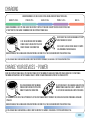
To reset your Minirig, start with the Minirig OFF and no cables plugged in.
Press and hold the button. Keep holding it for at least 16 seconds.
Eventually the Minirig will reset and the LED will turn off. You can release the button now.
Wait for the LED to illuminate yellow. Press the button once.
•
•
•
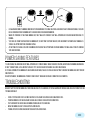
After around 3 seconds the Minirig and LED will turn off and be ready to use again as normal.
You will have to re-pair your devices after a reset.
The Bluetooth name will also be reset to default - “MINIRIG”
If you are still having problem you can visit our support page. Please read our FAQ section and view our demo
videos before contacting us.
WARRANTY AND REPAIRS
We hope that the Minirig will never let you down, however if you believe that there is a fault with your Minirig we have a simple and
fair warranty and repair service.
If you have been through our FAQ and troubleshooting section and still believe your Minirig is faulty, please contact us through our
support page.
Where possible we prefer to repair any faulty products. Our products are made in the UK, so we are in the unique position of being able
to fix and repair any of our products quickly ourselves. This also benefits the environment by re-using as many parts as possible,
minimising any harmful or non-recyclable waste going to land-fill.
The Minirig is covered by a full 1 year warranty service. Please see our terms and conditions for full details. If your Minirig product is faulty outside of this warranty period please still contact us as usual. We can still repair your product quickly and easily
through our fair non-profit repair service.
follow us by hitting the link
MINIRIG
R
home