1
Extract from: Format an Academic Paper Part 1: Creating Templates & Applying Styles
4. If your document uses a template shared by other documents (such as thesis chapters), then be
sure to click the New documents based on this template button near the bottom of the window.
(This will ensure that your changes are carried through to all other documents based on the
same template.)
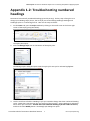
5. Click on the Format button in the lower left corner and choose Numbering. The Modify
Multilevel List dialog box opens. If the box looks smaller than the one shown below, click the
More>> button in the lower left corner to see additional options.
6. In the column in the upper left corner, click on level 2.
7. Delete everything shown in the Enter formatting for number box.
8. Return to page 43 above and work through steps 16–35, taking care to follow the instructions in
the exact order they are listed.
When you are finished, check the numbering in your document. If you still
have problems, consider attending an IT Software Surgery or a
PhD Thesis Surgery. You can book a place on either at:
https://apps.lse.ac.uk/training-system/.
© London School of Economics & Political Science
2
lse.ac.uk/imt/training