1
Check the volume setting on the control panel and amplifier
Whilst testing sound, it may help to play a sound through the laptop or pc continuously in order to give an indication as to when the problem is solved (a Mozart music file can typically be found in “My Documents/My Music”).
1.
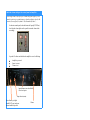
On the main control panel (where the buttons for Laptop/PC/DVD are)
check that the volume lights are lit up and if not turn the volume knob
accordingly
2.
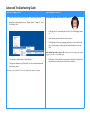
Open the AV cabinet and check that the amplifier is set to the following
Amplifier is powered
Source is correct
Volume is set
Input Indicators (one should be lit),
if not check power
Input selection (turn)
Power/Standby (red light
should NOT be on) and power
button should be depressed
Volume