Transcript
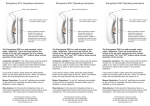
Entryphone® 53#V Operating Instructions
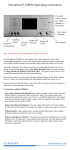
Ring volume adjustment
Door release and door open indicator
Ringer-off switch and indicator
Auxillary switch
Camera switch
Note. Not all
functions are
available on all
phones.
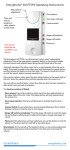
Phone on
The Entryphone 53#V is a wall-mounted, colour video telephone. The video screen
and the speech circuits turn on automatically when the telephone is called. If you
wish to speak to the caller, lift the handset and talk to a caller as you would on any
telephone.
If you wish to admit a visitor, press the door release button on the upper right of
the unit. Note: the release button will only operate when the screen is on.
The unit will turn itself off either a short time after the door has been released or
after about ninety seconds of operation.
The function switches (if fitted).
Door release button and indicator: If you wish to admit a visitor, press the door
release button on the upper right of the unit. Note: The release button will only
operate when the screen is on. If the lock release is fitted with a monitor switch
the release button will illuminate to indicate that the door is open.
Ringer off switch and indicator: Press the ringer-off switch to mute the ringer;
the button will illuminate to indicate the ringer is muted, press again to cancel.
Camera Switch: If your system has a second camera fitted press this to switch
between cameras or lock the view to one camera.
Phone on and power indicator: If the phone has not been called you can use this
button to turn the phone on, the indicator will illuminate. The unit will turn itself
off either a short time after the door has been released or after about ninety
seconds of operation.
Ring Volume: On the top left of the telephone there is a ring volume adjustment
that can be turned using a small screwdriver. Turn clock-wise to increase the
volume.
020 8870 8635
entryphone.co.uk