Transcript
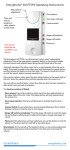
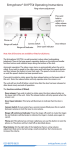
Entryphone 201V Operating Instructions
Ring volume adjustment.
Door release button. Press if
you want to admit a caller.
Manual operation switches.
Usually the monitor will
switch on automatically
when the phone is called. If
enabled these switches allow
the telephone to be operated
manually.
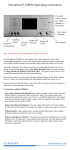
Entryphone 200V Operating Instructions
Ring volume adjustment.
Door release button. Press if
you want to admit a caller.
Manual operation switches.
Usually the monitor will
switch on automatically
when the phone is called. If
enabled these switches allow
the telephone to be operated
manually.
Entryphone 200V Operating Instructions
Ring volume adjustment.
Door release button. Press if
you want to admit a caller.
Manual operation switches.
Usually the monitor will
switch on automatically
when the phone is called. If
enabled these switches allow
the telephone to be operated
manually.
The Entryphone 200V is a wall mounted, colour
video, telephone. There are three buttons, the
button at the top right operates the door release
and the lower “On” and “Off” buttons allow manual
operation of the monitor.
The Entryphone 200V is a wall mounted, colour
video, telephone. There are three buttons, the
button at the top right operates the door release
and the lower “On” and “Off” buttons allow manual
operation of the monitor.
The Entryphone 200V is a wall mounted, colour
video, telephone. There are three buttons, the
button at the top right operates the door release
and the lower “On” and “Off” buttons allow manual
operation of the monitor.
Automatic operation: The video screen and the speech
circuits turn on automatically when the telephone is
called. If you wish to speak to the caller lift the handset
and talk to a caller as you would on any normal
telephone.
Automatic operation: The video screen and the speech
circuits turn on automatically when the telephone is
called. If you wish to speak to the caller lift the handset
and talk to a caller as you would on any normal
telephone.
Automatic operation: The video screen and the speech
circuits turn on automatically when the telephone is
called. If you wish to speak to the caller lift the handset
and talk to a caller as you would on any normal
telephone.
If you wish to admit a visitor press the small release
button on the upper right of the unit. Note: The release
button will only operate when the screen is on.
If you wish to admit a visitor press the small release
button on the upper right of the unit. Note: The release
button will only operate when the screen is on.
If you wish to admit a visitor press the small release
button on the upper right of the unit. Note: The release
button will only operate when the screen is on.
Manual Operation: On and off switches are provided
so the unit can be operated manually (these may be
disabled on some systems).
Manual Operation: On and off switches are provided
so the unit can be operated manually (these may be
disabled on some systems).
Manual Operation: On and off switches are provided
so the unit can be operated manually (these may be
disabled on some systems).
Ring Volume: On the top left of telephone there is a
ring volume adjustment that can be turned using a small
screwdriver. Turn clock-wise to increase the volume.
Ring Volume: On the top left of telephone there is a
ring volume adjustment that can be turned using a small
screwdriver. Turn clock-wise to increase the volume.
Ring Volume: On the top left of telephone there is a
ring volume adjustment that can be turned using a small
screwdriver. Turn clock-wise to increase the volume.
The Entryphone Company Limited
23 Granville Road, London SW18 5SD
Tel: 020 8870 8635 Fax: 020 8874 0066
www.entryphone.co.uk
The Entryphone Company Limited
23 Granville Road, London SW18 5SD
Tel: 020 8870 8635 Fax: 020 8874 0066
www.entryphone.co.uk
The Entryphone Company Limited
23 Granville Road, London SW18 5SD
Tel: 020 8870 8635 Fax: 020 8874 0066
www.entryphone.co.uk