1
Operating instructions
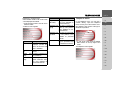
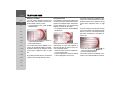
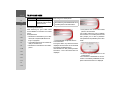
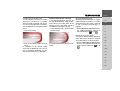
Index
>>>
INDEX
Index
2
>D
Safety information
6
> GB
The Traffic Assist
Use
8
8
>F
Navigation
Music
Pictures
Video
Telephone
>I
>E
Unpacking the Traffic Assist
>P
Checking the delivery
Delivery contents
Complaints procedure
Handling the packaging
> NL
> DK
Description of unit
>S
Traffic Assist - basic unit
Cable for power supply from
cigarette lighter
Mains adapter
Battery
SD memory card
USB connection cable
Unit bracket
Accessories
External GPS antenna
External microphone
Headset
>N
> FIN
> TR
> GR
> PL
> CZ
Information about
documentation
>H
Quick start guide
Operating instructions
> SK
2
8
8
8
8
8
9
9
9
10
10
10
10
11
11
11
11
12
12
12
12
12
12
13
13
13
Registration
Repairs
Emissions and disposal
13
13
13
Overview Traffic Assist
Maintenance and care
Battery quality declaration
Display quality declaration
Start-up
Memory card
14
19
20
20
20
20
Inserting memory card
Ejecting memory card
Power supply
Using the battery
Connecting to socket
Connecting up to power supply
Removing power supply
Connecting to the cigarette lighter
Unit bracket
Fitting the unit bracket
On the windscreen
Adjusting the unit bracket
Vertical
Horizontal
Attaching the Traffic Assist
Removing the Traffic Assist
TMC antenna
Installation of the TMC antenna
Connecting the TMC antenna
21
21
22
22
22
22
23
23
23
24
24
25
25
25
25
25
26
26
26
GPS-antenna
27
Unit antenna
Connecting up external
antenna
27
Additional connections
27
Connecting the telephone mute
function
Connecting the audio signal
Connecting USB storage media
Switching the Traffic Assist on/off
Switching on
Switching off
Basic information about the
touch screen
Operation
Calibration
Basic information about the menus
The main menu
Entries made with the entry menu
Entering characters
Adopting suggestions
Scrolling through the lists
Special characters and umlauts
Entering numbers
Switching between upper and
lower case
Deleting characters
Inserting spaces
The back key
Sensor button
27
28
28
28
29
29
29
30
30
30
30
30
30
31
31
31
32
32
33
33
33
33
34
INDEX
Button lock
Activating the button lock
Deactivating the button lock
Volume control
More maps
Installation program
Transferring files
Transferring using the SD card reader
Transferring using the USB port
Transferring maps
Transmitting music tracks, pictures
and videos
34
34
34
34
35
35
35
35
35
36
36
Faults
36
Navigational mode
What is navigation?
Selecting navigation
37
37
38
Aids for navigation
Fast access mode
Navigation menu
Map display
38
38
38
38
Rapid access
Structure of rapid access
Navigation menu and map display
The list of destinations
Icons used
Operating rapid access
Starting using an existing destination
Scrolling in the destinations memory
Displaying or editing destination
38
38
38
39
39
39
39
39
40
The Navigation menu
Structure of the navigation menu
Address
Point of interest
Select on map
Enter coordinates
Route planning
Settings
Navigation menu: Address
Selecting a country
Select address and start
Cancelling navigation
Navigation menu: Point of interest
Point of interest: Near GPS position
Point of interest: nationwide
Navigation menu: Select on map
Navigation menu: Route planning
Route list
Using a route
The New button
The Edit key
The Calculate key
The Start key
Navigation menu: Enter coordinates
Navigation menu: Settings
The Auto mode key
The Map info key
The Routing options key
The Route info key
The Format key
The Speed key
41
41
41
41
41
41
41
41
42
42
42
48
48
48
49
51
52
52
53
53
54
54
55
55
56
56
57
58
59
59
60
The Time Zone key
The Smart Speller button
The Junction info button
The Home address button
The TMC button
The Volume key
The Dimmer button
The button Load map
The Factory settings key
What is dynamic route guidance?
Displaying TMC messages on
the map
Using TMC
Reading a message
Display the relevant road in the map
Updating announcements
Taking announcements into
consideration when calculating routes
Automatic recalculation
Manual recalculation
Map display
Configuration of map display
Map display without route guidance
Map display with route guidance
Map display with reality view
Map display with toolbar
Using the map display
Repeat the last voice prompt
Changing the announcement volume
Additional information
Position information
>>>
61
61
62
62
63
64
64
64
65
>D
> GB
>F
>I
>E
65
>P
66
66
67
67
67
> NL
> DK
>S
67
67
68
>N
> FIN
68
69
69
69
70
70
71
71
71
72
72
> TR
> GR
> PL
> CZ
>H
> SK
3
>>>
INDEX
Zooming and the map (toolbar)
Display route (toolbar)
Displaying TMC messages (toolbar)
Change display (toolbar)
Point northwards (toolbar)
Available POIs along the route
(toolbar)
Move map (toolbar)
Calling up the options menu (toolbar)
Playback of MP3 files during an
active navigation
>D
> GB
>F
>I
>E
>P
Telephone mode
Calling up telephone mode
Telephone fast access mode
> NL
> DK
Configuration of fast access mode
Number list
Icons used
Operating in fast access mode
Dialling an existing number
Scrolling through the number list
Displaying or editing entries
>S
>N
> FIN
> TR
Telephone menu
Dialling a number
Telephone book
Connecting a mobile phone
Opening the device list
Connecting automatically
Searching for a mobile phone
Connecting from the device list
> GR
> PL
> CZ
>H
> SK
4
72
72
73
73
73
73
75
75
76
77
77
77
77
78
78
78
78
78
79
79
80
80
81
81
82
82
83
Telephone/Bluetooth settings
Switching Bluetooth on/off
Visibility of the Traffic Assist
Device name
Setting telephone and ringtone volume
Telephone calls
Establishing a call
Answering a call
Ending a call
When route guidance is active
Without route guidance
Music operations
Selecting music playback
The MP3 player
Operating the MP3-Players
Track skip
Play
Pause
Cancelling playback
Folder overview
Track repeat/random play function
Setting volume
Activating FM transmitter
Navigation during MP3 player
operation
Shutting down the MP3-Player
83
83
83
84
84
84
84
85
85
85
85
86
86
86
86
86
87
87
87
87
88
88
89
89
89
Pictures mode
Selecting pictures display
The Picture Viewer
Operating the Picture Viewers
Scrolling
Slideshow
Full screen
Shutting down the Picture Viewer
Folder viewing mode
Operating folder viewing mode
Subfolders
Scrolling
Selecting a picture
Changing folder levels
Closing folder viewing mode
Setting the volume
Video mode
Selecting video playback
The video player
Operating the video player
Opening and playing videos
Showing the button bar while
video is playing
Pausing and resuming playback
Fast forward/reverse
Setting the volume
90
90
90
90
90
90
91
91
91
92
92
92
92
92
92
92
93
93
93
93
93
94
94
94
94
INDEX
Settings
Selecting the settings
The setting menu
Operation
Selection possibilities
Closing the setting menu
The individual menu points
Energy
Displaying the energy supply
Ending the status display
Day/night display
Calibration
Starting calibration
Language
Calling up language selection
Turn the page
Selecting the language
Cancelling the language selection
Moodlight
Tones
Automatic on/off
Switching the function on / off
FM transmitter
Storing frequencies
Information
95
95
95
NOTICE
EU Declaration of Conformity
Disposal
>>>
107
107
108
>D
> GB
95
95
95
>F
95
95
95
96
96
96
96
97
97
97
97
97
97
98
98
98
98
99
100
Specialist words
101
Keywords
103
Technical Data
106
>I
>E
>P
> NL
> DK
>S
>N
The information and data contained in
these documents are subject to change
without prior notice.
No part of these documents may be reproduced or transmitted for any purpose
without express written permission from
HARMAN/BECKER
Automotive
Systems GmbH . All technical information, drawings etc. are subject to copyright
law.
© Copyright 2007, HARMAN/BECKER
Automotive Systems GmbH
All rights reserved.
> FIN
> TR
> GR
> PL
> CZ
>H
> SK
5
>>>
SAFETY INFORMATION
Safety information
>D
!Safety information
> GB
• The unit may only be operated if the traffic situation allows for this and if you are absolutely certain that you yourself,
your fellow passengers or other road users will not be put at risk, encumbered or disturbed by this.
>F
• The rules of applicable road traffic acts must be observed at all times. Destinations may only be input when the vehicle is
stationary.
>I
>E
• The navigational system is only an aid. The data/details provided may in some cases be incorrect. The driver must always
decide whether to follow the details given or not. We accept no liability for the navigational system issuing incorrect
details. As a result of traffic routing changes and deviating data, inaccurate or incorrect instructions may be given. Drivers
should always pay attention to the actual road signs and traffic control. In particular, the navigational system cannot be
used as a means of orientation in cases of poor visibility.
>P
> NL
> DK
>S
>N
• The unit may only be used for its intended purpose. The volume of the navigational system should be set so that noises
outside the vehicle can still be heard.
> FIN
• The unit should be switched off immediately if faults occur (e.g. development of smoke or smells).
> TR
• For safety reasons, the unit may only be opened by a specialist. Please contact your local stockist if you require repairs.
> GR
> PL
> CZ
>H
> SK
6
SAFETY INFORMATION
>>>
• The SD memory card can be removed. Caution! Small children could swallow it.
>D
• The mains voltages (V) indicated on the mains charger, the car charger adapter and the unit must not be exceeded. Failure
to observe this can result in destruction of the unit and the charger as well as explosion of the rechargeable battery.
> GB
• Never open the unit or the rechargeable battery. Any modification to the unit is also impermissible and renders the type
approval invalid.
>I
• Use only genuine BECKER original accessories. This will ensure that all the relevant regulations are complied with and
damage to health and property is avoided. Dispose of defective units and the rechargeable battery according to the
applicable legal requirements.
>P
• No warranty is granted in the case of improper use. These safety instructions also apply to genuine BECKER original
accessories.
> DK
>F
>E
> NL
>S
>N
> FIN
> TR
> GR
> PL
> CZ
>H
> SK
7
>>>
THE TRAFFIC ASSIST
Use
The Traffic Assist
>D
The Traffic Assist is a powerful PND
(Personal Navigation Device) for use in
vehicles and closed spaces. The unit
should be protected from dampness and
dirt.
> GB
>F
>I
>E
>P
> NL
> DK
>S
>N
The Traffic Assist can be used as:
• navigational unit
• MP3 (device for playing music)
• JPEG picture viewer
• Video player
• Can be used as a very convenient handsfree unit via Bluetooth®
> FIN
> TR
> GR
> PL
> CZ
>H
> SK
8
Navigation
Music
Thanks to GPS = Global Positioning System, you no longer need to spend hours
searching through road atlases.
Once outside buildings, the receiver antenna integrated in the unit gives you continuous access to navigational possibilities. Depending on reception, you may
not be able to use the navigational function inside buildings. When used in vehicles, you may not be able to adequately receive GPS data depending on how the
Traffic Assist is installed. In such cases,
you will have to connect up an external
antenna (does not fall within the scope of
supply).
The Traffic Assist with TMC is equipped
with TMC, which gives you the option of
receiving traffic announcements via the
TMC antenna provided. Traffic announcements are transmitted when the
TMC is active. The system plans an alternative route automatically or on request to
avoid traffic problems, depending on the
setting.
Thanks to the integrated MP3-Player, you
can listen to your favourite tracks when on
the go.
Pictures
The Traffic Assist has a Picture Viewer offering many functions for viewing pictures.
Video
Traffic Assist features a video player for
playing videos.
Telephone
Your Traffic Assist is equipped with Bluetooth® wireless technology. You can connect a mobile phone equipped with Bluetooth® wireless technology to it via
Bluetooth. Your Traffic Assist the serves
as a very convenient hands-free unit.
THE TRAFFIC ASSIST
Unpacking the Traffic Assist
Delivery contents
Note:
Your Traffic Assist is supplied in stable
packaging. Do not unpack the unit in full
if you discover any serious damage to the
packaging or its content. If this happens,
please contact your local stockist.
1
2
3
4
Checking the delivery
5
Before the Traffic Assist is started up, the
delivery should be checked to ensure that
it is complete and in the correct condition
(see also page 14).
> Carefully unpack the content of the
package and check it.
7
6
>>>
1 Traffic Assist, the mobile navigation
system with integrated MP3 player,
video player, picture viewer and extremely convenient Bluetooth®
hands-free unit.
2 Docking station
3 Memory card (SD memory card) with
pre-installed map data
4 USB cable
5 Mains adapter for power supply via
the 230 V mains
6 Unit holder
7 TMC antenna
8 12V car power adapter for cigarette
lighter socket
9 DVD with installer for map data, actual map data and operating instructions (not illustrated).
>D
> GB
>F
>I
>E
>P
> NL
> DK
>S
>N
> FIN
> TR
> GR
> PL
8
> CZ
>H
> SK
9
>>>
THE TRAFFIC ASSIST
Complaints procedure
>F
Please contact your local stockist if you
have any complaints. The unit can also be
sent directly to Harman/Becker in its original packaging.
>I
Handling the packaging
>E
Keep the original packaging in a dry place,
at least for the warranty period.
>D
> GB
>P
Note:
The packaging should be disposed of correctly in accordance with national disposal guidelines. The packaging must not be
burnt. Depending on the country to
which the unit is supplied, it may be possible for local stockists to accept packaging.
> NL
> DK
>S
>N
> FIN
> TR
> GR
> PL
> CZ
>H
> SK
10
Description of unit
The Traffic Assist consists of the basic
unit Traffic Assist and the accessories included in the delivery.
You will find photos of the individual
parts under:
• "Overview Traffic Assist" on page 14
Note:
The basic unit and accessories must not
be opened or modified in any way.
Traffic Assist - basic unit
The basic unit contains all the electronics:
• an integrated antenna,
• a TMC receiver for the reception of
traffic messages,
• a touchscreen,
• sensor buttons for operation,
• an integrated loudspeaker for the output of messages during navigation and
for MP3 files and phone calls,
• a microphone.
On the sides of the unit, there are also
light bars as well as various connections
and ports.
You will find more details of the unit
under:
• "Technical Data" on page 106
THE TRAFFIC ASSIST
Cable for power supply from
cigarette lighter
This cable allows the unit to be connected
up to the car's cigarette lighter.
The power supply must satisfy the following requirements:
• DC current 12 volts
0.5 amps
Mains adapter
This mains adapter enables the Traffic Assist to be connected to a mains outlet.
Requirements for power supply are:
• Alternating current
100-240 volts
0.2 Amps
50-60 Hertz
Battery
When depleted, the integrated rechargeable battery can be recharged by connecting the Traffic Assist to the power supply.
For this purpose, connect the unit to a
computer via the USB connecting cable,
connect it to a 12 V socket in a vehicle using the car power adapter, or charge it using the mains power supply unit connected the 230 V grid.
SD memory card
A memory card is used as a storage medium for road maps, music tracks and images.
The memory card provided has a storage
capacity of 2 GB and offers sufficient
space for the complete European map set,
the Traffic Assist does not support larger
memory cards. If you intend to listen to
music using the Traffic Assist or want to
view images, you must save these to a separate card (not included).
>>>
Alternatively, you can connect a USB
memory stick to the USB port to play
MP3 files or display images.
>D
> GB
Notes:
The complete European map set requires
approximately 1.8 GB of memory space.
If you intend to listen to music, look at
pictures or watch videos on the Traffic
Assist. We recommend that you store the
relevant data on a separate memory card
(not included in scope of delivery).
If you would like to listen to music with
the Traffic Assist during navigation, the
music must be stored on the supplied
memory card. The Traffic Assist does not
support the changing of memory cards
during navigation.
>F
>I
>E
>P
> NL
> DK
>S
>N
> FIN
When not in the unit, the memory card
must be stored in a protected dry place
away from direct sunlight in the packaging supplied. Avoid touching or dirtying the contact strip.
You will find more details about the memory card under:
• "Technical Data" on page 106
> TR
> GR
> PL
> CZ
>H
> SK
11
>>>
THE TRAFFIC ASSIST
USB connection cable
The USB connection cable can be used to
connect the unit to a standard personal
computer by means of the USB port.
However, to use the data on the PC, you
will first have to install the free "Active
Sync" software from Microsoft®.
>D
> GB
>F
>I
>E
Unit bracket
>P
The Traffic Assist can be attached in the
vehicle with the unit holder and the docking station.
> NL
> DK
>S
>N
Accessories
!Danger!
External GPS antenna
You can use an external antenna to improve reception in vehicles where only
limited GPS reception is available (not included in the scope of supply). Please contact your local stockist for more information.
Prevention of damage to hearing
The use of headphones or earphones over a relatively long
period of time at a high volume may cause permanent damage to
your hearing.
Conformity with the limits for sound
pressure laid down in the standard NF
EN 50332-1:2000 as required by
French Article L. 5232-1 is guaranteed.
External microphone
The internal microphone of the Traffic
Assist is unable to achieve satisfactory
voice quality if the Traffic Assist is unfavourably positioned in the vehicle.
In these cases, please use the optionally
available external microphone. Please consult your local specialist dealer.
> FIN
Headset
When using the Traffic Assist as an MP3
player, commercially available headphones with a 3.5 mm jack or adapter can
be connected (not included).
> TR
> GR
> PL
> CZ
>H
> SK
12
Note:
Headphones must not be used while
driving. Comply with the local national
laws and regulations.
THE TRAFFIC ASSIST
Information about
documentation
Quick start guide
The Quick Start Guide is designed to provide a brief introduction to operating your
Traffic Assist. The most important basic
functions of the Traffic Assist are explained in the Quick Start Guide.
Registration
Repairs
You can register your product using our
software service, we will then inform you
of any new updates and other news.
The unit must not be opened if damaged.
Please contact your local stockist.
You can register online on the Becker
homepage www.mybecker.com.
The “Software update” menu item is located under “SERVICE/SUPPORT“.
>>>
>D
> GB
Emissions and disposal
>F
Information on emissions, electromagnetic compatibility and disposal can be found
in "NOTICE" on page 107.
>I
>E
>P
Operating instructions
> NL
A comprehensive explanation of the Traffic Assist functionalities is contained in
these operating instructions.
> DK
>S
>N
> FIN
> TR
> GR
> PL
> CZ
>H
> SK
13
>>>
OVERVIEW TRAFFIC ASSIST
>D
1
> GB
2
>F
3
4
>I
>E
>P
8
> NL
7
5
> DK
6
>S
>N
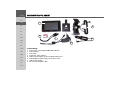
Scope of delivery
1 Traffic Assist – PND (Personal Navigation Device)
2 Docking station
3 Unit holder
4 Antenna for TMC reception
5 Cable for power supply via vehicle cigarette lighter (12 V)
6 Mains adapter for power supply via the 230 V mains
7 USB connecting cable
8 SD card (with navigation data)
Overview Traffic Assist
> FIN
> TR
> GR
> PL
> CZ
>H
> SK
14
OVERVIEW TRAFFIC ASSIST
>>>
>D
9
3
8
7
> GB
1
2
>F
3
>E
>I
4
5
>P
> NL
6
> DK
>S
>N
Front of unit with control and display elements
1 Touch screen with selected main menu
2 Map display sensor button area (see "Map display" on page
68)
3 Light bar (mood light)
4 Home address sensor button area (see "Structure of rapid access" on page 38)
5 Touchscreen button
Press = activates the respective button command
6 BACK button
Press = returns to various applications
Press and hold = switches Traffic Assist on and off
7 Day and night changeover sensor button area (see "Sensor
button" on page 34)
8 Telephone sensor button area (see "Calling up telephone
mode" on page 77)
9 Microphone
> FIN
> TR
> GR
> PL
> CZ
>H
> SK
15
>>>
OVERVIEW TRAFFIC ASSIST
>D
1
> GB
>F
2
>I
>E
3
3
>P
> NL
> DK
>S
5
>N
> FIN
Top of unit
1 Socket for external antenna (external antenna not included in
scope of delivery)
Back of unit
2 Docking station interface
3 Opening for speaker
Base of unit
4 USB interface PC connection
5 Reset button
> TR
> GR
> PL
> CZ
>H
> SK
16
4
OVERVIEW TRAFFIC ASSIST
>>>
>D
1
2
> GB
6
>F
>I
3
>E
5
>P
> NL
4
> DK
>S
>N
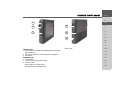
Left side of unit
1 3.5 mm socket for headphones (headphones not included in
scope of delivery)
2 USB port for data carrier containing MP3 or image files
3 SD card slot
Right side of unit
4 On/Off switch
5 Connection for external power supply
6 Volume control
Move upwards = increase volume
Move downwards = decrease volume
Press = mute
> FIN
> TR
> GR
> PL
> CZ
>H
> SK
17
>>>
OVERVIEW TRAFFIC ASSIST
>D
> GB
>F
>I
1
4
>E
3
>P
> NL
2
> DK
>S
>N
> FIN
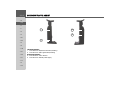
Left docking station
1 Connection for telephone-mute lead (accessory)
2 Connection for audio-signal lead (accessory)
Right docking station
3 Connection for TMC antenna
4 Connection for external power supply
> TR
> GR
> PL
> CZ
>H
> SK
18
>>>
Maintenance and care
The unit is maintenance-free.
For proper care, a commercially available
cleansing fluid for electrical devices may
be applied using a soft damp cloth.
!Danger!
Danger to life by electrocution. Always
switch off the unit and disconnect the
mains power supply unit before cleaning the unit, supplied components, or
accessories.
Note:
Do not use any aggressive or abrasive
substances or cloths which may damage
the surface.
The unit must not be exposed to water.
Your mobile navigation system was designed and manufactured with great care
and should be treated with equal care. You
will enjoy your mobile navigation system
for a long time to come if you observe the
recommendations listed in the following:
• "Protect your mobile navigation system
from water and moisture. If your unit is
exposed to moisture, switch it off immediately and disconnect the power
supply. Allow the unit to dry at room
temperature.
• Do not operate your mobile navigation
system in a dusty or dirty environment
and do not store it in such an environment.
• Do not store your mobile navigation
system in hot environments. High temperatures can shorten the service life of
electronic components in your unit,
damage the rechargeable batteries and
cause certain plastics to warp or melt.
• Do not store your mobile navigation
system in cold environments. During
operation, when the unit warms up to
operating temperature, moisture may
form internally, causing damage to electronic components.
• Do not drop your mobile navigation
system unit, protect it from shocks and
do not shake it. Improper handling can
damage components within the unit.
• Never use corrosive or aggressive chemicals, cleaning solutions or aggressive
detergents for cleaning.
All the above information applies equally
to the mobile navigation system, the rechargeable battery, the mains charging
and car power adapters as well as all accessories. Should one of these parts not work
properly, please contact your authorised
dealer.
>D
> GB
>F
>I
>E
>P
> NL
> DK
>S
>N
> FIN
> TR
> GR
> PL
> CZ
>H
> SK
19
>>>
>D
> GB
>F
>I
>E
>P
> NL
> DK
>S
>N
> FIN
> TR
> GR
> PL
> CZ
>H
> SK
20
Battery quality declaration
Display quality declaration
Memory card
The capacity of the rechargeable battery in
your mobile navigation system decreases
with every charging/discharging cycle.
Improper storage at excessively high or
low temperatures may also cause a gradual
deterioration of capacity. Consequently,
the operating time may be substantially
reduced even in the case of a fully charged
battery.
The rechargeable battery is designed such
that it should certainly still be possible for
it to be charged and discharged after 6
months of operation of your mobile navigation system. In the event of a significant
loss of capacity, we recommend replacement of the rechargeable battery. Please
contact your authorised dealer. Use only
genuine BECKER original spare parts.
In some cases, for technical reasons, a few
discoloured dots (pixels) may be visible on
the display. Some pixels may also appear
brighter or darker. However, such instances do not represent a product flaw.
The memory card provided has a storage
capacity of 2 GB and offers sufficient
space for the complete European map set,
the Traffic Assist does not support larger
memory cards.
The complete European map set requires
approximately 1.8 GB of memory space.
If you intend to listen to music, look at
pictures or watch videos on the Traffic
Assist. We recommend that you store the
relevant data on a separate memory card
(not included in scope of delivery).
If you would like to listen to music with
the Traffic Assist during navigation, the
music must be stored on the supplied
memory card. The Traffic Assist does not
support the changing of memory cards
during navigation.
Start-up
Once the Traffic Assist has been unpacked
and checked for damage, the unit can be
started up. The individual start-up stages
are:
• insert memory card
• connect to power supply
• Switching on the unit
• Ensuring antenna reception (if navigation is desired)
>>>
Notes:
A small slider is located on one side of the
card.
Notes:
The memory card should only ever be inserted and ejected when the unit is
switched off. If the unit is not switched
off, data may be lost.
Navigational operations are not possible if
the memory card containing card data is
not inserted. If you remove this during
navigation, directions to your destination
will be aborted immediately.
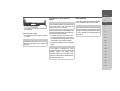
Inserting memory card
The card slot is located on the left side of
the unit. The card compartment is
equipped with a spring-actuated lock and
ejection mechanism.
> Remove the memory card from its
packaging without touching or soiling
the contact bar.
> Hold the memory card such that the
contact bar faces towards the rear of the
unit.
> Guide the memory card into the card
slot.
>D
> GB
>F
>I
>E
> Exert a little pressure and slide the
memory card into the card slot until it
snaps in.
>P
> NL
Ejecting memory card
> DK
The card slot ejects the card so that you
can pull it out with two fingers.
> Use your finger to gently press the
memory card against the spring force
into the card slot and then release it.
The card is ejected.
> Remove the memory card and place it
in the packaging while ensuring not to
touch contact bar.
>S
>N
> FIN
> TR
> GR
> PL
> CZ
>H
> SK
21
>>>
Power supply
>D
At home, the Traffic Assist can be powered by means of the supplied mains power supply unit. In the vehicle, the cable for
the cigarette lighter can be used (also supplied). In both cases, the internal battery
of the Traffic Assist is charged. The power
supply can either be connected directly to
the Traffic Assist, or to the docking station.
> GB
>F
>I
>E
>P
> NL
Notes:
• Please note that TMC reception is only
possible when the power supply is connected to the docking station.
• If the unit battery is completely discharged, connect the power supply. It
may take up to a minute before the
Traffic Assist can be switched on again.
> DK
>S
>N
> FIN
> TR
> GR
> PL
> CZ
>H
> SK
22
Using the battery
Connecting to socket
The internal power supply is via the integrated rechargeable battery. The rechargeable battery is maintenance-free and does
not require any particular care.
!Danger of Death!
Note:
Please note that with a completely discharged battery, the unit requires up to
one minute until it can be switched on
again.
Make sure that your hands are not damp
and that the mains section is dry. Only
connect the mains section to a mains
supply with which such purposes are
permitted.
Connecting up to power supply
The mains power supply unit is connected
to the public mains grid as follows:
> Hold the connector and push it, without using excessive force, to the stop in
the relevant connecting socket on the
Traffic Assist or the docking station.
>>>
Connecting to the cigarette
lighter
> Use the plug to insert the mains section
in the socket.
Removing power supply
> To remove the power supply, proceed
in reverse.
Note:
Remove the mains section if you are not
planning on using the Traffic Assist for a
long time.
Note:
If the cigarette lighter has just been used
and is still warm, wait until this has
cooled down in its mounting.
Power supplies using a vehicle battery are
connected up as follows using the cable supplied for the cigarette lighter.
> Hold the connector and push it, without using excessive force, to the stop in
the relevant connecting socket on the
Traffic Assist or the docking station.
> Plug the plug adapter into the cigarette
lighter.
Unit bracket
>D
The Traffic Assist can be attached directly
to the windscreen with the unit holder.
> GB
Note:
The Traffic Assist and unit bracket must
not be exposed to long periods of direct
sunlight. Temperatures inside the vehicle
of +70 C and higher may damage parts of
the bracket.
>F
>I
>E
>P
> NL
> DK
>S
>N
Note:
If the engine is switched off, using
the vehicle's power supply through the
cigarette lighter will slowly drain
the vehicle battery! Do not therefore operate the Traffic Assist for extended periods with the engine off.
> FIN
> TR
> GR
> PL
> CZ
>H
> SK
23
>>>
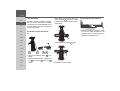
Fitting the unit bracket
>D
7
> GB
8
>F
>I
6
1
>E
>P
2
> NL
5
> DK
4
3
>S
>N
1
2
3
4
5
6
7
8
> FIN
> TR
> GR
> PL
> CZ
>H
> SK
24
Fastening screw
Fastening screw
Lever
Suction surface
Base
Docking station
Clip
Carrier plate
Note:
Fasten the unit holder such that your
field of vision is not impaired when the
Traffic Assist is installed and ensure that
the unit is outside the deployment area of
the airbag.
Ensure that the electrical connection cable does not hamper you from accessing
the vehicle's controls.
Also ensure that there is enough space to
easily slide the Traffic Assist back out of
the bracket.
Clean the attachment surface on the
windscreen to ensure that it is clean and
free of grease. Do not use greasy or soapy
cleaning agents.
On the windscreen
The unit holder can be attached directly
to the windscreen via the suction mechanism.
> Find a suitable position.
> Press the base (5) with its suction surface against the windshield.
> Rotate the unit bracket so that the support plate is roughly in the direction of
viewing required.
> Press the lever (3) downwards.
The bracket will have stuck firmly to the
windscreen. It can now be set precisely.
To remove, actuate the lever (3) again.
>>>
Adjusting the unit bracket
The support plate (7) can be swung in two
directions (horizontally and vertically). It
can thereby be set at virtually every angle
of vision to the driver.
Note:
Do not swing the support plate in both
directions at the same time! Before moving, always take the Traffic Assist off the
unit bracket.
Vertical
> Loosen the fastening screw (2) far
enough to be able to swivel the carrier
plate (8) downwards from above without using excessive force.
> Hold the base (5) with one hand and
swivel the carrier plate (8) to the desired
position with the other hand.
> Tighten the fastening screw (2) sufficiently so that the Traffic Assist is held
securely in place when the vehicle is in
motion.
Horizontal
> Loosen the fastening screw (1) far
enough to be able to swivel the carrier
plate (8) from left to right without exerting excessive force.
> Hold the base (5) with one hand, and
swivel the carrier plate (8) to the desired
position with the other hand.
> Tighten the fastening screw (1) sufficiently so that the Traffic Assist is held
securely in place when the vehicle is in
motion.
> Push the docking station downwards to
the stop.
The Traffic Assist has attachment points
for the docking station on the top and
bottom of the housing.
> Insert the Traffic Assist with the attachment points on the bottom of the housing into the docking station.
> Press the Traffic Assist into the docking
station without using excessive force
until the clip (7) engages in the attachment point.
>D
> GB
>F
>I
>E
>P
> NL
> DK
Removing the Traffic Assist
> Press the clip (7) on the unit holder
with one finger and remove the unit
from the unit holder using your free
hand.
>S
>N
Attaching the Traffic Assist
> FIN
The docking station (6) is equipped with
four guides, the carrier plate (8) has corresponding retaining lugs.
> Position the docking station with the
guides onto the carrier plate retaining
lugs.
> TR
> GR
> PL
> CZ
>H
> SK
25
>>>
TMC antenna
>D
The TMC antenna included in the accessories is used to receive traffic messages.
The antenna is included separately in the
scope of delivery and has to be mounted
onto the unit holder.
> GB
>F
>I
>E
> Align the hole on the other side of the
TMC antenna 3 so that it is positioned over the screw hole for the fastening screw.
> Insert the connector of the TMC antenna into the socket provided on the
right-hand side of the docking station
without using excessive force.
Installation of the TMC antenna
>P
> NL
> DK
> Install the fastening screw 1 again.
>S
>N
> FIN
> TR
1
> GR
2
3
4
> Remove the fastening screw 1 completely.
> Push the side of the TMC antenna with
the 4 slot over the 3 lug on the 2
holder.
> PL
> CZ
>H
> SK
26
Connecting the TMC antenna
The antenna is now mounted.
>>>
GPS-antenna
Unit antenna
The GPS antenna is integrated into the
housing.
Note:
The integrated GPS antenna is not suitable for use in vehicles with anti-glare windows (metalised thermo-glass or metal
foil, indicated by the window label - SIGLA SOL, SIGLA CHROM, SIGLA,
KOOL-OF, SUNGATE, etc.) and vehicles with fine-meshed heating wires in
the windows.
If this is the case, use an external GPS antenna. Please consult your local specialist
dealer.
Connecting up external
antenna
To enable reception under adverse reception conditions, an external GPS antenna
can be connected (not included). For this
purpose, a closable connecting socket is
located on the rear of the housing. If no
external antenna is connected, this connection must always be closed again.
Additional connections
>D
Further connections are provided on the
docking station. These connections can be
used to connect the Traffic Assist to an audio system already installed in the vehicle.
> GB
>F
>I
Note:
Please note that the following connection
options are not possible for all audio systems.
>E
>P
> NL
> DK
> Open the closure by pulling gently on
its upper surface.
> Connect the external antenna using the
optionally available adapter.
>S
>N
> FIN
> TR
> GR
> PL
> CZ
>H
> SK
27
>>>
Connecting the telephone
mute function
>D
You can connect your Traffic Assist to
your audio system using an optionallyavailable cable for the telephone mute
function.
If the cable is correctly connected, your
Traffic Assist will mute the car radio during navigation announcements.
> GB
>F
>I
>E
Connecting the audio signal
You can connect your Traffic Assist to
your audio system using an optionallyavailable cable for output of the audio signal.
If the cable is correctly connected, you can
then output the audio signal via the vehicle audio system.
>P
> NL
> DK
>S
> Insert the jack on the cable into the
socket on the docking station for this
purpose.
> Connect the other end of the cable to
the telephone mute socket on your radio.
Please observe the manufacturer’s connection specifications.
>N
> FIN
> TR
> GR
> PL
> CZ
>H
> SK
28
> Insert the jack on the cable into the
socket on the docking station for this
purpose.
> Connect the other end of the cable to
the audio inputs on your audio system.
Please observe the manufacturer’s connection specifications.
Connecting USB storage media
You can connect a USB memory stick or
an external hard drive to your Traffic Assist.
Images, music or videos can then be accessed from these storage media.
Notes:
• Only external hard drives with a maximum power consumption of 500mA
may be operated. The hard drive can
only be operated when the Traffic Assist is powered via the mains adapter or
via the car power adapter.
• Please note that when using USB
memory sticks to play MP3 files or display images or videos, the battery capacity may be considerably reduced
(without external power supply).
The USB port for storage media is located
on the left side of the unit.
>>>
Switching the Traffic Assist
on/off
The unit is switched on and off using the
back key.
Switching on
Switching off
> Set the On/Off switch on the right side
of the unit to On.
> Press the back key for a few seconds.
The unit is switched on. The manufacturer's logo appears on the touch screen.
You can switch the unit off at any time. If
necessary, new destinations should first be
saved.
> Press the back key for a few seconds.
The unit will enter sleep mode.
> Switch the On/Off switch to Off for final deactivation of the unit.
>D
> GB
>F
>I
>E
>P
> NL
> DK
The following question appears shortly
thereafter: Comply with highway code
>S
Note:
Please deactivate the Becker moodlights
while driving in your vehicle in order to
prevent visual distraction from the road
traffic!
>N
> FIN
> TR
> GR
> If you agree with this request, press the
OK key.
> PL
Note:
The Traffic Assist may only be used in accordance with the applicable national
road traffic act!
> CZ
>H
> SK
29
>>>
Basic information about the
touch screen
>D
> GB
The Traffic Assist is fitted with a touch
screen.
>F
>I
>E
Calibration
If the touch screen starts responding imprecisely and e.g. buttons have to
be touched off-centre in order to be actuated, calibration should be undertaken.
The calibration function is started from
the Settings menu (see also page 96).
Entries made with the entry
menu
Some applications require entries to be
made via the entry menu. The entry menu
is operated in a similar way to a keypad.
Basic information about the
menus
>P
During operations, you are assisted by
various menus and entry windows.
> NL
> DK
>S
Note:
To ensure that the display's surface is not
damaged, you may only touch it with
your fingers or a blunt, non-smearing object.
>N
> FIN
> TR
The main menu
The top menu level is the main menu.
The individual applications are started
from the main menu.
Operation
> GR
The buttons which appear in the menus
or message windows should simply be
touched so that they are displayed as if
they had been pressed.
If the key pressed is not permitted in the
current situation, a short signal will
sound.
> PL
> CZ
>H
> SK
30
You will find information about the individual applications in the corresponding
main chapters.
The character entered on the keypad is
displayed in the top line of the entry
menu. The central area is used to enter
characters. Help functions are provided in
the bottom line. Descriptions of how to
operate the menu are provided below.
>>>
Entering characters
Characters are entered by pressing the
keys in the central area.
Once the entry is complete, the process is
concluded by pressing the OK key and the
entry passed on to the Traffic Assist for
processing.
Adopting suggestions
When a navigation destination is entered,
the Traffic Assist compares the entry with
the set of data on the memory card. The
Traffic Assist then only makes those letters which are possible available for selection and adds a sensible suggestion to the
letters already entered.
The suggestion and the non-selectable
characters are shown in a lighter font. If
the desired input appears in the upper display area after entering the first few letters
or numbers, you can immediately accept
this suggestion.
Note:
If necessary, you can switch off the smart
speller in the navigation settings.
It should also be noted that in southern
countries (e.g. Italy), the "prefix" (e.g. via
Gran Mundo) needs to be entered afterwards (e.g. Gran Mundo_via).
>D
> GB
>F
>I
> In order to accept the suggestion, press
either the input field or the OK button.
>E
>P
Scrolling through the lists
If you have already entered some of the
letters of the selection you want, you can
use the selection list to display all the destinations containing the combination of
letters in question.
> NL
> DK
>S
>N
> FIN
> TR
> GR
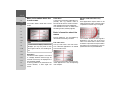
> To open the selection list, press the button at the top right corner of the screen.
The selection list appears.
> PL
> CZ
>H
> SK
31
>>>
Entering numbers
You have to change to the numerical keypad to enter numbers.
> Press the
key.
The numerical keypad is displayed.
>D
> GB
>F
>I
> Press the
arrow keys on the
right hand side of the screen to scroll
through the list.
> Press the destination you want.
The destination is adopted and the selection list is closed.
>E
>P
> NL
> To change to the special character keypad, press the
key.
The special character keypad is displayed.
> To return to entering letters, press
.
> DK
Special characters and umlauts
Special characters and umlauts do not
have to used when entering the names of
towns and streets. The Traffic Assist will
change entries from AE, OE and UE if
necessary.
> If e. g. you are searching for the town of
"Würzburg, then simply press
"WUERZBURG".
Special characters can be useful when
naming destinations and routes.
>S
>N
> FIN
> TR
> GR
> PL
> CZ
>H
> SK
32
> Enter the special character you want.
As soon as you have entered a special character, the system automatically switches
back to the letters keypad.
>>>
Switching between upper and lower
case
During free text entry, it is possible to
switch between upper and lower case
letters.
> Press
.
The display changes to lower case.
Deleting characters
To delete the last character, use the back
key.
The back key
The back key is integrated in the bottom
left hand corner of the casing.
>D
> GB
>F
>I
>E
>P
> To delete the character to the left of the
cursor, press the
key.
> In order to return to upper case, press
.
Inserting spaces
If you have an entry with two words, e.g.
for names of towns, the words should be
separated by a space.
> NL
It has various functions:
• Pressing and holding this button
switches the Traffic Assist to standby, or
on again.
• depending on the menu context, if
pressed briefly, you will be returned to
the previous entry level.
> DK
>S
>N
> FIN
> TR
> GR
> To enter a space, press the
> PL
key.
> CZ
>H
> SK
33
>>>
>D
Sensor button
25 There are two sensor buttons each on the
left and right sides of the touchscreen.
> GB
>F
>I
>E
1
4
2
3
Button lock
Volume control
The Traffic Assist can be protected from
inadvertent inputs via the sensor buttons
or the touchscreen via the button lock.
The volume can be adjusted both via the
integrated volume control on the Traffic
Assist and in the various applications.
Activating the button lock
1
>P
2
Note:
A description of volume adjustment in
the various applications is described in
the individual chapters.
1 Telephone sensor button
The telephone function is called up
using this sensor button. See “Calling
up telephone mode” on page 77.
2 Day/night sensor button
The display can be switched between
day and night mode using this sensor
button.
3 Home address sensor button
Route guidance to the home address
is started by pressing this sensor button, provided a home address has
been stored. See “The Home address
button” on page 62.
4 Map sensor button
Map display is called up using this
sensor button. See “Map display” on
page 68.
> NL
> DK
>S
>N
> FIN
> TR
> GR
> PL
> CZ
>H
> SK
34
1
> Press the sensor buttons simultaneously
1 and 2 .
the button lock is activated.
Now, if you press a button or the screen, a
message is displayed indicating that the
button lock is active.
Deactivating the button lock
> Press the sensor buttons simultaneously
1 and 2 .
the button lock is deactivated.
The volume control 1 is located on the
right side of the unit Traffic Assist.
> In order to increase or reduce the volume, press the volume control upwards
or downwards.
or
> Press the volume control in order to
mute the Traffic Assist.
>>>
More maps
Transferring files
The memory card provided has a storage
capacity of 2 GB and offers sufficient
space for the complete European map set,
the Traffic Assist does not support larger
memory cards.
If you should lose the supplied memory
card or if it should become defective, the
map set can be installed on another memory card.
Files can be transferred indirectly via the
memory card or directly via the USB port.
Installation program
Transferring using the SD
card reader
There is a map installation program on
the map DVD. Once the DVD is inserted
in a personal computer's DVD drive, this
program will usually start up automatically. The program guides you through the
installation process.
Otherwise, you will have to start the program manually.
> Open Windows® Explorer.
> Select your DVD drive folder.
> Double click on the "Setup.exe" file.
Note:
Only the maps supplied in the Traffic Assist may be used. The installation or
transfer of files or programs which limit
or modify the function of the Traffic Assist is prohibited!
The simplest and fastest form of transfer is
to use a standard SD card reader (does not
fall within the scope of supply). The
memory card is plugged into this.
The files required are then saved on
the memory card using the computer's
software.
Transferring using the USB
port
>D
The USB port is used to link the Traffic
Assist directly to a personal computer.
The Microsoft® Active Sync program
must be installed for transmission. Microsoft® Active Sync is contained on the
DVD provided.
> GB
>F
>I
>E
>P
> NL
> DK
>S
>N
> FIN
The link then involves several steps:
> Switch off Traffic Assist.
> Link the Traffic Assist and computer
using the USB cable.
> Switch on Traffic Assist again (do not
press the screen after the unit is
switched on).
ActiveSync automatically sets up a link to
the Traffic Assist.
> TR
> GR
> PL
> CZ
>H
> SK
35
>>>
Transferring maps
The installation software from the DVD
should be used for the transfer. This involves the following stages:
> switch off Traffic Assist.
> remove memory card and plug into an
SD card reading device or the use the
USB cable to connect the Traffic Assist
to the computer.
> boot up the computer and insert the
DVD.
> use the installation program to transfer
the map required.
> slide the memory card back into the
Traffic Assist or correctly remove the
USB cable.
> switch the Traffic Assist back on. The
new map is available right away
>D
> GB
>F
>I
>E
>P
> NL
> DK
>S
>N
> FIN
> TR
> GR
> PL
> CZ
>H
> SK
36
Transmitting music tracks,
pictures and videos
Faults
As the complete European map set occupies virtually all the memory space on the
memory card provided, pictures, music
and videos should be stored on a separate
memory card (not included in scope of delivery).
The files can be transferred via a card reader or the USB connection.
Faults in the operating system or in the
unit are displayed. If the desired function
cannot then be executed, the Traffic Assist
should be restarted using the On/Off
switch or the reset button.
If the messages reappear or the unit
does not function correctly for any other
reason, please contact your local stockist.
Note:
Use obvious folder names because these
will help you later when you are trying to
find the file you want in the Traffic Assist.
Note:
Never attempt to open the unit yourself.
Please contact your authorised dealer if
you are unable to remedy the fault.
NAVIGATIONAL MODE
What is navigation?
Navigational mode
Navigation (Latin navigare = to travel by
sea) is generally understood to mean finding the position of a vehicle, determining
the direction of and distance from the desired destination and establishing and following a route to this destination. Navigational aids include the stars, distinct
objects, a compass and satellites.
The Traffic Assist uses its GPS receiver to
find the vehicle's position. (The Global
Positioning System (GPS) was developed
by the US military in the 1970's as a missile guidance system.
GPS is based on a total of 24 satellites circling the earth which continuously emit
signals. The GPS receiver receives these
signals and uses the delay of each of the
signals to calculate its distance from the
individual satellites. In turn, it can use this
information to determine its current geographical position.
The signals of at least three satellites are
needed to establish position. If four or
more signals are available, height above
sea level can also be calculated).
Traffic Assist determines the direction of
and distance to the destination with the
aid of a digital road atlas on the SD card
and the navigation computer.
For safety, directions to the designation
are mainly provided verbally. The direction display and map diagram on the
touch screen are further aids.
>>>
!Safety information
>D
• The road traffic act takes precedence in
all circumstances. The navigational system is only an aid. The data/details
provided may in some cases be incorrect. The driver must always decide
whether to follow the details given or
not.
We accept no liability for the navigational system issuing incorrect details.
• When first started up, it may take up to
30 minutes before a position can be determined.
• Precedence should always be given to
actual traffic signs and local traffic
rules.
• The directions only relate to cars. Special recommendations and rules for
other vehicles (e.g. commercial vehicles) are not taken into consideration.
• Destinations may only be input when
the vehicle is stationary.
> GB
>F
>I
>E
>P
> NL
> DK
>S
>N
> FIN
> TR
> GR
> PL
> CZ
>H
> SK
37
>>>
NAVIGATIONAL MODE
Selecting navigation
>D
Navigational mode is called up from the
main menu.
> GB
>F
Fast access mode
Fast access mode starts automatically for
the immediate selection of previously
stored destinations.
Navigation menu
The Navigation menu, e.g. for entry of a
new destination can be called up using the
fast access mode.
See "The Navigation menu" on page 41.
>I
>E
>P
> DK
> Press the Navigation key in the main
menu.
Rapid access is called up.
>S
Aids for navigation
>N
Three different aids to navigation are
available:
• Fast access mode
• Navigation menu
• Map display
> NL
> FIN
> TR
> GR
> PL
> CZ
>H
> SK
38
Map display
It is also always possible to call up the map
display by pressing the upper right-hand
sensor button on the Traffic Assist.
In addition to indicating the current position, the map display also allows the selection of new destinations.
See "Map display" on page 68.
Rapid access
Rapid access allows you to select from the
key functions to quickly start navigation.
Rapid access is illustrated below using
sample destinations.
Structure of rapid access
Navigation menu and map display
In fast access mode, the Navigation menu
button for opening the Navigation menu
is displayed in the top line.
If you have already entered your home address, you can start route guidance to your
home address in the second line. Alternatively, you can start navigation to the
home address by pressing the relevant sensor button.
The destinations list is shown in the lines
below.
NAVIGATIONAL MODE
The list of destinations
The list of destinations displays all the destinations available for quick selection lineby-line. If you have already entered your
home address, you can start route guidance to your home address in the first line.
Each line is split into two boxes. Each list
box is depicted as a key. The destination is
named on the right-hand key and its characteristics shown in the left-hand icon.
Note:
The last 50 destinations are automatically
stored in the destinations list. Once the
memory's capacity has been fully used up,
the oldest destination is automatically deleted whenever a new one is entered. Important destinations can however be protected.
If you select your home address and it has
not yet been defined, you will be requested to enter the address.
Icons used
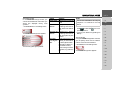
The following icons are used in the list of
destinations.
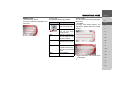
Icon
Meaning
This destination is a standard
destination without any special features.
This destination is protected.
Once the destination memory
is full, this destination is
not automatically deleted. If
required, this can be set manually.
In the case of a protected entry, you can also determine
the position using the fast access function.
This destination is the current
home address.
>>>
Operating rapid access
>D
Starting using an existing destination
Destinations already in the destinations
memory are listed in the list of destinations.
> Press the button with the desired destination to start route calculation.
The calculation is started. Once the calculation is complete, the map display appears and directions to the destination begin.
> GB
>F
>I
>E
>P
> NL
Scrolling in the destinations memory
You can use the
keys to scroll
through the list display in the direction indicated on the arrow.
The current list page and the total number
of its contents appear between the keys.
> DK
>S
>N
> FIN
> TR
> GR
> PL
> CZ
>H
> SK
39
>>>
NAVIGATIONAL MODE
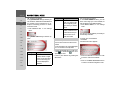
Displaying or editing destination
Each destination in the destinations memory can be displayed or edited.
> Press the icon to the left of the destination required.
> A selection menu appears.
>D
> GB
>F
>I
>E
>P
> NL
> DK
Selection
Meaning
All the data relating
to the destination is displayed.
On map
The map display and
toolbar are called up
and the destination displayed.
Name this en- The destination can be
try
renamed.
Delete
this The destination is deletentry
ed from the destination
memory.
>S
Show details
>N
> FIN
> TR
> GR
> PL
> CZ
>H
> SK
40
Protect
entry
this The destination is pro-
tected against automatic
deletion. This function is
only available in the case
of unprotected destinations.
Unprotect
Protection of the destinathis entry
tion is disabled. This
function is only available
in the case of protected
destinations.
Move this en- The destination is moved
try up
forwards by one position.
This function is only
available in the case of
protected destinations.
Move this en- The destination is moved
try down
back by one position.
This function is only
available in the case of
protected destinations.
Delete list
All destinations (including the protected ones)
are deleted from the list.
The home address is not
deleted.
Entries in the selection menu which only
appear if a home address has been created:
Selection
Meaning
Full home address data is
displayed.
Set
If no address has been entered, selection can be
made here.
Change
The stored home address
can be changed.
Delete home The stored home address
address
is deleted.
Show details
NAVIGATIONAL MODE
The Navigation menu
If you do not want to select a destination
quickly or if the planned destination is not
yet available in the destinations memory,
you can use the navigation menu to determine a new destination.
> In rapid access, press the Navigation
menu key at the upper edge of the
screen.
The navigation menu appears.
Structure of the navigation
menu
Address
The various steps from selecting a destination to starting route guidance can be carried out using the Address button.
• See "Navigation menu: Address" on
page 42.
Point of interest
Points of interest such as airports and ferry
ports, restaurants, hotels, petrol stations
or public buildings can be selected and
route guidance started via the Point of interest button.
• See "Navigation menu: Point of interest" on page 48.
Select on map
With Select on map, you can select a destination directly on the map and start
route guidance.
• See "Navigation menu: Select on map"
on page 51.
>>>
Enter coordinates
The geographic coordinates for a
destination can be entered and route
guidance started via the Enter
coordinates button.
• See "Navigation menu: Enter coordinates" on page 55.
>D
> GB
>F
>I
>E
Route planning
A route with several stopovers can be
planned using the Route planning button.
• See "Navigation menu: Route planning" on page 52.
>P
> NL
> DK
>S
Settings
Various general settings for navigation can
be made via the Settings button.
• See "Navigation menu: Settings" on
page 56.
>N
> FIN
> TR
> GR
> PL
> CZ
>H
> SK
41
>>>
NAVIGATIONAL MODE
Navigation menu: Address
A selection window for specifying the destination is opened from the Navigation
menu by pressing the Address key.
>D
> GB
>F
>I
>E
Selecting a country
The Country button offers you all the
countries available on the memory card
for navigation. A country is adopted automatically in the address input menu after
selection. If a destination country has already been entered, it appears in the first
line and is therefore active.
>P
> In the navigation menu, press the Address button.
The selection window for the address appears.
> NL
> DK
>S
>N
> If necessary, press the arrow keys
on the right-hand edge of the
screen to scroll through all the destination countries available.
Note:
Information regarding the various countries is displayed by pressing the flags in
front of the country designations.
Select address and start
You can enter the exact destination address in the address entry screen.
> Press the destination Country key to access the selection list of countries.
The selection list appears.
> FIN
> TR
> GR
> PL
> CZ
> Press the key of the country you want.
>H
> SK
42
The following details can be entered in the
address window:
• Town
• Postcode
• Street and building number
• Intersecting roads as an aid to orientation
NAVIGATIONAL MODE
You can also:
• display the destination on the map
• define options of the drive profile
• save the destination in the destinations
memory
• start directions to the destination immediately.
> Select between town entry and post
code entry.
Selecting the town
The destination town can be entered using
its name or postcode. During this process,
when each letter is entered a possible town
is displayed and/or when each character is
entered, a possible postcode is displayed.
When the towns are displayed, large
towns have priority over the alphabetical
sequence. Example: If you enter the initial
letter “K”, the Traffic Assist indicates
“Köln” as a possible city, and not the town
which is first alphabetically. Traffic Assist
rules out all impossible combinations of
letters and postcodes and only activates
those boxes of letters and/or characters
which will produce an existing town and/
or postcode (Smart speller).
> Consecutively enter the letters for the
destination town or the numbers of the
post code.
Notes:
• If necessary, you can switch off the
smart speller in the navigation settings.
• During entry, it should be noted that
in southern Europe (e.g. Italy), the
"prefix" (e.g. via Gran Mundo) needs
to be entered afterwards (e.g. Gran
Mundo_via).
• If you enter a post code, the name of
the town initially disappears in the input menu. Next, enter the name of the
street names. The name of the town is
then also displayed.
>>>
The OK key
The OK key can be used to transfer the
destination selected into the route calculation menu. If the destination required appears in the upper edge of the display once
the first letters or numbers have been entered, you can transfer the destination immediately with OK without using the list
function.
> Press the OK key to transfer your destination into the route calculation menu.
>D
> GB
>F
>I
>E
>P
> NL
Note:
If two words have to be entered, these
should be separated by a
character.
> DK
>S
>N
> FIN
> TR
> GR
> PL
> CZ
>H
> SK
43
>>>
NAVIGATIONAL MODE
Using the list of towns
If you have already entered some of the
letters of the town you want, you can use
the List function to display all the towns
containing the combination of letters in
question.
> Press the button at the top right corner
of the screen in order to open the list of
towns.
> A town is selected by pressing the corresponding button.
>D
> GB
>F
>I
>E
>P
> NL
> DK
Selecting the street
In the destination street area, the street
and building number can be entered separately using a letter and numerical key
panel. A possible street is displayed each
time a new letter is entered.
Traffic Assist rules out all impossible combinations of letters and only activates
those letter boxes which will produce an
existing street.
A building number can only be selected
once the street has been selected and/or if
building numbers are also present in the
data.
> Press the letters of the destination street
one another another.
>S
>N
> FIN
> TR
> GR
> PL
> CZ
>H
> SK
44
The OK key
The OK key can be used to transfer
the destination selected into the route calculation menu. If the destination required
appears in the upper edge of the display
once the first letters or numbers have been
entered, you can transfer the destination
immediately with OK without using the
list function.
> Press the OK key to transfer your destination into the route calculation menu.
NAVIGATIONAL MODE
Using the list of streets
If you have already entered some of the
letters of the street you want, you can use
the List function to display all the streets
containing the combination of letters in
question.
> Press the button at the top right corner
of the screen in order to open the list of
streets.
> The street is selected by pressing the
corresponding button.
Note:
You can display further information regarding the street by pressing the field to
the left of the street name. This can be
helpful if the street being searched for appears several times in the list.
Selecting the Intersection
After entering the destination town and
road, you can enter an intersecting road in
order to further limit the choice.
Selecting a house number
After entering the destination town and
road, you can enter a house number in
order to further limit the choice.
Note:
Instead of entering an intersecting road,
you can also enter a house number. Both
entries, however, are not possible
simultaneously.
Note:
Instead of entering a house number, you
can also enter an intersecting road. Both
entries, however, are not possible
simultaneously.
> Press Intersection.
The input menu for the name of the
intersecting road appears.
> Enter the name of the intersecting road
and then press OK.
The procedure is the same as for entering
a road, See “Selecting the street” on
page 44..
When entering an intersecting road, you
can also use the road list, See “Using the
list of streets” on page 45..
> Press No.
The input menu for the house number
appears.
> Enter the house number and then press
OK.
The procedure is essentially the same as
for entering a road, See “Selecting the
street” on page 44..
> When entering a house number, you
can also use the house number list. The
procedure is essentially the same as for
the road list, See “Using the list of
streets” on page 45..
>>>
>D
> GB
>F
>I
>E
>P
> NL
> DK
>S
>N
> FIN
> TR
> GR
> PL
> CZ
>H
> SK
45
>>>
NAVIGATIONAL MODE
>D
Displaying destination on the map
Once the destination has been entered,
you can display it in the map of the surrounding area.
> GB
>F
>I
Options for the drive profile
You can also set your driving profile in the
address entry field. Press the Options button for this purpose. The settings made
here have an effect on calculation of the
estimated journey times and the length of
the route.
Setting
optimum
fast
>E
>P
short
> Press the In map key to display the destination selected on the map.
> NL
> DK
> After pressing the field at the top left of
the screen, select your mode of travel.
> Select one of the following options by
pressing the field on the right next to
the Routing type display.
>S
>N
> FIN
> TR
> GR
> PL
> CZ
>H
> SK
46
scenic
Meaning
With this option, the optimum route in terms of
travel time and mileage is
calculated.
With this option, the
shortest route possible
for the time required is
calculated.
With this option, the
shortest route is calculated in terms of kilometres
travelled.
With this option, the
most winding route is
calculated.
> Select one of the following options by
pressing the field on the right next to
the Motorways, Ferries or Toll roads
display.
NAVIGATIONAL MODE
Option:
Permitted
Avoid
Forbidden
Description
With this option, the relevant road type is taken
into account during
route calculation.
With this option, the relevant road type is avoided wherever possible.
With this option, the relevant road type is not
taken into account during route calculation.
> Press the
button to start route guidance to the entered coordinates.
Saving destination
The Save button opens an entry menu for
entering a name for the destination entered. If a name has been entered and
adopted using OK, the destination is
transferred to rapid access and protected
there. The entry menu allows you to
change between upper and lower case letters.
Starting navigation
The Start button can be used to start navigation straight away. All the data entered
so far is processed in the route calculation.
> Press the Start key to start navigation.
>>>
Note:
If no GPS signal is available at the time of
route calculation, the following display
appears.
>D
> GB
>F
>I
>E
>P
> NL
If the GPS signal is available, route calculation is started automatically.
A short route to the selected destination
is displayed when Simulation is pressed.
A stored demonstration route guidance is
displayed when Demo is pressed.
> DK
>S
>N
> FIN
> TR
> GR
The route is calculated. The map display
then appears and directions to the destination begin.
> PL
> CZ
>H
> SK
47
>>>
NAVIGATIONAL MODE
>D
Cancelling navigation
> Press the BACK button.
> GB
>F
>I
>E
> Press the Yes key to confirm that you
want to stop.
>P
> NL
> DK
>S
Navigation menu: Point of interest
Points of interest, or POI for short (Point
of Interest), are included in the map and
can be displayed on the map. Points of interest include airports and ferry terminals,
restaurants, hotels, petrol stations, public
buildings etc. Points of interests can be
used as navigational destinations.
Note:
Points of interest from the present surroundings can only be selected if the reception is good enough to locate their position.
You can select between:
• a nearby destination,
• a nationwide destination and
• a destination in a town.
>N
> FIN
> TR
> GR
> PL
> CZ
>H
> Press the Point of interest key to display
the points of interest.
> SK
48
The search area selection window appears.
You can now use the buttons to select the
search area you want.
Point of interest: Near GPS position
> Press the Nearby GPS position button.
The following specifications are possible
for searches in this point of interest window.
> In the top button, enter the radius (in
kilometres) in which a point of interest
should be searched for.
NAVIGATIONAL MODE
> From the All categories box, select a
main category (e.g. Petrol station).
Only those points of interest currently
nearby are displayed.
> Select the subcategory from the subsequent menu (e.g. Aral, Esso).
You will find information about scrolling
in lists in the "Scrolling through the lists"
on page 31 chapter.
Note:
If you do not select a subcategory, all the
POIs from the main category within the
selected radius are displayed.
> Press the Point of interest button to
access the input menu.
> Select the desired POI via the input
menu.
For information on working with the
input menu, please refer to the section
"Entries made with the entry menu" on
page 30.
> For information on scrolling in lists,
please refer to the section "Scrolling
through the lists" on page 31.
Note:
The Category boxes do not have to be.
These are only used to restrict the list of
points of interest. In large towns, this list
may be very long.
>>>
Point of interest: nationwide
> Touch the Nationwide button.
>D
> GB
>F
>I
>E
> Select the desired country.
> Press the All categories button.
>P
> NL
> DK
>S
>N
> Select the desired category.
> Touch the Point of interest key to go to
the entry menu.
> Select the point of interest you want
from the entry menu.
> FIN
> TR
> GR
> PL
> CZ
>H
> SK
49
>>>
NAVIGATIONAL MODE
You will find information about working
with the entry menu in the chapter "Entries made with the entry menu" on page
30.
You will find information about scrolling
in lists in the "Scrolling through the lists"
on page 31 chapter.
>D
> GB
>F
>I
Note:
The Category box does not have to be
completed. It is only used to restrict the
list of points of interest. Depending on
the map currently being used, this list
may be very extensive.
>E
>P
> NL
> DK
>S
>N
> FIN
> TR
> GR
> PL
> CZ
>H
> SK
50
Point of interest: in a town
> Touch the In a town button.
> Select the desired country.
> In the Town or Postcode box enter the
town in which you want to search for a
point of interest.
> Press the All categories button.
> Select a main category (e.g. Culture).
Only the categories available in the
town indicated are displayed.
> Select the subcategory with the subsequent button (e.g. Museum).
> Touch the Point of interest key to go to
the entry menu.
> Select the point of interest you want
from the entry menu.
You will find information about working
with the entry menu in the "Entries made
with the entry menu" on page 30 chapter.
You will find information about scrolling
in lists in the "Scrolling through the lists"
on page 31 chapter.
Note:
The Category boxes do not have to
be completed. These are only used
to restrict the list of points of interest.
In large towns, this list may be very long.
Operating options in the POI input
menu
Following selection of a POI, the following options are available using the buttons
on the right-hand area of the screen:
• Display POIs on the map using the In
map button.
• Set the options for the driving profile
using the Options button.
• Save the POI in the destination memory using the Save button.
NAVIGATIONAL MODE
• Start route guidance directly to the POI
using the Start button.
You can also display information regarding the selected POI.
> Press the
button for this purpose.
Note:
The button can only be selected if information is actually available.
The available information on the selected
POI is displayed (exact address and phone
number if available).
The displayed phone number can be
called directly by pressing the Call button,
provided a telephone is connected via
Bluetooth.
>>>
Navigation menu: Select on
map
If the destination required cannot yet
or can no longer be found in the destinations memory, the Select on map button
allows you to select it directly.
No address details are asked for in this
case.
> Press the Select on map key to make a
direct selection.
The map display appears.
>D
> GB
>F
>I
> Gently press the screen surface until
a circle of dots is drawn around the destination requested. The destination is
recorded.
Information on the point selected
is loaded from the set of data and displayed. There are buttons under the information box which can be used to call up
several functions which are provided for
the route point selected.
>E
>P
> NL
> DK
>S
>N
> FIN
Note:
You may have to enlarge the area using
the zoom buttons
and
in order to
find the desired street. You can also find
the desired point by moving the map
> TR
> GR
> PL
> CZ
>H
> SK
51
>>>
NAVIGATIONAL MODE
>D
When route guidance is deactivated, the
following buttons are available:
> GB
Button
Navigation
>F
Meaning
Starts navigation
Adds the destination of
the stored route last used,
See “Navigation menu:
Route planning” on
page 52..
Save
Allows your destination
to be given a name
via the entry menu and
saves this in the destinations memory
Search near- Entry menu as for normal
POI entries
by
Add
>I
>E
>P
> NL
> DK
>S
>N
Navigation menu: Route planning
The route planning menu allows you to
create and select individual routes. For
this purpose, enter the individual destination points along the desired route. These
points will then be navigated to consecutively without having to make further entries.
> In Navigation menu, press the Route
planning key to access the route menu.
The map symbol appears at the top right
of the route menu. The name of the last
programmed route is displayed at the top
left and the individual stages of this route
appear underneath.
> FIN
When directions to the destination is active, the Interim destination button
is also still available. You can add the selected destination as a stopover for your
route guidance from the map.
> Press a key to undertake the action requested.
> TR
> GR
> PL
> CZ
>H
> SK
52
Note:
The route menu is empty following a
reset, or if no route has yet been planned.
Route list
Routes already stored in the system are selected from the route list.
button in the route menu.
> Press the
The route list opens.
Scrolling through the list of routes
> Press the
arrow keys on the
right hand side of the screen to scroll
through the list of routes.
Displaying route details
> Press button
to display the route
details.
The Route details window opens. You
can also rename or delete the route in this
window.
Press the BACK button to return to the
route list.
NAVIGATIONAL MODE
Selecting a route
> Press a route to select it.
The route is loaded and displayed in the
route menu.
Using a route
The following buttons are available:
Key
New
Edit
Calculate
Start
Meaning
Shows all stages inside
actual route in the map.
These keys can be used to
scroll up and down
through the lists.
Opens the "address window" for entering a new
destination address
Activates
individual
route points for processing
Calculates the difference
in distance and the journey time for the current
entries
Starts navigation
>>>
The New button
You can create a new route by pressing the
New button.
> Press New.
An empty route window appears. The
Add button appears below this empty
window.
>D
> GB
>F
>I
>E
>P
> NL
> DK
> Press the Add button.
>S
>N
> FIN
> TR
> GR
> Select a destination from the fast access
list displayed.
or
> PL
> CZ
>H
> SK
53
>>>
NAVIGATIONAL MODE
> Switch to the selection between Address, Point of interest or Select on
map by pressing the Other destination
button and then enter the intermediate
destination.
> Repeat these entries in the route planning window for each intermediate destination by pressing Add.
> You can move the individual entries by
pressing the
buttons.
> Once all the entries have been made in
the route planning window, save the
destination data by pressing the OK
button.
The entry menu appears.
> Give the destination a meaningful
name.
> Press OK.
Route planning is complete. The Routing
options entry window opens.
>D
> GB
>F
>I
>E
>P
> NL
> DK
>S
>N
> FIN
> TR
The Edit key
Existing routes can be changed in the Edit
menu.
> Press the Edit key to change existing
routes.
The route planning window appears. The
following functions are available:
Key
Add
Delete
OK
> GR
> PL
> CZ
>H
> SK
54
Meaning
This box can be used to
enter a new route point.
This box can be
used to delete a highlighted route point.
This box can be used to
save the processed route
and transfer it to rapid
access.
It is possible to scroll up
and down in the lists using these buttons.
Individual entries can be
moved using these buttons.
The Calculate key
A planned route can also be calculated
without GPS reception so that you can get
an overview of the journey.
When doing this, the first route point
specified is used as the starting point for
the route.
Note:
During navigation, your current location
is the starting point used. The first leg is
then the journey to the first route point
specified.
> Press the button Calculate to have the
total distance and probable length of
the journey calculated for this route.
The Routing options entry window is
opened.
NAVIGATIONAL MODE
> Define the settings you want.
> Press the
button.
The route is calculated. A window informs you of the progress of the calculation.
The Start key
> Press the Start key in the route planning
menu.
The route options are displayed again.
> Press the
key again to start navigation.
Note:
If no GPS signal is available, route guidance is started automatically as soon as a
signal is received.
Once the calculation is complete, the total
distance from the first to the last points on
the route and the probable length of the
journey for this route are displayed in the
Route planning window under the list of
route points.
>>>
Navigation menu: Enter
coordinates
You can also enter a destination via
geographic coordinates.
>D
> GB
>F
>I
> Select the value you wish to change.
> Then enter the desired values using the
to
buttons.
> You can set the direction of the
longitude and latitude via LON and LAT
using the left-hand buttons in the row.
>E
>P
> NL
Note:
The
coordinates
entered
must
correspond to WGS84 (World Geodetic
System 1984).
> DK
> Press the Start button to start route
guidance to the entered coordinates.
> FIN
>S
>N
> TR
> GR
> Press Enter coordinates
navigation menu.
in
the
> PL
> CZ
>H
> SK
55
>>>
NAVIGATIONAL MODE
Navigation menu: Settings
The settings of relevance to the navigation
functions can be found in the Settings
menu.
>D
> GB
>F
Note:
All settings must be confirmed by pressing the OK key. You can exit the current
settings button at any time without saving any changes by pressing the BACK
key.
>I
>E
>P
> NL
Structure
Various buttons are available in the setting
menu:
The Auto mode key
You can change the map view settings
(2D/3D display, auto zoom and map
orientation) in the Auto mode settings
window.
> Press Auto mode in the settings menu.
The Auto mode settings menu appears.
The functions of the various keys are explained below.
> DK
>S
>N
Setting
> FIN
> Scroll to the menu item Settings in the
navigation menu using the
button
and then press it.
This takes you to the setting menu.
> TR
> GR
> PL
> CZ
>H
> SK
56
Begin with
Meaning
Select whether the standard map view is to be the
3D or the 2D view.
NAVIGATIONAL MODE
2D Autozoom In the case of 2D view
2D View
navigation, select whether you would like the
auto zoom low, normal,
high or no auto zoom
view as standard.
With the Autozoom option, the zoom range varies according to your
speed: When you drive
slowly, the scale is decreased. When you drive
faster, the scale is increased.
In the case of 2D view
navigation, select whether the map should be oriented to the north or in
the direction of travel as
standard.
> Confirm your selection by pressing the
OK key.
The Map info key
In the Map info settings window, you can
make settings for additional information
in the map display.
> Press Map info in the settings menu.
The Map info settings menu appears.
Info box
>>>
If you activate this entry,
you get displayed the
point of compass, the
speed and the sea level.
>D
> GB
>F
> Press on the desired entry in order to activate
or deactivate
the corresponding function.
> Confirm your selection by pressing the
OK key.
>I
>E
>P
> NL
> DK
>S
Setting
Meaning
Points of in- If you activate this entry,
terest
points of interest are displayed in the map.
Street names If you activate the entry,
(2D)
all the street names are
displayed in 2D-mode
on the map.
Street names If you activate the entry,
(3D)
all the street names are
displayed in 3D-mode
on the map.
>N
> FIN
> TR
> GR
> PL
> CZ
>H
> SK
57
>>>
NAVIGATIONAL MODE
The Routing options key
You can set your drive profile in the
Routing options settings window. The
settings made here have an effect on the
route selection and on the calculation of
the estimated journey times.
> Press Routing options in the settings
menu.
>D
> GB
>F
>I
>E
>P
The Routing options settings menu appears.
> NL
Setting
optimum
fast
short
> DK
scenic
>S
>N
> FIN
> TR
> Select the mode of travel by repeatedly
pressing the Profile field.
> Select one of the following options by
pressing the field on the right next to
the Routing type display.
> GR
> PL
> CZ
>H
> SK
58
Meaning
With this option, the optimum route in terms of
travel time and mileage is
calculated.
With this option, the
shortest route possible
for the time required is
calculated.
With this option, the
shortest route is calculated in terms of kilometres
travelled.
With this option, the
most winding route is
calculated.
> Select one of the following options by
pressing the field on the right next to
the Motorways, Ferries or Toll roads
display.
Option:
Permitted
Description
With this option, the relevant road type is taken
into account during
route calculation.
Option:
Avoid
Forbidden
Description
With this option, the relevant road type is avoided wherever possible.
With this option, the relevant road type is not
taken into account during route calculation.
> Confirm your selection by pressing the
OK key.
>
NAVIGATIONAL MODE
The Route info key
In the Route info settings window, you
can set which additional information you
would like displayed during route
guidance.
> Press Route info in the settings menu.
The Route info settings menu appears.
The following settings are possible.
Setting
Meaning
Show street Displays the current/next
street
Info final des- Displays ETA, distance
tination
remaining, time until arrival at the main destination.
Info next des- Displays ETA, distance
tination
remaining, time until arrival at the part-way destination.
Info when
When this function is accrossing bor- tivated, you automaticalders
ly receive general traffic
information relating to
the relevant country
when crossing its national border (e.g. speed limits).
>>>
Note:
Some of this information can only be
displayed if it is contained in the map
material.
>D
> GB
>F
> Press on the desired entry in order to activate
or deactivate
the corresponding function.
> Confirm your selection by pressing the
OK key.
>I
>E
>P
The Format key
Using the Format configuration window,
you can specify which units of measurement to use for time and distance.
> Press Format in the settings menu.
> NL
> DK
>S
>N
> FIN
The Format settings menu appears.
> TR
> GR
> PL
> CZ
>H
> SK
59
>>>
NAVIGATIONAL MODE
The Speed key
The settings window Speed allows you to
display speed limits simultaneously with
navigation. You can also set an acoustic
warning when speed limits are exceeded.
>D
> GB
>F
>I
Setting
>E
Time
>P
> NL
Distance
> DK
>S
Meaning
Press this field to toggle
between the 12-hour and
24-hour clock display.
Press this field to toggle
between the kilometre
and mile display.
Note:
The information can only be displayed if
it is included in the map data.
The Speed settings window appears.
> TR
> GR
The following settings are available.
> PL
Setting
Show signs
>H
> SK
60
Out of town
Warning
> FIN
> CZ
In town
> Press Speed in the settings menu.
> Confirm your settings by hitting the OK
key.
>N
Setting
Description
Select whether the speed
limits should be displayed never, always or
only when the limit is exceeded.
Description
Select the amount over
the speed limit at which
you would like to receive
an acoustic warning
within built-up areas.
Select the amount over
the speed limit at which
you would like to receive
an acoustic warning outside built-up areas.
Choose whether you
would also like an acoustic warning when you exceed speed limits that are
only valid when it is raining, snowing or at specific times of the day (
function activated).
NAVIGATIONAL MODE
> Press a button and choose the setting
you require.
> Confirm your selection by pressing the
OK key.
!Danger!
Some of the information contained in
the map material may be inaccurate due
to short-term or recent changes (such as
road works, for example).
Supplying information is secondary to
the navigation system's main function,
which is traffic monitoring and signposting.
The Time Zone key
Set the relevant time zone for your region
in the Time Zone configuration window.
This is an important setting for calculating the estimated arrival times.
> Press Time Zone in the settings menu.
The Time Zone settings menu appears.
>>>
The Smart Speller button
The Smart Speller allows you to enter
towns, roads or other destinations that
you are searching for more quickly using a
logical process of elimination.
> Press Smart Speller in the settings
menu.
>D
> GB
>F
>I
>E
>P
The Smart Speller settings menu appears.
Meaning
Time zone
Specify the relevant time
zone for your region.
Summertime Set whether summer
time applies ( ) to the
current time zone or not
( ).
> NL
Setting
> Confirm your settings by pressing OK.
> DK
>S
>N
> Press on the button in order to activate
or deactivate
the function.
> Confirm your entry by pressing OK.
> FIN
> TR
> GR
> PL
> CZ
>H
> SK
61
>>>
NAVIGATIONAL MODE
The Junction info button
In the Junction info settings window you
can activate or deactivate the available aids
for complex turning manoeuvres, for example at motorway junctions or certain
multi-lane roads.
> Press Junction info in the settings
menu.
>D
> GB
>F
>I
>E
>P
The Junction info settings window appears.
> NL
> DK
>S
>N
> FIN
> TR
Setting
> GR
Reality View
> PL
> CZ
>H
> SK
62
Description
When the function is activated, realistic images
of the current lane situation at motorway junctions are displayed if
available.
Description
Signpost info When this function is enabled, you receive information regarding road
signs which you should
follow.
Lane info
When this function is activated, a small arrow indicates which lane you
should move into on
multi-lane roads.
The Home address button
In the Home address window, you can
enter and change your home address, as
well as displaying the address details.
> Press Home address in the settings
menu.
Notes:
• If the Reality View function is activated, the other functions cannot be selected.
• The information can only be displayed
if it is included in the map data.
To enter your home address:
> Press Set.
The fast access menu appears.
Setting
> Press on the desired entry in order to activate
or deactivate
the corresponding function.
> Confirm your selection by pressing the
OK button.
You see your home address, provided you
have already entered it.
> Press on a destination in the list in order
to enter it as the home address.
or
> Press on the Other destination button
in order to access the navigation menu.
NAVIGATIONAL MODE
In the navigation menu, you can enter
your home address in a different manner
(e.g. by entering the address details), See
“Structure of the navigation menu” on
page 41..
Changing an already entered home
address:
> Press Change.
The fast access function appears, further
operation is the same as for entering the
home address (see above).
The TMC button
You can make settings for the reception of
traffic announcements in the TMC
settings window.
> Press TMC in the settings menu.
Setting
The TMC settings window appears.
Rerouting
Setting
Automatic
tuning
Description
Select whether to run an
automatic search for the
station with the best reception (function activated
).
>>>
Description
Press the arrow buttons
to activate the automatic
station search. The currently received TMC station is displayed in the
adjacent field. The setting can only be performed if the Automatic
tuning function is deactivated.
With this button you can
select whether the route
change never, automatically or manually should
be made. (See "Taking
announcements into
consideration when calculating routes" on
page 67.) The setting
never corresponds to deactivating TMC functionality.
>D
> GB
>F
>I
>E
>P
> NL
> DK
>S
>N
> FIN
> TR
> GR
> PL
> Confirm your selection by pressing the
OK key.
> CZ
>H
> SK
63
>>>
NAVIGATIONAL MODE
The Volume key
With the Volume settings window, you
can set the general volume for voice announcements for each start of the Traffic
Assist, or switch off voice announcements
completely.Depending on the situation,
you can also adjust the volume in the map
display.
> Press Volume in the settings menu.
>D
> GB
>F
>I
>E
The Dimmer button
In the Dimmer settings menu you can set
whether the display's backlighting should
be switched off when you enter a tunnel.
> Press Dimmer in the settings menu.
The Dimmer settings menu appears.
The Load map settings menu appears.
>P
> NL
The button Load map
The Traffic Assist operates using the map
data stored on the memory card. Pressing
the Load map button displays the loaded
map data.
> Press Load map in the settings menu.
The Volume settings window appears.
> DK
>S
> Press on the button in order to activate
or deactivate
the function.
> Confirm your settings by pressing OK.
>N
> FIN
> TR
> The required volume can be selected via
and
buttons.
the
> Confirm your settings by hitting the OK
key.
> GR
> PL
> CZ
>H
> SK
64
> Select the desired map by pressing the
relevant button.
NAVIGATIONAL MODE
The Factory settings key
You can use the Factory settings configuration window to cancel all new settings
and reset the system to the factory settings.
> Press Factory settings in the settings
menu.
The Factory settings settings menu
appears.
> In order to reset the Traffic Assist to the
factory settings, press Yes.
What is dynamic route guidance?
Dynamic route guidance calculates the
route, while taking into account current
traffic announcements.
Note:
Dynamic route guidance is not available
for all countries (currently only Belgium,
Germany, Denmark, France, Italy, The
Netherlands, Austria, Sweden, Switzerland and Spain).
TMC reception must be available in order to activate dynamic navigation and
the functions described below.
Traffic announcements are transmitted by
radio stations via the TMC (Traffic Message Channel) in addition to the radio
programme and are received and analysed
by the navigation system. Receiving traffic
announcements is free of charge.
>>>
Note:
As the traffic announcements are transmitted by radio stations, we cannot assume responsibility for the completeness
or accuracy of the announcements.
Austria: The location and event code was
made available by ASFINAG and BMVIT.
>D
> GB
>F
>I
>E
A continuous check is made for the presence of relevant messages for the selected
route. However, traffic problems are also
shown on the map even if route guidance
is deactivated.
>P
> NL
> DK
>S
>N
> FIN
> TR
If these continuous checks determine that
a traffic announcement is relevant to route
guidance, the unit will automatically recalculate a new route to the destination
(See “The TMC button” on page 63.).
> GR
> PL
> CZ
>H
> SK
65
>>>
NAVIGATIONAL MODE
>D
Displaying TMC messages on
the map
Current TMC messages are displayed on
the map graphically. Sections of the route
where there are traffic problems are highlighted blue. Arrows continue to be displayed, which indicate the traffic direction
which is affected by the traffic problem.
> GB
>F
>I
>E
In addition to the coloured mark, a warning sign is displayed on the stretch of road
affected.
>P
> NL
> DK
>S
Using TMC
Once you have connected the TMC antenna, your Traffic Assist will receive current traffic announcements and dynamic
route calculation will be enabled (traffic
jam diversion). You can also view traffic
announcements directly.
To preset the TMC, See "The TMC button" on page 63.
> In the map display, activate the (see also
page 70) toolbar and press
.
or
> In the main menu, press TMC (see also
page 30).
Note:
The button only becomes visible once
you have switched to navigation mode
and then called up the main menu again.
After switching the Traffic Assist with
TMC off and on again via the On/Off
switch, the TMC button is only visible
following the procedure described above.
>N
> FIN
> TR
> GR
> PL
> CZ
>H
> SK
66
After pressing one of the two buttons, the
message list appears.
You can scroll through the list using the
arrow keys
on the right–hand
edge of the screen.
The road number (motorway, A-road or
district roads), section of road if applicable, traffic direction and the type of problem are displayed in each traffic message.
NAVIGATIONAL MODE
Reading a message
> Press on the desired message in the list.
The message display appears.
Display the relevant road in the map
> Press the
button in the message
display.
The relevant road can be seen in the map.
>>>
Taking announcements into
consideration when calculating routes
>D
> GB
Your Traffic Assist can take traffic announcements into consideration when
calculating a route. You have the option of
setting this function to automatic or manual under "The TMC button" on page 63.
>F
>I
>E
If the message text is longer than the
display space available, the
button
appears at the bottom right.
> Press this button in order to view the
remaining message text.
> Press the arrow buttons
to
scroll in the messages.
> Press the BACK button to return to the
message list.
Updating announcements
button in the message dis> Press the
play.
Automatic recalculation
If a traffic announcement affects your
route, a new route is calculated to bypass
the problem at the earliest possible convenience.
>P
> NL
> DK
>S
>N
> FIN
> TR
> GR
> PL
> CZ
>H
> SK
67
>>>
NAVIGATIONAL MODE
>D
Manual recalculation
If a traffic announcement affects your
route, a window with detailed information on the traffic announcement appears.
> GB
>F
Changing status
You can set the function to act upon or ignore an announcement at any time.
> Activate the toolbar in the map display
(see also page 70).
> Press the
button.
Map display
The map display is called up automatically if navigation is activated.
However, the map display can also be
called up if navigation is deactivated.
>I
1
>E
>P
> NL
If you wish to calculate a detour around
the traffic problem, press Evade or alternatively Ignore.
> DK
>S
>N
> FIN
> TR
> GR
> PL
> CZ
>H
> SK
68
The message list appears. Messages which
are relevant for your route are listed at the
beginning.
> Press the relevant traffic announcement.
> Press the button at the bottom of the
screen to switch between Evade and Ignore.
> For this purpose, touch the area 1 on
the housing of the Traffic Assist.
Note:
In certain menus, the map display can
also be called up by pressing the thumbnail of a map. In most cases, this is used
to display information such as TMC
messages on the map.
NAVIGATIONAL MODE
Configuration of map display
The configuration depends upon the current operating mode of the Traffic Assist.
Map display without route guidance
Map display with route guidance
1
2
4
6
8
If navigation is deactivated, almost the entire area of the touchscreen is filled by the
map display. An icon for opening the
toolbar is continuously displayed in the
bottom right corner.
If the current position can be determined
via GPS, this is indicated by a circle with
a red arrow head.
7
5
3
9
1 Estimated time of arrival, remaining
journey time and remaining distance
to the destination (can be displayed/
hidden by pressing).
2 Road to which the next driving manoeuvre leads
3 Speed limit on the road currently being driven on (display not available for
all roads)
4 Route
5 Vehicle speed and altitude above sea
level
6 Next driving manoeuvre
7 Vehicle position
8 Distance to next driving manoeuvre
and currently travelled road.
9 Traffic lane recommendation (only
appears on some multi-lane roads; red
arrows = recommended lanes)
>>>
Note:
Following the traffic lane recommendations allows you to perform the next driving manoeuvre without changing lanes.
>D
> GB
>F
When navigation is active, your current
position is displayed on the map via the
Position icon.
>I
>E
>P
> NL
> DK
Depending on the settings in the options
mode, the Position icon will remain stationary and the map will move or vice versa.
The information box at the right edge of
the display shows your current speed and
the altitude in metres. The information
box display can be activated/deactivated
in the settings as described under "The
Map info key" on page 57.
>S
>N
> FIN
> TR
> GR
> PL
> CZ
>H
> SK
69
>>>
NAVIGATIONAL MODE
>D
Information continues to be displayed in
the bottom left corner of the preview area.
> GB
>F
>I
For this purpose, the further route is displayed via an arrow with distance information given below it. If two driving manoeuvres are to be performed in
succession within a short time, an additional smaller arrow for the second driving
manoeuvre appears above the first one.
>E
>P
> NL
> DK
Map display with reality view
At many motorway junctions, a detailed
and realistic display of the motorway
junction can be shown.
For this purpose, activate the function Reality View in the settings under "The
Junction info button" on page 62.
If you are guided via a motorway junction
by Traffic Assist, the appropriate display is
shown.
>S
Depending upon the setting, additional
information may be shown in the map
display. See "Additional information" on
page 72.
>N
> FIN
> TR
> GR
> PL
> CZ
>H
> SK
70
Then follow the lanes marked by the red
arrows.
Map display with toolbar
Press the following key to activate the
toolbar. Press again to deactivate the toolbar.
The following function keys are displayed
in addition to the map display.
NAVIGATIONAL MODE
The following function keys appear in the
toolbar:
Icon
Meaning
See "Display route (toolbar)"
on page 72.
See "Displaying TMC messages (toolbar)" on page 73.
Using the map display
Repeat the last voice prompt
During route guidance, the system announces important information, e.g. the
next driving manoeuvre. The last announcement can be repeated with updated information.
See "Available POIs along the
route (toolbar)" on page 73.
See "Play" on page 87.
> Press the preview area while route
guidance is active and the toolbar
deactivated.
>D
> GB
>F
>I
>E
See "Change display (toolbar)" on page 73.
See "Point northwards (toolbar)" on page 73.
>>>
> Press the preview area while route guidance is active and the toolbar deactivated.
The last announcement is repeated with
updated information. The volume is also
displayed.
Changing the announcement volume
The volume of announcements can be
adjusted.
>P
The bar display indicates the volume.
or
to increase or decrease
> Press
the volume.
> Press
in order to mute the
announcements.
> Press
again in order to cancel the
mute function.
> NL
> DK
>S
>N
!Warning
> FIN
Always adjust the volume so that you
can still hear any ambient noise while
driving.
> TR
> GR
The bar display disappears again automatically after three seconds if no button is
pressed.
> PL
> CZ
>H
> SK
71
>>>
NAVIGATIONAL MODE
Additional information
Depending upon the selected setting, See
“The Route info key” on page 59., up to
three different information displays are
available.
At the left edge of the screen, information
(estimated time of arrival, remaining journey time and remaining distance to destination/stopover) regarding the main destination 1 and the stopover 2 can be
displayed/hidden. The left display window shows the hidden information.
>D
> GB
>F
>I
>E
>P
> NL
> DK
1
>S
2
>N
In the bottom area of the screen (red
lines), the road currently being driven on
is displayed, provided that this function is
activated.
> FIN
> TR
> GR
Position information
If you require information regarding a certain point on the map display, the information window can be opened. This displays information on the selected point (if
any is stored in the map data) and provides various functions for further action.
> Move or zoom the map until you see the
desired point.
> Press and hold on the desired point until the information window appears.
Make the necessary selection as necessary,
See “Navigation menu: Select on map” on
page 51..
Zooming and the map (toolbar)
The map can be zoomed into in steps via
the zoom buttons.
> Press Zoom in
: to expand or
"zoom in on the map" and view individual features more closely.
> Press Zoom out
: to "zoom out
from the map" and get a broader overview of the area.
Display route (toolbar)
With this map, the map is automatically
zoomed out so that the entire route is displayed. The Display route function is only
activated when a route has been selected
for driving guidance.
> Press the Route key.
The map is expanded and the specific
route destinations are displayed.
> PL
> CZ
>H
> SK
72
NAVIGATIONAL MODE
Displaying TMC messages (toolbar)
Press this button to display all TMC traffic announcements received from the station you are currently tuned in to.
Change display (toolbar)
For the map display, 2-D view 1 or 3-D
view 2 are available.
>>>
Point northwards (toolbar)
Use the compass key to orient the map on
the touchscreen towards the north.
>D
> GB
>F
1
You have the option of obtaining an overview of the current traffic situation and
calculating an alternative route or deleting
a previously calculated detour, as required
(See “Taking announcements into consideration when calculating routes” on
page 67.).
> Press the TMC announcement button.
A list of TMC announcements opens.
> Press the arrow buttons
on
the right of the screen to browse
through the list.
2
>I
> Press the compass key.
The map is pointed north on the touchscreen.
>E
>P
Available POIs along the route (toolbar)
With the POI button, you can display
available POIs along the route and set a
POI as a stopover.
> NL
> DK
>S
Change the display using the 3D key.
> Press the 3D key.
The display is changed. Press the key
again to return to the previous display.
>N
> Press the POI button.
A display of the POIs available along the
route appears.
> FIN
> TR
> GR
> PL
> CZ
>H
> SK
73
>>>
NAVIGATIONAL MODE
To select a POI as a stopover:
> Press the desired POI.
It is set as the stopover and the Traffic
Assist starts route calculation to the
stopover.
>D
> GB
>F
>I
A maximum of six POIs are displayed
simultaneously. The example shown has
five POIs, two each from the Restaurant
and Parking categories and one from the
Petrol station category, recognisable by
the category icons at the left of the
distance indications. The distance
indications represent the direct distance to
the POIs.
The stylised road on the left indicates on
which side of the road the POIs are
located. The numbering of the POIs refers
to the position of the POIs in the list on
the right (POI No. 1 appears at the very
bottom of the list).
>E
>P
> NL
> DK
>S
>N
> FIN
> TR
> GR
> PL
> CZ
>H
> SK
74
To set a POI category:
You can set which categories the Traffic
Assist should take into account when
displaying the POIs.
> Press the POI button.
The current settings are displayed.
> Press one of the categories set, e.g.
Petrol station.
The complete category list appears.
> If necessary, scroll in the list and press
one of the categories which you would
like to set as a new category, e.g. Railway station.
The current setting is displayed again, the
Petrol Station category has now been
replaced by the Railway station category.
> Proceed in the same manner for the
other two categories as necessary.
> Finally, press OK.
An updated display appears of the POIs
available along the route, which takes into
account the change in categories.
NAVIGATIONAL MODE
Move map (toolbar)
In move mode, the map can be moved in
any direction. Move mode is activated automatically when the toolbar is activated,
See “Map display with toolbar” on
page 70..
> With the toolbar activated, press on any
point on the map and move it in the desired direction.
The map is then moved accordingly after
a short delay.
Note:
If you wait too long before moving the
point, the position information regarding
the selected point appears on the map,
See “Position information” on page 72..
Calling up the options menu (toolbar)
The Options menu offers a range of useful
functions.
> Press the Options button.
The options menu appears. This can be
closed again via the BACK button or by
pressing the sensor button for the map
display.
>>>
The following options are available.
>D
Selection
Meaning
Navi menu
Terminates driving guidance and switches to rapid access mode.
Interim desti- Allows you to enter a innation
terim destination (only if
driving guidance is activated).
• See "Navigation
menu: Address" on
page 42.
Next destina- Indicates the next destition
nation, if multiple destinations have been entered (only if driving
guidance is activated).
Route
Allows you to change
options
route options (only if
driving guidance is activated).
• See "Options for the
drive profile" on
page 46.
> GB
>F
>I
>E
>P
> NL
> DK
>S
>N
> FIN
> TR
> GR
> PL
> CZ
>H
> SK
75
>>>
NAVIGATIONAL MODE
The driving directions
planned by the Traffic
Assist may be hindered
by unanticipated road
blocks.
This function notifies the
system of the length of a
road block. Existing road
block lengths may be selected. Once the length
has been entered, the
route is replanned and
new directions given (only if driving guidance is
activated).
Country infor- Country-specific information
mation, such as the maximum permissible speed,
is displayed.
Preferences • See "Navigation
menu: Settings" on
page 56.
Block road
>D
> GB
>F
>I
>E
>P
> NL
> DK
>S
>N
> FIN
> TR
> GR
> PL
> CZ
>H
> SK
76
GPS status
The number of satellites
received, your current
position and current
speed can be displayed
using this function. It is
also possible to store your
current position.
Playback of MP3 files during an active
navigation
Previously recorded MP3 files can be
played back while an active navigation is
in progress.
> Press
.
The MP3 player opens.
You can now play back your music files
(refer to "Playback" on page 60).
TELEPHONE MODE
You can connect your Traffic Assist to a
mobile phone equipped with Bluetooth®
wireless technology.
The Traffic Assist then serves as a convenient hands-free device.
Telephone mode
Notes:
• It is possible that some of the functions
described are not available with some
mobile phones equipped with Bluetooth® wireless technology.
• If no mobile phone us connected to the
Traffic Assist, unusable menu items
and entries are displayed as inactive
(greyed out).
Calling up telephone mode
Telephone fast access mode
Telephone mode is called up via a sensor
button.
In fast access mode the last 50 numbers or
names which have been dialled, answered
or rejected will be displayed in chronological order. Fast access mode is shown below with example telephone numbers and
names.
1
>>>
>D
> GB
>F
>I
>E
>P
> To call up telephone mode, touch the
area 1 on the housing of the Traffic
Assist.
The telephone fast access function is
called up.
> NL
> DK
>S
>N
Configuration of fast access
mode
> FIN
In fast access mode, the Phone menu button for opening the telephone menu is
displayed in the top line. In addition, provided that a telephone has already been
connected, the name of telephone and the
strength of the received signal is displayed
in the first line.
The number list is shown in the line below.
> TR
> GR
> PL
> CZ
>H
> SK
77
>>>
TELEPHONE MODE
Number list
The number list displays, line by line, all
numbers/names available for fast dialling.
Each line of the number list is divided into
two fields. Each list field is in the form of
a button. The number/name is shown on
the right button and the characteristics of
the entry are shown using the left icon.
>D
> GB
>F
>I
>E
Notes:
• The last 50 numbers/names are automatically stored in the number list. If
the storage capacity of 50 numbers is
reached, the oldest number is automatically deleted to make room for a new
number. However, important numbers can be protected.
• Entries in fast access mode always only
apply to the time during which the
mobile phone with Bluetooth® wireless
technology was connected to the Traffic Assist. The entries in the fast access
mode of the Traffic Assist are not synchronised with the call lists in the mobile phone.
>P
> NL
> DK
>S
>N
> FIN
> TR
> GR
> PL
> CZ
>H
> SK
78
Icons used
The following icons are used in the
number list:
Icon
Description
This entry is a standard entry
with no special features.
This entry is protected. If the
number list is full, this entry is
not automatically deleted.
This can be performed manually, if required.
In the case of a protected entry, you can also determine
the position using the fast access function.
Operating in fast access mode
Dialling an existing number
The numbers/names in the number list
can be dialled directly.
Notes:
• If no telephone has been previously
connected, no entry can be dialled.
• Entries with the name Unknown cannot be dialled. These are calls for which
no telephone number was transmitted.
> Press the button with the desired entry
in order to start the call.
The call will be started.
Scrolling through the number list
Using the
buttons, it is possible
to scroll through the number list in the direction of the relevant arrow.
The current list page and the total number
of pages appear between the buttons.
TELEPHONE MODE
Displaying or editing entries
Each number stored in fast access mode
can be displayed and edited.
> Press the button field to the left of the
desired number.
A selection menu appears.
Option
Show details
Name this entry
Delete
entry
this
Protect
entry
this
Description
The data for the entry is
displayed (number and
name, call time and call
date, if available).
The entry can be renamed.
The entry is deleted from
the number list.
The entry is protected
against automatic deletion (only available on
unprotected devices).
Option
Description
Unprotect
Entry protection is disathis entry
bled (only available on
protected devices).
Move this en- The entry is moved fortry up
ward by one position
(only available on protected devices).
Move this en- The entry is moved back
try down
by one position (only
available on protected
devices).
Delete list
All destinations (including the protected ones)
are deleted from the list.
>>>
Telephone menu
>D
In the telephone menu, you can dial a
number directly, open the telephone
book, connect your Traffic Assist to a mobile telephone and perform settings for
Bluetooth® operation.
> GB
>F
>I
>E
>P
> NL
> DK
> In fast access mode, press the Phone
menu button at the top edge of the
screen.
The telephone menu appears.
>S
>N
> FIN
> TR
> GR
> PL
> CZ
>H
> SK
79
>>>
>D
> GB
>F
TELEPHONE MODE
Dialling a number
Telephone book
You can enter a telephone number and
start a call to this number or store the entered number under any name.
> In the telephone menu, press the Dial
number button.
The telephone book entries loaded from
the SIM card of the mobile phone are displayed in the telephone book. After selecting the desired entry, the corresponding
telephone number can be called.
> In the telephone menu, press the Phone
book button.
>I
>E
>P
The Traffic Assist tries to establish a connection to the desired telephone number.
Detailed instructions for operation can be
found under "Telephone calls" on page
84.
If the full name has not yet been entered,
a list can be called up by pressing the List
button. In this list, only those entries appear which correspond to the letters entered so far.
> NL
> DK
> Enter the desired telephone number using the displayed buttons.
> Press the Dial button.
The Traffic Assist tries to establish a connection to the desired telephone number.
Detailed instructions for operation can be
found under "Telephone calls" on page
84.
>S
>N
> FIN
> TR
> GR
By pressing the Save button, the entered
number can be stored under any name.
> PL
> CZ
>H
> SK
80
If there are more than 30 entries in the telephone book, an input menu appears. If
there are less than 30 entries, a list of entries is displayed directly.
> Select the initial letter of the desired entry in the input menu.
> Press the OK button when the desired
name is displayed in the top line.
> Press the arrow buttons
to
scroll through the messages.
> Press on the desired entry.
The Traffic Assist tries to establish a connection to the desired telephone number.
TELEPHONE MODE
Connecting a mobile phone
In order to be able to make calls with your
Traffic Assist, a mobile phone equipped
with Bluetooth® wireless technology
must be connected. The various options
for establishing a connection are described
below.
Opening the device list
> In the telephone menu, press the Connect phone button.
The device list is displayed.
You can search for a mobile phone or connect a mobile phone from the device list.
Note:
If you have not yet established a connection to a mobile phone, the list is empty.
>>>
The device list displays, line by line, all devices available for selection.
Each line of the device list is divided into
two fields. Each list field is in the form of
a button. The device name is shown on
the right button and its characteristics are
shown using the left icon.
Icon
Description
This device is a standard device with no special features.
This device is protected. If the
device list is full, this device is
not automatically deleted.
This can be performed manually, if required.
In the case of a protected entry, you can also determine
the position in the device list.
By pressing the icon, you can open a
menu in which, for example, you can protect the device.
>D
> GB
>F
>I
Option
Show details
Protect
entry
this
Unprotect
this entry
Move this entry up
Move this entry down
Delete
entry
this
Description
The device data is displayed.
The device is protected
against automatic deletion (only available on
unprotected devices).
Device protection is disabled (only available on
protected devices).
The device is moved forward by one position
(only available on protected devices).
The device is moved
back by one position (only available on protected
devices).
The device is deleted
from the device list.
>E
>P
> NL
> DK
>S
>N
> FIN
> TR
> GR
> PL
> CZ
>H
> SK
81
>>>
TELEPHONE MODE
Option
>D
Delete list
> GB
Description
All devices (including the
protected ones) are deleted from the list.
>F
Connecting automatically
After switching on, your Traffic Assist
tries to establish a connection to a mobile
phone.
Prerequisites are:
• Bluetooth® is activated on your Traffic
Assist (see "Telephone/Bluetooth settings" on page 83).
• The mobile phone to be connected is already in the device list.
• Bluetooth® is activated on the mobile
phone.
>I
>E
>P
> NL
> DK
>S
>N
> FIN
> TR
> GR
> PL
> CZ
>H
> SK
82
Searching for a mobile phone
Note:
Before searching, activate Bluetooth® on
the mobile phone to be searched for.
> Open the device list.
> Press the Search for phones button.
The search starts.
During the search, any devices found are
displayed and the search can be cancelled
by pressing the Cancel button.
After the search or after pressing the Cancel button, a list of the devices found is
displayed.
> Now press on the name of the mobile
phone to be connected.
The Traffic Assist then tries to establish
the connection. The mobile phone should
then prompt you to enter a password.
This password is stipulated by the Traffic
Assist.
> Enter the displayed password on the
mobile phone.
The connection is established. If the connection is successfully established, the telephone fast access function is displayed.
TELEPHONE MODE
Connecting from the device list
You can initiate a connection to a mobile
phone from the device list. If a mobile
phone is already connected, that connection will be terminated and a connection
will be established to the selected mobile
phone.
> Open the device list.
> Press on the desired mobile phone in
the list.
A connection to the selected mobile
phone will be established. If the connection is successfully established, the telephone fast access function is displayed.
Telephone/Bluetooth settings
In the telephone/Bluetooth settings, you
can activate Bluetooth®, assign a Bluetooth name to your Traffic Assist, set the
visibility of your Traffic Assist, and adjust
the telephone and ringtone volume.
> In the telephone menu, press the Preferences button.
The telephone/Bluetooth settings are displayed.
>>>
Switching Bluetooth on/off
Bluetooth must be switched on in order to
enable automatic connection to a mobile
phone after the Traffic Assist is switched
on (see "Connecting automatically" on
page 82).
> Press the Bluetooth activated button in
the telephone/Bluetooth settings to
switch Bluetooth on
or off
.
>D
> GB
>F
>I
>E
>P
Visibility of the Traffic Assist
Here you can specify whether other Bluetooth devices are to be able to recognise
the Traffic Assist or not during a search.
> Press the Detectable by other devices
button in the telephone/Bluetooth settings to switch visibility on
or off
.
> NL
> DK
>S
>N
> FIN
> TR
> GR
> PL
> CZ
>H
> SK
83
>>>
TELEPHONE MODE
>D
Device name
You can give your Traffic Assist a name.
This name will be displayed by other
Bluetooth devices.
> GB
Note:
The current name is shown in brackets
on the Change device name button.
>F
>I
>E
> Press the Change device name button
in the telephone/Bluetooth settings.
An input menu opens.
> Enter the desired name.
>P
> NL
> DK
Setting telephone and ringtone volume
You can set the volume of the call signal.
> Press the Volume button in the telephone/Bluetooth settings.
> Set the desired value.
>S
>N
> FIN
> TR
> GR
> PL
> CZ
>H
> SK
84
Telephone calls
The available operating options when establishing a call, answering a call and ending a call are included under the item Telephone calls.
Establishing a call
> Enter a telephone number or select an
entry from the fast access function or
telephone book.
The number is dialled.
Note:
Dialling can be interrupted by pressing
the End call button.
When the call has been answered at the receiver end, the display changes and you
are connected to the other party.
If you have initiated the call from an active
navigation, the display returns to the map
display.
Note:
The call can be returned to the mobile
phone and the hands-free function terminated by pressing the Privat mode button.
TELEPHONE MODE
>>>
Answering a call
Ending a call
A ringtone sounds when an incoming call
is received. The following display also appears.
How a call is terminated depends on
whether route guidance is active or not.
>D
When route guidance is active
>F
1
If available, the telephone number and
name of the caller are displayed.
Option
I accept
I refuse
Description
The call is accepted. If
navigation is active, the
device returns to the map
display.
The call is rejected. The
caller hears a busy tone.
The last active display is
shown.
> Touch the sensor button 1 on the
housing of the Traffic Assist.
> GB
>I
> End the call by pressing the End call
button.
The call is terminated and the map display
is shown.
>E
>P
> NL
Without route guidance
> DK
>S
Note:
By pressing and holding the sensor button, 1 the call is terminated without
any query being made.
>N
> FIN
> TR
> Press the End call button.
The call is terminated. The last active display is shown.
> GR
> PL
Note:
The incoming call can be rejected by
pressing the BACK button.
> CZ
>H
> SK
85
>>>
MUSIC OPERATIONS
Selecting music playback
The MP3 player
Music playback is called up from the main
menu.
The MP3 files saved on a memory card
can be called up and played using the
MP3 player.
Music operations
>D
> GB
>F
Note:
Please refer to "Transmitting music
tracks, pictures and videos" on page 36"
to find out how to save tracks to the internal memory or on to a memory card.
>I
>E
>P
> Press the Music key in the main menu.
> NL
Calling up without active navigation
The MP3-Player is called up and appears
with its main screen.
• If playback of a music track was stopped
previously, that last music track is displayed.
• If this is no longer available, the first
track on the memory card is displayed.
• If the memory card contains no tracks,
the No music available message appears.
> DK
>S
>N
> FIN
> TR
> GR
> PL
> CZ
>H
> SK
86
The MP3-Player is shown below along
with its standard display and a sample
track.
In the central area of the MP3 player, the
title of the currently loaded track with the
artist’s name and the number in the current folder structure is shown in the title
line.
Note:
The artist and track name are taken from
the ID3 tag of the MP3 file. If the MP3
track played does not have an ID3 tag,
the file name of the track is displayed directly.
Operating the MP3-Players
Various key panels are arranged around
the track line to simplify operations.
Track skip
The names of the next and previous track
are displayed above and below the current
music track.
> Press a track.
The track in the track line is loaded.
• If a piece of music is being played at
present, this is stopped and playback of
the new track started.
MUSIC OPERATIONS
Play
The pieces of music starting from the
track displayed in the track line are played
when the following key is pressed.
Pause
Playback can be paused at any time and
then continued.
>>>
Folder overview
>D
> GB
>F
> Press the key featuring the play icon.
The MP3-Player starts playback. The key
changes to display the pause icon.
Via the current track display, you see the
name of the current artist and, next to it,
the playing time of the current track.
Note:
Depending on the bit rate (compression)
of the MP3 track, the times displayed
may vary slightly from the actual time.
> Press the key featuring the pause icon.
Playback is interrupted. The current track
is still displayed in the track line. The button display changes to the Playback icon.
Playback is continued by pressing again.
>I
> Press
>E
(see arrow).
>P
> NL
Cancelling playback
You can cancel playback
> DK
>S
> Press the button next to the pause icon.
Playback is terminated. If you then restart
playback, the track is played from the beginning.
The contents of the current folder
appears. The file name appears in the top
line and below this, any available
subfolders and track titles.
>N
> FIN
> TR
> GR
> PL
> CZ
>H
> SK
87
>>>
MUSIC OPERATIONS
>D
The currently playing track is surrounded
by a red frame.
> Press the
button in order to move
up one level in the folder structure.
> GB
Track repeat/random play function
It is possible to have a track continuously
repeated or to have the tracks played in
random order.
>F
Setting volume
You can increase or decrease the volume
or
buttons.
by pressing the
The set volume is indicated by the bar
next to the buttons.
!Warning
>I
Always adjust the volume so that you
can still hear any ambient noise while
driving.
>E
>P
Here also, the name of the current folder
appears in the top line and below it the
subfolders and the tracks contained.
> NL
> DK
>S
> Press on a folder in order to display its
contents.
> Press on a track in order to play it.
>N
> FIN
> TR
> GR
> PL
> CZ
>H
> SK
88
> Press the button marked with the arrow
repeatedly until the desired function is
activated.
The displayed icon changes depending
upon the selected function.
• Icon
- functions are deactivated
• Icon
- random play function activated
• Icon
- track repeat activated
> Press
or
to increase or decrease
the volume.
> Press
in order to mute the music.
> Press
again in order to cancel the
mute function.
MUSIC OPERATIONS
Activating FM transmitter
In music mode, you can activate the FM
transmitter.
> Press the button marked with the arrow.
The FM transmitter setting is called up.
See “FM transmitter” on page 98.
Navigation during MP3 player operation
You can start or continue an active navigation while the MP3 player is playing music.
> For this purpose, press the BACK button to exit the MP3 player.
The map display appears if route guidance
is activated. If route guidance is not active,
the main menu is displayed.
>>>
Shutting down the MP3-Player
By pressing the BACK button, the MP3
player is terminated and the main menu is
displayed or, if route guidance is activated,
the map display appears.
>D
> GB
>F
Note:
Bear in mind that music will continue to
play when you exit the MP3 menu. Press
the pause icon to stop music playback
(See “Pause” on page 87.).
>I
>E
>P
> NL
> DK
Note:
Please refer to the instructions for use of
the FM transmitter. See “FM transmitter” on page 98.
>S
>N
> FIN
> TR
> GR
> PL
> CZ
>H
> SK
89
>>>
PICTURES MODE
Selecting pictures display
The Picture Viewer
The pictures display is called up from the
main menu.
Using the picture viewer, the images
stored on the memory card of the Traffic
Assist (JPG) can be called up and displayed. The Picture Viewer is shown below along with its standard display and a
sample picture.
Pictures mode
>D
> GB
>F
>I
>E
>P
> Press the Pictures key in the main
menu.
The Picture Viewer is called up and appears with its main screen.
• If the last image displayed is present on
the memory card, this will be displayed
in the image area.
• If it is no longer available, the next picture in the same folder is displayed. If
there are no pictures in the corresponding folder, no pictures are displayed.
• If the memory card contains no pictures, the No pictures available message appears.
> NL
> DK
>S
>N
> FIN
> TR
> GR
> PL
> CZ
>H
> SK
90
Note:
You can find out how to save image files
on a memory card under "Transmitting
music tracks, pictures and videos" on
page 36.
The picture currently loaded is displayed
in the centre of the Picture Viewers.
Operating the Picture Viewers
Various key panels are arranged around
the picture display to simplify operations.
Scrolling
The
keys can be used to scroll in
the direction indicated by the arrow and
to therefore move between the pictures at
the current folder level.
Slideshow
During the slideshow, all pictures from
the current folder level are automatically
displayed one after another. The slideshow can be started using the following
key.
> Press the key featuring the slideshow
icon.
PICTURES MODE
A prompt appears once all images have
been displayed.
> If you wish to repeat the slide show,
press Yes.
> If you wish to end the slide show, press
No.
The slide show will be repeated automatically if no buttons are pressed.
Press the BACK button to end the slide
show.
Full screen
In full screen mode, the current picture is
enlarged to fill the entire touch screen.
Full screen mode can be started using the
following keys.
> Press the button with the full-screen
icon.
or
> Press on the displayed image.
The image display changes to full screen
and initiates the slide show with the displayed image of the current folder level.
By pressing the left-hand or right-hand
touchscreen surface, the previous or next
image in the current folder level is displayed.
You can return to the standard screen by
pressing the BACK key.
>>>
Folder viewing mode
>D
The folder level of the displayed image is
shown in a button field above the image
displayed in the picture viewer.
> GB
>F
>I
> Press the key panel.
Folder viewing mode appears.
>E
>P
> NL
> DK
>S
In this viewing mode, the name of the current folder level is displayed in the top
line. It content appears in the list provided
below the line.
The list fields are also displayed as buttons. Pictures and sub-folders are displayed along with their names.
>N
> FIN
> TR
> GR
> PL
Shutting down the Picture Viewer
Press the back key to shut down the Picture Viewer. The main menu appears.
> CZ
>H
> SK
91
>>>
PICTURES MODE
Operating folder viewing mode
>D
Subfolders
All folders containing image files are included in the folder overview.
> GB
>F
Scrolling
You can use the
keys to scroll
through the list display in the direction indicated by the arrow.
The current list page and the total number
of its contents appear between the keys.
>I
>E
>P
> NL
Selecting a picture
You can load a picture from the list
straight into the Picture Viewer.
> Press the button of the picture you
want.
Folder viewing mode is closed and the
Picture Viewer appears along without the
picture requested.
> DK
>S
>N
> FIN
> TR
> GR
> PL
> CZ
>H
> SK
92
Changing folder levels
With the
button, you can move to the
next highest folder level.
Press the appropriate button to display a
subfolder´s contents.
Setting the volume
The volume of music playback can be increased or decreased via the
or
buttons.
The set volume is indicated by the bar
next to the buttons.
Closing folder viewing mode
The folder overview is closed by pressing
the BACK button.
!Warning.
Always adjust the volume so that you
can still hear any ambient noise while
driving.
> Press the
or
buttons to increase or decrease the volume.
> Press the
button in order to mute
the music.
Press the
button again in order to
cancel the mute function.
VIDEO MODE
Selecting video playback
The video player
Operating the video player
Video playback is called up from the main
menu.
The videos stored on the Memory Card
can be played using the video player.
The Traffic Assist supports the following
video formats:
• MPEG1
• WMV
Opening and playing videos
Video mode
> In the main menu, press Video.
The video player is called up and appears
with its main display.
• If the last video played is present on the
Memory Card, this will be displayed on
the video player.
• If this is no longer available, the next
video in the same folder is displayed. If
there are no videos in the relevant folder, the blank video player display is
shown.
• If the Memory Card does not contain
any videos, the message No video available appears.
Note:
You can find out how to store videos on
a Memory Card under “Transmitting
music tracks, pictures and videos” on
page 36".
>>>
>D
> GB
>F
>I
>E
>P
> Press the folder button (see arrow).
> NL
> DK
The following is an example video player
display with a video playing.
>S
>N
The contents of the current folder appears. The folder name appears in the top
line and below this, any available subfolders and videos. The currently playing video is surrounded by a red frame.
> Press the
folder button at the top
right in order to move up one level in
the folder structure.
> FIN
> TR
> GR
> PL
> CZ
>H
> SK
93
>>>
VIDEO MODE
Here as well, the name of the current folder appears in the top line and underneath
it the subfolders and then the videos
which it contains.
> Press on a folder in order to display its
contents.
> Press on a video in order to play it.
>D
> GB
>F
>I
>E
Showing the button bar while video is
playing
>P
> NL
> DK
Pausing and resuming playback
The following buttons are used for this
purpose:
Setting the volume
The following buttons are used for this
purpose:
> Display the button bar.
> Press the
button to stop playback.
Depiction of the button changes to
.
> Press the
button to resume playback.
Depiction of the button changes to
.
> Show the button bar.
> Press
to reduce the volume and
to increase the volume.
> Press
in order to activate or to cancel the mute function.
Fast forward/reverse
The following buttons are used for this
purpose:
>S
>N
The button bar is in the lower and upper
area of the video player display. The button bar is automatically hidden after a certain video running time.
> Press on any point on the display in order to show the button bar again.
> FIN
> TR
> GR
> PL
> CZ
>H
> SK
94
> Display the button bar.
> Press the
button for fast forward.
> Press the
button for fast reverse.
> Press the
button to end fast forward or reverse.
SETTINGS
Selecting the settings
The individual menu points
Settings
>D
You can pre-select various basic settings
for all applications of the Traffic Assist.
Operation
> Push the button Settings in the main
menu.
This calls up the setting menu for the further selections.
The setting menu
The various setting possibilities can be selected from the setting menu.
>>>
Selection possibilities
The desired selection is chosen by pushing
the desired button. The funtionality of
the buttons varies according to the selection and is described under "The individual menu points" on page 95.
You can jump to the next or previous page
of the settings by pressing the
and
buttons.
Closing the setting menu
The setting menu is closed by pushing the
back button, and the main menu then appears.
Energy
> GB
Your Traffic Assist may be operated using
an external power supply unit or using an
integrated rechargeable battery.
>F
>I
Note:
The current charge condition is particularly important when operating from batteries. If there is insufficient energy, then
the navigational aid cannot be maintained until the destination is reached,
for example.
>E
>P
> NL
> DK
>S
The energy supply and its condition is visualised using the status display.
>N
> FIN
Displaying the energy supply
The status display can be called up using
the following button.
> TR
> GR
> PL
> Push the button Energy.
The status display is called up and
the energy supply is visualised.
> CZ
>H
> SK
95
>>>
SETTINGS
>D
> GB
Day/night display
Calibration
Using the following button, you can
change between the day and night screen
displays:
If the touch-screen reacts incorrectly
to the touching of the screen in specific areas, calibration is required.
>F
>I
The charge condition is displayed using
the level gauge. In the example, the battery still has a charge of two thirds of its
capacity.
The charging operation is indicated by the
mains socket symbol in the status display.
>E
>P
> NL
> DK
>S
>N
> FIN
> TR
Ending the status display
By pushing the button OK the status display is ended and the setting menu appears.
> GR
> PL
> CZ
>H
> SK
96
> Press the Brightness button.
The brightness of the screen display
changes from day to night display or vice
versa.
The icon for the active setting is highlighted.
• Left icon: Day display
• Right icon: Night display
Starting calibration
The calibration can be started using the
following button.
> Push the button Calibration.
The calibration process is started.
You will be guided through the procedure
by means of text instructions.
SETTINGS
Language
The text of the touch-screen images can be
displayed in various languages.
Calling up language selection
The following button allows selection of
various different languages.
> Push the button Language.
The language selection appears.
Turn the page
These buttons
allow page turning in the direction shown by the arrow
through the pages of the list.
The current page of the list and the total
number of pages is shown between the
buttons.
Selecting the language
If you change the language the software
restarts.
> Push the contact area of the desired language.
Cancelling the language selection
The language selection is closed by pushing the back button, and the setting menu
then appears.
>>>
Moodlight
Using this button, the light bars on the
side can be switched on, switched to red or
blue, or switched off completely.
>D
> GB
>F
>I
>E
>P
> Push the button Mood light.
The light bars are controlled accordingly.
> NL
Note:
Please deactivate the Becker moodlights
while driving in your vehicle in order to
prevent visual distraction from the road
traffic!
> DK
>S
>N
> FIN
In the language selection, the available
languages are shown in a list which extends over several pages. Each list area is a
contact surface. The individual contact
surfaces are marked with the language designation and the associated national flag.
> TR
> GR
> PL
> CZ
>H
> SK
97
>>>
SETTINGS
Tones
You can switch the Traffic Assist signal
tones on and off. This can also be effected
by clicking on the display buttons.
> Press Tones.
Depending on the previous setting, the
signal tones are switched on or off. The
current setting is indicated via display of
the relevant icon in colour.
>D
> GB
>F
>I
>E
>P
> NL
• Left icon: Tones switched on
• Right icon: Tones switched off
> DK
>S
Automatic on/off
>N
The Traffic Assist can switch
automatically to sleep mode when the
vehicle ignition is switched off.
Prerequisite:
• The Traffic Assist must be connected to
the vehicle cigarette lighter (see also
page 23).
• The cigarette lighter is de-energized
after the ignition is switched off.
• The relevant function can be switched
on at the Traffic Assist.
> FIN
> TR
> GR
> PL
> CZ
>H
> SK
98
Switching the function on / off
> Press Automatic on/off.
Depending on the previous setting, the
function will be switched on or off. The
current setting is indicated via display of
the relevant icon in colour.
• Left icon: The function is switched on,
the Traffic Assist does switch off automatically.
• Right icon: The function is switched
off, the Traffic Assist does not switch off
automatically.
FM transmitter
Note:
Operation of the FM transmitter is not
permitted in all countries. The use of the
FM transmitter in countries in which operation is not permitted, may result in
criminal prosecution.
During activation of the transmitter, you
are prompted to declare in which country
the transmitter is to be operated. You
then receive information as to whether
the use of the FM transmitter is permitted in this country. Please note that this
information is only valid at the time of
delivery of the Traffic Assist. Subsequent
changes are not taken into account.
Please also note that when crossing borders, other laws and regulations may apply which prohibit the use of the transmitter.
If the FM transmitter function is activated, all audio outputs (e.g. navigation voice
announcements, music) of the Traffic Assist are transmitted on a certain radio frequency. If the corresponding frequency is
now set on the installed radio, the audio
output of the Traffic Assist can be heard
via the radio.
SETTINGS
Up to five different frequencies can be
stored which can then be selected depending upon the current reception.
Note:
Before setting the frequency, check
which frequencies in your reception
range are unused. You can thus prevent a
powerful radio station being superimposed on the audio transmission.
> Press the FM-Transmitter button.
> Please observe the displayed instruction
and select between Select country and
Cancel.
If Select country is selected, a selection
list containing countries is displayed.
> Scroll through the list using the
buttons in order to search for
the desired country.
> Press the button with the desired country.
You then receive information as to whether the FM transmitter may be used in this
country.
If use is permitted, press the OK button in
order to access the Settings menu.
>>>
> Select a previously stored frequency using the buttons on the right side of the
display.
> Press the Transmit Audio button in order to activate transmission.
Press the Transmit Audio button again in
order to end transmission of the audio
output.
>D
> GB
>F
>I
>E
Storing frequencies
You can store up to 5 frequencies.
> For this purpose, set the frequency as
previously described.
> Then press the Save frequency button.
The frequency is stored on the top right
button.
>P
> NL
> DK
>S
>N
Note:
If all buttons on the right side have already been assigned a frequency, the frequency of the bottom button is automatically deleted when a new frequency is
stored.
> FIN
> TR
> GR
> PL
> Set the desired frequency using the
and
buttons.
or
> CZ
>H
> SK
99
>>>
SETTINGS
Information
Information concerning the Traffic Assist
is displayed using the following buttons.
>D
> GB
>F
> Push the button Information.
The information display appears.
>I
>E
>P
> NL
> DK
>S
Please note particularly the product designation and the details of the software version. Always quote these details in the
event of queries with Harman/Becker service department.
>N
> FIN
> TR
> GR
> PL
> CZ
>H
> SK
100
SPECIALIST WORDS
Active Sync
Active Sync is a Microsoft product. This is
the standard synchronisation software for
Windows mobile units such as your Traffic Assist. The programme can be downloaded free-of-charge from the internet.
Specialist words
Bluetooth
Technology for wireless data transmission
over short distances of up to approx. 10
metres.
GMT
(Greenwich Mean Time)
Central European Time
The standard time at 0 degrees of longitude (the longitude which passes through
Greenwich, Great Britain). This time is
used worldwide for the synchronisation of
data collection.
GPS
(Global Positioning System)
GPS determines your actual geographical
position by the use of satellites. It is based
on 24 satellites which orbit the Earth and
emit signals. The GPS receiver receives
these signals and calculates the distance to
each satellite from the running time differences and thus evaluates its actual current position in terms of geographical
length and width. In order to determine
the position, signals from at least three satellites are required, and the fourth one allows the height to be determined.
HDOP
(Horizontal Dilution Of Precision)
HDOP states the quality of the positional
dtermination. In theory, values from 0 to
50 are possible, whereby the following applies: the smaller the value the more accurate the positioning (value 0= no deviation
from the actual position). Values of up to
8 are acceptable for navigation units.
>>>
ID3-Tag
„Index of Contents" of an MP3 title.
Contains information such as title, artist,
album, year and genre.
>D
> GB
>F
JPG/JPEG
(Joint Photographic Experts Group)
The JPEG is the most common type
of storage format for dissipating picture
compression., i.e. when compressing, details of the picture are lost. Still provides
good picture quality despite compression,
compression stages are selectable. It is the
most common format for representation
and exchange of pictures on the internet.
>I
>E
>P
> NL
> DK
>S
MP3
Special compression process for audio
data (e.g. music).
>N
> FIN
> TR
> GR
> PL
> CZ
>H
> SK
101
>>>
SPECIALIST WORDS
>D
File
Index
File on a CD/storage card/microdrive
which contains MPS titles.
> GB
>F
SD Card
(Secure Digital)
The Secure Digital Card was developed in
2001 by SanDisk on the basis of the older
MMC standard. An SD card is a re-writable change-over storage card.
>I
>E
>P
> NL
Stylus
A stylus is an input pointer which is used
for the operation of touch-screens, mobile
phones or PDAs.
The stylus consists basically of a plastic
pointer with a softer plastic core. The
sleeve is hard and can be gripped and the
softer core emerges at the tip and is designed to touch the screen as softly as possible (i.e. without the danger of scratching
the screen).
The stylus is more accurate than operation
using the fingers, since only the thin tip
touches the screen. In addition, dirty
marks on the screen caused by finger
prints are avoided.
> DK
>S
>N
> FIN
> TR
> GR
> PL
> CZ
>H
> SK
102
TMC
(Traffic Message Channel)
Traffic announcements transmitted by
most FM stations via RDS. Basis for dynamic navigation.
USB
(Universal Serial Bus)
The Universal Serial Bus (USB) is a bus
sytem for interconnection of a computer
with external USB peripherals for the exchange of data.
Keywords
KEYWORDS
A
Active Sync . . . . . . . . . . . . . . . .35, 101
Adjusting the volume . . . . . . . . . .63, 65
Autozoom . . . . . . . . . . . . . . . . . . . . . 57
B
Bluetooth settings . . . . . . . . . . . . . . . 83
Button lock . . . . . . . . . . . . . . . . . . . . 34
C
Calling a POI . . . . . . . . . . . . . . . . . . 51
Calling up without active
navigation . . . . . . . . . . . . . . . . . . . . . 86
Cancelling playback . . . . . . . . . . . . . . 87
Changing folder levels . . . . . . . . . . . . 92
Closing folder viewing mode . . . . . . . 92
D
Day display . . . . . . . . . . . . . . . . . . . . 34
Daylight saving time . . . . . . . . . . . . . 61
Destination memory
changing . . . . . . . . . . . . . . . . . . . 78
POIs . . . . . . . . . . . . . . . . . . . . . . 50
Destination selection
Entering address . . . . . . . . . . . . . 42
from map . . . . . . . . . . . . . . . . . . 51
Point of interest . . . . . . . . . . . . . 48
Destinations
home address . . . . . . . . . . . . . . . 39
protected . . . . . . . . . . . . . . .39, 81
save . . . . . . . . . . . . . . . . . . . . . . . 47
standard . . . . . . . . . . . . . . . .39, 81
Destinations memory . . . . . . . . . . . . .39
changing . . . . . . . . . . . . . . . .39, 40
scrolling . . . . . . . . . . . . . . . . . . . 39
Dialling a number . . . . . . . . . . . . . . . 80
Display . . . . . . . . . . . . . . . . . . . . . . . 56
Day display . . . . . . . . . . . . . . . . . 34
Night display . . . . . . . . . . . . . . . 34
Display street names . . . . . . . . . . . . . 59
Displaying current street . . . . . . . . . . 59
Distance to destination . . . . . . . . . . . 59
Drive profile . . . . . . . . . . . . . . . . . . . 46
E
Entering
destinations . . . . . . . . . . . . . . . .41
Entering address . . . . . . . . . . . . . . . .42
ETA . . . . . . . . . . . . . . . . . . . . . . . . . . 59
>>>
F
Fast access mode
Icons . . . . . . . . . . . . . . . . . . . . . .78
Fast route . . . . . . . . . . . . . . . . . . 46, 58
Ferry . . . . . . . . . . . . . . . . . . . . . 46, 58
File . . . . . . . . . . . . . . . . . . . . . . . . .102
Folder viewing mode . . . . . . . . . . . . .91
Full screen . . . . . . . . . . . . . . . . . . . . .91
>D
G
>P
GMT . . . . . . . . . . . . . . . . . . . . . . . .101
GPS . . . . . . . . . . . . . . . . . . . . . . . . .101
> NL
> GB
>F
>I
>E
> DK
H
>S
HDOP . . . . . . . . . . . . . . . . . . . . . .101
>N
I
> FIN
ID3 tag . . . . . . . . . . . . . . . . . . . . . . .86
ID3-Tag . . . . . . . . . . . . . . . . . . . . .101
Intended use . . . . . . . . . . . . . . . . . . . .6
Intersecting road . . . . . . . . . . . . . . . .45
> TR
> GR
> PL
J
> CZ
JPG/JPEG . . . . . . . . . . . . . . . . . . . .101
>H
> SK
103
>>>
KEYWORDS
L
>P
List of destinations . . . . . . . . . . . . . .
List of routes
edit . . . . . . . . . . . . . . . . . . . . . .
new route . . . . . . . . . . . . . . . . .
Lists
Destinations list . . . . . . . . . . . .
List of streets . . . . . . . . . . . . . . .
List of towns . . . . . . . . . . . . . . .
Telephone numbers . . . . . . . . .
> NL
M
> DK
Main menu . . . . . . . . . . . . . . . . . . . 30
Map display . . . . . . . . . . . . . . . . . . . 38
2D, 3D . . . . . . . . . . . . . . . . . . . 56
Current position . . . . . . . . . . . . 38
Destination displays . . . . . . . . . 46
POIs . . . . . . . . . . . . . . . . . . . . . 50
Memory Card . . . . . . . . . . . . . . . . 101
Memory card . . . . . . . . . . . . . . . . . . 20
Motorway . . . . . . . . . . . . . . . . . . 46, 58
MP3 . . . . . . . . . . . . . . . . . . . . . 86, 101
MP3 player . . . . . . . . . . . . . . . . . . . 86
calling up . . . . . . . . . . . . . . . . . 86
shutting down . . . . . . . . . . . . . . 89
Music . . . . . . . . . . . . . . . . . . . . . . . . 86
>D
> GB
>F
>I
>E
>S
>N
> FIN
> TR
> GR
> PL
> CZ
>H
> SK
104
39
53
53
38
45
44
77
N
R
Navigation . . . . . . . . . . . . . . . . . . . . 37
Fast access mode . . . . . . . . . . . . 38
starting . . . . . . . . . . . . . . . . . . . 47
Stopping . . . . . . . . . . . . . . . . . . 48
Navigation menu . . . . . . . . . . . . 38, 41
structure . . . . . . . . . . . . . . . . . . 41
Night display . . . . . . . . . . . . . . . . . . 34
Number list . . . . . . . . . . . . . . . . . . . 78
Dialling a number . . . . . . . . . . . 78
editing . . . . . . . . . . . . . . . . . . . . 79
scrolling . . . . . . . . . . . . . . . . . . 78
Rapid access . . . . . . . . . . . . . . . . . . . 39
Icons . . . . . . . . . . . . . . . . . . . . . 39
Reality view . . . . . . . . . . . . . . . . 62, 70
Repeat current track . . . . . . . . . . . . . 87
Restrictions
Ferry . . . . . . . . . . . . . . . . . . 46, 58
Route
deleting . . . . . . . . . . . . . . . . . . . 52
fast . . . . . . . . . . . . . . . . . . . 46, 58
renaming . . . . . . . . . . . . . . . . . . 52
short . . . . . . . . . . . . . . . . . . 46, 58
Type of . . . . . . . . . . . . . . . . . . . 58
Winding . . . . . . . . . . . . . . . 46, 58
Route planning . . . . . . . . . . . . . . 41, 52
O
Operating folder viewing mode . . . . 92
optimum route . . . . . . . . . . . . . . 46, 58
P
Part-way destination . . . . . . . . . . . . .
Pause . . . . . . . . . . . . . . . . . . . . . . . .
Picture Viewer . . . . . . . . . . . . . . . . .
shutting down . . . . . . . . . . . . . .
Picture viewer . . . . . . . . . . . . . . . . . .
Play . . . . . . . . . . . . . . . . . . . . . . . . .
Points of interest . . . . . . . . . . . . . . .
display on the map . . . . . . . . . .
nearby . . . . . . . . . . . . . . . . . . . .
52
87
90
91
93
87
48
59
48
S
Safety information . . . . . . . . . . . . 6,
Scroll
in image folder . . . . . . . . . . . . .
Scrolling
in lists . . . . . . . . . . . . . . . . . . . .
in the pictures folder . . . . . . . . .
SD card . . . . . . . . . . . . . . . . . . . . . .
Select image display . . . . . . . . . . . . .
Selecting a picture . . . . . . . . . . . . . .
Selecting pictures display . . . . . . . . .
37
93
92
90
20
93
92
90
KEYWORDS
Selecting street . . . . . . . . . . . . . . . . . . 44
Selecting town . . . . . . . . . . . . . . . . . . 43
Sensor button . . . . . . . . . . . . . . . . . . 15
Sensor buttons . . . . . . . . . . . . . . . . . . 34
Set the volume . . . . . . . . . . . . . . . . . . 92
Setting the volume . . . . . . . . . . . . . . . 71
Setting volume . . . . . . . . . . . . . . . . . . 88
Settings
for navigation . . . . . . . . . . . .41, 56
Short route . . . . . . . . . . . . . . . . .46, 58
Shutting down the Picture Viewer . . . 91
Slideshow . . . . . . . . . . . . . . . . . . . . . 90
Speed limit . . . . . . . . . . . . . . . . . . . . 60
Stylus . . . . . . . . . . . . . . . . . . . . . . . . 102
TMC antenna . . . . . . . . . . . . . . . . . . 26
Toll road . . . . . . . . . . . . . . . . . . .46, 58
Travel time . . . . . . . . . . . . . . . . . . . . 59
Travel time remaining . . . . . . . . . . . . 59
Type of route . . . . . . . . . . . . . . . . . . . 58
Type of routing . . . . . . . . . . . . . . . . . 58
T
Telephone book . . . . . . . . . . . . . . . . . 80
Telephone fast access mode . . . . . . . . 78
Telephone menu . . . . . . . . . . . . .77, 79
Telephone mode . . . . . . . . . . . . . . . . 77
Time format . . . . . . . . . . . . . . . . . . . 59
Time of arrival . . . . . . . . . . . . . . . . . . 59
Time zone . . . . . . . . . . . . . . . . . . . . . 61
TMC . . . . . . . . . . . . . . . . . . . . . . . . . 65
Display on the map . . . . . . . . . . 66
Recalculating routes . . . . . . . . . . 67
Settings . . . . . . . . . . . . . . . . . . . . 63
>>>
>D
> GB
>F
>I
U
>E
Units of measurement . . . . . . . . . . . . 59
USB . . . . . . . . . . . . . . . . . . . . . . . . . 102
>P
V
> NL
Volume control . . . . . . . . . . . . . . . . . 34
> DK
W
>S
Warnings
Speed limit . . . . . . . . . . . . . . . . . 60
>N
> FIN
> TR
> GR
> PL
> CZ
>H
> SK
105
>>>
TECHNICAL DATA
Technical Data
• Dimensions:
(W x H x D) in mm 147 x 93 x 19
• Weight:
287 grams
• Processor:
400 MHz Processor RISC-architecture
• Screen:
4.8 Inch
Touch-Screen with 16 Bit colour depth
65536 Colours
Low reflection values
• Storage:
128 MB Flash Storage
128 MB SD-RAM
• SD Card Reader:
Support up to 2 GB
FAT 16 formatted
• USB Interface:
USB 1.1
MINI USB
• Headphone output:
3.5 mm Stereo Socket
• 2 Internal speakers:
2 Watt max.
• Power supply voltage:
5 Volt DC via USB connection
>D
> GB
>F
>I
>E
>P
> NL
> DK
>S
>N
> FIN
> TR
> GR
> PL
> CZ
>H
> SK
106
• AC Adapter:
110 - 230 Volt
0.2 Ampere
50 - 60 Hz
Output Voltage: 5Volt
NOTICE
>>>
Dear customer,
In conformance with current EC guidelines, any person may operate this unit. This unit conforms to the current valid European or harmonised national standards. This designation is
your guarantee that the unit conforms to the applicable specifications regarding electromagnetic compatibility. This means that interference with other electrical/electronic devices
caused by the unit, or interference with this unit caused by other electrical/electronic devices,
is largely prevented.
NOTICE
>D
> GB
>F
>I
>E
The EC type-approval mark (E13) issued by Luxembourg's Road Traffic Registration Authority in accordance with European Directive ECE-R10 governing the
EMC of motor vehicles in its current version authorises installation and operation of
the unit in motor vehicles (classes L, M, N and O).
>P
> NL
> DK
>S
EU Declaration of Conformity
>N
Harman/Becker Automotive Systems GmbH declares herewith that Traffic Assist conforms
to the basic requirements of the applicable EU guidelines and in particular conforms to the
basic requirements and the other relevant regulations of the R&TTE Directive 1999/5/EU.
> FIN
> TR
> GR
You can find a comprehensive EU Declaration of Conformity on our website
http://www.mybecker.com under the "Downloads" area for the respective product.
> PL
> CZ
>H
> SK
107
>>>
NOTICE
Disposal
>D
Customer information on the disposal of electrical and electronic devices
(private households)
In accordance with the self-imposed principles of Harman/Becker Automotive Systems GmbH, the product has been developed and made from high-quality, recyclable materials and
components.
This symbol on the product and/or accompanying documents means that at the end of their
life electrical and electronic products must be disposed of separately from domestic waste.
Please take these products to communal collecting points or recycling centres for processing
and salvage of materials. The units will be accepted there free of charge.
The proper disposal of this product helps protect the environment and prevents harmful effects on humans and the environment which could result from improper handling.
More detailed information on the nearest collecting point or the nearest recycling centre can
be obtained from your local council.
> GB
>F
>I
>E
>P
> NL
> DK
>S
For commercial customers in the European Union
Please contact your dealer or supplier if you would like to dispose of this electrical/electronic
equipment.
>N
> FIN
> TR
Information on disposal in countries outside of the European Union
This symbol is only valid within the European Union.
> GR
> PL
> CZ
>H
> SK
108