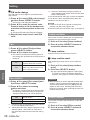
1
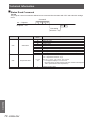
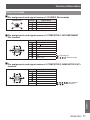
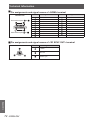
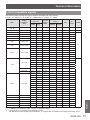
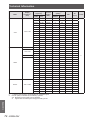
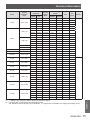
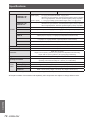
Technical Information
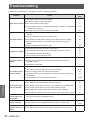
Scanning
frequency
Display
resolution *1
(dots)
H (kHz)
V
(Hz)
D-VGA
640 x 480
31.469
59.940
D-SVGA
800 x 600
37.879
Mode
D-XGA
D-SXGA
D-SXGA+
Dot clock
frequency
(MHz)
Picture
quality *2
PnP
3D
Display
A
○
○
A
○
○
PTCW230EA
PTCX200EA
25.175
A
60.320
40.000
A
76.302
119.972
73.250
A
A
43.363
60.000
65.000
A
AA
97.551
119.989
115.500
A
AA
○
63.980
60.020
108.000
A
A
○
60.276
58.069
93.067
A
A
65.350
60.120
122.850
A
A
65.120
59.900
122.430
A
A
62.500
58.600
108.000
A
A
○
64.744
59.948
101.000
A
A
○
65.317
59.978
121.750
A
A
○
1360 x 768
97.533
119.967
148.250
A
A
○
1376 x 768
48.360
60.00
86.670
A
A
○
47.776
59.870
79.500
AA
A
○
60.289
74.893
102.250
AA
A
68.633
84.837
117.500
AA
A
97.396
119.798
140.250
AA
A
○
49.600
60.050
79.360
AA
A
○
41.200
50.000
68.557
AA
A
○
49.702
59.810
83.500
AA
A
○
1024 x 768
1280 x 1024
1400 x 1050
1280 x 768
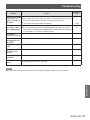
D-WXGA
1280 x 800
Format
○
○
○
101.563
119.909
146.250
AA
A
○
D-WXGA+
1440 x 900
55.935
59.887
106.500
A
A
○
D-WSXGA+
1680 x 1050
65.290
59.954
146.250
A
A
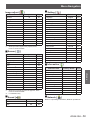
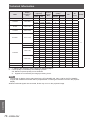
***** “i” added to the resolution value indicates an interlaced signal.
***** Picture quality is indicated by the following symbols.
AA: Maximum picture quality can be obtained.
A: Signals are converted by the image processing circuit.
Note
zz The number of display dots is 1280 x 800 for the PT-CW230EA and 1024 x 768 for the PT-CX200EA.
A signal with a different resolution will be projected after converting the resolution to match the projector
display.
zz When interlaced signals are connected, flicker may occur on the projected image.
Appendix
76 - ENGLISH
H