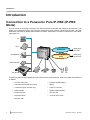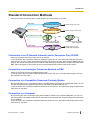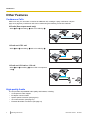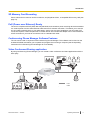
1
Preparation
Preparation
Basic Connections
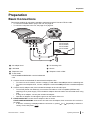
This section explains all connections needed to make and receive IP line and TEL line calls.
• To connect a Portable Station (PS) to the unit, see page 43.
• To connect a computer to the unit, see page 45 or page 46.
F
KX-NT700NE
KX-NT700UK
KX-NT700RU
KX-NT700BX
KX-NT700ML
D
LINE
LAN DC IN
D
A
B
E
G
C
A AC Adaptor Cord
E To Switching Hub
B LAN Cable
F Groove
C Telephone Cord
G Telephone Jack or PBX
D To AC Outlet
KX-NT700NE/UK/RU/BX/ML: use the included AC
cord
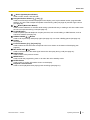
1. Connect the unit to the desired IP network and/or telephone line.
• To connect to an IP network, connect a category 5 LAN cable to the LAN port and to a switching hub.
• To connect to a telephone line, connect a telephone cord to the LINE jack and to a modular telephone
jack.
2. Connect the AC adaptor cord of the included AC adaptor to the unit’s DC input.
• To use PoE (Power over Ethernet), connect the LAN cable to a PoE-compatible (IEEE802.3af)
switching hub or power supply. The included AC adaptor does not need to be connected when using
PoE.
• If using an AC adaptor, use only the included AC adaptor.
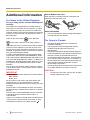
• Pass the AC adaptor cord through the groove on the bottom of the unit.
3. KX-NT700C/AL/NZ: Connect the AC adaptor to the AC outlet.
KX-NT700NE/UK/RU/BX/ML: Connect the AC cord to the AC adaptor, then connect the AC cord to the
AC outlet.
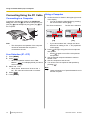
• If "Select Country" is displayed after the unit turns on, press [ ] or [ ] repeatedly to select the
country of use, then press SAVE .
Document Version
2010/02
Operating Instructions
23