1
OPERATING INSTRUCTIONS
Personal Computer
Getting Started
Introduction..................................................... 13
Description of Parts........................................ 15
First-time Operation........................................ 18
Turning On / Turning Off................................. 24
Switching the Display Mode........................... 25
Useful Information
Handling and Maintenance............................. 26
Installing Software.......................................... 32
Troubleshooting
Troubleshooting (Basic).................................. 38
Read Me First
Safety Precautions............................................ 2
Regulatory Information...................................... 8
Getting Started
Read Me First
Useful Information
Contents
CF-AX3 series
Troubleshooting
Model No.
LIMITED USE LICENSE AGREEMENT......... 44
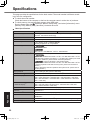
Specifications................................................. 46
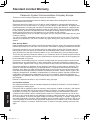
Standard Limited Warranty............................. 51
Appendix
Appendix
Please read these instructions carefully before using this product, and save this manual for future use.
CF-AX3mk2_EU_M.indb
1
2013/11/18
12:12:47
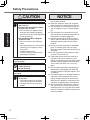
Safety Precautions
To reduce the risk of injury, loss of life, electric shock, fire, malfunction, and damage to
equipment or property, always observe the
following safety precautions.
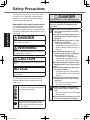
Explanation of symbol word panels
Read Me First
The following symbol word panels are used
to classify and describe the level of hazard,
injury, and property damage caused when the
denotation is disregarded and improper use is
performed.
DANGER
Denotes a potential hazard that will result in
serious injury or death.
WARNING
Denotes a potential hazard that could result
in serious injury or death.
CAUTION
Denotes a hazard that could result in minor
injury.
NOTICE
Denotes a hazard that could result in property damage.
The following symbols are used to classify
and describe the type of instructions to be
observed.
These symbols are used to alert users
to a specific operating procedure that
must not be performed.
DANGER
Precautions on the battery pack
Electrolyte leakage, generation of heat,
ignition or rupture of the Battery Pack
may result.
Do Not Throw the Battery Pack
into a Fire or Expose It to Excessive Heat
Do Not Insert Sharp Objects Into
the Battery Pack, Disassemble, or
Modify It
Do Not Short the Positive (+) and
Negative (-) Contacts
ÖÖDo not place the battery pack together with articles such as necklaces or hairpins when carrying or
storing.
Do Not Apply Shocks to the
Product by Dropping It, Applying
Strong Pressure to It, etc.
ÖÖIf this product is subjected to a
strong impact, damaged or deformed, stop using it immediately.
Do Not Charge the Battery Using
Methods Other Than Those Specified
Do Not Use the Battery Pack with
Any Other Product
• The battery pack is rechargeable
and was intended for the specified
product.
Do Not Use This Product with a
Battery Pack Other Than the One
Specified
ÖÖUse only the specified battery
pack with your product.
When the Battery Pack Has De
teriorated, Replace It With a New
One
ÖÖDo not continue to use a damaged
battery pack.
Avoid Extreme Heat (Near the Fire,
in Direct Sunlight, for Example)
This symbol is used to alert users to
a specific operating procedure that
must be followed in order to operate
the unit safety.
2
CF-AX3mk2_EU_M.indb
2
2013/11/18
12:12:48
Precautions on the built-in battery
(for disposal)
When disposing the battery, generation
of heat, ignition or rupture of the battery
may result.
Handling This Computer
Do Not Disassemble the Computer
Except When Disposing of it
Handling The Built-in Battery
Do Not Charge
Do Not Use With Any Other Prod
uct
Do Not Throw the Battery Into a
Fire or Expose It to Excessive
Heat
Do Not Short the Positive (+) and
Negative (-) Contacts
Do Not Insert Sharp Objects Into
the Battery, Disassemble, or Modify It
Do Not Apply Shocks to the Com
puter by Dropping It, Applying
Strong Pressure to It, etc.
WARNING
Precautions on the built-in battery
Generation of heat, ignition or rupture of
the battery may result.
Do Not Charge the Battery Using
Methods Other Than Those Specified
Do Not Throw the Product Into
a Fire or Expose It to Excessive
Heat
Do Not Insert Sharp Objects Into
the Battery or Shocks, Disassemble, or Modify It
Do Not Apply Shocks to the
Product by Dropping It, Applying
Strong Pressure to It, etc
Read Me First
DANGER
Avoid Extreme Heat (Near the Fire,
In Direct Sunlight, for Example)
When the Battery Has Deteriorat
ed, Contact Your Technical Support Office to Replace the Battery
Avoid Extreme Heat (Near the Fire,
In Direct Sunlight, for Example)
3
CF-AX3mk2_EU_M.indb
3
2013/11/18
12:12:48
Safety Precautions
WARNING
Fire or electric shock may result.
Read Me First
Do Not Do Anything That May
Damage the AC Cord, the AC Plug,
or the AC Adaptor
Do not damage or modify the
cord, place it near hot tools, bend,
twist, or pull it forcefully, place
heavy objects on it, or bundle it
tightly.
ÖÖDo not continue to use a damaged
AC cord, AC plug and AC adaptor.
• Contact your technical support office for repair.
Do Not Connect the AC Adaptor
to a Power Source Other Than a
Standard Household AC Outlet
ÖÖConnecting to a DC/AC converter
(inverter) may damage the AC
adaptor. On an airplane, only connect the AC adaptor/charger to an
AC outlet specifically approved for
such use.
Do Not Pull or Insert the AC Plug
If Your Hands Are Wet
Do Not Disassemble This Product
Do Not Touch This Product In a
Thunderstorm If Connected with
the AC Cable or Any Other Cables
Do Not Place Containers of Liquid
or Metal Objects on Top of This
Product
ÖÖIf foreign matter has found its way
inside, immediately turn the power
off and unplug the AC plug and
remove the battery pack. Then
contact your technical support office.
If a Malfunction or Trouble Oc
curs, Immediately Stop Use
If the Following Malfunction Occurs, Immediately Unplug the AC
Plug (and the Battery Pack)
This product is damaged
Foreign object inside this product
Smoke emitted
Unusual smell emitted
Unusually hot
ÖÖAfter the above procedure, contact
your technical support office for
repair.
Insert the AC Plug Completely
ÖÖDo not use a damaged plug or
loose AC outlet.
Clean Dust and Other Debris of
the AC Plug Regularly
• If dust or other debris accumulates
on the plug, humidity, etc. may
cause a defect in the insulation.
4
CF-AX3mk2_EU_M.indb
4
2013/11/18
12:12:48
Low-temperature burns may result.
Do Not Use This Product in Close
Contact With Your Body For a
Long Period of Time
ÖÖDo not use this product with exposing the skin to the heat source
of this product or AC adaptor for a
long period of time.
Do Not Expose Yourself or Other
Persons to the Hot Wind from the
Ventilation Hole (Exhaust) For a
Long Period of Time.
• Depending on the direction of the
computer or the way you hold the
computer, your hands and body
will be more exposed to the hot
wind.
• Covering the ventilation hole
(exhaust) with your hand or other
object can cause heat to build up
inside, possibly resulting in burns.
Detrimental health effects on your body
may result.
Do Not Turn the Volume Up To
Loud When Using Headphones
• Listening at high volumes that
overstimulate the ear for long periods of time may result in loss of
hearing.
CAUTION
Fire or electric shock may result.
Do Not Move This Product While
the AC Plug Is Connected
ÖÖIf the AC cord is damaged, unplug
the AC plug immediately.
Do Not Connect a Telephone Line,
or a Network Cable Other Than the
One Specified, Into the LAN Port
ÖÖDo not connect to a network such
as the ones listed below.
• Networks other than 1000BASE-T,
100BASE-TX or 10BASE-T
• Phone lines (IP phone (Internet
Protocol Telephone), Telephone
lines, internal phone lines (onpremise switches), digital public
phones, etc.)
Do Not Subject the AC Adaptor To
Any Strong Impact
ÖÖDo not continue to use the AC
adaptor after a strong impact such
as being dropped.
ÖÖContact your technical support office for repair.
Do Not Leave This Product in High
Temperature Environment for a
Long Period of Time
• Leaving this product where it will
be exposed to extremely high
temperatures such as near fire or
in direct sunlight may deform the
cabinet and/or cause trouble in the
internal parts.
Do Not Keep This Product Wher
ever There is a Lot of Water, Moisture, Steam, Dust, Oily Vapors,
etc.
Do Not Block the Ventilation Hole
(Exhaust)
ÖÖDo not use this product wrapped
in cloth or on top of bedding or a
blanket.
Read Me First
WARNING
5
CF-AX3mk2_EU_M.indb
5
2013/11/18
12:12:48
Safety Precautions
CAUTION
Fire or electric shock may result.
Read Me First
Hold the Plug When Unplugging
the AC Plug
Use Only the Specified AC Adap
tor With This Product
ÖÖDo not use an AC adaptor other
than the one supplied (supplied
with the unit or one sold separately
as an accessory).
Use the Modem With a Regular
Telephone Line
ÖÖDo not connect to the following
lines.
• An internal phone line (on-premise
switches) of a company or business office
• A digital public phone
• Line in a country or area not upported by this product
This product may fall over or drop, resulting in an injury.
Do Not Place This Product on Un
stable Surfaces
Avoid Stacking
Detrimental health effects on your body
may result.
Take a Break Of 10-15 Minutes
Every Hour
• Using this product for long periods of time may have detrimental health effects on the eyes or
hands.
NOTICE
l Do not place the computer near a television or radio receiver.
l Keep the computer away from magnets.
Data stored on the hard disk may be lost.
l This computer is not intended for the display of images for use in medical diagnosis.
l This computer is not intended for a use
with connection of medical equipment for
the purpose of medical diagnosis.
l Panasonic shall not be liable for loss of
data or other incidental or consequential
damages resulting from the use of this
product.
l Do not touch the terminals on the battery
pack. The battery pack may no longer
function properly if the contacts are dirty or
damaged.
l Do not expose the battery pack to water,
or allow it to become wet.
l If the battery pack will not be used for a
long period of time (a month or more),
charge or discharge (use) the battery pack
until the remaining battery level becomes
30% to 40% and store it in a cool, dry
place.
l This computer prevents overcharging of
the battery by recharging only when the
remaining power is less than approx. 95%
of capacity.
l The battery pack is not charged when the
computer is first purchased. Be sure to
charge it before using it for the first time.
When the AC adaptor is connected to the
computer, charging begins automatically.
l Should the battery leak and the fluid get
into your eyes, do not rub your eyes. Immediately flush your eyes with clear water
and see a doctor for medical treatment as
soon as possible.
6
CF-AX3mk2_EU_M.indb
6
2013/11/18
12:12:48
l The battery pack may become warm during recharging or normal use. This is completely normal.
l Recharging will not commence if internal
temperature of the battery pack is outside
of the allowable temperature range (0 °C
to 50 °C). ( Reference Manual “Battery Power”) Once the allowable range
requirement is satisfied, charging begins
automatically. Note that the recharging
time varies based on the usage conditions.
(Recharging takes longer than usual when
the temperature is 10 °C or below.)
l If the temperature is low, the operating
time is shortened. Only use the computer
within the allowable temperature range.
l This computer has a high temperature
mode function that prevents the degradation of the battery in high temperature
environments. ( Reference Manual
“Battery Power”) A level corresponding to
a 100% charge for high temperature mode
is approximately equivalent to an 80%
charge level for normal temperature mode.
l The battery pack is a consumable item.
If the amount of time the computer can
be run by using a particular battery pack
becomes dramatically shorter and repeated recharging does not restore its
performance, the battery pack should be
replaced with a new one.
l When transporting a spare battery inside a
package, briefcase, etc., it is recommended that it be placed in a plastic bag so that
its contacts are protected.
l Always power off the computer when it is
not in use. Leaving the computer on when
the AC adaptor is not connected will exhaust the remaining battery capacity.
THIS PRODUCT IS NOT INTENDED FOR USE
AS, OR AS PART OF, NUCLEAR EQUIPMENT/
SYSTEMS, AIR TRAFFIC CONTROL EQUIPMENT/SYSTEMS, AIRCRAFT COCKPIT EQUIPMENT/SYSTEMS, MEDICAL DEVICES OR
ACCESSORIES*1, LIFE SUPPORT SYSTEMS
OR OTHER EQUIPMENTS/DEVICES/SYSTEMS
THAT ARE INVOLVED WITH ENSURING HUMAN LIFE OR SAFETY. PANASONIC WILL NOT
BE RESPONSIBLE FOR ANY LIABILITY RESULTING FROM THE USE OF THIS PRODUCT
ARISING OUT OF THE FOREGOING USES.
*1
As defined by the European Medical Device
Directive (MDD) 93/42/EEC.
Read Me First
NOTE
Panasonic cannot guarantee any specifications, technologies, reliability, safety (e.g.
Flammability/Smoke/Toxicity/Radio Frequency Emission, etc) requirements related
to aviation standards that exceed the specifications of our COTS (Commercial-Off-TheShelf) products.
This computer is not intended for use in medical equipment including life-support systems,
air traffic control systems, or other equipment, devices or systems that are involved
with ensuring human life or safety. Panasonic
cannot be held responsible in any way for any
damages or loss resulting from the use of this
unit in these types of equipment, devices or
systems, etc.
This computer has been designed so as to
minimize shock to the LCD and hard disk
drive, but no warranty is provided against
such trouble. Therefore, as a precision instrument, be extremely careful in the handling.
7
CF-AX3mk2_EU_M.indb
7
2013/11/18
12:12:48
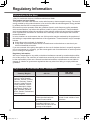
Regulatory Information
Information to the User
Read Me First
<Only for model with wireless LAN/Bluetooth/wireless WAN>
This product and your Health
This product, like other radio devices, emits radio frequency electromagnetic energy. The level of
energy emitted by this product however is far much less than the electromagnetic energy emitted
by wireless devices like for example mobile phones.
Because this product operates within the guidelines found in radio frequency safety standards
and recommendations, we believe this product is safe for use by consumers. These standards
and recommendations reflect the consensus of the scientific community and result from deliberations of panels and committees of scientists who continually review and interpret the extensive
research literature.
In some situations or environments, the use of this product may be restricted by the proprietor of
the building or responsible representatives of the organization. These situations may for example
include:
l Using this product on board of airplanes, or
l In any other environment where the risk of interference to other devices or services is perceived or identified as harmful.
If you are uncertain of the policy that applies on the use of wireless devices in a specific organization or environment (e.g. airports), you are encouraged to ask for authorization to use this product
prior to turning on the product.
Regulatory Information
We are not responsible for any radio or television interference caused by unauthorized modification of this product. The correction of interference caused by such unauthorized modification will
be the responsibility of the user. We and its authorized resellers or distributors are not liable for
damage or violation of government regulations that may arise from failing to comply with these
guidelines.
26-M-1
Regulations for Wireless LAN / Bluetooth
Country / Region
802.11a
Austria, Belgium, Croatia,
Cyprus, Czech Republic,
Denmark, Estonia, Finland,
France, Germany, Greece,
Hungary, Iceland, Ireland,
Latvia, Lithuania, Luxembourg, Macedonia, Malta,
Netherlands, Poland, Portugal, Slovakia, Slovenia,
Spain, Sweden, Switzerland,
United Kingdom
Restricted to indoor use.
Italy
Restricted to indoor use.
General authorization required if used outside.
Turkey
Restricted to indoor use.
Prohibited within an 1 km
radius from the centre of the
runway of the airports.
802.11b/g
Bluetooth
General authorization required if used outside of own
premises.
8
CF-AX3mk2_EU_M.indb
8
2013/11/18
12:12:48
Country / Region
Norway
802.11a
Restricted to indoor use.
802.11b/g
Bluetooth
Prohibited within a 20 km
radius from the centre of NyÅlesund.
l The latest version of “ERC RECOMMENDATION 70-03” by European Radiocommunications
Committee and the regulation in Turkey.
l Use only the antenna specified by Panasonic.
l Confirm the latest information to the radio regulation authorities.
40-E-1
Read Me First
Lithium Battery
Lithium Battery!
This computer contains a lithium battery to enable the date, time, and other data to be stored.
The battery should only be exchanged by authorized service personnel.
Warning!
A risk of explosion from incorrect installation or misapplication may possibly occur.
15-E-1
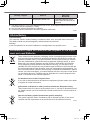
Information for Users on Collection and Disposal of Old Equipment and used Batteries
These symbols on the products, packaging, and/or accompanying documents mean
that used electrical and electronic products and batteries should not be mixed with
general household waste. For proper treatment, recovery and recycling of old products and used batteries, please take them to applicable collection points, in accordance with your national legislation and the Directives 2002/96/EC and 2006/66/
EC.By disposing of these products and batteries correctly, you will help to save
valuable resources and prevent any potential negative effects on human health and
the environment which could otherwise arise from inappropriate waste handling. For
more information about collection and recycling of old products and batteries, please
contact your local municipality, your waste disposal service or the point of sale where
you purchased the items. Penalties may be applicable for incorrect disposal of this
waste, in accordance with national legislation.
For business users in the European Union
If you wish to discard electrical and electronic equipment, please contact your dealer
or supplier for further information.
[Information on Disposal in other Countries outside the European Union]
These symbols are only valid in the European Union. If you wish to discard this product, please contact your local authorities or dealer and ask for the correct method of
disposal.
Note for the battery symbol (bottom two symbol examples):
This symbol might be used in combination with a chemical symbol. In this case it
complies with the requirement set by the Directive for the chemical involved.
53-E-1
9
CF-AX3mk2_EU_M.indb
9
2013/11/18
12:12:49
Regulatory Information
Safety Precautions
Read Me First
<Only for model with wireless WAN>
The following safety precautions must be observed during all phases of the operation, usage, service or repair of any Personal Computer or Handheld Computer incorporating wireless WAN modem. Manufacturers of the cellular terminal are advised to convey the following safety information
to users and operating personnel and to incorporate these guidelines into all manuals supplied
with the product. Failure to comply with these precautions violates safety standards of design,
manufacture and intended use of the product. Panasonic assumes no liability for customer failure
to comply with these precautions.
When in a hospital or other health care facility, observe the restrictions on the use of
mobiles. Switch Personal Computer or Handheld Computer incorporating wireless WAN
modem off, if instructed to do so by the guidelines posted in sensitive areas. Medical
equipment may be sensitive to RF energy.
The operation of cardiac pacemakers, other implanted medical equipment and hearing
aids can be affected by interference from Personal Computer or Handheld Computer
incorporating wireless WAN modem placed close to the device. If in doubt about potential danger, contact the physician or the manufacturer of the device to verify that the
equipment is properly shielded. Pacemaker patients are advised to keep their Personal
Computer or Handheld Computer incorporating wireless WAN modem away from the
pacemaker, while it is on.
Switch off Personal Computer or Handheld Computer incorporating wireless WAN modem before boarding an aircraft. Make sure it cannot be switched on inadvertently. The
operation of wireless appliances in an aircraft is forbidden to prevent interference with
communications systems. Failure to observe these instructions may lead to the suspension or denial of cellular services to the offender, legal action, or both.
For details on usage of this unit in aircrafts please consult and follow instruction provided by the airline.
Do not operate Personal Computer or Handheld Computer incorporating wireless WAN
modem in the presence of flammable gases or fumes. Switch off the cellular terminal
when you are near petrol stations, fuel depots, chemical plants or where blasting operations are in progress. Operation of any electrical equipment in potentially explosive
atmospheres can constitute a safety hazard.
Your Personal Computer or Handheld Computer incorporating wireless WAN modem
receives and transmits radio frequency energy while switched on. Remember that
interference can occur if it is used close to TV sets, radios, computers or inadequately
shielded equipment. Follow any special regulations and always switch off Personal
Computer or Handheld Computer incorporating wireless WAN modem wherever forbidden, or when you suspect that it may cause interference or danger.
Road safety comes first! Do not use a Personal Computer or Handheld Computer incorporating wireless WAN modem while driving a vehicle. Do not place the computer
with wireless WAN modem in an area where it could cause personal injury to the driver
or passengers. It is recommended to stow the unit in the boot or secure stowage area
while driving.
Do not place the computer with wireless WAN modem in an area over an air bag or in
the vicinity where an air bag may deploy.
Air bags inflate with great force and if the computer with wireless WAN modem is placed
in the air bag deployment area may be propelled with great force and cause serious
injury to occupants of the vehicle.
10
CF-AX3mk2_EU_M.indb
10
2013/11/18
12:12:50
CAUTION:
Risk of Explosion if Battery is replaced by an
Incorrect Type.
Dispose of Used Batteries According to the Instructions.
Read Me First
IMPORTANT!
Personal Computer or Handheld Computer incorporating wireless WAN modem operate
using radio signals and cellular networks cannot be guaranteed to connect in all conditions. Therefore, you should never rely solely upon any wireless device for essential
communications, for example emergency calls.
Remember, in order to make or receive calls, Personal Computer or Handheld Computer incorporating wireless WAN modem must be switched on and in a service area with
adequate cellular signal strength.
Some networks do not allow for emergency calls if certain network services or phone
features are in use (e.g. lock functions, fixed dialing etc.). You may need to deactivate
those features before you can make an emergency call.
Some networks require that a valid SIM card be properly inserted in Personal Computer
or Handheld Computer incorporating wireless WAN modem.
Interface Cable
Use of an interface cable longer than 3 m (9.84
feet) is not recommended.
11-E-1
58-E-1
For Europe
<Only for model with a “CE ” mark on the bottom of the computer>
Declaration of Conformity (DoC)
“Hereby, Panasonic declares that this Personal Computer is in compliance
with the essential requirements and other relevant provisions of the Directive
1999/5/EC.”
Hint:
If you want to get a copy of the original DoC of our above mentioned products, please contact our
web address: http://www.doc.panasonic.de
Authorised Representative:
Panasonic Testing Centre
Panasonic Marketing Europe GmbH
Winsbergring 15, 22525 Hamburg, Germany
Indication of the countries where WLAN is intended to be used:
AT BE BG CH CY CZ DE DK EE ES
FI FR GB GR HU IE IS IT LT LU
LV MT NL NO PL PT RO SE SI SK TR
18-25-E-0
This equipment requires minimum 20 cm spacing from all person’s body (excluding extremities of hands,
wrist and feet) in directions of the back and both sides of the LCD display during wireless modes of operation.If you use this equipment in tablet mode when utilizing the wireless functionality, it requires a minimum
10 mm spacing from the body (excluding extremities such as hands, wrist and feet) around the left and
right hand sides of the LCD display.
60-E-1
11
CF-AX3mk2_EU_M.indb
11
2013/11/18
12:12:50
Regulatory Information
For UK
For your safety, please read the following text carefully.
This appliance is supplied with a molded three pin mains plug for your safety and convenience.
A 3 ampere fuse is fitted in this plug.
Should the fuse need to be replaced please ensure that the replacement fuse has a rating of 3
ampere and that it is approved by ASTA or BSI to BS1362.
Check for the ASTA mark
or the BSI mark
on the body of the fuse.
If the plug contains a removable fuse cover you must ensure that it is refitted when the fuse is
replaced.
If you lose the fuse cover the plug must not be used until a replacement cover is obtained. A replacement fuse cover can be purchased from your local dealer.
If the fitted molded plug is unsuitable for the socket outlet in your home then the fuse should be
removed and the plug cut off and disposed of safely.
There is a danger of severe electrical shock if the cut off plug is inserted into any 13-ampere
socket.
Read Me First
ASA
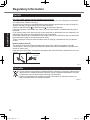
How to replace the fuse
The location of the fuse differs according to the type of AC mains plug (figures A and B).
Confirm the AC mains plug fitted and follow the instructions below. Illustrations may differ from
actual AC mains plug.
Open the fuse cover with a screwdriver and replace the fuse and close or attach the fuse cover.
Figure A
Figure B
Fuse cover
8-E-1
For India
For the purpose of recycling to facilitate effective utilization of resources, please return
this product to a nearby authorized collection center, registered dismantler or recycler,
or Panasonic service center when disposing of this product.
Please see the Panasonic website for further information on collection centers, etc.
http://www.panasonic.co.in/wps/portal/home
68-M-1
12
CF-AX3mk2_EU_M.indb
12
2013/11/18
12:12:51
Introduction
Thank you for purchasing this Panasonic product. For optimum performance and safety, please
read these instructions carefully.
In these instructions, the names are referred as follows.
indicates Windows® 8.1 Operating System.
indicates Windows® 7 Operating System.
n Terms and illustrations in these instructions
CAUTION :
NOTE :
Enter :
Fn + F5 :
Conditions that may result in minor or moderate injury.
Useful and helpful information.
Press [Enter] key.
Press and hold [Fn] key, and then press [F5] key.
Getting Started
Display “Charm”:Align the cursor to the top right (or bottom right) corner of the
screen to display Charm menu.
Alternatively:
Flick toward the center of the screen from the right edge.
:Click
(Settings) and then click
(Power).
(Start) - [All Programs] : Click
(Start), and then click [All Programs].
:
Page
in
these
Operating Instructions or in the Reference Manual.
è
:
Reference to the on-screen manuals.
l Some illustrations are simplified to help your understanding and may look different from the
actual unit.
l If you do not log on as an administrator, you cannot use some functions or cannot display
some screens.
l Refer for the latest information about optional products to the catalogs, etc.
l In these instructions, the names and terms are referred as follows.
®
“Windows 8.1 Pro 64-bit” as “Windows” or “Windows 8.1”
®
®
“Windows 7 Professional 32-bit Service Pack 1” and “Windows 7 Professional 64-bit Service Pack 1” as “Windows” or “Windows 7”
l For models with the flash memory drive, read the terms “hard disk” and “hard disk drive” as
“flash memory drive”.
l
Screen messages are explained in [English (United States)].
(Depending on the language preference, some screen messages in these instructions are different from the actual screen messages. For example, [Flight mode] may be displayed instead
of [Airplane mode] in some language preference.)
n Disclaimer
Computer specifications and manuals are subject to change without notice. Panasonic Corporation assumes no liability for damage incurred directly or indirectly from errors, omissions or discrepancies between the computer and the manuals.
13
CF-AX3mk2_EU_M.indb
13
2013/11/18
12:12:51
Introduction
n Trademarks
Microsoft®, Windows® and the Windows logo are registered trademarks of Microsoft Corporation
of the United States and/or other countries.
Intel, Core, Centrino and PROSet are either registered trademarks or trademarks of Intel Corporation.
SDXC Logo is a trademark of SD-3C, LLC.
Adobe, the Adobe logo and Adobe Reader are either registered trademarks or trademarks of
Adobe Systems Incorporated in the United States and/or other countries.
Bluetooth® is a registered trademark owned by Bluetooth SIG, Inc., U.S.A. and licensed to
Panasonic Corporation.
HDMI, the HDMI Logo and High-Definition Multimedia Interface are trademarks or registered
trademarks of HDMI Licensing LLC in the United States and other countries.
Names of products, brands, etc., appearing in this manual are trademarks or registered trademarks of their respective own companies.
Getting Started
n On-screen Manual
For further information about the computer, you can refer to the on-screen manual.
l Reference Manual
The Reference Manual contains the practical information to help you fully enjoy the computer’s performance.
l Important Battery Tips
The Important Battery Tips will provide you with the battery information so that you can use
the battery pack in the optimum condition to obtain longer operation time.
To access the on-screen manuals, follow the steps below.
On the Start screen, click the [Manual Selector] tile, and select the on-screen manual.
Double-click [Manual Selector] on the desktop screen, and select the on-screen manual.
14
CF-AX3mk2_EU_M.indb
14
2013/11/18
12:12:51
Description of Parts
C
D
E
F
G
H
I
A
B
J
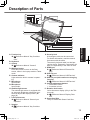
A:Function key
Reference Manual “Key Combinaè
tions”
B:Keyboard
C:Camera
Reference Manual “Camera”
è
D:Windows button
Press this button to return to the Start
screen, either in the Laptop mode or Tablet
mode.
E: Camera indicator
Lights when the built-in camera is operating.
F: Microphone
Inputs audio.
G:Microphone
Inputs audio.
H:Ambient light sensor
The ambient light sensor is equipped with
an automatic brightness adjustment function that adjusts the display screen. (è
page 28)
I: LCD/Touchscreen
Reference Manual “Screen Input
è
Operation”
Getting Started
K
L
M
N
O
P
Q
R
S
K:Security lock
A Kensington cable can be connected.
For further information, read the manual
that comes with the cable.
The security lock and cable is a theft prevention device. Panasonic Corporation will
bear no responsibility in the event of theft.
L: HDMI port
Reference Manual “External Disè
play”
M:USB 3.0 port
Reference Manual “USB Devices”
è
N:USB 3.0 port (with continuous charging
function)
Reference Manual “USB Devices”
è
O:Volume adjustment buttons
– : Decreases volume
+ : Increases volume
P: Rotation lock button
Locks the screen display. (Only in the Tablet mode)
Reference Manual “Display Rotaè
tion”
Q:Smart Card Slot
<Only for model with Smart Card Slot>
J: Speaker
Reference Manual “Key Combinaè
tions”
15
CF-AX3mk2_EU_M.indb
15
2013/11/18
12:12:51
Description of Parts
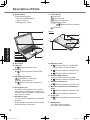
R:Power switch
Power status indicator
Off: Power off/Hibernation
Green: Power on
Blinking green: Sleep
S: LED indicator
: Caps Lock
: HOLD mode
: Numeric key (NumLk)
: Battery status
Reference Manual “Battery
è
Power”
: Drive status
H
Bottom
N
I
O
M
P
J
Q
Getting Started
K
A
B
C
D
E
F
G
L
A:DC-IN jack
B:LAN port
Reference Manual “LAN”
è
C:VGA port
Reference Manual “External Disè
play”
D:SD Memory Card slot
: SD Memory Card status
(Blinking: During access)
Reference Manual “SD Memory
è
Card”
E: Microphone jack
A condenser microphone can be used. If
other types of microphones are used, audio input may not possible, or malfunctions
may occur as a result.
F: Headphone jack
You can connect headphones or amplified
speakers.
When they are connected, audio from the
internal speaker is not heard.
G:Wireless switch
Reference Manual “Disabling/Enè
abling Wireless Communication”
è
Reference Manual “Wireless LAN”
Reference Manual “Bluetooth”
è
H:Wireless WAN antenna
<Only for model with wireless WAN>
Reference Manual “Wireless WAN”
è
I: Wireless LAN antenna
Reference Manual “Wireless LAN”
è
J:Wireless LAN antenna / Bluetooth antenna
Reference Manual “Wireless LAN”
è
Reference Manual “Bluetooth”
è
K:Touch pad
Reference Manual “Using the Touch
è
Pad”
L: HOLD button
On: HOLD mode activated
Off: HOLD mode deactivated
16
CF-AX3mk2_EU_M.indb
16
2013/11/18
12:12:52
M:Rubber feet
Raise or lower the rubbers in accordance
with the usage conditions.
Do not raise them in the Tablet mode.
Otherwise the rubbers may break when
changing to the Laptop mode.
N:Battery pack
è page 18
O:Battery latch
Automatically locked when the battery
pack is correctly secured. To unlock, slide
the latches to the unlocked position .
P: Dust cover
è “To clean the inside of the dust cover”
(page 30)
Q:Ventilation hole (Exhaust)
SIM card slot
Getting Started
<Only for model with wireless WAN>
SIM card slot is located in the battery compartment on
the bottom of the computer. Remove the battery pack
to insert the SIM card.
CAUTION
l The slot accepts SIM Cards (15 mm x 25 mm).
SIM card
Bottom
Insert the SIM card into the SIM card slot with the
contact side facing upward and with the cut corner
oriented as shown in the illustration.
Do not insert the SIM card upside down.
17
CF-AX3mk2_EU_M.indb
17
2013/11/18
12:12:52
First-time Operation
n Preparation
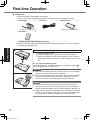
ACheck and identify the supplied accessories.
If you do not find the described accessories, contact Panasonic Technical Support.
• AC Adaptor. . . . . . . . . . 1
• AC Cord. . . . . . . . . . . . 1
• Battery Pack . . . . . . . . 1
Model No: CF-VZSU81EA
Model No: CF-AA6503A
• Soft Cloth. . . . . . . . . . . 1
• OPERATING INSTRUCTIONS (This book). . . . . . . . . . . . . . . . . . . . 1
Getting Started
BRead the LIMITED USE LICENSE AGREEMENT before breaking the seal on the computer’s packaging (è page 44).
1
1
A
Insert the battery pack.
ATurn the computer over.
BSlide the battery pack in parallel with the arrow direction.
CInsert the connector (A) into the receptacle on the computer,
and push the battery pack until it clicks into the secured position.
n To remove the battery pack
While sliding the left and right latches to the unlocked position
lift up the battery pack, and pull it out.
,
CAUTION
l Make sure the battery pack is securely locked. If not, the battery
pack may fall when you carry the computer.
l Do not touch the terminals of the battery pack and the computer.
Doing so can make the terminals dirty or damaged, and may
cause malfunction of the battery pack and the computer.
NOTE
l Note that the computer consumes electricity even when the
computer power is off. For the period of time the fully charged
battery will fully discharge, refer to “Battery duration” (è page 23).
l When the DC plug is not connected to the computer, disconnect
the AC cord from your AC wall outlet. Power is consumed simply
by having the AC adaptor plugged into an electrical outlet.
18
CF-AX3mk2_EU_M.indb
18
2013/11/18
12:12:53
2
2
Open the display.
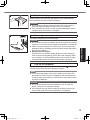
Hold the side of the computer with either of your hands and then
hold and lift the (A) part to open the display.
CAUTION
l Do not apply excessive pressure to the LCD. Do not open or
close the display holding the edge of the LCD segment.
l If the computer lifts when you are opening the display, hold the
computer down at its side, for example.
A
3
DC IN 16 V
3
Connect your computer to a power outlet.
The battery charging starts automatically.
CAUTION
4
Getting Started
l Do not disconnect the AC adaptor and do not switch the wireless
switch to on until the first-time operation procedure is completed.
l When using the computer for the first time, do not connect any
peripheral device (including wired LAN cable) except the battery
pack and AC adaptor.
l Handling the AC adaptor
Problems such as sudden voltage drops may arise during periods of thunder and lightning. Since this could adversely affect
your computer, an uninterruptible power source (UPS) is highly
recommended unless running from the battery pack alone.
Turn on the computer.
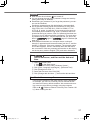
Open the display, and slide and hold the power switch
until the power status indicator (è page 16) lights.
(è page 16)
NOTE
l If the remaining charge of the built-in battery is less than 50%,
performance of the computer is degraded. We recommend you
to charge the built-in battery for 20 minutes or more before starting setup of Windows.
CAUTION
l Do not slide the power switch repeatedly or do not hold the
power switch for four seconds or longer.
l Any changes from the default setting of the Setup Utility must
not be made until the First-time Operation is completed.
19
CF-AX3mk2_EU_M.indb
19
2013/11/18
12:12:53
First-time Operation
5
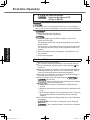
Select language.
Select language and OS
(32-bit or 64-bit).
CAUTION
l Carefully choose your language because you cannot change it
later. If you set a wrong language, you need to reinstall Windows.
ASelect language and click [Next].
Follow the on-screen instructions.
Getting Started
ASelect language and OS (32bit or 64bit) on “Select OS”
screen and click [OK].
The language setting will start by clicking [OK] on the confirmation screen.
You can return to the “Select OS” screen by clicking [Cancel].
The language and OS setting will be completed in about 15
minutes.
BWhen termination screen is displayed, click [OK] to turn off
the computer.
CTurn on the computer.
6
Setup Windows.
Follow the on-screen instructions.
lThe computer restarts several times. Do not touch the keyboard or touch pad, and wait until the drive indicator
has
turned off.
lAfter the computer is turned on, the screen remains black or
unchanged for a while, but this is not a malfunction. Wait for
a moment until the Windows setup screen appears.
lDuring setup of Windows, use the touch pad and clicking to
move the cursor and to click an item.
5/
lSetup of Windows will take approximately
20 minutes.
Go to the next step, confirming each message on the display.
Follow the steps below.
l
AWhen “Enable sensors” is displayed, click [Enable this
sensor].
BWhen the [User Account Control] screen is displayed, click
[Yes].
CAt the [Display Rotation Tool] confirmation screen, click [Yes].
The computer restarts automatically, and the setting is
enabled.
lYou can set the Wireless Network after the setup of Windows
is complete.
If “Get online” is displayed, select “Skip this
step”.
“Join a wireless network” screen may not appear.
20
CF-AX3mk2_EU_M.indb
20
2013/11/18
12:12:54
CAUTION
Getting Started
has turned off.
l Wait until the drive indicator
l You can change the user name, password, image and security
setting after setup of Windows.
l Remember your password. If you forget the password, you cannot use the Windows.
Creating a password reset disk beforehand is recommended.
l Do not use the following words and characters for user name:
CON, PRN, AUX, CLOCK$, NUL, COM1 to COM9, LPT1 to
LPT9, @, &, space. In particular, if you create a user name (account name) that includes the “@” mark, a password will be requested at the log-on screen, even if no password has been set.
If you try to log on without entering a password, “The user name
or password is incorrect.” may be displayed and you will not be
able to
sign in /
log on to Windows (è
page 41).
l Use standard characters as a computer name: numbers 0
through 9, uppercase and lowercase letters from A to Z, and the
hyphen (-) character. If the error message “The computer name
is not valid” appears, check if characters other than the above
are not entered. If the error message still remains on the display,
set the key entry mode to English (“EN”) and enter characters.
7
Set the time zone, and then set the date and
time.
A Open the Control Panel.
1. Click
on the Start screen.
2. Click [Control Panel] under “Windows System”.
B Click [Clock, Language, and Region] - [Date and Time].
C Click [Change time zone…].
D Select the time zone, then click [OK].
E Click [Change date and time…], then set the date and time.
8
Create the recovery disc.
If the recovery partition of the flash memory drive is damaged,
for example, you can use a recovery disc to reinstall the OS
and restore its factory default condition. We recommend creating a recovery disc before you begin using the computer.
Refer to è
Reference Manual “Recovery Disc Creation Utility” about creating the disc.
21
CF-AX3mk2_EU_M.indb
21
2013/11/18
12:12:54
First-time Operation
NOTE
l PC Information Viewer
This computer periodically records the management information of the hard disk, etc. The
maximum data volume for each record is 1024 bytes.
This information is only used for estimating the cause when the hard disk goes down by any
possibility. They are never sent to outside via network nor used for any other purpose except
for the purpose described the above.
To disable the function, add the check mark for [Disable the automatic save function for management information history] in [Hard Disk Status] of PC Information Viewer, and click [OK].
Then follow the on-screen instructions.
(è
Reference Manual “Troubleshooting (Advanced)” - “Checking the Computer’s Usage
Status”)
<For MUI OS model>
l
In the default settings, a shortcut icon for Korean language is on the Desktop screen. You may
delete the icon if not necessary.
<For MUI OS model>
l
If the recovery partition is deleted, you cannot create Recovery Disc(s).
Getting Started
n Before using wireless function
A Slide the wireless switch to ON.
- [Change PC Settings] - [Network] - [Airplane mode].
B Click [Charm] Set [Airplane mode] to [Off], and then;
set [Wi-Fi] in “Wireless device” to [On] (for wireless LAN).
set [Mobile broadband] in “Wireless device” to [On] (for wireless WAN).
set [Bluetooth] in “Wireless device” to [On] (for Bluetooth).
n To change the partition structure
You can shrink a part of an existing partition to create unallocated disk space, from which you can
create a new partition.
This computer has a single partition as default setting.
A
1.Click
on the Start screen, and then right-click [This PC] under “Windows System”.
2.Click [Manage] on the app bar.
(Start) and right-click [Computer], then click [Manage].
Click
l A standard user needs to enter an administrator password.
B Click [Disk Management].
C Right-click the partition for Windows (“c” drive in the default setting), and click [Shrink Volume].
l The partition size depends on the computer specifications.
D Input the size in [Enter the amount of space to shrink in MB] and click [Shrink].
l You cannot input a larger number than the displayed size.
l To select [Reinstall to the OS related partitions.] in installing OS (è page 34),
<For localized OS model> 70 GB / <For MUI OS model> 100 GB
60 GB or more is necessary for [Total size after shrink in MB].
E Right-click [Unallocated] (the shrunk space in the step D) and click [New Simple Volume].
F Follow the on-screen instructions to make the settings, and click [Finish].
Wait until formatting is completed.
NOTE
l You can create an additional partition using remaining unallocated space or newly creating
unallocated space.
l To delete a partition, right-click the partition and click [Delete Volume] in the step C.
22
CF-AX3mk2_EU_M.indb
22
2013/11/18
12:12:54
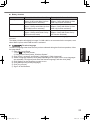
n Battery duration
<For model without Smart Card Slot> <For model with Smart Card Slot>
In sleep
Approx. 8 days
Approx. 7 days
(Approx. 6 days with Wake Up from (Approx. 5 days with Wake Up from
wired LAN function activated)
wired LAN function activated)
In hibernation
Approx. 35 days
Approx. 30 days
(Approx. 10 days with Wake Up from (Approx. 8 days with Wake Up from
wired LAN function activated)
wired LAN function activated)
When power is off Approx. 35 days
Approx. 30 days
(Approx. 10 days with Power On by (Approx. 8 days with Power On by
LAN function activated)
LAN function activated)
The above table shows the battery duration while the USB port continuous charging function is
not used.
The battery duration will slightly be longer if a LAN cable is not connected to the computer, even
when Wake Up from wired LAN function is activated.
Getting Started
To select language
n
To select a language other than the one you have selected during the first-time operation, follow
the steps below.
A Open the Control Panel.
1. Click
on the Start screen.
2. Click [Control Panel] under “Windows System”.
B Click [Clock, Language, and Region] - [Language] - [Add a language].
C Select a language, and then click [Add].Depending on the region, two or more languages
are selectable. Click [Open] and select the desired language, and then click [Add].
D Click [Option] for the language you want to use.
E Click [Make this the primary language].
F Click [Log off now].
G Sign in to the Windows.
23
CF-AX3mk2_EU_M.indb
23
2013/11/18
12:12:54
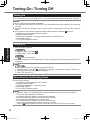
Turning On / Turning Off
Turning On
Slide and hold the power switch (è page 16) until the power status indicator (è page 16) lights.
NOTE
l Do not slide the power switch repeatedly.
l The computer will forcibly be turned off if you slide and hold the power switch for four seconds
or longer.
l Once you turn off the computer, wait for ten seconds or more before you turn on the computer
again.
turns off.
l Do not perform the following operation until the hard disk drive indicator
Connecting or disconnecting the AC adaptor
Sliding the power switch
Touching the keyboard, touch pad, tablet buttons or external mouse
Closing the display
Turn on/off the wireless switch
Turning Off
Getting Started
A Shut down the computer.
1. Display “Charm”, and click .
2. Click [Power] - [Shut down].
Click
(Start) - [Shutdown].
B When the computer is in the laptop mode, close the display after the power indicator goes off
completely.
NOTE
l
To turn off the computer completely, proceed as follows.
- [Change PC settings] - [Update and recovery] - [Recovery].
A Display “Charm”, and click
B Click [Restart now] under “Advanced startup”.
C Click [Turn off your PC].
When Starting Up/Shutting Down
Do not do the following
Connecting or disconnecting the AC adaptor
Sliding the power switch
Touching the keyboard, or external mouse
Closing the display
Turn on/off the wireless switch
NOTE
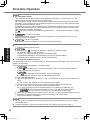
l To conserve power, the following power saving methods are set at the time of purchase.
The screen automatically turns off after :
10 minutes (when AC adaptor is connected) of inactivity
5 minutes (when operating on battery power) of inactivity
*1
The computer automatically enters sleep after :
20 minutes (when AC adaptor is connected) of inactivity
15 minutes (when operating on battery power) of inactivity
*1
Refer to
Reference Manual “Sleep or Hibernation Functions” about resuming from sleep.
24
CF-AX3mk2_EU_M.indb
24
2013/11/18
12:12:54
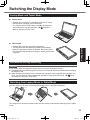
Switching the Display Mode
Laptop Mode and Tablet Mode
n Laptop mode
Operate the computer as a standard notebook PC using
the keyboard, touchpad, and touchscreen.
You can press the HOLD button to disable the keyboard
and touchpad or only the touchpad. (è
Reference
Manual “Using the Touch Pad”)
Getting Started
n Tablet mode
Operate the computer using the touchscreen.
The keyboard and touchpad are disabled automatically.
When the automatic rotation is enabled, the screen will rotate automatically based on the angle in which you hold the
computer.
Precautions during Switching
CAUTION
l Be careful when changing the display mode to prevent tangling the cables.
l If peripheral devices that may get in the way are connected, disconnect them before changing
the display mode.
l When changing the display mode, unintentional operation of the keyboard and touchpad may
occur. You can prevent such unintentional operations using the HOLD button. (è
Reference Manual “Using the Touch Pad”)
Switching from Laptop Mode to Tablet Mode
Hold the display in the area circled in the illustration below, and fold it backward.
The computer will operate in laptop mode until the display mode finishes switching over to tablet
mode.
25
CF-AX3mk2_EU_M.indb
25
2013/11/18
12:12:55
Handling and Maintenance
Operation Environment
Useful Information
l Place the computer on a flat stable surface not subject to shock, vibration, and danger of
dropping. Do not place the computer upright or turn it over. If the computer is exposed to an
extremely strong impact, it may become damaged.
l Temperature: Operation: 5 °C to 35 °C {41 °F to 95 °F}
Storage: -20 °C to 60 °C {- 4 °F to 140 °F}
Humidity: Operation: 30% to 80% RH (No condensation)
Storage: 30%% to 90% RH (No condensation)
Even within the above temperature/humidity ranges, operation for a long time in extreme environments, smoking nearby, or operation in places where oil is used or where there is a lot of
dust will result in the product deterioration and will shorten the product life.
Be sure to use the computer in an environment with sufficient heat ventilation.
-Avoid using the computer on a highly heat retentive surfaces (e.g., rubber pads and blankets). If possible, use the computer on surfaces that can dissipate heat, such as a steel
desk.
-Do not cover the computer with towels, keyboard covers, etc., as this prevents heat dissipation.
-When using the computer, always keep the display open. (Note, however, that closing the
display while the computer is in use does not cause generation of heat, ignition, or other
malfunctions.)
-When using the computer in the Laptop mode, the areas around the ventilation holes become especially hot.
Do not hold the computer by these areas in the Laptop mode.
Do not use the computer on your lap for an extended periods of time.
l Do not place the computer in the following areas, otherwise the computer may be damaged.
Near electronic equipment. Image distortion or noise may occur.
In extremely high or low temperature.
l As the computer can become hot during operation, keep it away from items that are sensitive
to heat.
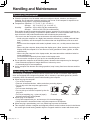
Handling Cautions
This computer is designed to minimize shock to parts such as the LCD and the flash memory
drive and equipped with a dripproof keyboard, but no warranty is provided against any trouble
caused by shock. Be extremely careful when handling the computer.
l When carrying the computer:
Turn off the computer.
Remove all external devices, cables, and other protruding objects.
Do not drop or hit the computer against solid
objects.
Do not leave the display open.
Do not pick up or hold the computer by the display part.
Do not put anything (e.g., a piece of paper)
Correct
Incorrect
Incorrect
between the display and keyboard.
l When flying on an airplane:
Carry the computer with you, and never put it in checked baggage.
Obey the airline’s instructions when using the computer on the airplane.
l When carrying a spare battery, put it in a plastic bag to protect its terminals.
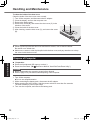
l This computer contains a magnet and magnetic products at the locations circled in the illustration at the right. Avoid leaving metallic object or magnetic media in contact with these areas.
26
CF-AX3mk2_EU_M.indb
26
2013/11/18
12:12:55
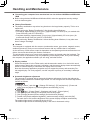
l Do not place an object containing magnetic power to the (A)
portions. Doing so may cause the computer to detect mistakenly that the display is closed, and as a result, the display may
go out and the computer may enter sleep.
l The touch pad is designed to be used by finger tip. Do not place
any object on its surface and do not press down strongly with
sharp-pointed or hard objects that may leave marks (e.g., nails,
pencils and ball point pens).
l Avoid any harmful substances such as oil from getting into the
touch pad.
A
The cursor may not work correctly.
A
l If the computer is being carried in a soft bag with the battery
pack removed, avoid undue pressure on the body of the computer in a crowded place, etc., as
this may result in damage to the LCD.
n When the battery indicator does not light on
The battery indicator may not light on even if the AC adaptor and the battery pack are correctly
connected to the computer, due to the following reasons.
l The AC adaptor’s protection function may be working. In this case, pull out the AC cord and
wait for more than 1 minute before reconnecting the AC cord.
l When the battery is fully charged and the computer is not operating (i.e., it is turned off or in
sleep mode), the power supply from the AC adaptor stops and power consumption is inhibited
(except when the Wake Up from LAN or the Power On by LAN function is enabled). In this
case, the indicator will light green upon connecting the AC adaptor, but only for a moment.
Useful Information
n If the computer becomes warm during usage
on the notification area, click , and click [Panasonic Power management (Better
l Click
Heat Dispersion)].
When changing to [Panasonic Power management (Better Heat Dispersion)], the following
settings will change.
-Change to [High Speed] from [Standard] in [Fan control mode].
Rotation of the cooling fan will become faster and the computer can be cooled down. Note
that the battery operating time will be shorter.
-Switch the screen saver to [Prohibited].
-Other setting changes such as the lowering of the internal LCD brightness.
When you do not frequently use CPU or the rotation noise of the fan bothers you, set [Standard] or [Low Speed] in [Fan control mode].
l If you are not using a wireless LAN, turn the wireless LAN off.
l Clean the inside of the dust cover once a month. (è page 30)
nWhen using peripheral devices
Follow these instructions and the Reference Manual to avoid any damage to the devices. Carefully read the instruction manuals of the peripheral devices.
l Use the peripheral devices conforming to the computer’s specifications.
l Connect to the connectors in the correct direction.
l If it is hard to insert, do not try forcibly but check the connector’s shape, direction, alignment of
pins, etc.
l If screws are included, fasten them securely.
l Remove the cables when you carry the computer. Do not pull the cables forcibly.
27
CF-AX3mk2_EU_M.indb
27
2013/11/18
12:12:55
Handling and Maintenance
nPreventing your computer from unauthorized use via wireless LAN/Bluetooth/Wireless
WAN
l Before using wireless LAN/Bluetooth/Wireless WAN, make the appropriate security settings
such as data encryption.
n Battery Recalibration
l The battery recalibration may take a long time due to the large battery capacity. This is not a
malfunction.
<When performing “Battery Recalibration” after shutting down Windows>
Full charge: Approximately 4 hours (max.) (Approximately 3.5 hours (max.) for models with
Smart Card slot) (with CF-VZSU81EA)
Complete discharge: Approximately 3 hours (max.) (Approximately 2.5 hours (max.) for
models with Smart Card slot) (with CF-VZSU81EA)
When performing “Battery Recalibration” without shutting down Windows, it may take more
time to charge / discharge.
n Sensors
This computer is equipped with four sensors (acceleration sensor, gyro sensor, magnetic sensor,
ambient light sensor), and you can use these sensors with any software that is compatible.
As the accuracy of each sensor output is dependent on the operating environment and other conditions, the results should only be used as a reference.
The acceleration sensor, gyro sensor, and magnetic sensor are located under the keyboard. The
detection results of each sensor may vary depending on the display mode, how you are holding
the computer, the application software you are using, and other factors.
Useful Information
l Display rotation
When the computer is in the Tablet mode, and the automatic rotation is on, the built-in acceleration sensor detects the computer’s inclination, and the screen display rotates automatically.
When an external display is connected, the display does not rotate.
Note also that some application programs may not support the primary and secondary Portrait angle display. For such programs, use the computer in primary or secondary Landscape
angle.
l Automatic brightness adjustment
The computer is equipped with an automatic brightness adjustment function that adjusts the
display screen based on the ambient light sensor. You can configure the automatic adjustment
function as follows.
- [Change PC Settings] - [PC and devices] - [Power and
ADisplay “Charm”, and click
sleep], then set [Adjust my screen brightness automatically] to [On].
(Start) - [Control Panel] - [Hardware and Sound] - [Power Option].
A Click
B Click [Change plan settings] for the power plan currently used.
C Click [Change advanced power settings] and double-click [Display].
D Double-click [Enable adaptive brightness], make necessary settings, and click [OK].
Set each item to ON, and the brightness of the screen display will adjust automatically.
The ambient light sensor is located at the top of LCD.
The ambient light cannot be detected properly if this area is obstructed or dirty.
28
CF-AX3mk2_EU_M.indb
28
2013/11/18
12:12:56
l Magnetic sensor
The magnetic sensor on the computer operates by detecting geomagnetism. Therefore, the
magnetic sensor may not function properly and it readings may be inaccurate, especially in
the following environments.
Inside or near steel structures such as buildings or bridges
• Inside or near automobiles, or near train power lines
• Near metallic furniture or appliances
• When the AC adaptor or other peripheral devices are brought closer to the computer
• Near magnets, speakers, or other objects with strong magnetic fields
The magnetic directions indicated by the magnetic sensor may not be accurate immediately
after purchase or in environments with poor magnetic fields.
In such cases, turn on the computer and move it as follows.
A Hold the computer so that its keyboard side is facing the ground and level.
BWhile keeping the computer level, rotate it 90 degrees or more clockwise, back to its original position, and then 90 degrees or more counterclockwise.
C Tilt the computer 90 degrees or more so that the side of the computer tilts down.
DWhile holding the computer vertically, rotate it 90 degrees or more clockwise, back to its
original position, and then 90 degrees or more counterclockwise.
CAUTION
●Hold the computer firmly when moving it. Strong shocks from dropping the computer may
result in damage.
Maintenance
Useful Information
If drops of water or other stains get on the surface of the LCD panel, wipe them off immediately.
Failure to do so may result in staining.
To clean the LCD panel
Use the soft cloth included with the computer. (For further information, refer to “Suggestions
About Cleaning the LCD Surface” è
Reference Manual “Screen Input Operation”.)
To clean the touch pad
Wipe lightly with a gauze or other dry, soft cloth.
To clean areas other than the LCD panel and touch pad
Wet a soft cloth with water or a diluted kitchen cleanser (neutral), wring the cloth out thoroughly,
and wipe the dirty area gently. Using a detergent other than a neutral kitchen cleanser (e.g., a
weak alkali cleanser) may adversely affect painted surfaces.
CAUTION
l Do not use benzene, thinner, or rubbing alcohol since it may adversely affect the surface
causing discoloration, etc.
Do not use commercially-available household cleaners and cosmetics, as they may contain
components harmful to the surface.
l Do not apply water or detergent directly to the computer, since liquid may enter inside of the
computer and cause malfunction or damage.
29
CF-AX3mk2_EU_M.indb
29
2013/11/18
12:12:56
Handling and Maintenance
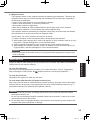
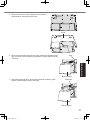
To clean the inside of the dust cover
Clean the inside of the dust cover once a month.
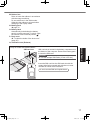
A Turn off the computer, and disconnect the AC adaptor.
B Close the display, and turn the computer over.
C Remove the battery pack.
D Remove the screw (B), and remove the dust cover (C) in the
direction of the arrow.
E Clean the inside of the dust cover.
F After cleaning, reset the dust cover (C), and secure the screw
(B).
C
B
CAUTION
l If dust is piled up inside the dust cover and hard to remove, use an electric cleaner.
Be careful not to inhale dust.
l Make sure no water or other liquid spills inside the dust cover, and pay attention not to drop
the screw inside the dust cover.
Dispose of Computer
Useful Information
n Preparation
l Remove all peripherals (SD memory card etc.).
Reference Manual “Hard Disk Data Erase Utility”)
l Erase the stored data. (è
CAUTION
l Never disassemble the computer except before disposal.
l Refer to page 3 for precautions when disposing of the computer.
1. Turn off the computer.
lDo not use sleep/hibernation.
2. While connecting the battery pack, disconnect the AC adaptor.
3. While pressing the HOLD button, slide the power switch for more than five seconds.
The built-in battery’s power output stops.
4. Turn over the computer, and remove the battery pack.
30
CF-AX3mk2_EU_M.indb
30
2013/11/18
12:12:56
5. Remove the screws (19), except the one circled in
the illustration, and remove the cover.
Cover
Tape
Useful Information
6. Remove the tape that secures the cords, and move the built-in battery as shown in the illustration. (Illustration: models without Smart
Card slot)
Built-in battery
7. Disconnect the connector, and remove the built-in battery. (Illustration: models without Smart Card slot)
Connector
Built-in battery
31
CF-AX3mk2_EU_M.indb
31
2013/11/18
12:12:56
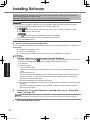
Installing Software
Installing software will return the computer to the default condition. When you install the software, the hard disk data will be erased.
Back up important data to other media or an external hard disk before installation.
CAUTION
l If the recovery partition is deleted, you cannot perform hard disk (flash memory) recovery.
To check the Recovery Partition, perform the following methods.
A
on the Start screen, and then right-click [This PC] under “Windows System”.
1. Click
2. Click [Manage] on the app bar.
Click
(Start) and right-click [Computer], then click [Manage].
l A standard user needs to enter an administrator password.
B Click [Disk Management].
n Remove everything and reinstall Windows
You can reinstall the OS that was pre-installed at the time of purchase (Windows 8.1 or Windows 7).
Preparation
l Change to the laptop mode.
l Remove all peripherals.
l Connect the AC adaptor and do not remove it until installation is complete.
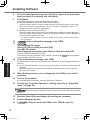
1
Perform “Remove everything and reinstall Windows”.
2
Perform the “First-time Operation”, starting from step 6, “Setup Windows” ( page 20).
Useful Information
- [Change PC settings] - [Update and recovery] - [Recovery].
A Display “Charm”, and click
B Click [Get Started] under “Remove everything and reinstall Windows”.
C Click [Next].
D Select the option.
• Just remove my files
Perform the reinstallation of the Windows in a few moments (Approximately 20 minutes).
• Fully clean the drive
By fully cleaning, the deleted files can not be recovered easily and the security level
will be increased. The processing time will be longer (Approximately 140 minutes).
Follow the on-screen instructions.
After the reinstallation, the computer will restart.
l Do not interrupt installation, for example by turning off the computer or performing other
operation.
Otherwise installation may become unavailable as Windows may not start up or the
data may be corrupted.
NOTE
lThe date and time, and the time zone may not be correct. Be sure to set them correctly.
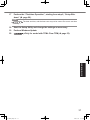
3
Perform Windows Update.
32
CF-AX3mk2_EU_M.indb
32
2013/11/18
12:12:56
4
<Only for model with TPM> Clear TPM.
on the Start screen.
A Click
B Click [Run] under “Windows System”, input [tpm.msc] and click [OK].
C Click [Clear TPM…] under “Actions” on the right of the “TPM Manager on Local Computer” screen.
D Click [Restart] of the “Manage the TPM security hardware” screen.
The computer will restart.
E When “TPM configuration change was requested to ...” is displayed, press F12.
F Click the Desktop tile, and when “TPM is ready” appears, click [Close].
n Hard Disk (Flash memory) Recovery
CAUTION
l If the recovery partition is deleted, you cannot perform hard disk (flash memory) recovery.
Preparation
l Change to the laptop mode.
l Remove all peripherals.
l Connect the AC adaptor and do not remove it until installation is complete.
If reinstallation using the method described in “Remove everything and reinstall
Windows” above is not successful, follow the steps below.
1
Start the Setup Utility.
- [Change PC settings] - [Update and recovery] - [Recovery].
A Display “Charm”, and click
B Click [Restart now] under “Advanced startup”.
C Click [Troubleshoot] - [Advanced options] - [UEFI Firmware Settings] - [Restart].
2
Write down all of the contents of the Setup Utility and press F9.
3
Check the [UEFI Boot] setting of the Setup Utility.
4
Press F10.
5
Press F2 or Del while [Panasonic] boot screen is displayed.
6
7
Select the [Exit] menu, then select [Recovery Partition] and press Enter .
Useful Information
Turn on the computer, and press F2 or Del while [Panasonic] boot screen is displayed.
l If the [Panasonic] boot screen is not displayed, turn on the computer while holding down
F2 or Del.
l If the password is requested, enter the Supervisor Password.
At the confirmation message, select [Yes] and press Enter.
[UEFI Boot] should be set to as follows.
When Windows 8.1 is used: [Enabled]
When Windows 7 is used: [Disabled]
At the confirmation message, select [Yes] and press Enter.
Computer will restart.
The Setup Utility starts up.
l If the password is requested, enter the Supervisor Password.
Click [Next] and click [YES].
Click [Reinstall Windows] and click [Next].
33
CF-AX3mk2_EU_M.indb
33
2013/11/18
12:12:57
Installing Software
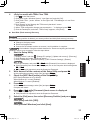
8
At the License Agreement screen, click [Yes, I agree to the provisions
above and wish to continue!] and click [Next].
Click [Next].
9
If the option is displayed, select the setting and click [Next].
l [Reinstall Windows to the System Disk to factory default.]
Select this option when you want to install Windows to the factory default. After installation, you can create a new partition. For how to create a new partition, refer to “To
change the partition structure” ( page 22).
*1
l [Reinstall to the OS related partitions.]
Select this option when the hard disk has already been divided into several partitions.
For how to create a new partition, refer to “To change the partition structure” ( page 22).
You can keep the partition structure.
*1
10
11
This does not appear if Windows cannot be installed to the recovery partition and the area usable by Windows.
At the confirmation message, click [YES].
<For localized OS model>
Select OS (32bit or 64bit) and click [OK].
<For MUI OS model>
Select language and system type (32bit or 64bit) and click [OK].
At the confirmation message, click [OK].
To cancel the recovery procedure, click [CANCEL], and click the
at the top right corner of the screen.
mark that appears
12 At the confirmation message, click [YES].
Useful Information
Installation starts according to the instructions on the screen. (It will take approximately 20
minutes.)
l Do not interrupt installation, for example by turning off the computer or performing other
operation.
Otherwise installation may become unavailable as Windows may not start up or the
data may be corrupted.
13 When Ending process screen is displayed, click [OK] to turn off the
computer.
14 Turn on the computer.
l If the password is requested, enter the Supervisor Password.
15 Perform the “First-time Operation”, starting from step 6, “Setup Windows” ( page 20).
NOTE
l
correctly.
The date and time, and the time zone may not be correct. Be sure to set them
16 Start the Setup Utility and change the settings as necessary.
17 Perform Windows Update.
18
<Only for model with TPM> Clear TPM ( page 33).
34
CF-AX3mk2_EU_M.indb
34
2013/11/18
12:12:57
n Using Recovery Disc
Use the Recovery Disc in the following conditions.
You have forgotten the administrator password.
Installation is not complete. The recovery partition in the hard disk (flash memory drive) may
be broken.
The recovery partition is deleted.
<Only for Windows 7 downgrade model>
To change OS from Windows 7 to Windows 8.1, or vice versa.
NOTE
l
To change the OS from 32 bit to 64 bit or vice versa, the recovery partition must
be used to install the OS. Therefore, the recovery partition must still exist on the hard disk in
order to perform this operation.
Preparation
l Change to the laptop mode.
l Prepare the following items:
Reference Manual “Recovery Disc Creation Utility”)
•Recovery Disc (
•USB DVD drive (optional) (refer to recent catalogs and other sources for information
about the products available)
Remove
all peripherals (except for the USB DVD drive).
l
Connect
the AC adaptor and do not remove it until installation is complete.
l
1
2
Connect the DVD drive to the USB port.
Start the Setup Utility.
Useful Information
- [Change PC settings] - [Update and recovery] - [Recovery].
A Display “Charm”, and click
B Click [Restart now] under “Advanced startup”.
C Click [Troubleshoot] - [Advanced options] - [UEFI Firmware Settings] - [Restart].
Turn on the computer, and press F2 or Del while [Panasonic] boot screen is displayed.
l If the [Panasonic] boot screen is not displayed, turn on the computer while holding down
F2 or Del.
l If the password is requested, enter the Supervisor Password.
3
Write down all of the contents of the Setup Utility and press F9.
4
Check the [UEFI Boot] setting of the Setup Utility.
5
6
Set the Recovery Disc into the DVD drive.
Press F10.
7
Press F2 or Del while [Panasonic] boot screen is displayed.
8
Select the [Exit] menu, then select your DVD drive in [Boot Override]
and press Enter .
At the confirmation message, select [Yes] and press Enter.
[UEFI Boot] should be set to as follows.
When the recovery disc for Windows 8.1 is used: [Enabled]
When the recovery disc for Windows 7 is used: [Disabled]
At the confirmation message, select [Yes] and press Enter.
Computer will restart.
The Setup Utility starts up.
l If the password is requested, enter the Supervisor Password.
The computer will restart.
35
CF-AX3mk2_EU_M.indb
35
2013/11/18
12:12:57
Installing Software
9
Click [Reinstall Windows] and click [Next].
At the confirmation message, click [YES].
10
11 At the License Agreement screen, click [Yes, I agree to the provisions
above and wish to continue!] and click [Next].
<For MUI OS model>
12
Click [Next].
If the option is displayed, select the setting and click [Next].
l [Reinstall with HDD recovery partition.]
Standard recovery method.
You can use recovery from Recovery Partition.
l [Reinstall without HDD recovery partition.]
Increase usable HDD size.
You can NOT use recovery from Recovery Partition.
When this option is selected, you can no longer create Recovery Disc(s) after the recovery operation.
CAUTION
l Carefully choose above item because you cannot change it later.
13 Click [Next].
Useful Information
If the option is displayed, select the setting and click [Next].
l [Reinstall Windows to the System Disk to factory default.]
Select this option when you want to install Windows to the factory default. After installation, you can create a new partition. For how to create a new partition, refer to “To
change the partition structure” ( page 22).
*2
l [Reinstall to the OS related partitions.]
Select this option when the hard disk has already been divided into several partitions.
For how to create a new partition, refer to “To change the partition structure” ( page 22).
You can keep the partition structure.
*2
This does not appear when [Reinstall without HDD recovery partition.] is selected, or if Windows cannot be installed to the recovery partition and the area usable by Windows.
14 At the confirmation message, click [YES].
15
<For MUI OS model>
Select language and system type (32bit or 64bit) and click [OK].
At the confirmation message, click [OK].
mark that appears
To cancel the recovery procedure, click [CANCEL], and click the
at the top right corner of the screen.
/
Installation starts according to the instructions on the screen. (It will take approximately 30
- 45 minutes. The process may take longer depending on the type of the DVD drive used.)
l Do not interrupt installation, for example by turning off the computer or pressing Ctrl +
Alt + Del.
Otherwise installation may become unavailable as Windows may not start up or the
data may be corrupted.
16 When Ending process screen is displayed, remove the Recovery Disc
and DVD Drive, and then click [OK].
Follow the on-screen instructions.
Some models may take approximately 40 minutes.
36
CF-AX3mk2_EU_M.indb
36
2013/11/18
12:12:57
17 Perform the “First-time Operation”, starting from step 6, “Setup Windows” ( page 20).
NOTE
l
correctly.
The date and time, and the time zone may not be correct. Be sure to set them
18 Start the Setup Utility and change the settings as necessary.
19 Perform Windows Update.
20
Useful Information
<Only for model with TPM> Clear TPM ( page 33).
37
CF-AX3mk2_EU_M.indb
37
2013/11/18
12:12:57
Troubleshooting (Basic)
Follow the instructions below when a problem has occurred. There is also an advanced troubleshooting guide in the “Reference Manual”. For a software problem, refer to the software’s instruction manual. If the problem persists, contact Panasonic Technical Support. You can also check
the computer’s status in the PC Information Viewer (è
Reference Manual “Troubleshooting
(Advanced)”).
n Starting Up
The computer does not
power on / The power
status indicator or battery indicator is not lit.
l Connect the AC adaptor.
l Insert a fully charged battery.
l Remove the battery pack and the AC adaptor, then connect them
again.
l When the CPU temperature is high, the computer may not start up
to prevent overheating of the CPU. Wait until the computer cools
down, and then turn the power on again. If the computer does not
power on even after cooling down, contact your technical support
office.
l Pull out the AC cord and wait for more than 1 minute to reconnect
the AC cord.
Troubleshooting
Windows does not start l Remove all peripheral devices (e.g. USB memory).
up.
l If the power status indicator is lit, slide the power switch for four
seconds or longer to turn off, then turn on again.
Using the following procedure, start up in Safe Mode,
l
and check the error details.
A Turn on the computer, and when the [Panasonic] boot screen
disappears (after entering the password*1 if one is set) hold
down F8.
B Release your finger when [Windows Advanced Options Menu]
is displayed, and with or , select [Safe Mode], then press
Enter.
Follow the on-screen instructions.
*1
Supervisor Password or User Password set with the Setup Utility
l Press F9 in the Setup Utility to return the Setup Utility settings (excluding the passwords) to the default values. Start the Setup Utility
and make the settings again.
l Check the [UEFI Boot] setting of the Setup Utility. [UEFI Boot]
should be set to
[Enabled] /
[Disabled].
You have forgotten the
password.
l Supervisor Password or User Password: Contact Panasonic Technical Support.
l Administrator password:
If you have another account with Administrator authority, log-on
with it, then delete the password for the problem account.
If you have a password reset disk, click [Reset password] displayed after the password input error, then follow the on-screen
instructions and set a new password.
If you cannot do either of the above, you will need to reinstall (è
page 32) and setup Windows.
38
CF-AX3mk2_EU_M.indb
38
2013/11/18
12:12:57
n Starting Up
The date and time are
incorrect.
l Make the correct settings.
A Open the Control Panel.
on the Start screen.
1. Click
2. Click [Control Panel] under “Windows System”.
(Start) - [Control Panel].
Click
B Click [Clock, Language, and Region] - [Date and Time].
C Click [Change time zone…].
D Select the time zone, then click [OK].
E Click [Change date and time…], then set the date and time.
l If the problem persists, the internal clock battery may need to be
replaced. Contact Panasonic Technical Support.
l When the computer is connected to LAN, check the date and time
of the server.
l The 2100 A.D. or later year will not be correctly recognized on this
computer.
[Executing Battery
Recalibration] screen
appears.
l The Battery Recalibration was canceled before Windows was shut
down last time.
To start up Windows, turn off the computer by the power switch,
and then turn on.
[Enter Password] does l Select [Enabled] in [Password On Resume] in the [Security] menu
not appear when resumReference Manual “Setup Utility”).
of the Setup Utility (è
ing from sleep / hiberna- l The Windows password can be used instead of the password set
in the Setup Utility.
tion.
A Open the Control Panel.
on the Start screen.
1. Click
2. Click [Control Panel] under “Windows System”.
(Start) - [Control Panel].
Click
B
Click [System and Security] - [Power Option] - [Require a password on wakeup] and add a check mark for [Require a password].
Click [System and Security] - [Power Option] - [Require a password when the computer wakes] and add a check mark for
[Require a password].
CF-AX3mk2_EU_M.indb
39
Troubleshooting
“Remove disks or other l A floppy disk in the drive or USB memory is connected, and it does
media. Press any key to
not contain system startup information. Remove the floppy disk and
restart” or a similar mesUSB memory, then press any key.
sage appears.
l If a device is connected to the USB port, disconnect the device, or
set [USB Port] or [Legacy USB Support] to [Disabled] in the [Advanced] menu of the Setup Utility.
l If the problem persists after removing the disk, it may be a flash
memory drive failure.
Perform the installation and return the flash memory drive to its
condition at the time of purchase. (è page 32) If the problem persists even after the reinstallation, contact Panasonic Technical Support.
39
2013/11/18
12:12:58
Troubleshooting (Basic)
n Starting Up
The computer will not
automatically enter
sleep or hibernation.
l If you connect to a network using wireless LAN function, perform
access point settings.
Reference Manual “Wireless LAN”)
(è
l If you do not use wireless LAN function, turn off wireless LAN function.
(è
Reference Manual “Disabling/Enabling Wireless Communication”)
l Make sure that you are not using any software that regularly accesses the hard disk.
When logging on (e.g., l Perform the following steps to change the audio settings to prevent
resuming the computer),
audio output.
audio is distorted.
A Click the [Desktop] tile on the Start screen.
B Right-click the desktop and click [Personalize] - [Sound].
C Remove the check mark from [Play Windows Startup sound],
and click [OK].
A Right-click the desktop and click [Personalize] - [Sounds].
B Remove the check mark from [Play Windows Startup sound],
and click [OK].
Cannot resume.
l One of the following operations may have been carried out. Slide the
power switch to turn on the computer. Data not saved will be lost.
In sleep mode, the AC adaptor or battery pack was disconnected,
or a peripheral was connected or disconnected.
The power switch was slid for four seconds or longer to forcibly
turn off the computer.
Troubleshooting
Other startup problems. l Check to see if there was a disk error.
A Remove all peripheral devices including an external display.
B
on the Start screen, and then click [This PC] under
Click
“Windows System”.
(Start) - [Computer].
Click
Right-click [Windows (C:)], and click [Properties].
C
Right-click [Local Disc (C:)], and click [Properties].
D
Click [Tools] - [Check].
l
Click [Tools] - [Check Now...].
A standard user needs to enter an administrator password.
E Follow the on-screen instructions.
Start the computer in Safe Mode and check the error details. (è
page 38 “Windows does not start up”.)
40
CF-AX3mk2_EU_M.indb
40
2013/11/18
12:12:58
n Entering Password
Even after entering the l The computer may be in ten-key mode.
password, password inlights, press NumLk to disable the tenIf the NumLk indicator
key mode, and then input.
put screen is displayed
again.
l The computer may be in Caps Lock mode.
If the Caps Lock indicator
lights, press Caps Lock to disable
the Caps Lock mode, and then input.
Cannot log on to Winl The user name (account name) includes an “@” mark.
dows.
If another user account exists:
(“The user name or
Log on to Windows using another user account, and delete the acpassword is incorrect” is
count that includes “@”. Then create a new account.
displayed.)
If no other account exists:
You need to reinstall Windows (è page 32).
®
l Disable automatic update of Intel Smart Connect Technology.
For details, refer to “Help”. Click
Supervisor password
on the notification area, click
or user password is not
the Intel® Smart Connect Technology icon, place the cursor on “?”,
requested when resumand select “Help” in the menu that appears.
ing from sleep.
n Shutting down
Windows does not shut
down.
l Remove all peripheral devices.
l Wait one or two minutes. It is not a malfunction.
When the screen becomes black for a moment.
l When you set [Display power saving function] of Power Plan Extension Utility to [Enabled], if you do the following operations, the
screen becomes black for a moment, but this is not a malfunction.
You can use it.
Adjust the brightness of the screen with Fn + F1 / Fn + F2.
Remove and insert the AC adaptor.
While you are using motion video playback software, benchmark
software for graphic, if error screen is displayed or application software does not function normally, set [Display power saving function] to [Disabled].
No display.
l The external display is selected. Press Fn + F3 ( or + P) to
switch the display.
Wait until the display has been switched completely before pressing Fn + F3 ( or + P) again.
l The display is turned off by the power-saving function. To resume,
do not press the direct selection keys, but press any other key like
Ctrl.
l The computer entered sleep or hibernation by the power-saving
function. To resume, slide the power switch.
l The screen may become darker. Press Fn + F2 to make the
screen brighter.
Troubleshooting
n Display
41
CF-AX3mk2_EU_M.indb
41
2013/11/18
12:12:58
Troubleshooting (Basic)
n Display
The screen is disordered.
l Changing the number of display colors and resolution may affect
the screen. Restart the computer.
l The refresh rate of the internal LCD may be 40 Hz. Change the
refresh rate of the internal LCD.
A
1.Click the [Desktop] tile on the Start screen.
2.Right-click on the desktop, and click [Graphics Properties].
Right-click on the desktop, and click [Graphics Properties].
B Click [Display].
C If [Refresh Rate] for the Notebook is [40 Hz], change to [60 Hz]
and click [Apply].
D Follow the on-screen instructions.
The external display
l If the external display does not support the power saving function,
does not work normally.
it may not work normally when the computer enters the power saving mode. Turn off the external display.
The image on the display does not rotate
l The application program currently running may not support the
image rotation. Quit the program, and then try to rotate the image.
This can ameliorate the status.
l Under the factory default settings, the image display will not rotate
automatically in Laptop mode. The image will not rotate in Tablet
mode either if the auto rotation is disabled.
Troubleshooting
n Battery
The battery indicator
lights red.
l The battery level is very low (the charge is approx. 9% or less).
l Connect the AC adaptor. You can use the computer when the indicator light is orange. If you do not have an AC adaptor, save your
data and power off your computer. After replacing the battery pack
with a fully charged one, turn your computer on again.
The battery indicator
lights red.
l Quickly saver your data and power off your computer.
l Connect the AC adaptor and wait until either one of the battery indicators
and
lights orange.
The battery indicator is
blinking.
l If blinking red:
Quickly save your data and power off your computer. Remove the
battery pack and disconnect the AC adaptor, then connect them
again. If the problem persists, contact Panasonic Technical Support. The battery pack or charging circuit may be defective.
l If blinking orange:
Battery cannot be recharged temporarily because the internal
temperature of the battery pack is outside the acceptable temperature range for recharging. Your computer can be used normally
in this state. Once the range requirement is satisfied, charging
begins automatically.
Software applications and peripheral devices (USB devices, etc.)
are consuming too much power. Exit the software applications
currently running, and remove all peripherals. Once the range
requirement is satisfied, charging begins automatically.
42
CF-AX3mk2_EU_M.indb
42
2013/11/18
12:12:59
n Battery
The battery indicator is
flashing.
l The battery is recharging.
If [Battery Charging Indicator] in [Main] menu of the Setup Utility is set
to [Flashing], the indicator will alternately become lighter and darker.
n Touch Pad
The cursor does not
work.
l If the Touch Pad cannot be used in the Laptop mode, the computer
may be in the HOLD mode. Press the HOLD button to deactivate
the HOLD mode.
l You cannot use the Touch Pad in the Tablet mode.
l When using the external mouse, connect it correctly.
l Restart the computer using the keyboard or touchscreen.
l If the computer does not respond to keyboard commands, read “No
response” (è below).
n On-screen Document
The document of PDF
format is not displayed.
l Install Adobe Reader and update to its latest version.
If your computer is connected to the internet, start up Adobe Reader and click [Help] - [Check for Updates...].
No response.
l Press Ctrl + Shift + Esc to open Task Manager and close the
software application that is not responding.
l An input screen (e.g., password input screen at startup) may be
hidden behind another window. Press Alt + Tab to check.
l Press the power switch for four seconds or longer to shut down the
computer, and then press the power switch to turn it on. If the application program does not work normally, uninstall and reinstall the
program. To uninstall,
A Open the Control Panel.
on the Start screen.
1. Click
2. Click [Control Panel] under “Windows System”.
(Start) - [Control Panel].
Click
B Click [Program] - [Uninstall a program].
The battery status indicator lights green and
then turns off immediately.
l When the battery is fully charged and the computer is not operating
(i.e., it is turned off or in sleep mode), the power supply from the
AC adaptor stops and power consumption is inhibited.
In such cases, the indicator will light green upon connecting the AC
adaptor, but only for a moment.
The recovery disc for
Windows 8.1 in not
functioning.
l Perform recovery using the recovery disc for Windows 7 first, and
then perform recovery using the recovery disc for Windows 8.1.
Troubleshooting
n Others
43
CF-AX3mk2_EU_M.indb
43
2013/11/18
12:12:59
LIMITED USE LICENSE AGREEMENT
THE SOFTWARE PROGRAM(S) (“PROGRAMS”) FURNISHED WITH THIS PANASONIC
PRODUCT (“PRODUCT”) ARE LICENSED ONLY TO THE END-USER (“YOU”), AND MAY BE
USED BY YOU ONLY IN ACCORDANCE WITH THE LICENSE TERMS DESCRIBED BELOW.
YOUR USE OF THE PROGRAMS SHALL BE CONCLUSIVELY DEEMED TO CONSTITUTE
YOUR ACCEPTANCE OF THE TERMS OF THIS LICENSE.
Panasonic Corporation has developed or otherwise obtained the Programs and hereby licenses
their use to you. You assume sole responsibility for the selection of the Product (including the
associated Programs) to achieve your intended results, and for the installation, use and results
obtained therefrom.
LICENSE
A. Panasonic Corporation hereby grants you a personal, non-transferable and non-exclusive
right and license to use the Programs in accordance with the terms and conditions stated in
this Agreement. You acknowledge that you are receiving only a LIMITED LICENSE TO USE
the Programs and related documentation and that you shall obtain no title, ownership nor any
other rights in or to the Programs and related documentation nor in or to the algorithms, concepts, designs and ideas represented by or incorporated in the Programs and related documentation, all of which title, ownership and rights shall remain with Panasonic Corporation or
its suppliers.
B. You may use the Programs only on the single Product which was accompanied by the Programs.
C. You and your employees and agents are required to protect the confidentiality of the Programs. You may not distribute or otherwise make the Programs or related documentation
available to any third party, by time-sharing or otherwise, without the prior written consent of
Panasonic Corporation.
D. You may not copy or reproduce, or permit to be copied or reproduced, the Programs or related
documentation for any purpose, except that you may make one (1) copy of the Programs for
backup purposes only in support of your use of the Programs on the single Product which was
accompanied by the Programs. You shall not modify, or attempt to modify, the Programs.
E. You may transfer the Programs and license them to another party only in connection with your
transfer of the single Product which was accompanied by the Programs to such other party.
At the time of such a transfer, you must also transfer all copies, whether in printed or machine
readable form, of every Program, and the related documentation, to the same party or destroy
any such copies not so transferred.
F. You may not remove any copyright, trademark or other notice or product identification from the
Programs and you must reproduce and include any such notice or product identification on
any copy of any Program.
YOU MAY NOT REVERSE ASSEMBLE, REVERSE COMPILE, OR MECHANICALLY OR ELECTRONICALLY TRACE THE PROGRAMS, OR ANY COPY THEREOF, IN WHOLE OR IN PART.
Appendix
YOU MAY NOT USE, COPY, MODIFY, ALTER, OR TRANSFER THE PROGRAMS OR ANY
COPY THEREOF, IN WHOLE OR IN PART, EXCEPT AS EXPRESSLY PROVIDED IN THE
LICENSE.
IF YOU TRANSFER POSSESSION OF ANY COPY OF ANY PROGRAM TO ANOTHER PARTY,
EXCEPT AS PERMITTED IN PARAGRAPH E ABOVE, YOUR LICENSE IS AUTOMATICALLY
TERMINATED.
44
CF-AX3mk2_EU_M.indb
44
2013/11/18
12:12:59
Appendix
TERM
This license is effective only for so long as you own or lease the Product, unless earlier terminated. You may terminate this license at any time by destroying, at your expense, the Programs and
related documentation together with all copies thereof in any form. This license will also terminate
effective immediately upon occurrence of the conditions thereof set forth elsewhere in this Agreement, or if you fail to comply with any term or condition contained herein. Upon any such termination, you agree to destroy, at your expense, the Programs and related documentation together
with all copies thereof in any form.
YOU ACKNOWLEDGE THAT YOU HAVE READ THIS AGREEMENT, UNDERSTAND IT AND
AGREE TO BE BOUND BY ITS TERMS AND CONDITIONS. YOU FURTHER AGREE THAT IT
IS THE COMPLETE AND EXCLUSIVE STATEMENT OF THE AGREEMENT BETWEEN US,
WHICH SUPERSEDES ANY PROPOSAL OR PRIOR AGREEMENT, ORAL OR WRITTEN, AND
ANY OTHER COMMUNICATIONS BETWEEN US, RELATING TO THE SUBJECT MATTER OF
THIS AGREEMENT.
45
CF-AX3mk2_EU_M.indb
45
2013/11/18
12:12:59
Specifications
This page provides the specifications for the basic model. The model number is different according to the unit configuration.
l To check the model number:
Check the bottom of the computer or the box the computer came in at the time of purchase.
l To check memory size and the flash memory drive (SSD) size:
Reference Manual “Setup Utility”) and select [Information] menu.
Run the Setup Utility (è
[Memory Size]: Memory size, [Hard Disk]: Hard disk drive size
n Main Specifications
Model No.
CF-AX3EDC series
CF-AX3EDW series
CPU/Secondary cache memory Intel Core™ i5-4300U vPro™ Processor (3 MB*1 cache, up to 2.90 GHz)
with Intel® Turbo Boost Technology
®
Chipset
Built-in CPU
Intel® HD Graphics 4400 (Built-in CPU)
Video controller
Main Memory
*2
4 GB*1 (Option: 8 GB*1), DDR3L SDRAM
Memory expansion is not possible.
Video Memory
*1*3
UMA 1792 MB Max.
UMA <32-bit> 1553 MB Max. <64-bit> 1696 MB Max.
Flash Memory Drive (SSD)
*4
128 GB (Option: 256 GB)
Approx. <For localized OS model> 15 GB / <For MUI OS model> 15 GB
(SSD Recovery partition) and approx. 1 GB (Recovery partition) are used
as recovery partitions. (Users cannot use these partitions.)
<Only for Windows 7 downgrade model>
Approx. <For localized OS model> 30 GB / <For MUI OS model> 50 GB
is used as a partition with HDD recovery tools. (Users cannot use this
partition.)
Approx. 300 MB is used as a partition with system tools. (Users cannot
use this partition.)
Display Method
11.6 Full HD type (IPS) (1920 x 1080 dots)
65,536/16,777,216 colors (1920 x 1080 dots)*5
Internal LCD
External Display
*6
Simultaneous Display on LCD
+ External Display*6
Bluetooth*7
Appendix
65,536/16,777,216 colors (1024 × 768 dots/1280 × 768 dots/
1360 × 768 dots/1366 x 768 dots/1400 x 1050 dots/1600 x 900 dots/
1680 x 1050 dots/1920 x 1080 dots)
Intel® Dual Band Wireless-N 7260 (è page 48)
Wireless LAN
Wireless WAN
65,536/16,777,216 colors (1024 × 768 dots/1280 × 768 dots/
1280 × 1024 dots/1360 × 768 dots/1366 × 768 dots/1400 × 1050 dots/
1600 × 900 dots/1600 × 1200 dots/1680 × 1050 dots/1920 × 1080 dots/
1920 × 1200 dots)
Bluetooth v4.0
*8
Equipped for some models (è page 49)
LAN
IEEE 802.3 10Base-T / IEEE 802.3u 100BASE-TX / IEEE 802.3ab
1000BASE-T
Sound
WAVE and MIDI playback, Intel® High Definition Audio subsystem support
Security Chip
TPM (TCG V1.2 compliant)
46
CF-AX3mk2_EU_M.indb
46
2013/11/18
12:12:59
n Main Specifications
Model No.
CF-AX3EDC series
Card Slots
SD Memory
Card Slot*9
x1
SIM Card
Slot*8
x1
Smart Card
Slot
–
CF-AX3EDW series
x1
Interface
USB 3.0 Ports x 2 (right side)*10 / LAN Port (RJ-45) x 1 / External Display
Port (VGA) (Mini Dsub 15-pin female) / HDMI Port (Type A)*11 / Microphone Jack (Miniature jack, 3.5 DIA) / Headphone Jack (Miniature jack,
3.5 DIA)
Keyboard / Pointing Device
84 or 85 keys / Touch Pad / Touchscreen (Capacitive)
Camera
High Definition 720p
Resolution
Effective num- Max. 1280 x 720
ber of pixels
Sensor
Microphone
Built-in (Microphone Array)
Ambient light
sensor
Equipped
Magnetic sensor
Gyro sensor
Acceleration
sensor
AC adaptor, Battery pack, or Built-in battery
*12
AC Adaptor
Input: 100 V - 240 V AC, 50 Hz/60 Hz, Output: 16 V DC, 5.0 A
Battery Pack
Li-ion 7.2 V, Typical 4400 mAh / Minimum 4100 mAh
Built-in Battery
(not replaceable)
Li-ion 7.2 V, Typical 2200 mAh /
Minimum 2050 mAh
Operating Time*13
Non-SCR model: Approx. 12 hours, SCR model: Approx 10 hours,
(Economy Mode(ECO) - Disable)
(Economy Mode(ECO) - Disable)
Charging Time*14
Approx. 4 hours
When the built-in battery is fully
charged
Approx. 2 hours
Power Consumption*15
Approx. 20 W*16/ Approx. 45 W (maximum when recharging in the ON
state)
Physical Dimensions
(W × D × H)
288 mm × 194 mm × 18 mm
Weight *17
Approx. 1.135 kg (for models without wireless WAN)
Approx. 1.14 kg (for models with
wireless WAN)
Operating
Environment Storage
Li-ion 7.2 V, Typical 1090 mAh /
Minimum 1030 mAh
Approx. 3.5 hours
When the built-in battery is fully
charged
Approx. 2 hours
Approx. 1.11 kg (for models without
wireless WAN)
Approx. 1.115 kg (for models with
wireless WAN)
Appendix
Power Supply
Temperature 5 °C to 35 °C
Humidity
30% to 80% RH (No condensation)
Temperature -20 °C to 60 °C
Humidity
30% to 90% RH (No condensation)
47
CF-AX3mk2_EU_M.indb
47
2013/11/18
12:13:00
Specifications
n Software
Base OS
Installed OS*18
Pre-installed Software*18
Windows® 8.1 Pro 64-bit
Windows® 8.1 Pro 64-bit
<Only for Windows 7 downgrade model>
Windows® 7 Professional 32-bit Service Pack 1 (downgraded to
Windows® 7) / Windows® 7 Professional 64-bit Service Pack 1 (downgraded to Windows® 7)
Adobe Reader, PC Information Viewer, Intel® PROSet/Wireless Software,
Hotkey Settings, Battery Recalibration Utility, Infineon TPM Professional
Package*19, Aptio Setup Utility, PC-Diagnostic Utility, Hard Disk Data
Erase Utility*20, Recovery Disc Creation Utility, Dashboard for Panasonic
PC, Power Plan Extension Utility, Camera Utility, USB Charge Setting
Utility, PC Information Popup, HOLD Mode Settings Utility, Manual
Selector, Microsoft Office Trial*21
<For localized OS model>
Wireless Manager 6.0
Camera for Panasonic PC, Wireless Toolbox, Touch Operation Help
Utility
Quick Boot Manager, Wireless Switch Utility, Wireless Connection
Disable Utility*19
Appendix
n Wireless LAN
:54/48/36/24/18/12/9/6 Mbps (automatically switched)*22
:11/5.5/2/1 Mbps (automatically switched)*22
:54/48/36/24/18/12/9/6 Mbps (automatically switched)*22
:(HT20)GI*24 = 400ns:150/130/115/86/72/65/57/43/28/
21/14/7 Mbps (automatically
switched)*22
GI*24 = 800ns:130/117/104/78/65/58/52/39/26/
19/13/6 Mbps (automatically
switched)*22
(HT40)GI*24 = 400ns:300/270/240/180/150/135/120/
90/60/45/30/15 Mbps (automatically switched)*22
GI*24 = 800ns:270/243/216/162/135/121/108/
81/54/40/27/13 Mbps (automatically switched)*22
Data Transfer Rates
IEEE802.11a IEEE802.11b IEEE802.11g IEEE802.11n*23 Standards Supported
IEEE802.11a / IEEE802.11b / IEEE802.11g / IEEE802.11n
Transmission Method
OFDM system, DS-SS system
Wireless Channels Used
IEEE802.11a : Channels 36/40/44/48/52/56/60/64/100/104/108/112/116/
120/124/128/132/136/140
IEEE802.11b/IEEE802.11g : Channels 1 to 13
IEEE802.11n : Channels 1-13/36/40/44/48/52/56/60/64/100/104/108/112/
116/120/124/128/132/136/140
RF Frequency Band
IEEE802.11a : 5.18 GHz - 5.32 GHz, 5.5 GHz - 5.7 GHz
IEEE802.11b/IEEE802.11g : 2.412 GHz - 2.472 GHz
IEEE802.11n : 2.412 GHz - 2.472 GHz, 5.18 GHz - 5.32 GHz,
5.5 GHz - 5.7 GHz
48
CF-AX3mk2_EU_M.indb
48
2013/11/18
12:13:00
n Bluetooth
Bluetooth Version
4.0
Classic mode / Low Energy mode
Transmission Method
FHSS system
Wireless Channels Used
Channel 1 to 79 / Channel 0 to 39
RF Frequency Band
2.402 GHz - 2.480 GHz
n Wireless WAN*8
Data
Communication
LTELTE
model
(EM7305)
UMTS/
HSUPA/
HSDPA/
HSPA+/
DCHSPA+
Band B1, B3, B7, B8, B20
DL 100 Mbps, UL 50 Mbps
Band850, 900, 1900, 2100
DL 42 Mbps, UL 5.76 Mbps
GPRS/
EDGE
Band 850, 900, 1800, 1900
GPRS Multislot Class 10
EDGE Multislot Class 12
GNSS
GPS, GLONASS
3G-model UMTS/
Band 850, 900, 1900, 2100
(EM8805) HSUPA/ DL 42 Mbp, UL 5.76 Mbps
HSDPA/
HSPA+/
DCHSPA+
Other
Features
GPRS/
EDGE
Band 850, 900, 1800, 1900
GPRS Multislot Class 10
EDGE Multislot Class 12
GNSS
GPS, GLONASS
SMS
LTEmodel
(EM7305)
Voice
3G-model SMS
(EM8805)
Voice
SIM
*2
*3
*4
*5
*6
*7
*8
No support
Mobile Originated SMS (MO-SMS)
Mobile Terminated SMS (MT-SMS)
No support
1.8/3V SIM Support
1 MB = 1,048,576 bytes /
1 GB = 1,073,741,824 bytes
For 32-bit OS, the usable memory available will be less depending on the specifications (3.4 GB to
3.5 GB).
A segment of the main memory is allotted automatically depending on the computer’s operating status.
The size of the Video Memory cannot be set by the user. The size of Video memory is allotted depending on the operating system.
1 MB = 1,000,000 bytes / 1 GB = 1,000,000,000 bytes. Your operating system or some application software will report as fewer GB.
A 16,777,216 color display is achieved by using the dithering function.
Display may be impossible using some connected external displays.
Does not guarantee operation of all Bluetooth-compatible peripherals.
Only for model with wireless WAN. The specification may differ depending on models.
Appendix
*1
Mobile Originated SMS (MO-SMS)
Mobile Terminated SMS (MT-SMS)
SMS over LTE
49
CF-AX3mk2_EU_M.indb
49
2013/11/18
12:13:00
Specifications
*9
*10
*11
*12
*13
*14
*15
*16
*17
*18
*19
*20
This slot is compatible with High-Speed Mode. Operation has been tested and confirmed using Panasonic SD/SDHC/SDXC Memory Cards with a capacity of up to 64 GB. Operation on other SD equipment
is not guaranteed.
Compatible with USB 1.1/2.0/3.0. Does not guarantee operation of all USB-compatible peripherals.
Does not guarantee operation of all HDMI-compatible peripherals.
<Only for North America>
The AC adaptor is compatible with power sources up to 240 V AC adaptor.
The unit for North America (identified by the suffix ‘M’ on the model number) is supplied with a 125 V AC
20-M-1
compatible AC cord.
2
Measured with LCD brightness : 60 cd/m
Varies depending on the usage conditions, or when an optional device is attached.
Varies depending on the usage conditions, CPU speed, etc.
Approx. 0.5 W when the battery pack is fully charged (or not being charged) and the computer is off.
<When using with 115 V AC>
Even when the AC adaptor is not connected to the computer, power is consumed (Max. 0.2 W) simply
by having the AC adaptor plugged into an AC outlet.
<When using with 240 V AC>
Even when the AC adaptor is not connected to the computer, power is consumed (Max. 0.4 W) simply
by having the AC adaptor plugged into an AC outlet.
23-E-1
Rated power consumption. Average value. May differ depending on models.
Operations of this computer are not guaranteed except for the pre-installed OS and the OS which is
installed by using the hard disk recovery and the recovery disc.
Must be installed before use.
Perform on the recovery partition. (If this software can not be performed on the recovery partition, perform from the recovery disc)
*21
*22
*23
Appendix
*24
Perform from the recovery disc.
To continue using this software after the end of the trial, purchase a license by following the on-screen
instructions.
These are speeds specified in IEEE802.11a+b+g+n standards. Actual speeds may differ.
Available when set to “WPA-PSK”, “WPA2-PSK” or “none”.
Only available when HT40 enabled by the computer.
50
CF-AX3mk2_EU_M.indb
50
2013/11/18
12:13:00
Standard Limited Warranty
Panasonic System Communications Company Europe
Panasonic System Communications Company Europe (referred to as “Panasonic”) will repair this
product (other than software, which is treated in a different section of this warranty) with new or
refurbished parts, from the date of original purchase in the event of a defect in materials or workmanship. This warranty only applies to new Panasonic Toughbooks purchased in the EEA and
Switzerland and Turkey.
Panasonic (or its authorised Service Provider) target to repair your equipment within 48 hours
from its receipt in our service centre.
Additional charges may apply for shipment to countries outside of the European Union. Panasonic will use all reasonable endeavours to ensure this service.
This warranty only covers failures due to defects in materials or workmanship which occur during
normal use for the applicable Service Agreement Period listed below. In the event that any product (or part thereof) is replaced, Panasonic shall transfer ownership of the replacement product (or
part) to the customer and the customer shall transfer ownership of the replaced product (or part)
to Panasonic.
Service Agreement Period - from original date of purchase
Toughbooks (and every accessory included in the original packaging except the battery) 3 years
Toughpads (and every accessory included in the original packaging except the battery) 3 years
Accessories included in the original package - 3 years
Additional peripherals manufactured by Panasonic (including media bay devices such as
CD-Rom drives) - 1 year
Batteries - 6 months. Panasonic Warranty covers the battery for six months. A battery is
considered good if it maintains 50% of its charge capacity during the warranty period. If a
battery is returned under this contract and testing determines that it has charge capacity
greater than 50%, the battery will be returned with an invoice for the retail purchase price of
a new battery.
This warranty is extended solely to the original purchaser. A purchase receipt or other proof of
date of original purchase will be required before warranty performance is rendered.
Limits and Exclusions:
This warranty does not cover and shall be void for:
Appendix
Broken or cracked LCD screen.
Defective pixel in notebook displays and LCD screens within 0.002%
Damage that is attributable to fire, theft or acts of God.
Damage caused by environmental influences (electrical storms, magnetic fields etc.).
Damage which has not been caused during normal operation
Repair of damage that is cosmetic only or does not affect product functionality such as wear and
tear, scratches and dents.
Failures caused by products not supplied by Panasonic.
Failures resulting from alteration, accidental damage, casualty, misuse, abuse or neglect.
Introduction of liquid or other foreign matter into the unit.
Improper installation, operation or maintenance.
Improper connections with peripherals.
Maladjustment of consumer controls such as function settings.
Modification or service by anyone other than Panasonic or its approved Service Providers.
Products used as short term rental or leased equipment.
Products whose serial number has been removed making the unit warranty condition impossible
to clearly determine.
THIS PRODUCT IS NOT INTENDED FOR USE AS, OR AS PART OF, NUCLEAR EQUIPMENT/
SYSTEMS, AIR TRAFFIC CONTROL EQUIPMENT/SYSTEMS, OR AIRCRAFT COCKPIT
EQUIPMENT/SYSTEMS. PANASONIC WILL NOT BE RESPONSIBLE FOR ANY LIABILITY RESULTING FROM THE USE OF THIS PRODUCT ARISING OUT OF THE FOREGOING USES.
51
CF-AX3mk2_EU_M.indb
51
2013/11/18
12:13:00
Standard Limited Warranty
Panasonic System Communications Company Europe
There are no other express warranties except as listed above.
We strongly recommend that customers backup their data before sending back their unit to an
Authorised Service Provider.
Panasonic shall not be liable for loss of data or other incidental or consequential damages resulting from the use of this product, or arising out of any breach of this warranty. All express and
implied warranties, including the warranties of satisfactory quality and fitness for a particular purpose are limited to the applicable warranty period set forth above. Panasonic shall not be liable
for any indirect, special or consequential loss or damage (including without limitation any loss of
profits) arising from the use of this product or for any breach of this warranty.
This limited warranty gives you specific legal rights, and you may have other rights that vary from
country to country.
You must consult the applicable country laws for a full determination of your rights. This limited
warranty is in addition to, and does not affect any rights arising out of any contract of sale or by
statute.
Data Storage Media
Data Storage Media is the media on which the Operating System, drivers and programs originally
installed by Panasonic on the main unit are stored. This media is originally provided with the unit.
Panasonic warrants to you only that the disc(s) or other media on which the Programs are furnished will be free from defects in material and workmanship under normal use for a period of
sixty (60) days from the date of delivery thereof to you, as evidenced by your purchase receipt.
This is the only warranty Panasonic makes to you. Panasonic does not warrant that the functions
contained in the Programs will meet your requirements or that the operation of the Programs will
be uninterrupted or error free.
Panasonic’s entire liability and your exclusive remedy under this warranty shall be limited to the
replacement of any defective disk or other media which is returned to Panasonic’s authorized
Service Centre, together with a copy of the purchase receipt, within the aforesaid warranty period.
Panasonic shall have no obligation for any defects in the disk(s) or other media on which the Programs are furnished resulting from your storage thereof, or for defects that have been caused by
operation of the disk(s) or other media otherwise than on the Product or in the environment conditions other than those specified by Panasonic by alteration, accident, misuse, abuse, neglect, mishandling, misapplication, installation, maladjustment of consumer controls, improper maintenance,
modification or damage that is attributable to acts of God. In addition, Panasonic shall have no
obligation for any defects in the disk(s) or other media if you have modified, or attempted to modify
any Program.
Duration of implied warranties, if any is limited to sixty (60) days.
Pre-installed software
Pre-installed software means the software shipped pre-loaded by Panasonic, not that loaded by
any third party or selling agent.
Appendix
Panasonic and its suppliers makes no warranty, either express, implied or statutory, with respect
to software provided with the Product and licensed to Purchaser, its quality, performance, merchantability, or fitness for a particular purpose. Panasonic does not warrant that the functions
contained in the software will be uninterrupted or error free. Panasonic assumes no risk of and
shall not in any case be liable for any damages, including, without limitation, any special, incidental, consequential, or punitive damages arising from breach of warranty or contract, negligence or
any other legal theory, including, without limitation loss of goodwill, profits or revenue, loss of use
of the Programs or Products or any associated equipment, cost of capital, cost of any substitute
equipment, facilities, or services, downtime costs, or claims of any party dealing with such damages.
52
CF-AX3mk2_EU_M.indb
52
2013/11/18
12:13:00
Panasonic System Communications Company Europe
Some countries do not allow the exclusion or limitation of incidental or consequential damages, or
limitations on how long an implied warranty lasts, so the above limitations or exclusions may not
apply to you.
This limited warranty gives you specific legal rights and you may also have other rights that vary
from country to country. You must consult applicable country laws for a full determination of your
rights.
Contacts
Address
Panasonic System Communications Company Europe
Panasonic Manufacturing U.K. Ltd.
Service Centre Building B4,
Wyncliffe Road, Pentwyn Industrial Estate, Cardiff,
United Kingdom
CF23 7XB
Web page
http://www.toughbook.eu/
Helpdesk
English speaking service French speaking service German speaking service Italian speaking service Spanish speaking service E-mail address
+44 (0) 8709 079 079
+33 (0) 1 47 91 64 99
+49 (0) 1805 410 930
+39 (0) 848 391 999
+34 (0) 901 101 157
[email protected]
Czech speaking service Hungarian speaking service Polish speaking service Romanian speaking service Slovakian speaking service E-mail address
+420 (0) 800 143234
+36 (0) 6800 163 67
+48 (0) 800 4911558
+40 (0) 800 894 743
+421 (0) 800 42672627
[email protected]
Payments
[email protected]
Appendix
53
CF-AX3mk2_EU_M.indb
53
2013/11/18
12:13:00
MEMO
54
CF-AX3mk2_EU_M.indb
54
2013/11/18
12:13:00
55
CF-AX3mk2_EU_M.indb
55
2013/11/18
12:13:00
As an ENERGY STAR® Partner, Panasonic Corporation has determined that this
product meets ENERGY STAR® guidelines for energy efficiency. By enabling
available power management settings, Panasonic computers enter a low-power sleep
mode after a period of inactivity, saving the user energy.
Outline of the International ENERGY STAR® Office Equipment Program
The international ENERGY STAR® Office Equipment Program is an international program that promotes energy saving through the use of computers and other office equipment. The program backs the development and dissemination of products with functions
that effectively reduce energy consumption. It is an open system in which business proprietors can participate voluntarily. The targeted products are office equipment such as computers, displays, printers, facsimiles, and copiers. Their standards and logos are uniform
among participating nations.
22-E-1
Panasonic Corporation
Osaka, Japan
Importer’s name & address pursuant to the EU legislation
Panasonic System Communications Company Europe, Panasonic Marketing
Europe GmbH
Hagenauer Straße 43
65203 Wiesbaden
Germany
© Panasonic Corporation 2013
Printed in UK
CF-AX3mk2_EU_M.indb
56
UK1113-0
CPE02797ZA
2013/11/18
12:13:00