1
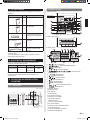
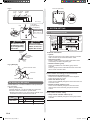
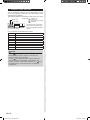
4.2. Name of parts
2. ACCESSORIES
The following installation parts are supplied. Use them as
required.
Name and Shape
Installation manual
Q’ty
●●With cover open
Application
This manual
Display panel
15
1
7
1
8
Instruction book
for operation
Operating manual
Label
4
10
3
11
4
1
9
2
12
5
Use this for writing the
names of the indoor units
that have been registered.
6
13
* The display is the same with the cover open or closed.
●●With cover closed
For installing the remote
controller
Screw
(M4 × 16 mm)
2
Binder
1
14
For remote controller and
remote controller cable
binding
Use of this product requires a special convertor and remote
controller cable.
These are provided as service parts, so please contact
authorized service personnel.
●●Display panel
16
17
18
19
20
21
23
22
3. ELECTRICAL REQUIREMENT
24
When connecting the Group remote controller and the
Convertor, use the following wiring.
Use
Remote
controller cable
Size
0.33 mm2
Wire type
22AWG
Polar 3 core,
Twisted pair
Remarks
Use shield
cable.
We recommend that you purchase our service parts for the
remote controller cable. Contact service personnel to
purchase this.
4. SELECTING AN INSTALLATION
LOCATION
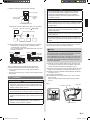
4.1. Dimensions
Unit : mm (in.)
9
(11/32)
4.5 (3/16)
4.5
(3/16)
63.5 (2-1/2)
4.5 (3/16)
45.3
(1-25/32)
120 (4-3/4)
23
(29/32)
Hole
83.5 (3-9/32)
18
(23/32)
12.5
(1/2)
120 (4-3/4)
15.3
(5/8)
30
33.5
(1-3/16) (1-5/16)
6
(1/4)
Hole × 2
Hole × 3
25
26
27
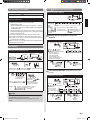
” (All Timer Button)
1“ ” (Timer Mode/Delete Button)
2“ ” (Day Button)
3“ ”, “ ” (Set Time Button)
4“ ” (Program/Clock
5“ Adjust Button)
” (Enter Button)
6“ ” (All ON Button)
7“ ” (All OFF Button)
8“ ” (Start/Stop Button)
9“ ” (Select Button)
0“ a“ ” (Fan Control Button)
”, “ ” (Set Temperature Button)
b“ ” (Mode Button)
c“ d(ON/OFF Button)
eOperation Lamp
fDay Display
gSetting Display
hTransmission Display
iOperation Lock Display
jTemperature Display
kON/OFF Display
lTimer and Clock Display
mFan Speed Display
nRemote Controller Address Display
oTimer Mode Display
pIndoor Unit Operation Indicators
qOperation Mode Display
En-3
9374707072-05_IM_en.indd 3
28/1/2554 16:00:36