1
3.3
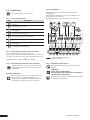
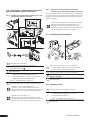
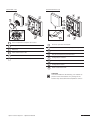
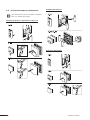
Setting the min and max temperatures
Thermostat Display T-75
The minimum and maximum temperatures (5° C
and 35° C) of the Thermostat Display T-75 are
pre-set. It is however possible to tailor these
temperatures to your system if it is equipped with
an interface.
Thermostat T-55
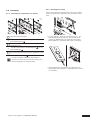
3.4
Floor sensor settings
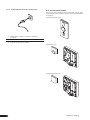
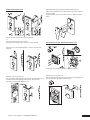
If your system includes a floor sensor, a potentiometer fitted
behind the cover of the Thermostat Public T-53 allows you to
adjust the minimum or maximum temperature settings for
the floor.
The floor sensor can be used for maximum or minimum
limitation of the floor temperature, regardless of the room
temperature.
The maximum limitation can be used, for example, to prevent
a sensitive floor covering from exposure to a too high
temperature where there is a high heat demand. The
minimum limitation can be used, for example, to keep a tile
floor warm even when there is no general demand for heat
supply to the room.
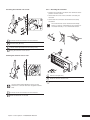
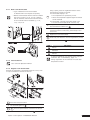
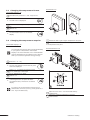
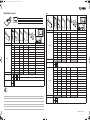
.1 Remove the dial with a screwdriver
Set the desired minimum temperature of the room with
the blue cam
2
Set the maximum temperature with the red
3 cam
The blue and red cam allow the minimum and
maximum set point to be set as a deviation from the
usual setpoint.
Example:
• The usual set point is 21°C
1
Select the required temperature using the
potentiometer
See controller Installation Manual for more
information.
• The setting of the blue cam is -10°C
➜
• The setting of the red cam is +5°C
The temperature range for this room is 11°C
to 26°C.
Thermostat Public T-53
It is not possible to set min/max temperatures using
the Thermostat Public T-53.
99 Uponor Control System - Operation Manual
9