1
PDA200E Induction Loop System - Installation Guide
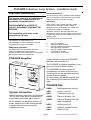
Fitting Outreach Plates
Connecting Inputs
Microphones
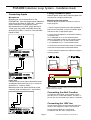
Microphones can be wired direct to the
PDA200E Mic input as shown below. Balanced
mics should be wired as GND, MIC - and Mic +
(which carries the 12V phantom power)
Non balanced mics ie AMT (after removal of
3.5mm jack plug), AML and AMD should be
wired as live to Mic+, screen to Gnd and MIC–
linked to GND.
Outreach plates can be daisy-chained together and
connected as a single line level input.
Mounting Outreach plates
Outreach plates should be mounted on a 25 mm
single gang box.
1. Run the 2-pair screened audio cable (supplied in
kits) from the PDA200E to the first Outreach plate
and secure with an appropriate gland.
2. Connect the PDA200E to the Outreach Plates in
accordance with:
V+ on PDA200E to V+ on the Outreach Plate
GND on PDA200E to GND on the Outreach Plate
L+ on PDA200E to AU+ on the Outreach Plate
L- on PDA200E to AU- on the Outreach Plate
3. Connect the second Outreach Plate (if required)
to the first Outreach Plate as described above.
4. Fit the Outreach plate to the outlet box using the
screws provided.
AU_BUS_IN+
AU_BUS_IN+
AU_BUS_IN-
AU_BUS_IN-
V+
GND
AU+
AU-
V+
GND
AU+
AU-
PDA200E
Line Level
Unbalanced line level inputs should be wired
as diagram below with live to Lin+, screen to
Gnd and Lin - linked to GND.
Balanced Line level should be wired as the
outreach plate (omitting the V+ connection)
NB, For installation of Outreach plates purchased before Jan 2003
please contact your supplier.
Connecting the Alert Function
To trigger the alert signal, close a switch across
pins ALT and V+ on the alert header. The alert input can also be connected to fire alarms / doorbells
Connecting the 100V line
This should be wired into the termination block as
shown in the diagram on Page 2 of the manual.
Ensure that the cables are connected in
accordance with the colour coding shown.
Page 5
Document No DCP0002129 JC 28/04/04 Rev 6