1
Installation
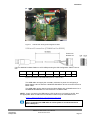
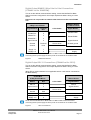
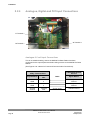
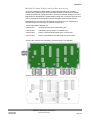
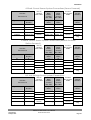
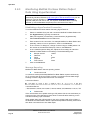
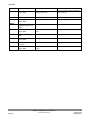
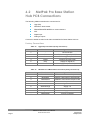
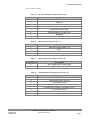
Digital Output RS232 Connections (COMMS set for RS232)
This is the MetPak Pro Base Station default communication configuration setting.
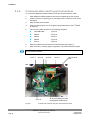
J5 Hub Box
8 Way Push fit Block
Terminal
Signal names
Nos.
3 Pair Cable
PC 9 Way D Type
Connector
Pin
Signal
No’s
Names
RS232 TX
RS232 RX
3
4
2
3
RXD
TXD
Signal Ground
2
5
Sig Gnd
Chasis Ground
Terminal
Post
NA
Chassis
Ground
Supply –ve
Supply +ve
7
8
Screen wires
–
+
DC Power
supply
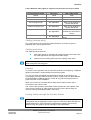
NOTE. Ensure that MetPak Pro Base Station 10 Metre cable is terminated before
connecting dc power as sensor power is connected to the 10 Metre cable
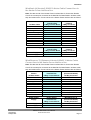
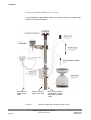
Figure 6
RS232 connections
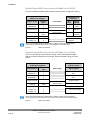
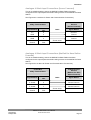
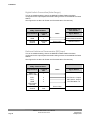
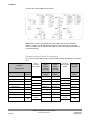
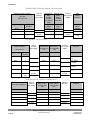
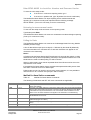
Digital Output RS422 Connections (COMMS set for RS422)
This is not the default communications setting; ensure the MetPak Pro Base
Station has been configured for this output requirement before wiring to a user
device.
J5 Hub Box
8 Way Push fit Block
Terminal
Signal Names
Nos.
RS422 to RS232 or
USB Converter
4 Pair Cable
Signal Names
RS422 TX +
RS422 TX –
6
3
RX +
RX –
RS422 RX +
RS422 RX –
TX +
TX –
Signal Ground
5
4
2
Chassis
Ground
Terminal
Post
Supply –ve
Supply +ve
7
8
Signal Ground
Screen wires
Chassis Ground
–
+
DC Power Supply
NOTE. Ensure that MetPak Pro Base Station 10 Metre cable is terminated before
connecting the DC power supply as sensor power is connected to the 10 Metre cable.
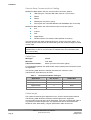
Figure 7
RS422 connections
MetPak Pro Base Station User Manual
© Gill Instruments Ltd
Page 16
Last Change
22 April, 2013