1
Content
Safety instructions
5
About this manual
12
Legend
12
1
Device description
13
1.1
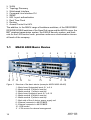
MACH 4000 Basic Device
14
1.2
Power supply
1.2.1 Power supply on back of device
1.2.2 M4-POWER power unit chassis
18
19
19
1.3
Fan
1.3.1 M4-AIR plug-in fan
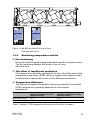
1.3.2 Monitoring temperature and fan
20
20
21
1.4
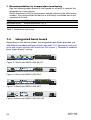
Integrated basic board
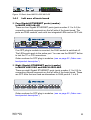
1.4.1 Left area of basic board
1.4.2 Right area of basic board
22
23
24
1.5
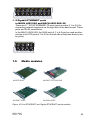
Media modules
1.5.1 M4-8TP-RJ45
1.5.2 M4-FAST 8TP-RJ45-PoE
1.5.3 M4-FAST 8-SFP
1.5.4 M4-GIGA 8-SFP
25
26
26
26
27
2
Assembly and start-up
28
2.1
Installing the device
2.1.1 Unpacking and checking
2.1.2 Installing the media modules
2.1.3 Installing the SFP/XFP modules
2.1.4 Installing the power supply unit
on the back of the device
2.1.5 Installing the plug-in power units in the
M4-POWER power unit chassis
2.1.6 Setting up/mounting the basic switch device in the 19" rack
2.1.7 Grounding the device
2.1.8 Mounting the power unit chassis, connecting it with the
MACH 4000
2.1.9 Connecting the terminal block for signal contact
2.1.10Connecting the supply voltage, starting up
28
28
28
30
MACH 4000
Release
06/09
30
31
31
34
34
35
36
3