1
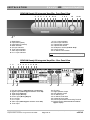
KNOW YOUR KANDY
•
•
•
•
When you first power up from the Mains Switch from the front underside of the amplifier, the amplifier goes
into Standby and the MODE Indicator glows GREEN.
In order to reduce power consumption and heat, the power stage of the amplifier is shut down when in
Standby mode.
In normal operation when an external fault such as a short circuit on the loudspeaker leads is detected, the
amplifier will go into standby and the speaker output and AC power relays will disconnect and the MODE
indicator light will glow GREEN. Unless the fault is rectified the amplifier can not be brought out of standby.
If the amplifier output Current exceeds its safe operating range (very low loudspeaker impedance and/or very
high volume level) the protective circuitry of the Kandy will take the amp into Standby mode. If subsequently
the volume is lowered or the loudspeakers changed, the amplifier can be brought out of Standby to resume
normal operation.
TROUBLESHOOTING
Kandy K
K22 Integrated Amplifier
If you suspect that your ROKSAN Kandy Integrated Amplifier is not operating properly, you should check all the
connections carefully. Pay particular attention to speaker phasing and channel connections. Phono plugs should
be fully inserted- a frequent cause of problems is that Phono plug surrounds do not make proper contact. Below
are some commonly encountered problems with suggestions for possible cure. The list is not exhaustive: If you
have any unresolved problems, please consult ROKSAN or your appointed ROKSAN dealer or distributor.
SYMPTOM
LIKELY CAUSE
SUGGESTED REMEDY
No power
AC Mains lead not inserted properly
Unit not switched on
Ensure AC Mains lead is fully inserted
Switch unit on (on the front underside)
No output on one or both
channels
Amplifier in stand-by mode (MODE light
GREEN)
Press MODE button to set amplifier in
operational mode (MODE light RED)
Missing or bad input signal connection
Incorrect speaker connection
Check all input connections
Check speaker output connections on
rear panel
Select correct input, ascertain source is
working
Deselect Tape Monitor
Wrong input selected
Tape Monitor selected
Very low sound output
Amplifier set in 20dB MUTE position
(MODE light AMBER)
Press MODE button to set amplifier in
operational mode (MODE light RED)
(Check volume setting first)
Poor speaker imaging, lack
of Bass output
Loudspeakers connected out of phase
Check polarity of speaker connections
(especially important if Multi-wiring,
Multi-Amping)
Hum from speakers
Incorrect grounding
Check Mains polarity and grounding on
all connected equipment
Roksan Audio ltd
Kandy K2 Integrated Amplifier User Manual
CLASSIFICATION: General Use
All specifications are liable to change without notice. E&OE
Version 3.5
Page 9 of 11
ENGLISH