1
LW400
USER MANUAL - NETWORK GUIDE
020-000049-01
LW400
User Manual - Network Guide
Thank you for purchasing this projector.
This projector has the network function that brings you the following main features.
Web control
The projector can be controlled and monitored by a web browser software on
your PC, which can help you to setup and maintain the projector.
MY IMAGE (Still Image Transfer) Display
The projector can display still images that are transferred via the network.
This manual is only intended to explain Network function only.
For safety, operations or any other issues, refer to the Safety Guide and User
Manual - Concise and User Manual - Operating Guide.
WARNING ►Before using this product, be sure to read all manuals for this
product. After reading them, store them in a safe place for future reference.
NOTE • The information in this manual is subject to change without notice.
• The manufacturer assumes no responsibility for any errors that may appear in
this manual.
• The reproduction, transfer or copy of all or any part of this document is not
permitted without express written consent.
Trademark acknowledgment
• Microsoft and Internet Explorer, Windows, Windows NT, Windows Me, Windows
Vista are registered trademark of Microsoft Corporation.
• PowerPC is a registered trademark of International Business Machines Corporation.
• VESA and DDC are trademarks of the Video Electronics Standard Association.
• Apple and Macintosh, Mac, Mac OS are registered trademarks of Apple Inc.
• Pentium is a registered trademark of Intel Corporation.
• JavaScript is a registered trademark of Sun Microsystems, Inc.
• DVI is a trademark of Digital Display Working Group.
• HDMI, the HDMI logo and High-Definition Multimedia Interface are trademarks
or registered trademarks of HDMI Licensing LLC.
•
is a trademark of SRS Labs, Inc. WOW technology is incorporated under
license from SRS Labs, Inc.
All other trademarks are the properties of their respective owners.
LW400 Usr Manual - Network GUID
1
020-000049-01 Rev.1 (04/08)
Content
Content
Content .......................................................................................... 2
1. Main functions............................................................................ 3
1.1 Configuring and controlling via a web browser............................................ 3
1.2 MY IMAGE (Still image Transfer) Display.................................................... 3
2. Equipment connection and network setting.............................. 4
2.1 Required equipment preparation................................................................. 4
2.2 Manual network connection setting.............................................................. 5
2.2.1 Equipments connection.......................................................................... 5
2.2.2 Network settings..................................................................................... 5
2.2.3 “Internet Option” setting.......................................................................... 8
2.2.4 Check connection................................................................................... 9
3. Management with Web browser software............................... 10
3.1 Configuring and controlling the projector via a web browser..................... 11
3.1.1 Logon................................................................................................... 13
3.1.2 Network Information............................................................................. 14
3.1.3 Network Settings.................................................................................. 15
3.1.4 Port Settings......................................................................................... 16
3.1.5 Mail Settings......................................................................................... 17
3.1.6 Alert Settings........................................................................................ 18
3.1.7 Schedule Settings................................................................................ 20
3.1.8 Date/Time Settings............................................................................... 22
3.1.9 Security Settings.................................................................................. 24
3.1.10 Projector Control................................................................................ 26
3.1.11 Projector Status.................................................................................. 30
3.1.12 Network Restart.................................................................................. 31
3.1.13 Logoff................................................................................................. 31
3.2 E-mail Alerts............................................................................................... 32
3.3 Projector Management using SNMP.......................................................... 34
3.4 Event Scheduling....................................................................................... 35
3.5 MY IMAGE (Still Image Transfer) Display.................................................. 38
3.6 Command Control via the Network............................................................ 40
LW400 Usr Manual - Network GUID
2
020-000049-01 Rev.1 (04/08)
1. Main functions
1. Main functions
1.1 Configuring and controlling via a web browser
You can adjust or control the projector via a network from a web browser on a PC
that is connected to the same network.
Logon the network from the web browser and it offers the menus to configure the
network settings, monitor the projector and so on.
1.2 MY IMAGE (Still image Transfer) Display
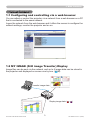
Image files can be sent via the network, and up to 4 image data can be stored in
the projector and displayed on screen one by one. (&38)
Transfer image data
Display image data ( 1 -
LIT MAN USR LW400 NTWK GUID
3
4
)
020-000049-01 Rev.1 (04/08)
2. Equipment connection and network setting
2. Equipment connection and network setting
2.1 Required equipment preparation
The following equipments are required to connect the projector to your PC through
the network.
PC : 1) equipped with the network feature
2) installed a web browser software (&11)
LAN cable : CAT-5 or greater
NOTE • The system for using the network function of the projector requires
communication environment conforming 100Base-TX or 10Base-T.
LIT MAN USR LW400 NTWK GUID
4
020-000049-01 Rev.1 (04/08)
2. Equipment connection and network setting
2.2 Manual network connection setting
2.2.1 Equipments connection
Connect the projector and PC with a LAN cable.
* Before connecting with an existing network, contact the network administrator.
Next, please check the PC setting as explained below.
2.2.2 Network settings
This is the explanation of network connection settings for Windows XP and
Internet Explorer.
1) Log on to Windows XP as administrator authority. (*)
2) Open “Control Panel” from “Start” menu.
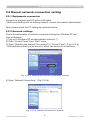
3) Open “Network and Internet Connections” in “Control Panel”. (Fig. 2.2.2.a)
* Administrator authority is the account, which can access to all functions.
Fig. 2.2.2.a “Network and Internet Connections” window
4) Open “Network Connections”. (Fig.2.2.2.b)
Fig. 2.2.2.b “Network Connections” window
LIT MAN USR LW400 NTWK GUID
5
020-000049-01 Rev.1 (04/08)
2. Equipment connection and network setting
2.2 Manual network connection setting (continued)
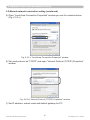
5) Open “Local Area Connection Properties” window you use for network device.
(Fig. 2.2.2.c)
Fig. 2.2.2.c “Local Area Connection Properties” window
6) Set used protocol as “TCP/IP” and open “Internet Protocol (TCP/IP) Properties”
window.
Fig. 2.2.2.d “Internet Protocol (TCP/IP) Properties” window
7) Set IP address, subnet mask and default gateway for PC.
LIT MAN USR LW400 NTWK GUID
6
020-000049-01 Rev.1 (04/08)
2. Equipment connection and network setting
2.2 Manual network connection setting (continued)
[About IP address]
■ Setting manually
The Network address portion included in the IP address set into your PC should
be common with projector’s one. And the entire IP address in the PC should not
be overlapped with other equipments in the same network, including the projector.
For example
The projector’s initial settings are as follows.
IP address: 192.168.1.10
Subnet mask: 255.255.255.0
(Network address: 192.168.1 in this case)
Therefore, specify PC’s IP address as follows.
IP address: 192.168.1.xxx (xxx shows decimal number.)
Subnet mask: 255.255.255.0
(Network address: 192.168.1 in this case)
Select from 1 to 254 for “xxx” not duplicating with any other equipments.
In this case, projector has “192.168.1.10” IP address, specify from 1 to 254
except 10 for PC.
NOTE • “0.0.0.0” cannot be set to the IP address.
• The projector’s IP address can be changed by using the configuration utility
via a web browser. (&11)
• If the projector and PC exist in the same network (i.e. network address is
common), default gateway can be blank.
• When the projector and PC exist in different networks, default gateway setting
is necessary. Contact the network administrator in detail.
■ Setting automatically
When DHCP server exists in network, it is possible to assign IP address to the
projector and PC automatically.
* DHCP is abbreviation for “Dynamic Host Configuration Protocol” and has the
function to provide necessary setting for network like IP address from server to
client. A server that has DHCP function is called DHCP server.
LIT MAN USR LW400 NTWK GUID
7
020-000049-01 Rev.1 (04/08)
2. Equipment connection and network setting
2.2 Manual network connection setting (continued)
2.2.3 “Internet Option” setting
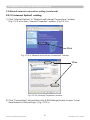
1) Click “Internet Options” in “Network and Internet Connections” window
(Fig. 2.2.3.a) to open “Internet Properties” window. (Fig.2.2.3.b)
Click
Fig. 2.2.3.a “Network and Internet Connections” window
Click
Fig. 2.2.3.b “Internet Properties” window
2) Click “Connections” tab and then click [LAN Settings] button to open “Local
Area Network (LAN) settings”. (Fig. 2.2.3.c)
LIT MAN USR LW400 NTWK GUID
8
020-000049-01 Rev.1 (04/08)
2. Equipment connection and network setting
2.2 Manual network connection setting (continued)
Fig. 2.2.3.c “Local Area Network (LAN) Settings” window
3) Uncheck all boxes in “Local Area Network (LAN) Settings” window. (Fig. 2.2.3.c)
2.2.4 Check connection
Check PC and projector are connected properly here. If it is not connected, check
cable connections and settings are properly or not.
1) Start browser in PC and specify following URL, then click “ ” button.
URL: http://(Projector IP address)/
For example, if projector IP address is 192.168.1.10, specify
URL: http://192.168.1.10/
2) If Fig. 2.2.4 appears, it succeeds.
Fig. 2.2.4 “Logon Menu”
LIT MAN USR LW400 NTWK GUID
9
020-000049-01 Rev.1 (04/08)
3. Management with Web browser software
3. Management with Web browser software
This projector is equipped with the following network functions by using a web
browser software.
Configuring and Controlling the Projector via a Web Browser
You can change the settings of or control the projector via a network by using a
web browser from a PC that is connected to the same network.
(11)
E-mail Alerts
The projector can automatically send an alert to specified e-mail addresses when
the projector requires maintenance or has encountered an error.
(32)
Projector Management using SNMP
This projector is SNMP (Simple Network Management Protocol) compliant,
allowing you to monitor it from a remote location using SNMP software. In
addition, the projector is able to send failure & warning alerts to a specified PC.
(34)
Event Scheduling
You can schedule the projector to perform various functions according to the date
and time.
(35)
MY IMAGE (Still Image Transfer) Display
The projector can display still images that are transferred via the network.
(38)
Command Control via the Network
The projector can be controlled using RS-232C commands over a network.
(40)
LIT MAN USR LW400 NTWK GUID
10
020-000049-01 Rev.1 (04/08)
3. Management with Web browser software
3.1 C
onfiguring and controlling the projector via a web
browser
You can adjust or control the projector via a network from a web browser on a PC
that is connected to the same network.
NOTE • Internet Explorer 5.5 or later is required.
• If JavaScript is disabled in your web browser configuration, you must enable
JavaScript in order to use the projector web pages properly. See the Help files
for your web browser for details on how to enable JavaScript.
• You can communicate using SSL (Secure Socket Layer) if you are using
Windows XP Service Pack 2 or earlier versions of Microsoft Windows. Please
specify “https://” when you enter the IP address of the projector on the web
browser. You can't communicate the projector using SSL on Windows Vista.
• It is recommended that all web browser updates are installed. It is especially
recommended that all users running Internet Explorer on a Microsoft Windows
version prior to Windows XP Service Pack 2 install security update Q832894
(MS04-004) or the web browser interface may not be displayed correctly.
And when using an earlier version of Internet Explorer, during operations the
browser will log out after 50 seconds.
LIT MAN USR LW400 NTWK GUID
11
020-000049-01 Rev.1 (04/08)
3. Management with Web browser software
3.1 Configuring and controlling the projector via a web browser (continued)
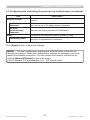
When configuring or controlling the projector via a web browser, an ID and
password are required. There are two types of IDs, Administrator ID and User ID.
The following chart describes the differences between Administrator and User IDs.
Item
Description
Displays the projector’s current
Network Information
network configuration settings.
Administrator
User
√
√
Network Settings
Displays and configures network
settings.
√
N/A
Port Settings
Displays and configures
communication port settings.
√
N/A
Mail Settings
Displays and configures e-mail
addressing settings.
√
N/A
Alert Settings
Displays and configures failure &
warning alerts.
√
N/A
Schedule Settings
Displays and configures schedule
settings.
√
N/A
Date/Time Settings
Displays and configures the date and
time settings.
√
N/A
Security Settings
Displays and configures passwords
and other security settings.
√
N/A
Projector Control
Controls the projector.
√
√
Projector Status
Displays the current projector status.
√
√
Network Restart
Restarts the projector’s network
connection.
√
N/A
LIT MAN USR LW400 NTWK GUID
12
020-000049-01 Rev.1 (04/08)
3. Management with Web browser software
3.1 Configuring and controlling the projector via a web browser (continued)
3.1.1 Logon
Refer to the following for configuring or controlling the projector via a web browser.
Example: If the IP address of the projector is set to 192.168.1.10:
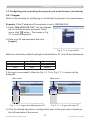
1) Enter “http://192.168.1.10/” into the address
bar of the web browser and press “Enter”
key or click “ ” button. The screen in Fig.
3.1.1a will be displayed.
2) Enter your ID and password and click
[Logon].
Fig. 3.1.1 a “Logon Menu”
Below are the factory default settings for Administrator ID, User ID and passwords.
Item
ID
Password
Administrator
Administrator
<blank>
User
User
<blank>
If the logon is successful, either the Fig. 3.1.1 b or Fig. 3.1.1 c screen will be
displayed.
Main menu
Main menu
Fig. 3.1.1 b “Logon with Administrator ID”
Fig. 3.1.1 c “Logon with User ID”
3) Click the desired operation or configuration item on the main menu located on
the left-hand side of the screen.
LIT MAN USR LW400 NTWK GUID
13
020-000049-01 Rev.1 (04/08)
3. Management with Web browser software
3.1 Configuring and controlling the projector via a web browser (continued)
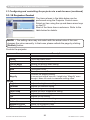
3.1.2 Network Information
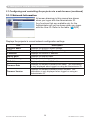
All screen drawings in this manual are shown
when you logon with the Administrator ID.
Any functions that are available only for the
Administrator will not be shown when you logon
with the User ID. Refer to the table. (12,13)
Displays the projector’s current network configuration settings.
Item
Description
Projector Name
Displays the projector name settings.
DHCP
Displays the DHCP configuration settings.
IP Address
Displays the current IP address.
Subnet Mask
Displays the subnet mask.
Default Gateway
Displays the default gateway.
MAC Address
Displays the ethernet MAC address.
Firmware Date
Displays the network firmware time stamp. This information
is only displayed when logged on using an Administrator ID.
Firmware Version
Displays the network firmware version number. This
information is only displayed when logged on using an
Administrator ID.
LIT MAN USR LW400 NTWK GUID
14
020-000049-01 Rev.1 (04/08)
3. Management with Web browser software
3.1 Configuring and controlling the projector via a web browser (continued)
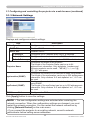
3.1.3 Network Settings
Displays and configures network settings.
Item
IP Configuration
Description
Configures network settings.
DHCP ON
Enables DHCP.
DHCP OFF
Disables DHCP.
IP Address
Configures the IP address when DHCP is disabled.
Subnet Mask
Configures the subnet mask when DHCP is disabled.
Default Gateway
Configures the default gateway when DHCP is disabled.
Projector Name
Configures the name of the projector.
The length of the Projector Name can be up to 64
alphanumeric characters. Only alphabets, numbers and
following symbols can be used. !"#$%&'()*+,-./:;<=>?@
[\]^_`{|}~ and space
sysLocation (SNMP)
Configures the location to be referred to when using SNMP.
The length of the sysLocation can be up to 255 alphanumeric
characters. Only numbers ‘0-9’ and alphabet ‘a-z’, ‘A-Z’ can
be used.
sysContact (SNMP)
Configures the contact information to be referred to when
using SNMP.
The length of the sysContact can be up to 255 alphanumeric
characters. Only numbers ‘0-9’ and alphabet ‘a-z’, ‘A-Z’ can
be used.
DNS Server Address
Configures the DNS server address.
Click [Apply] button to save the settings.
NOTE • The new configuration settings are activated after restarting the
network connection. When the configuration settings are changed, you must
restart the network connection. You can restart the network connection by
clicking [Network Restart] on the main menu.
• If you connect the projector to an existing network, consult a network
administrator before setting server addresses.
LIT MAN USR LW400 NTWK GUID
15
020-000049-01 Rev.1 (04/08)
3. Management with Web browser software
3.1 Configuring and controlling the projector via a web browser (continued)
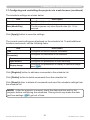
3.1.4 Port Settings
Displays and configures communication port settings.
Item
Network Control Port1
(Port:23)
Description
Configures command control port 1 (Port:23).
Port open
Click [Enable] check box to use port 23.
Authentication
Click [Enable] check box when authentication is required for
this port.
Network Control Port2
(Port:9715)
Configures command control port 2 (Port:9715).
Port open
Click [Enable] check box to use port 9715.
Authentication
Click [Enable] check box when authentication is required for
this port.
Image Transfer Port
(Port:9716)
Configures the image transfer port (Port:9716).
Port open
Click the [Enable] check box to use port 9716.
Authentication
Click the [Enable] check box when authentication is required
for this port.
SNMP Port
Configures the SNMP port.
Port open
Click [Enable] check box to use SNMP.
Trap address
Configures the destination of the SNMP Trap in IP format.
• The address allows not only IP address but also domain
name if the valid DNS server is setup in the Network
Settings. The maximum length of host or domain name is up
to 255 characters.
SMTP Port
Port open
Configures the SMTP port.
Click [Enable] check box to use the e-mail function.
Click [Apply] button to save the settings.
NOTE • The new configuration settings are activated after restarting the
network connection. When the configuration settings are changed, you must
restart the network connection. You can restart the network connection by
clicking [Network Restart] on the main menu.
LIT MAN USR LW400 NTWK GUID
16
020-000049-01 Rev.1 (04/08)
3. Management with Web browser software
3.1 Configuring and controlling the projector via a web browser (continued)
3.1.5 Mail Settings
Displays and configures e-mail addressing settings.
Item
Description
Send mail
Click [Enable] check box to use the e-mail function.
Configure the conditions for sending e-mail under the Alert
Settings.
SMTP Server IP Address
Configures the address of the mail server in IP format.
• The address allows not only IP address but also domain
name if the valid DNS server is setup in the Network
Settings. The maximum length of host or domain name is up
to 255 characters.
Sender E-mail address
Configures the sender e-mail address.
The length of the sender e-mail address can be up to 255
alphanumeric characters.
Configures the e-mail address of up to five recipients. You
can also specify [TO] or [CC] for each address. The length of
Recipient E-mail address
the recipient e-mail address can be up to 255 alphanumeric
characters.
Click [Apply] button to save the settings.
NOTE • You can confirm whether the mail settings work correctly using [Send
Test Mail] button. Please enable Send mail setting before clicking [Send Test
Mail].
• If you connect the projector to an existing network, consult a network
administrator before setting server addresses.
LIT MAN USR LW400 NTWK GUID
17
020-000049-01 Rev.1 (04/08)
3. Management with Web browser software
3.1 Configuring and controlling the projector via a web browser (continued)
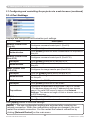
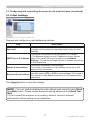
3.1.6 Alert Settings
Displays and configures failure & alert settings.
Alert Item
Description
Cover Error
The lamp cover has not been properly fixed.
Fan Error
The cooling fan is not operating.
Lamp Error
The lamp does not light, and there is a possibility that interior
portion has become heated.
Temp Error
There is a possibility that the interior portion has become
heated.
Air Flow Error
The internal temperature is rising.
Lamp Time Error
Lamp time over.
Cold Error
There is a possibility that the interior portion has become
overcooled.
Filter Error
Filter time over.
Other Error
Other error.
If displaying this error, please contact your dealer.
Schedule Execution
Error
Schedule Execution error. (20)
Lamp Time Alarm
Lamp time over Alarm Time setting.
Filter Time Alarm
Filter time over Alarm Time setting.
Transition Detector
Alarm
Transition Detector Alarm. (OPTION Menu in the User
Manual – Operating Guide)
“CHANGE THE LAMP” is
“CHANGE THE LAMP” is displayed.
displayed.
Cold Start
The Power switch is turned on.
(Off → standby mode)
Authentication Failure
The SNMP access is detected from the invalid SNMP
community.
Refer to “Troubleshooting” in the User Manual – Operating Guide for further detailed
explanation of Error except Other Error and Schedule Execution Error.
18
LIT MAN USR LW400 NTWK GUID
020-000049-01 Rev.1 (04/08)
3. Management with Web browser software
3.1 Configuring and controlling the projector via a web browser (continued)
The Alert Items are shown below.
Setting Item
Description
Alarm Time
Configures the time to alert.
(Only Lamp Time Alarm and Filter Time Alarm.)
SNMP Trap
Click [Enable] check box to enable SNMP Trap alerts.
Send Mail
Click [Enable] check box to enable e-mail alerts.
(Except Cold Start and Authentication Failure.)
Mail Subject
Configures the subject line of the e-mail to be sent.
The length of the subject line can be up to 100 alphanumeric
characters.
(Except Cold Start and Authentication Failure.)
Mail Text
Configures the text of the e-mail to be sent.
The length of the text can be up to 1024 alphanumeric
characters.
(Except Cold Start and Authentication Failure.)
Click [Apply] button to save the settings.
NOTE • The trigger of Filter Error e-mail is depending on the FILTER
MESSAGE setting in the SERVICE item of the OPTION Menu which defines
the period until the filter message is displayed on the projector screen. The
e-mail will be sent when the filter timer exceeds 500, 1000, 1500 or 2000 hours
based on the configuration. No notification e-mail will be sent if the FILTER
MESSAGE is set to TURN OFF. (OPTION Menu in the User Manual
– Operating Guide)
• Lamp Time Alarm is defined as a threshold for e-mail notification (reminder)
of the lamp timer. When the lamp hour exceeds this threshold that is configured
through the Web page, the e-mail will be sent out.
• Filter Time Alarm is defined as a threshold for e-mail notification (reminder)
of the filter timer. When the filter hour exceeds this threshold, the e-mail will be
sent out.
LIT MAN USR LW400 NTWK GUID
19
020-000049-01 Rev.1 (04/08)
3. Management with Web browser software
3.1 Configuring and controlling the projector via a web browser (continued)
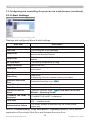
3.1.7 Schedule Settings
Displays and configures schedule settings.
Item
Description
Daily
Configures the daily schedule.
Sunday
Configures the Sunday schedule.
Monday
Configures the Monday schedule.
Tuesday
Configures the Tuesday schedule.
Wednesday
Configures the Wednesday schedule.
Thursday
Configures the Thursday schedule.
Friday
Configures the Friday schedule.
Saturday
Configures the Saturday schedule.
Specific date No.1
Configures the specific date (No.1) schedule.
Specific date No.2
Configures the specific date (No.2) schedule.
Specific date No.3
Configures the specific date (No.3) schedule.
Specific date No.4
Configures the specific date (No.4) schedule.
Specific date No.5
Configures the specific date (No.5) schedule.
LIT MAN USR LW400 NTWK GUID
20
020-000049-01 Rev.1 (04/08)
3. Management with Web browser software
3.1 Configuring and controlling the projector via a web browser (continued)
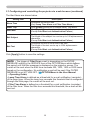
The schedule settings are shown below.
Item
Description
Schedule
Click [Enable] check box to enable the schedule.
Date (Month/Day)
Configures the month and date.
This item appears only when Specific date (No. 1-5) is
selected.
Click [Apply] button to save the settings.
The current event settings are displayed on the schedule list. To add additional
functions and events, set the following items.
Item
Description
Time
Configures the time to execute commands.
Command
[Parameter]
Configures the commands to be executed.
Power
Configures the parameters for power control.
Input Source
Configures the parameters for input switching.
Display Image
Configures the parameters for display of transfered image
data (38).
Click [Register] button to add new commands to the schedule list.
Click [Delete] button to delete commands from the schedule list.
Click [Reset] button to delete all commands and reset the schedule settings from
the schedule list.
NOTE • After the projector is moved, check the date and time set for the
projector before configuring the schedules. Strong shock may make the date
and time settings (22) get out of tune.
LIT MAN USR LW400 NTWK GUID
21
020-000049-01 Rev.1 (04/08)
3. Management with Web browser software
3.1 Configuring and controlling the projector via a web browser (continued)
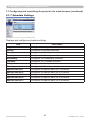
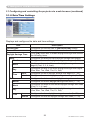
3.1.8 Date/Time Settings
Displays and configures the date and time settings.
Item
Description
Current Date
Configures the current date in year/month/day format.
Current Time
Configures the current time in hour:minute:second format.
Daylight Savings Time
Click [ON] check box to enable daylight savings time and set
the following items.
Start
Configures the date and time daylight savings time begins.
Month
Configures the month daylight savings time begins (1~12).
Week
Configures the week of the month daylight savings time
begins (First, 2, 3, 4, Last).
Day
Configures the day of the week daylight savings time begins
(Sun, Mon, Tue, Wed, Thu, Fri, Sat).
Time
hour
Configures the hour daylight savings time begins (0 ~ 23).
minute
Configures the minute daylight savings time begins (0 ~ 59).
End
Configures the date and time daylight savings time ends.
Month
Configures the month daylight savings time ends (1 ~ 12).
Week
Configures the week of the month daylight savings time ends
(First, 2, 3, 4, Last).
Day
Configures the day of the week daylight savings time ends
(Sun, Mon, Tue, Wed, Thu, Fri, Sat).
Time
hour
Configures the hour daylight savings time ends (0 ~ 23).
minute
Configures the minute daylight savings time ends (0 ~ 59).
LIT MAN USR LW400 NTWK GUID
22
020-000049-01 Rev.1 (04/08)
3. Management with Web browser software
3.1 Configuring and controlling the projector via a web browser (continued)
Item
Description
Time difference
Configures the time difference. Set the same time difference
as the one set on your PC. If unsure, consult your IT
manager.
SNTP
Click the [ON] check box to retrieve Date and Time
information from the SNTP server and set the following items.
SNTP Server IP
Address
Configures the SNTP server address in IP format.
• The address allows not only IP address but also domain
name if the valid DNS server is setup in the Network
Settings. The maximum length of host or domain name is up
to 255 characters.
Cycle
Configures the interval at which to retrieve Date and Time
information from the SNTP server (hour:minute).
Click [Apply] button to save the settings.
NOTE • The new configuration settings are activated after restarting the
network connection. When the configuration settings are changed, you must
restart the network connection. You can restart the network connection by
clicking [Network Restart] on the main menu.
• If you connect the projector to an existing network, consult a network
administrator before setting server addresses.
• To enable the SNTP function, the time difference must be set.
• The projector will retrieve Date and Time information from the time server and
override time settings when SNTP is enabled.
• The internal clock’s time may not remain accurate. Using SNTP is
recommended to maintain accurate time.
LIT MAN USR LW400 NTWK GUID
23
020-000049-01 Rev.1 (04/08)
3. Management with Web browser software
3.1 Configuring and controlling the projector via a web browser (continued)
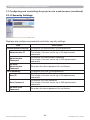
3.1.9 Security Settings
Displays and configures passwords and other security settings.
Item
Administrator authority
Description
Configures the Administrator ID and password.
Administrator ID
Configures the Administrator ID.
The length of the text can be up to 32 alphanumeric
characters.
Administrator
Password
Configures the Administrator password.
The length of the text can be up to 255 alphanumeric
characters.
Re-enter
Administrator
Password
Re-enters the above password for verification.
User authority
Configures the User ID and password.
User ID
Configures the User ID.
The length of the text can be up to 32 alphanumeric
characters.
User Password
Configures the User password.
The length of the text can be up to 255 alphanumeric
characters.
Re-enter User
Password
Re-enters the above password for verification.
LIT MAN USR LW400 NTWK GUID
24
020-000049-01 Rev.1 (04/08)
3. Management with Web browser software
3.1 Configuring and controlling the projector via a web browser (continued)
Item
Network Control
Description
Configures the Authentication password for the command
control.
Authentication
Password
Configures the Authentication password. The length of the
text can be up to 32 alphanumeric characters.
Re-enter
Authentication
Password
Reenter the above password for verification.
SNMP
Community name
Configures the community name if SNMP is used.
Configures the community name. The length of the text can
be up to 64 alphanumeric characters.
Click [Apply] button to save the settings.
NOTE • The new configuration settings are activated after restarting the
network connection. When the configuration settings are changed, you must
restart the network connection. You can restart the network connection by
clicking [Network Restart] on the main menu.
• Only numbers ‘0-9’ and alphabet ‘a-z’, ‘A-Z’ can be used.
LIT MAN USR LW400 NTWK GUID
25
020-000049-01 Rev.1 (04/08)
3. Management with Web browser software
3.1 Configuring and controlling the projector via a web browser (continued)
3.1.10 Projector Control
The items shown in the table below can be
performed using the Projector Control menu.
Select an item using the up and down arrow keys
on the PC.
Most of the items have a submenu. Refer to the
table below for details.
NOTE • The setting value may not match with the actual value if the user
changes the value manually. In that case, please refresh the page by clicking
[Refresh] button.
Controls the projector.
Item
Main
Power
Input Source
Picture Mode
Blank On/Off
Mute
Freeze
Magnify
Picture
Brightness
Contrast
Gamma
Color Temp
Color
Tint
Sharpness
Active Iris
MyMemory Save
MyMemory Recall
LIT MAN USR LW400 NTWK GUID
Description
Turns the power on/off.
Selects the input source.
Selects the picture mode setting.
Turns Blank on/off.
Turns Mute on/off.
Turns Freeze on/off.
Controls the magnify setting.
In some input signal sources, it might stop “Magnify” even
though it does not reach to maximum setting value.
Adjusts the brightness setting.
Adjusts the contrast setting.
Selects the gamma setting.
Selects the color temperature setting.
Adjusts the color setting.
Adjusts the tint setting.
Adjusts the sharpness setting.
Selects the active iris setting.
Saves the MyMemory data.
Recalls the MyMemory data.
26
020-000049-01 Rev.1 (04/08)
3. Management with Web browser software
3.1 Configuring and controlling the projector via a web browser (continued)
Item
Image
Aspect
Over Scan
V Position
H Position
H Phase
H Size
Auto Adjust Execute
Input
Progressive
Video NR
3D-YCS
Color Space
Component
C-Video Format
S-Video Format
HDMI
Frame Lock-RGB1
Frame Lock-RGB2
Frame Lock-HDMI
RGB in-1
RGB in-2
Setup
Auto Keystone
Execute
Keystone V
Keystone H
Whisper
Mirror
Monitor Out-RGB1
Monitor Out-RGB2
Monitor Out-HDMI
Monitor OutComponent
Monitor Out-S-Video
Monitor Out-Video
Monitor Out-Standby
LIT MAN USR LW400 NTWK GUID
Description
Selects the aspect setting.
Adjusts the over scan setting.
Adjusts the vertical position.
Adjusts the horizontal position.
Adjusts the horizontal phase.
Adjusts the horizontal size.
Performs the automatic adjustment.
Selects the progressive setting.
Selects the video noise reduction setting.
Selects the 3D-YCS setting.
Selects the color space.
Selects the COMPONENT port setting.
Selects the video format setting.
Selects the s-video format setting.
Selects the HDMI setting.
Turns the frame lock-RGB1 function on/off.
Turns the frame lock-RGB2 function on/off.
Turns the frame lock-HDMI function on/off.
Selects the RGB1 input signal type.
Selects the RGB2 input signal type.
Performs the automatic keystone distortion setting.
Adjusts the vertical keystone distortion setting.
Adjusts the horizontal keystone distortion setting.
Selects the whisper mode.
Selects the mirror status.
Assigns the MONITOR OUT when the RGB1 input port is
selected.
Assigns the MONITOR OUT when the RGB2 input port is
selected.
Assigns the MONITOR OUT when the HDMI input port is
selected.
Assigns the MONITOR OUT when the COMPONENT input
port is selected.
Assigns the MONITOR OUT when the S-VIDEO input port is
selected.
Assigns the MONITOR OUT when the VIDEO input port is
selected.
Assigns the MONITOR OUT in the standby mode.
27
020-000049-01 Rev.1 (04/08)
3. Management with Web browser software
3.1 Configuring and controlling the projector via a web browser (continued)
Item
Audio
Volume
Treble
Bass
SRS WOW
Speaker
Audio-RGB1
Audio-RGB2
Audio-HDMI
Audio-Component
Audio-S-Video
Audio-Video
Audio Out Standby
HDMI Audio
Screen
Language
Menu Position V
Menu Position H
Blank
Startup
MyScreen Lock
Message
Template
LIT MAN USR LW400 NTWK GUID
Description
Adjusts the volume setting.
Adjust the Treble setting.
Adjusts the Bass setting.
Selects the SRS WOW setting.
Turns the built-in speaker on/off.
Assigns the AUDIO-RGB1 input port.
Assigns the AUDIO-RGB2 input port.
Assigns the AUDIO-HDMI input port.
Assigns the AUDIO-COMPONENT input port.
Assigns the AUDIO-S-VIDEO input port.
Assigns the AUDIO-VIDEO input port.
Assigns the AUDIO OUT in the standby mode.
Selects the HDMI audio setting.
Selects the language for the OSD.
Adjusts the vertical Menu position.
Adjusts the horizontal Menu position.
Selects the Blank mode.
Selects the startup screen mode.
Turns MyScreen lock function on/off.
Turns the message function on/off.
Selects the template setting.
28
020-000049-01 Rev.1 (04/08)
3. Management with Web browser software
3.1 Configuring and controlling the projector via a web browser (continued)
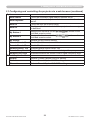
Option
Auto Search
Turns the automatic signal search function on/off.
Turns the automatic keystone distortion correction function
Auto Keystone
on/off.
Auto on
Turns the auto on function on/off.
Configures the timer to shut off the projector when no signal
Auto off
is detected.
Assigns the functions for the MY BUTTON1 button on the
My Button-1
included remote control.
Assigns the functions for the MY BUTTON2 button on the
My Button-2
included remote control.
My Source
Selects the My Source setting.
Remote Receiv. Front Enable/Disable remote receiv. front.
Remote Receiv. Rear Enable/Disable remote receiv. rear.
Remote Receiv. Top
Enable/Disable remote receiv. top.
Remote Freq. Normal Enables/Disables the remote control signal frequency normal.
Remote Freq. High
Enables/Disables the remote control signal frequency high.
Closed Caption
Display
Selects Closed Caption DISPLAY setting.
Mode
Selects Closed Caption MODE setting.
Channel
Selects Closed Caption CHANNEL setting.
LIT MAN USR LW400 NTWK GUID
29
020-000049-01 Rev.1 (04/08)
3. Management with Web browser software
3.1 Configuring and controlling the projector via a web browser (continued)
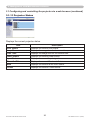
3.1.11 Projector Status
Displays the current projector status.
Item
Description
Error Status
Displays the current error status
Lamp Time
Displays the usage time for the current lamp.
Filter Time
Displays the usage time for the current filter.
Power Status
Displays the current power status.
Input Status
Displays the current input signal source.
Blank On/Off
Displays the current Blank on/off status.
Mute
Displays the current Mute on/off status.
Freeze
Displays the current Freeze status.
LIT MAN USR LW400 NTWK GUID
30
020-000049-01 Rev.1 (04/08)
3. Management with Web browser software
3.1 Configuring and controlling the projector via a web browser (continued)
3.1.12 Network Restart
Restarts the projector’s network connection.
Item
Restart
Description
Restarts the projector’s network connection in order to
activate new configuration settings.
NOTE • Restarting requires you to re-log on in order to further control or
configure the projector via a web browser. Wait 1 minute or more after clicking
[Restart] button to log on again.
• The Logon menu (13) is displayed after restarting the projector’s network
connection if the DHCP is set to ON.
3.1.13 Logoff
When [Logoff] is clicked, the Logon menu is displayed. (13)
LIT MAN USR LW400 NTWK GUID
31
020-000049-01 Rev.1 (04/08)
3. Management with Web browser software
3.2 E-mail Alerts
The projector can automatically send an alert message to the specified e-mail
addresses when the projector detects a certain condition that is requiring
maintenance or detected an error.
NOTE • Up to five e-mail addresses can be specified.
• The projector may be not able to send e-mail if the projector suddenly loses
power.
Mail Settings (17)
To use the projector’s e-mail alert function, please configure the following items
through a web browser.
Example: If the IP address of the projector is set to 192.168.1.10:
1) Enter “http://192.168.1.10/” into the address bar of the web browser.
2) Enter the Administrator ID and password and click [Logon].
3) Click [Port Settings] on the main menu.
4) Click [Enable] check box to open the SMTP Port.
5) Click [Apply] button to save the settings.
NOTE • A Network Restart is required after the SMTP Port configuration
settings have changed. Click [Network Restart] and configure the following
items.
6) Click [Mail Settings] and configure each item. Refer to the item 3.1.5 Mail
Settings (17) for further information.
7) Click [Apply] button to save the settings.
NOTE • Click [Send Test Mail] button in [Mail Settings] to confirm that the
e-mail settings are correct. The following mail will be delivered to the specified
addresses.
Subject line
Text
:Test Mail
:Send Test Mail
Date
Time
IP Address
MAC Address
LIT MAN USR LW400 NTWK GUID
<Projector name>
<Testing date>
<Testing time>
<Projector IP address>
<Projector MAC address>
32
020-000049-01 Rev.1 (04/08)
3. Management with Web browser software
3.2 E-mail Alerts (continued)
8) Click [Alert Settings] on the main menu to configure the E-mail Alerts settings.
9) S
elect and configure each alert item. Refer to the item 3.1.6 Alert Settings (18)
for further information.
10) Click [Apply] button to save the settings.
Failure/Warning e-mails are formatted as follows:
Subject line
Text
: <Mail title>
: <Mail text>
Date
Time
IP Address
MAC Address
LIT MAN USR LW400 NTWK GUID
<Projector name>
<Failure/Warning date>
<Failure/Warning time>
<Projector IP address>
<Projector MAC address>
33
020-000049-01 Rev.1 (04/08)
3. Management with Web browser software
3.3 Projector Management using SNMP
The SNMP (Simple Network Management Protocol) enables to manage the
projector information, which is a failure or warning status, from the computer on
the network. The SNMP management software will be required on the computer
to use this function.
NOTE • It is recommended that SNMP functions be carried out by a network
administrator.
• SNMP management software must be installed on the computer to monitor
the projector via SNMP.
SNMP Settings (16)
Configure the following items via a web browser to use SNMP.
Example: If the IP address of the projector is set to 192.168.1.10:
1) Enter “http://192.168.1.10/” into the address bar of the web browser.
2) Enter the Administrator ID and Password and click [Logon].
3) Click [Port Settings] on the main menu.
4) Click [Enable] check box to open the SNMP Port. Set the IP address to send
the SNMP trap to when a Failure/Warning occurs.
NOTE • A Network Restart is required after the SNMP Port configuration
settings have been changed. Click [Network Restart] and configure the
following items.
5) Click [Security Settings] on the main menu.
6) Click [SNMP] and set the community name on the screen that is displayed.
NOTE • A Network Restart is required after the Community name has been
changed. Click [Network Restart] and configure the following items.
7) Configure the settings for Trap transmission of Failures/Warnings. Click
[Alert Settings] on the main menu and select the Failure/Warning item to be
configured.
8) Click [Enable] check box to send out the SNMP trap for Failures/Warnings.
Clear [Enable] check box when SNMP trap transmission is not required.
9) Click [Apply] button to save the settings.
LIT MAN USR LW400 NTWK GUID
34
020-000049-01 Rev.1 (04/08)
3. Management with Web browser software
3.4 Event Scheduling
The scheduling function enables to setup scheduled events including power on /
power off. It enables to be “self-management” projector.
NOTE • You can schedule the following control events: Power ON/OFF, Input
Source and Transferred Image Display.
• The power on / off event has the lowest priority among the all events that are
defined at the same time.
• There are 3 types of Scheduling, 1) daily 2) weekly 3) specific date. (20)
• The priority for scheduled events is as follows 1) specific date 2) weekly 3)
daily.
• Up to five specific dates are available for scheduled events. Priority is given to
those with the lower numbers when more than one event has been scheduled
for the same date and time (e.g., ‘Specific date No. 1’ has priority over ‘Specific
date No. 2’ and so on.
• Be sure to set the date and time before enabling scheduled events. (22)
LIT MAN USR LW400 NTWK GUID
35
020-000049-01 Rev.1 (04/08)
3. Management with Web browser software
3.4 Event Scheduling (continued)
Schedule Settings (20)
Schedule settings can be configured from a web browser.
Example: If the IP address of the projector is set to 192.168.1.10:
1) Enter “http://192.168.1.10/” into the address bar of the web browser.
2) Enter the Administrator ID and password and click [Logon].
3) Click [Schedule Settings] on the main menu and select the required schedule
item. For example, if you want to perform the command every Sunday, please
select [Sunday].
4) Click [Enable] check box to enable scheduling.
5) Enter the date (month/day) for specific date scheduling.
6) Click [Apply] button to save the settings.
7) After configure the time, command and parameters, click [Register] to add the
new event.
8) Click [Delete] button when you want to delete a schedule.
There are three types of scheduling.
1) Daily: Perform the specified operation at a specified time every day.
2) Sunday ~ Saturday: Perform the specified operation at the specified time on a
specified day of the week.
3) Specific date: Perform the specified operation on the specified date and time.
NOTE • In Standby mode the power indicator will flash green for approx. 3
seconds when at least 1 “Power ON” schedule is saved.
• When the schedule function is used, the power cord must be connected to
the projector and the outlet and the power switch must be turned on, [ | ]. The
schedule function does not work when the power switch is turned off, [O] or the
breaker in a room is tripped. The power indicator will lights orange or green
when the projector gets is receiving the power.
LIT MAN USR LW400 NTWK GUID
36
020-000049-01 Rev.1 (04/08)
3. Management with Web browser software
3.4 Event Scheduling (continued)
Date/Time Settings (22)
The Date/Time setting can be adjusted via a web browser.
Example: If the IP address of the projector is set to 192.168.1.10:
1) Enter “http://192.168.1.10/” into the address bar of the web browser. Enter the
Administrator ID and Password and click [Logon].
2) Click [Date/Time Settings] on the main menu and configure each item. Refer
to the item 3.1.8 Data/Time Settings for further information.
3) Click [Apply] button to save the settings.
NOTE • A Network Restart is required after the Daylight Savings Time or
SNTP configuration settings have been changed.
• The battery for the built in clock may be dead if the clock loses time even
when the date and time have been set correctly. Replace the battery by
following “Internal clock battery” section of the User Manual - Concise.
• The internal clock’s time may not remain accurate. Using SNTP is
recommended to maintain accurate time.
LIT MAN USR LW400 NTWK GUID
37
020-000049-01 Rev.1 (04/08)
3. Management with Web browser software
3.5 MY IMAGE (Still Image Transfer) Display
The projector can display still images that are transferred via the network.
Transfer image data
Display image data ( 1 -
4
)
Fig. 3.5 Still Image Transfer
MY IMAGE transmission requires an exclusive application for your PC. You can
download it from the web site (http://www.christiedigital.com). Refer to the manual
for the application for instructions.
To display the transferred image, select the MY IMAGE item in the NETWORK
Menu. For more information, please see the description of the MY IMAGE item
of the NETWORK Menu. ( NETWORK Menu in User Manual – Operating
Guide)
NOTE • It is possible to allocate the image file up to 4 in the maximum.
• The image file also can be displayed by using schedule function from the web
browser. Refer to the item 3.4 Event Scheduling (35) in detail.
LIT MAN USR LW400 NTWK GUID
38
020-000049-01 Rev.1 (04/08)
3. Management with Web browser software
3.5 MY IMAGE (Still Image Transfer) Display (continued)
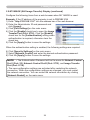
Configure the following items from a web browser when MY IMAGE is used.
Example: If the IP address of the projector is set to 192.168.1.10:
1) Enter "http://192.168.1.10/" into the address bar of the web browser.
2) Enter the Administrator ID and password and
click [Logon].
3) Click [Port Settings] on the main menu.
4) Click the [Enable] check box to open the Image
Transfer Port (Port: 9716). Click the [Enable]
check box for the [Authentication] setting when
authentication is required, otherwise clear the
check box.
5) Click the [Apply] button to save the settings.
When the authentication setting is enabled, the following settings are required.
6) Click [Security Settings] on the main menu.
7) Select [Network Control] and enter the desired authentication password.
8) Click the [Apply] button to save the settings.
NOTE • The Authentication Password will be the same for Network Control
Port1 (Port: 23), Network Control Port2 (Port: 9715), and Image Transfer
Port (Port: 9716).
• The new configuration settings are activated after restarting the network
connection. When the configuration settings are changed, you must restart
the network connection. You can restart the network connection by clicking
[Network Restart] on the main menu.
LIT MAN USR LW400 NTWK GUID
39
020-000049-01 Rev.1 (04/08)
3. Management with Web browser software
3.6 Command Control via the Network
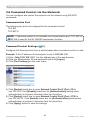
You can configure and control the projector via the network using RS-232C
commands.
Communication Port
The following two ports are assigned for the command control.
TCP #23
TCP #9715
NOTE • Command control is not available via communication port (TCP #9716)
(16) that is used for the MY IMAGE transmission function.
Command Control Settings (16)
Configure the following items from a web browser when command control is used.
Example: If the IP address of the projector is set to 192.168.1.10:
1) Enter “http://192.168.1.10/” into the address bar of the web browser.
2) Enter the Administrator ID and password and click [Logon].
3) Click [Port Settings] on the main menu.
4) Click [Enable] check box to open Network Control Port1 (Port: 23) to
use TCP #23. Click [Enable] check box for [Authentication] setting when
authentication is required, otherwise clear the check box.
5) Click [Enable] check box to open Network Control Port2 (Port: 9715) to
use TCP #9715. Click [Enable] check box for [Authentication] setting when
authentication is required, otherwise clear the check box.
6) Click [Apply] button to save the settings.
LIT MAN USR LW400 NTWK GUID
40
020-000049-01 Rev.1 (04/08)
3. Management with Web browser software
3.6 Command Control via the Network (continued)
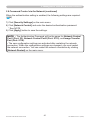
When the authentication setting is enabled, the following settings are required.
(24)
7) Click [Security Settings] on the main menu.
8) Click [Network Control] and enter the desired authentication password.
* See NOTE.
9) Click [Apply] button to save the settings.
NOTE • The Authentication Password will be the same for Network Control
Port1 (Port: 23), Network Control Port2 (Port: 9715), and Image Transfer
Port (Port: 9716).
• The new configuration settings are activated after restarting the network
connection. When the configuration settings are changed, you must restart
the network connection. You can restart the network connection by clicking
[Network Restart] on the main menu.
LIT MAN USR LW400 NTWK GUID
41
020-000049-01 Rev.1 (04/08)
3. Management with Web browser software
3.6 Command Control via the Network (continued)
Command Format
Command formats differ among the different communication ports.
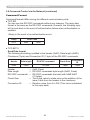
● TCP #23
You can use the RS-232C commands without any changes. The reply data
format is the same as the RS-232C commands. However, the following reply
will be sent back in the event of authentication failure when authentication is
enabled.
<Reply in the event of an authentication error>
Reply
0x1F
Error code
0x04
0x00
● TCP #9715
Send Data format
The following formatting is added to the header (0x02), Data length (0x0D),
Checksum (1byte) and Connection ID (1 byte) of the RS-232C commands.
Header
Data length
RS-232C command
Check Sum
Connection
ID
0x02
0x0D
13 bytes
1 byte
1 byte
Header
→ 0x02, Fixed
Data length
→ RS-232C commands byte length (0x0D, Fixed)
RS-232C commands →RS-232C commands that start with 0xBE 0xEF
(13 bytes)
Check Sum
→This is the value to make zero on the addition of the
lower 8 bits from the header to the checksum.
Connection ID
→Random value from 0 to 255 (This value is attached
to the reply data)
LIT MAN USR LW400 NTWK GUID
42
020-000049-01 Rev.1 (04/08)
3. Management with Web browser software
3.6 Command Control via the Network (continued)
Reply Data format
The connection ID (the data is same as the connection ID data on the sending
data format) is attached to the RS-232C commands reply data.
<ACK reply>
Reply
Connection
ID
0x06
1 byte
<NAK reply>
Reply
Connection
ID
0x15
1 byte
<Error reply>
Reply
Error code
Connection
ID
0x1C
2 bytes
1 byte
Reply
Data
Connection
ID
0x1D
2 bytes
1 byte
Reply
Status code
Connection
ID
0x1F
2 bytes
1 byte
<Data reply>
<Projector busy reply>
<Authentication error reply>
Reply
Authentication
Error code
0x1F
0x04
LIT MAN USR LW400 NTWK GUID
0x00
Connection
ID
1 byte
43
020-000049-01 Rev.1 (04/08)
3. Management with Web browser software
3.6 Command Control via the Network (continued)
Automatic Connection Break
The TCP connection will be automatically disconnected after there is no
communication for 30 seconds after being established.
Authentication
The projector does not accept commands without authentication success
when authentication is enabled. The projector uses a challenge response type
authentication with an MD5 (Message Digest 5) algorithm.
When the projector is using a LAN, a random 8 bytes will be returned if
authentication is enabled. Bind this received 8 bytes and the Authentication
Password and digest this data with the MD5 algorithm and add this in front of the
commands to send.
Following is a sample if the Authentication Password is set to “password” and the
random 8 bytes are “a572f60c”.
1) Select the projector.
2) Receive the random 8 bytes “a572f60c” from the projector.
3) Bind the random 8 bytes “a572f60c” and the Authentication Password
“password” and it becomes “a572f60cpassword”.
4) Digest this bind “a572f60cpassword” with MD5 algorithm.
It will be “e3d97429adffa11bce1f7275813d4bde”.
5) Add this “e3d97429adffa11bce1f7275813d4bde” in front of the commands
and send the data.
Send “e3d97429adffa11bce1f7275813d4bde”+command.
6) When the sending data is correct, the command will be performed and the
reply data will be returned. Otherwise, an authentication error will be returned.
NOTE • As for the transmission of the second or subsequent commands, the
authentication data can be omitted when the same connection.
LIT MAN USR LW400 NTWK GUID
44
020-000049-01 Rev.1 (04/08)