1
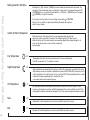
increased or decreased by 4°C for that specific room.
If the WLTM-19 or WLTD-19 thermostat has been allocated to a clock controlled group, then when AUTOMATIC mode has been chosen with the built-in
Quickguides
slide switch, the temperature settings will be as programmed in the clock thermostat and not in the master, but the same local ±4°C adjustment is available.
On the Master WLM-1FS and WLM-3FS, if the temperature setting is changed, then the default temperature for all the rooms is changed, but the local
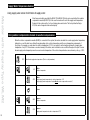
Quick guide analogue room sensors
adjustment can still increase or decrease this new setting by ±4°C. Turn the knob clockwise to increase the temperature.
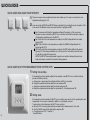
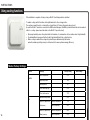
These room sensors have an adjustment knob, which enables you to increase or decrease the room
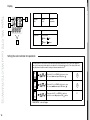
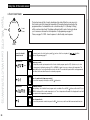
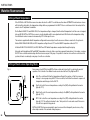
Setting of thermostat operating mode
temperature setting by up to 4˚C.
1
2
Fig. 6
TA
TD
TM
Setting
of Thermostat
Operating
Mode have a slide switch for selecting the mode of operation of the
room
sensors
type WLTM-19
and WLTD-19
Thermostats
type
WLTM-19
and can
WLTD-19
have a Auto,
slide switch
(seeand
fig. 6)
for selecting the mode of
room
sensor. Four
different
modes
be selected:
Day, Night
OFF
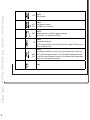
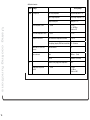
operation of the thermostat. Four different modes can be selected: Auto, Day, Night and OFF.
Auto:Roomsensor
The thermostat
will follow
the temperature
settings
of master,
the master,
the thermostat
Auto:
will follow
the temperature
settings
of the
or if or
theif room
sensor
belongstotoana area
zonecontrolled
group using
will follow
follow the
the automatic
automatic sequence
belongs
by aa WLCT
WLCT2clock
roomthermostat,
controller, itit will
of temperatures
timings
set in the WLCT.
ofsequence
temperatures
and timings and
set in
the WLCT2.
Day:It Itwill
willcontrol
controlthe
theroom
roomtemperature
temperatureaccording
accordingtotothe
the(DAY)
(DAY)setting
settingdefined
definedininthe
themaster
master
Day:
(typically20˚C).
20°C).
(typically
Night:It Itwill
willcontrol
controlthe
theroom
roomtemperature
temperatureaccording
accordingtotothe
the(NIGHT)
(NIGHT)setting
settingdefined
definedininthe
the
Night:
master(typically
(typically15˚C).
15°C).
master
OFF:It Itwill
willcontrol
controlthe
theroom
roomtemperature
temperatureaccording
accordingtotothe
the(OFF)
(OFF)setting
settingdefined
definedininthe
themaster
master
OFF:
(typically5˚C).
5°C).
This
setting
intended
a ”frost
protection”
mode
and
used
if the
(typically
This
setting
is is
intended
toto
bebe
a ”frost
protection”
mode
and
is is
used
if the
room tounoccupied
be left unoccupied
long periods.
isroom
to be isleft
for longfor
periods.
WLTM-19
& WLTD-19
are are
recommended
for guest
rooms
andand
other
infrequently
used
rooms,
as WLTM-19
& WLTD-19
recommended
for guest
rooms
other
infrequently
used
rooms,
theyasthey
allow allow
simplesimple
override
of theof
automatic
timingtiming
sequence.
override
the automatic
sequence.
Quick guide Wlct2 programmable Room controllers
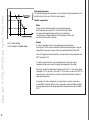
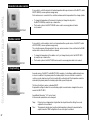
Mounting of limit sensor type WLTD and WLCT
Fig. 7
1
2
4
Jumper connected: max. limitation
Setting time and day
Limit Sensor
Thermostats
withday
a limit
sensor
haveroom
a mechanical
on the
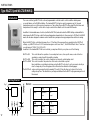
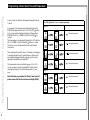
If not already done by the installer, adjust
the time and
on any
WLCT2
controllerjumper
as follows:
printed circuit board allowing the limitation to be set for MIN. or
(picture with button positions)
MAX.
temperature
regulation.
If set
for MAX., it will have a
a. Using a pen or pencil press the small
pinhole
button with
the clock
symbol.
temperature
of 27°C.
b. Using the up and down buttons adjust
the hourssetting
and press
OK. Set for MIN., it has a setting of 17°C.
These
fixedOK.
when used with masters WLM-1BA
c. Using the up and down buttons adjust
thetemperature
minutes andare
press
or WLM-3BA
unless (1
the= thermostat
haspress
beenOK.
allocated to a zone
d. Using the up and down buttons adjust
the day number
Monday) and
group controlled by a WLCT clock thermostat. In this case, the
limit settings can be increased or decreased by accessing the
Setting areas
clock thermostat. The limits then set will apply to all relevant
thermostats with limit sensors belonging to that group. If the
If not already done by the installer, themaster
WLCT2WLM-1FS
room controller
can be is
used
to the
set the
times
or WLM-3FS
used,
limitoperating
settings can
beand
temperatures of room sensors (channels)
in addition
to controlling
its own buttons
room. on the master.
changed
through
the programming
To achieve this, do the following on the WLCT2 room controller:
a. Enter the “InFo” menu by pressing Mounting
the up andof
down
buttonsensor
simultaneously for 4 seconds.
limitation
b. Find the “ArEA” menu with the down
button
and presslimitation
OK.
Max.
temperature
is used to protect the floor area
c. The display shows “CH 1” (channelfrom
1). becoming too warm. This may be required if special floor
- Press OK button.
surfaces (real wood) are used. The sensor should be positioned
where it can read the true temperature of the floor and should