1
68 • vacon
CONTROL KEYPAD
Default page in the operating menu (P6.6.2)
Here you can set the location (page) in the Operating menu (in special applications only) to which
the display automatically moves as the set Timeout time (see below) has expired or as the power is
switched on to the keypad. See setting of Default page above.
Timeout time (P6.6.3)
The Timeout time setting defines the time after which the keypad display returns to the Default page
(P6.6.1) see above.
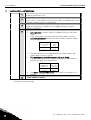
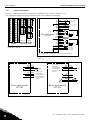
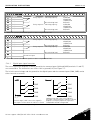
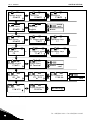
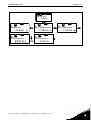
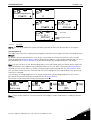
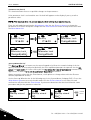
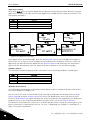
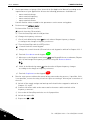
Move to the Edit menu by pressing the Menu button right. Set the timeout time you want and confirm
the change with the Enter button. You can return to the previous step anytime by pushing the Menu
button left.
READY
READY
Timeout time
READY
Timeout time
Timeout time
90 s.
60 s.
90 s
enter
CONFIRM CHANGE
CANCEL
Figure 8-20. Timeout time setting
Note: If the Default page value is 0 the Timeout time setting has no effect.
Contrast adjustment (P6.6.4)
In case the display is unclear you can adjust its contrast through the same procedure as that for the
timeout time setting (see above).
Backlight time (P6.6.5)
Giving a value for the Backlight time, you can determine how long the backlight stays on before
going out. You can select here any time between 1 and 65535 minutes or 'Forever'. For the value
setting procedure see Timeout time (P6.6.3).
8.3.6.7
Hardware settings
NOTE: The Hardware settings submenu is protected with a password (see chapter Password
(S6.5.1). Store the password in a safe place!
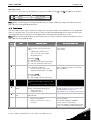
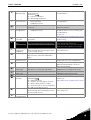
In the Hardware settings submenu (S6.7) under the System menu you can further control some
functions of the hardware in your frequency converter. The functions available in this menu are
Internal brake resistor connection, Fan control, HMI acknowledge timeout and HMI retry.
Internal brake resistor connection (P6.7.1)
With this function you can tell the frequency converter, whether the internal brake resistor is
connected or not. If you have ordered the frequency converter with an internal brake resistor, the
default value of this parameter is Connected. However, if it is necessary to increase braking capacity
by installing an external brake resistor, or if the internal brake resistor is disconnected for another
reason, it is advisable to change the value of this function to Not conn. in order to avoid unnecessary
fault trips.
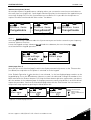
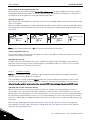
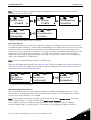
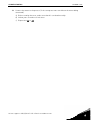
Enter the edit mode by pushing the Menu button right. Use the Browser buttons to change the
internal brake resistor status. Accept the change with the Enter button or return to the previous
level with the Menu button left.
8
Tel. +358 (0)201 2121 • Fax +358 (0)201 212 205