1
7 Setup with PACTware and other adjustment programs
7 Setup with PACTware and other adjustment
programs
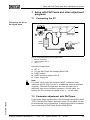
7.1 Connecting the PC
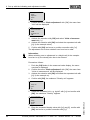
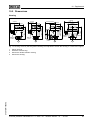
Connecting the PC to
the signal cable
=
2
~
3
Power supply
HARTModem
PACTwareTM /
DTM
1
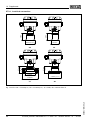
Fig. 10: Connecting the PC to the signal cable
1
2
3
RS232 connection
HART resistor 250 Ω
IPT-11 3
Necessary components:
l
l
l
l
l
IPT-11
PC with PACTware and suitable WIKA DTM
HART modem
HART resistance approx. 250 Ω
Power supply unit
Note:
For power supply units with integrated HART resistance (inner
resistance approx. 250 Ω), there is no additional external resistance
necessary. Standard Ex separators are often provided with a
sufficiently high current limitation resistance. In such cases, the
modem can be connected in parallel to the 4 … 20 mA cable.
37301-EN-100302
7.2 Parameter adjustment with PACTware
Further setup steps are described in the operating instructions manual
"DTM Collection/PACTware" attached to each CD and which can also
be downloaded from our homepage. A detailed description is available
in the online help of PACTware and the WIKA DTMs.
Process pressure transmitter IPT-11 Vers. 4.0 - ceramic sensor • 4 … 20 mA
31