1
6 Set up with the indicating and adjustment module
If the adjustment ranges are exceeded, the message "Outside
parameter limits" appears. The editing procedure can be aborted with
[ESC] or the displayed limit value can be accepted with [OK].
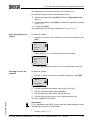
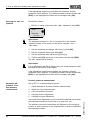
Carrying out max. adjustment
Proceed as follows:
1
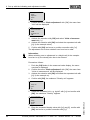
Edit the % value in the menu item "Max. adjustment" with [OK].
Max. adjustment
+100.0 %
=
+1000.0 mbar
0000.0 mbar
Information:
The displayed pressure for 100 % corresponds to the nominal
measuring range of the sensor (in the above example 1 bar =
1000 mbar).
2
Set the requested percentage value with [->] and [OK].
3
Edit the requested mbar value with [OK].
4
Set the requested mbar value with [+] and [->].
5
Confirm with [OK] and move to the menu overview with [ESC].
The max. adjustment is finished.
Information:
For an adjustment with filling, simply enter the actual measured value
indicated at the bottom of the display.
If the adjustment ranges are exceeded, the message "Outside
parameter limits" appears. The editing procedure can be aborted with
[ESC] or the displayed limit value can be accepted with [OK].
Process pressure measurement
Parameter adjustment "Process pressure
measurement"
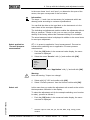
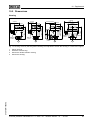
Set up IPT-11 in the following sequence:
1
Select application "Process pressure measurement"
2
Select the unit of measurement
3
Carry out position correction
4
Carrying out zero adjustment
5
Carrying out span adjustment
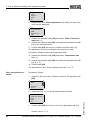
In the menu item "Adjustment unit" you select the physical unit in which
the adjustment should be carried out, e.g. mbar, bar, psi…
22
Process pressure transmitter IPT-11 Vers. 4.0 - ceramic sensor • 4 … 20 mA
37301-EN-100302
The position correction compensates the influence of the mounting
position or static pressure on the measurement. It does not influence
the adjustment values.