1
6 Set up with the indicating and adjustment module
Carrying out zero adjustment
Proceed as follows:
1
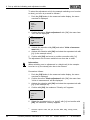
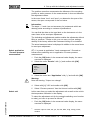
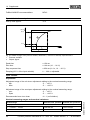
Edit the mbar value in the menu item "zero" with [OK].
Zero adjustment
000.0 %
=
+0000.0 mbar
0000.0 mbar
P
2
Set the requested mbar value with [+] and [->].
3
Confirm with [+] and move to span adjustment with [->].
The zero adjustment is finished.
Information:
The zero adjustment shifts the value of the span adjustment. The span,
i.e. the difference between these values, however, remains unchanged.
Information:
For an adjustment with pressure, you simply enter the displayed actual
measured value. If the adjustment ranges are exceeded, the message
"Outside parameter limits" appears. The editing procedure can be
aborted with [ESC] or the displayed limit value can be accepted with
[OK].
Carrying out span adjustment
Proceed as follows:
1
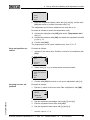
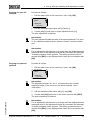
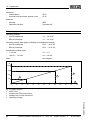
Edit the mbar value in the menu item "span" with [OK].
Span adjustment
100.0 %
=
+1000.0 mbar
0000.0 mbar
P
Information:
The displayed pressure for 100 % corresponds to the nominal
measuring range of the sensor (in the above example 1 bar =
1000 mbar).
2
Set the requested mbar value with [->] and [OK].
3
Confirm with [OK] and move to the menu overview with [ESC].
31543-EN-090130
The span adjustment is finished.
Information:
For an adjustment with pressure, you simply enter the displayed actual
measured value. If the adjustment ranges are exceeded, the message
"Outside parameter limits" appears. The editing procedure can be
aborted with [ESC] or the displayed limit value can be accepted with
[OK].
Process pressure transmitter IPT-1* Vers. 3.0 - metalic sensor • 4 … 20 mA/HART
31