1
1
Introduction
1.3.3 Feathered traps
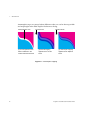
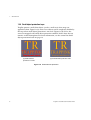
Feathered traps are used to create a smooth color transition at the trap/object
boundary. This softens the line between the trap and the object, with the intent
of making the trap less noticeable. TrapPro allows you to specify the number
of steps to use for feathering with the Feather steps option, as described on
page 17.
Unfeathered brush
(a) Unfeathered trap
Feathered brush
(b) Feathered trap
Figure 1.3 Image showing feathered and unfeathered traps
1.3.4 Sliding traps
An ink’s neutral density value is used to determine whether an ink should be
spread or choked. In some cases, where the neutral density changes across an
object, the spread/choke threshold may be crossed. This results in a sudden
change in trap direction and a noticeable step in the trap. A sliding trap prevents the abrupt shift in direction by allowing the trap to “slide” along the
6
TrapPro User Manual: December 2010