1
Development Kit Setup
4.6
Mobile Intel® QM87 Chipset Configuration Settings
4.6.1
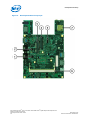
R2B7 — Clear/Keep CMOS Settings
Clearing the contents of the CMOS and all BIOS settings will restore the development
kit system to factory default values.
Note: R2B7 is open by default.
To restore the BIOS settings:
1. Turn off the development kit system and unplug the power cord.
2. Short two solder pads at R2B7 for a few seconds by using a tweezer or a blue wire
(that is, connect pin 1 and pin 2), and then leave it open. Take note that these pins
are not shorted by default.
3. Turn on the development kit system.
4.6.2
R2B12 — Clear/Keep ME Settings
Clearing the contents of the ME settings will restore the development kit system to
factory default values.
Note: R2B12 is open by default.
To restore the ME settings:
1. Turn off the development kit system and unplug the power cord.
2. Short two solder pads at R2B12 for a few seconds by using a tweezer or a blue wire
(that is, connect pin 1 and pin 2), and then leave it open. Take note that these pins
are not shorted by default.
3. Turn on the development kit system.
4th Generation Intel® Core™ Processor with Mobile Intel® QM87 Chipset Development Kit
based on Small Form Factor
December 2013
Document Number: 541656-001
Development Kits User Guide
23