1
Chapter 1: User Guide for the Device-Specific Power Delivery Network (PDN) Tool
Major Tabs of the PDN Tool
1–17
BOM
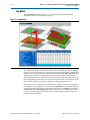
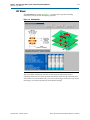
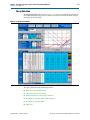
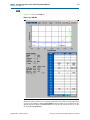
Figure 1–13 shows the BOM tab.
Figure 1–13. BOM Tab
When the analysis is done, you can print out the final ZEFF profile and capacitor count
to achieve the profile by clicking Print BOM on the top right corner. It defaults to the
default printer assigned in the File/Print menu. You can also export the data as an .xls
file by clicking Export Data.
September 2012
Altera Corporation
Device-Specific Power Delivery Network (PDN) Tool User Guide