1
Article Name
Location
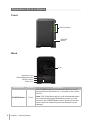
LED Indicators
Front
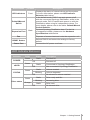
In the default mode, DX213 can auto power on/off
with the connected Synology DiskStation, while in the manual mode, DX213 cannot auto power on with the
DiskStation when using its independent volume. For
more details, please refer to the table: Default/Manual
Switch Behavior.
Default/Manual
Switch
Expansion Port
Description
Displays the status of internal drives and the system.
For more information, please see LED Indicator
Behavior table below.
Connect Synology DiskStation here. For the list
of supported models, please see the Hardware
Specifications table below.
Back
Fan
Disposes of excess heat and cools the expansion unit.
Reboot DX213 and restore its settings to factory
default.
RESET Button
Power Port
Connect the AC power cord here.
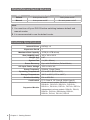
LED Indicator Behavior
Indicator
POWER
eSATA
STATUS
Color
Green
Status
Static
Off
Green
Powered off
Static
Off
Blinking
Off
Drive status
Blinking
Orange
Static
Off
Volume created
Volume degraded
No volume or volume crashed
Static
Green
Connected to Synology DiskStation
Not connected to Synology DiskStation
Static
Green
Description
Powered on
Drive ready and idle
Accessing drive
Drive error
No internal drive
Chapter 1: Getting Started
5