1
Pro16 Digital Snakes
The SB4 is used in pairs when configuring a digital snake system. When using Pro16 products
such as the AN-16/i v.2, AN-16/i-M, and AN-16/o, up to four of each I/O module can be used
with one System Bridge pair. Pro16 products can be combined as needed to create a flexible
and easily reconfigured system with up to 64 total inputs suited to a wide variety of audio
applications. An input device is always paired with an output device in a digital snake
configuration.
Use a pair of System Bridges to configure a digital snake.
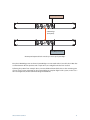
There is a one-to-one relationship between the pairs of like-named ports on the System Bridge rear panels
in a digital snake system. The Pro16 device connected to the port labeled 1-16 on one System bridge is
always feeding A-Net to the device connected to the matching port 1-16 on the other System Bridge, etc.
For example, if an AN-16/i-M Mic Input Module is used on the stage side of a digital snake, a corresponding
AN-16/o Output Module will be used at the front-of-house mix position—analog in feeds analog out, and
likewise A-Net Out of the AN-16/i-M feeds the A-Net In on the AN-16/o.
Connecting Pro16 Devices
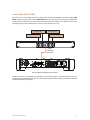
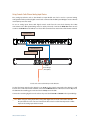
The examples below illustrate how to set up a Pro16 digital snake. They use generic icons to represent the
various Pro16 input and output devices available.
The A-Net Out from a Pro16 input module is connected to SB4 port 1-16 with a Cat-5e cable at one side of
the digital snake (the stage, for example). The AN-16/o Output Module’s A-Net In is connected to port 1-16
at the other side of the digital snake (the front-of-house mix position).
SB4 System Bridge User Guide
14