1
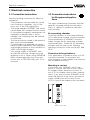
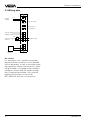
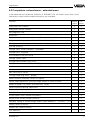
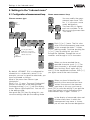
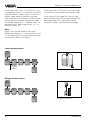
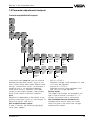
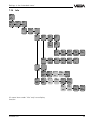
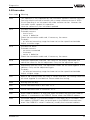
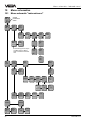
Settings in the "extended menu"
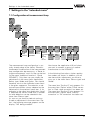
Relay outputs
TAG No. 1
%
xx,x
Param.
TAGNo. 1
Adjustment
Signal
conditioning
Outputs
Current
outputs
Relay
output
1
Volt
outputs
Relay
outputs
Relay
output
2
like relay output 1
prop.
to
Percent
Volume
Height
Pressure
Unit
0,0%
0,00 %
Tare %
MoniLow
Mode
toring
OverLow &
fill
%
High
protec.
0,0
Dry run protec.
Switching window on
Switching window off
Tendency rising
Tendency falling
(monitoring)
High
%
100,0
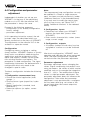
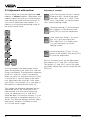
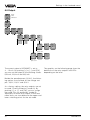
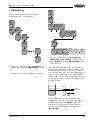
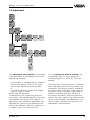
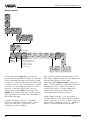
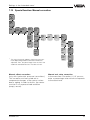
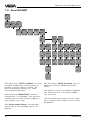
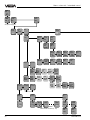
In the menu item "prop. to" you choose a
parameter that the relay will react to. You can
choose between percent and volume ("prop.
to volume" is useful when under "Conditioning
- Linearisation curves", for example, a spherical tank or a user programmable lin. curve is
chosen). In the next menu item you can
choose the suitable Unit. In the menu item
"Mode", the mode of the relay can be chosen.
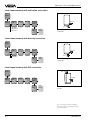
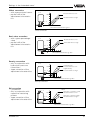
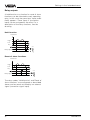
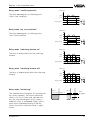
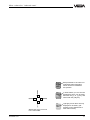
The individual relay modes are described on
the following pages.
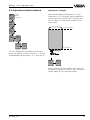
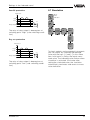
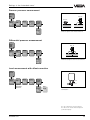
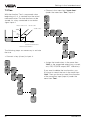
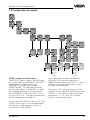
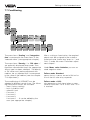
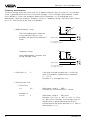
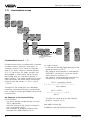
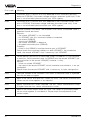
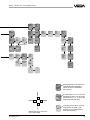
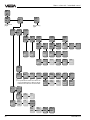
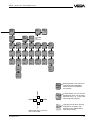
If mode "Tendency rising" or "Tendency
falling" is selected, the menu items "Deviation", "Dev. per time", "Cycle time" and
"Number of cycles" appear.
40
Deviation
s
1,0
Deviation
per
time
Failure
mode
Add'l
functions
off
hold
Switching
delay
Scan
time
s
1
Number t
of
scan
10
on
t off
s
0
s
0
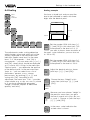
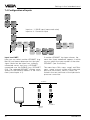
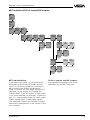
With all other modes, the menu items "Low"
and "High" appear. There you can determine
the switching points for the relay.
The menu item "Failure mode" always appears. "Failure mode off" causes the relay to
deenergise when a failure (e.g. sensor
shortcircuit) occurs. "Failure mode hold"
causes the actual relay status to be
maintained when a failure occurs.
Under "Add’l functions", you can adjust a
switch on delay (t on) and a switch off delay
(t off) of the relay to a max. of 600 s (with the
relay modes "Tendency rising" or "Tendency
falling" no switching delay can be set).
VEGAMET 514