1
Orbis – Operation
22
4.2
Menu Settings Control Unit
General
There are two types of settings within the Orbis system.
• User-specific settings, which the user selects via the glass panel of the control unit.
• Settings determined by the system (possibly limited), which are required due to the current system
parameters (e.g. external media control system or network setup).
Settings that are made with a device connected to the RS 232 interface are considered and applied as
user-specific settings. Maybe they are not directly active or displayed, because the current system
status might not allow this. This refers to all settings selected via the external device. The system
always returns to the user-specific settings, as soon as this is allowed by the settings determined by the
system.
Examples:
1. Four chairman microphone units in the system. On the Orbis CU control unit the NOM has been
set to “4”. The fifth chairman microphone unit is connected. The NOM display on the Orbis CU
control unit changes to “3”, because determined by the network there is only a max. NOM of 3
possible. NOM cannot be set higher.
2. As described under 1. – two chairman microphone units are removed from the network. The NOM
display returns to “4”, because this was the user-specific setting.
3. The user selects“Voice” as operating mode. Afterwards an external device will be activated via the
RS 232 interface. The display and operating mode changes from “Voice” to “Normal”, because
“Voice” is not available within the external device. When the external device is deactivated, the
display and operating mode changes to “Voice”, because this was the user-specific setting.
4. As described under 3., but the user selects the “Normal” operating mode via the RS 232 interface while the external device is active. As this is not possible due to the system, because the
system is in the “Ext. Control” mode, the display does not change. But as a user-specific setting
has been changed, the display does not change to “Voice”, when deactivating the external device,
but remains “Normal”.
Menu on the glass panel
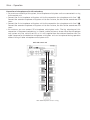
The Orbis conference system is configured via the rotary encoder on the Orbis control unit. By
pressing and turning the rotary encoder you can enter the individual menus and select settings
within the menu, which you can save by pressing the rotary encoder .
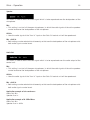
The selected menu flashes white. By turning the rotary encoder , you can select a setting within the
menu and save it by pressing the rotary encoder . The selected setting turns white.
The menu settings are permanently stored in the control unit, even when the Orbis CU control unit is
disconnected from the mains.